Shopee’s New Meta Ads Tool: What It Is and How to Use It Effectively
Erra04 Dec 2025 09:09ENCopy link & title
In this article, we’ll break down what this new tool actually does, how it works, who it’s best suited for, and how you can use it strategically to boost traffic and sales. Whether you’re new to Meta Ads or you’ve always avoided them because they seem complicated, this guide will walk you through everything you need to know before getting started.

How Meta Ads on Shopee Seller Centre Works
Shopee’s Meta Ads tool allows sellers to run Facebook and Instagram ads directly from Seller Centre. Designed for quick and effective setup, this tool helps sellers reach potential customers beyond the Shopee ecosystem while driving traffic, conversions, and sales back to their shops.
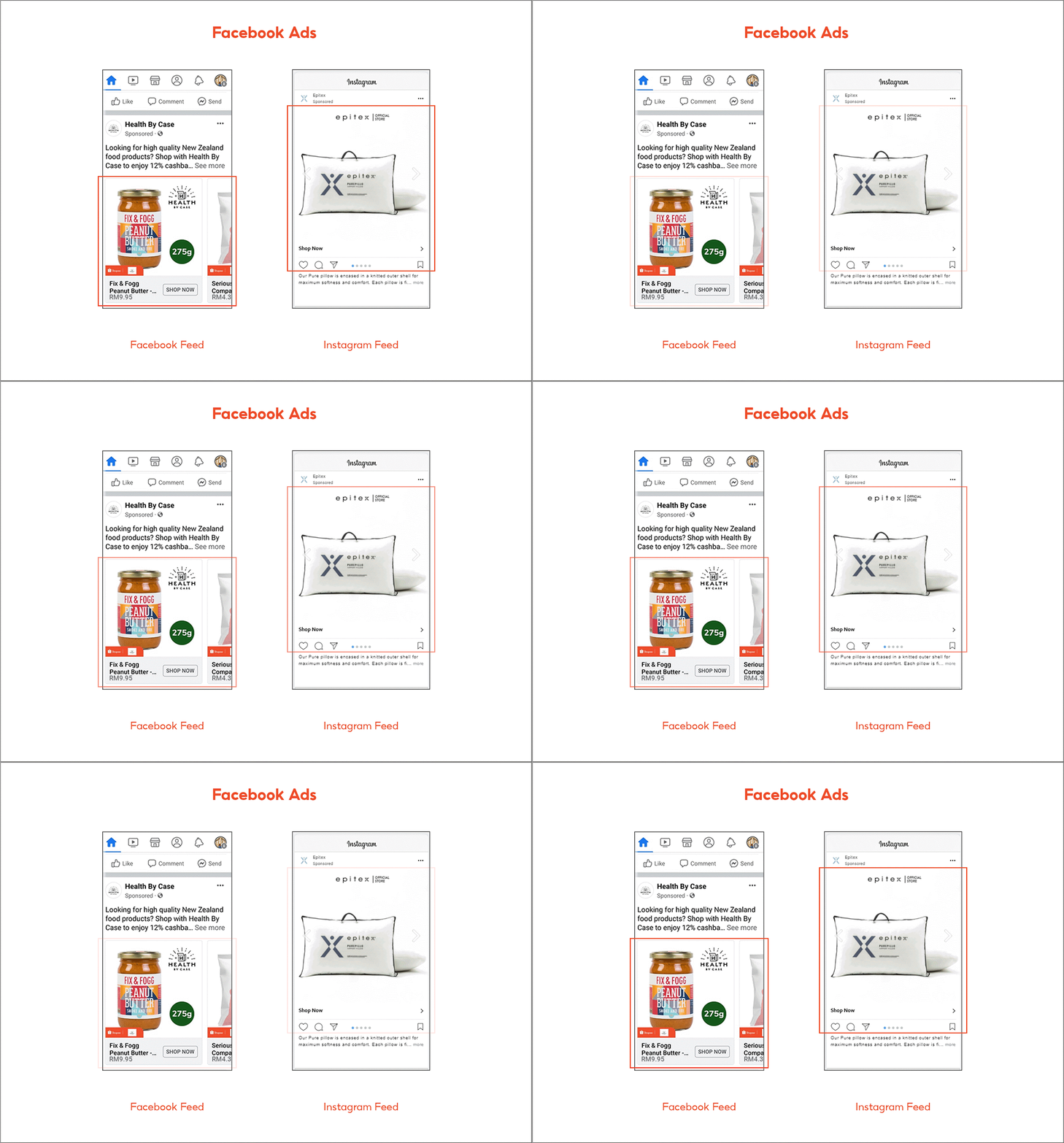
With just your existing product listings, Meta Ads can automatically generate dynamic Carousel ads, the only format currently available. These ads are displayed to social media users who are most likely to be interested based on Meta’s targeting algorithm.
When a shopper taps your ad:
-
Desktop users are sent to your Shopee product page on the website.
-
Mobile users are routed to your Shopee App product page.
Important Notes Before You Start
-
You must create a new Meta Ads account within Shopee Seller Centre, even if you already have a Facebook Ads Manager account.
-
Currently, only Carousel Ads are supported.
-
The Facebook Page used for your ads is system-generated, not linked to your personal or business Meta pages.
-
Meta automatically targets audiences based on interest and behaviour.
Incentives for Running Meta Ads
Shopee rewards sellers with Meta Ads credits to encourage advertising on the platform.
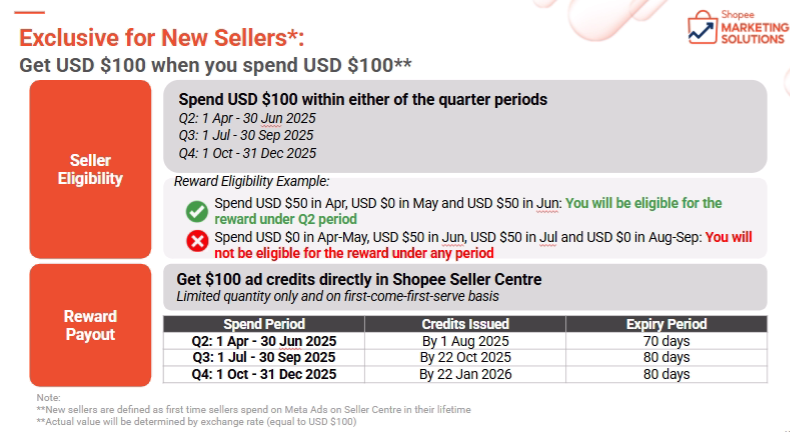
For New Sellers: Spend USD 100 on Meta Ads and receive USD 100 in free Meta Ads credits.
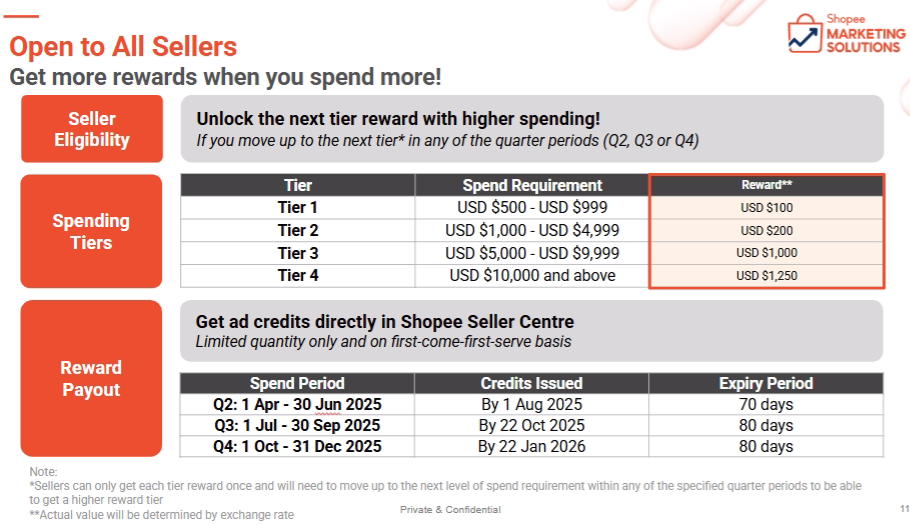
For Existing Sellers: Shopee offers a tiered rewards system, the more you spend, the more ad credits you can earn. (Refer to Shopee for the latest tiers.)
Setting Up Your Meta Ads Account
Before running any campaigns, you need to create a Meta Ads account via Seller Centre.
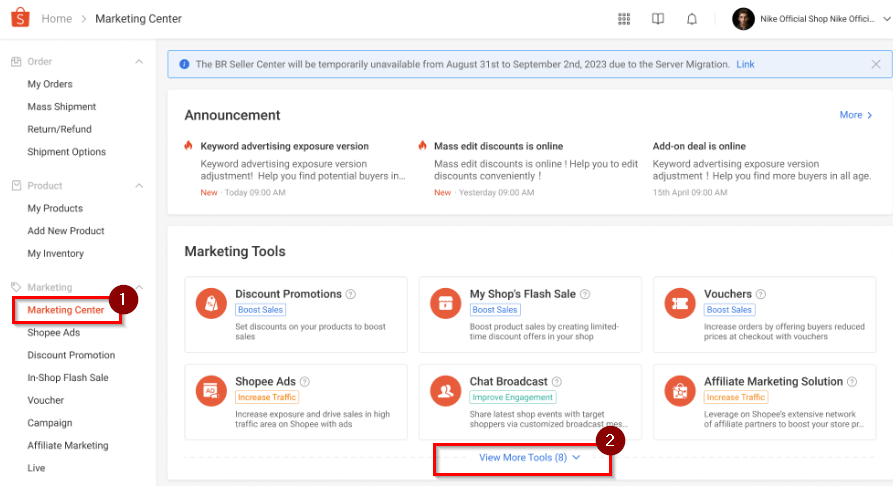
Step 1: Access Off-Platform Ads
Navigate to: Shopee Seller Centre → Marketing Centre → View More Tools → Off-Platform Ads
Step 2: Create Your Meta Ads Account
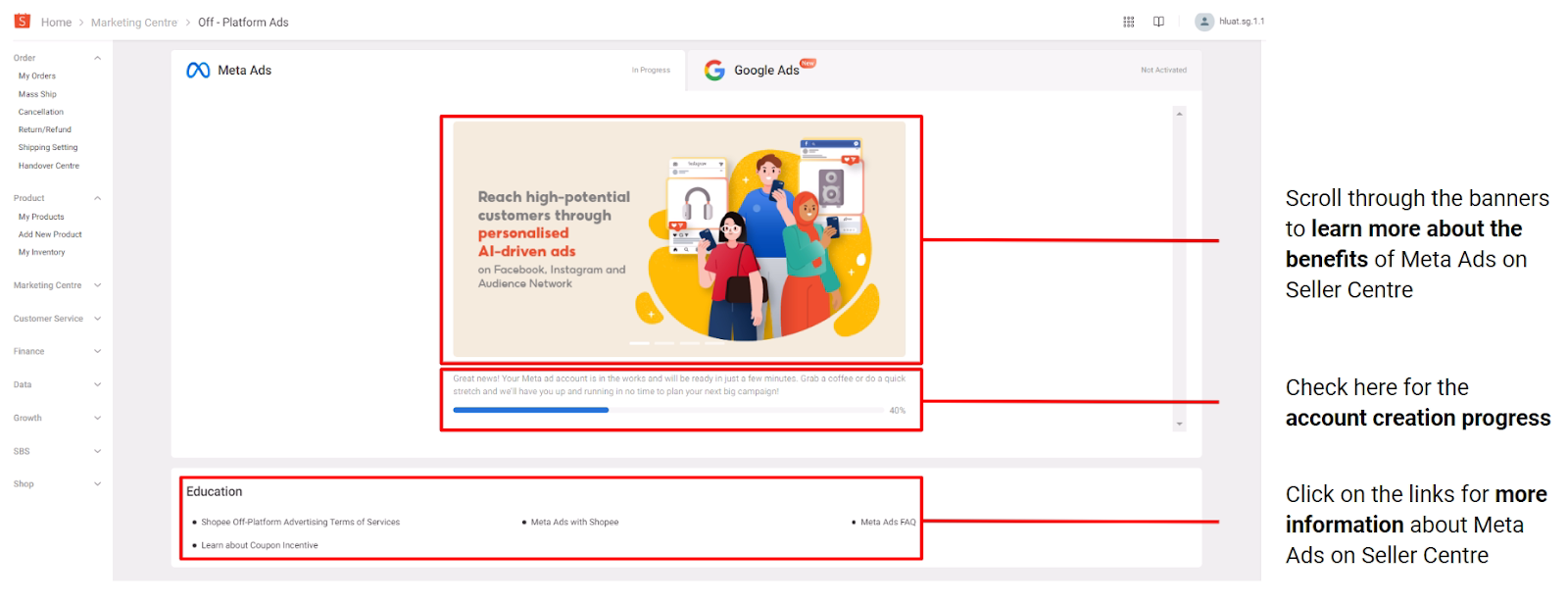
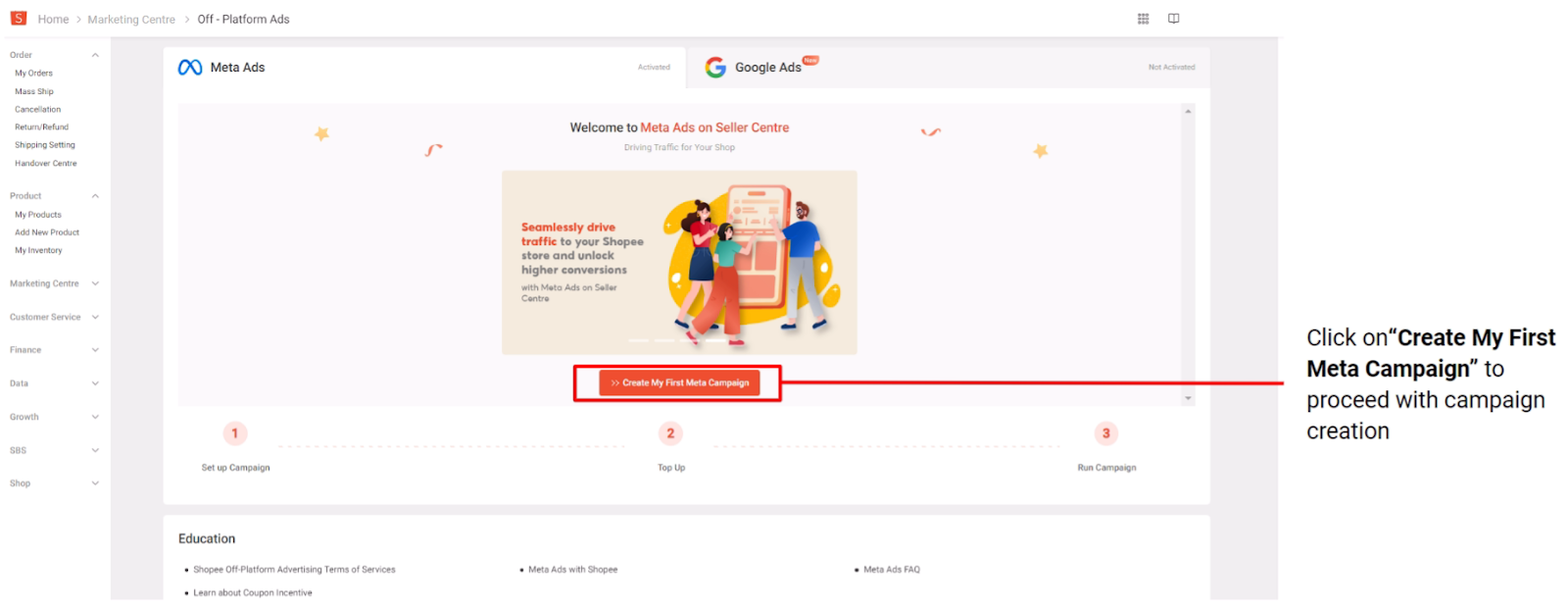
Click Get Started under “Meta Ads on Seller Centre.”
Notes:
-
Account creation may take up to 15 minutes.
-
Set up your account at least 3 weeks before major campaigns (e.g., 11.11, 12.12).
-
This Meta account is only for advertising your products within Meta’s ecosystem.
Once the progress bar completes, your account is ready for campaign creation.
Creating a Meta Ads Campaign
A Meta Ads campaign allows you to promote products for a specific budget and duration. You can run multiple campaigns targeting different product categories.
Campaign Information (Pre-Filled Defaults)
Shopee pre-fills most campaign fields based on best practices:
-
Campaign Name: Editable anytime. Customise based on your objectives.
-
Campaign Duration: Default 7 days (minimum 3 days). Recommended 14 days for optimal performance.
-
Lifetime Budget: Minimum daily spend is RM50. The system adjusts spending based on opportunities.
-
Products: All available products selected by default. You can manually pick at least 5 products.
-
Primary Text: Suggested caption; editable.
-
Collection Ad Banner: Upload your own image/video or let the system auto-generate one from your product images.
Creative Tips for Better Ads
Collection Ad Banner:
-
Highlight your hero SKUs.
-
Keep visuals clean and uncluttered.
Recommended Specs:
-
Images: JPG/PNG, 1:1, 1080 × 1080px, < 30MB
-
Videos: MP4/MOV/GIF, 1:1, 1080 × 1080px, < 30MB, 1–15s
Preview Your Ads: Check both Facebook and Instagram before launching.
Start Early: Begin campaigns 14 days before major sale days to allow algorithm optimisation.
Adding Products to Your Campaign
-
Up to 10 products are displayed per Carousel and Collection ad.
-
Meta can automatically select products based on shopper interest, or you can manually choose at least 5 products.
Product Selection Tips:
-
Add more products → more impressions
-
Ensure products are in stock
-
Avoid very high-priced or low-conversion items
-
Follow Shopee listing best practices (clear titles, quality images)
Product updates in the Seller Centre reflect in Meta Ads the next day.
Topping Up Your Ads Credit
After creating a campaign, ensure your Meta Ads account has sufficient credits.
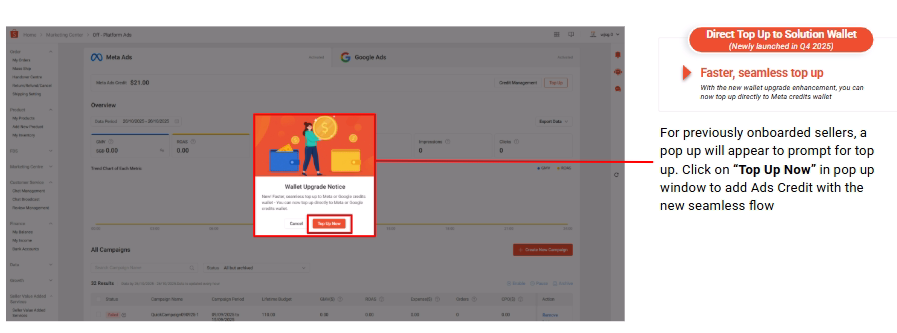
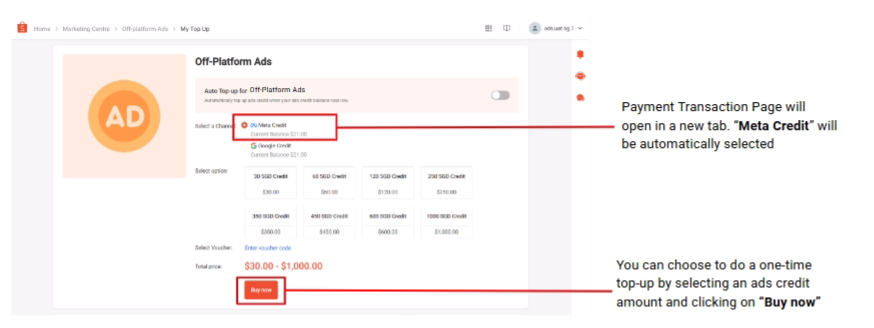
Top-Up Options:
-
Manual Top-Up
-
Auto Top-Up (recommended)
Auto Top-Up Benefits:
-
Prevents campaigns from pausing due to low balance.
-
Automatically charges your Seller Wallet when credits fall below a set threshold.
-
Triggered once per day.
Currently, Auto Top-Up is available only to selected, whitelisted sellers.
Managing Your Meta Ads Campaign
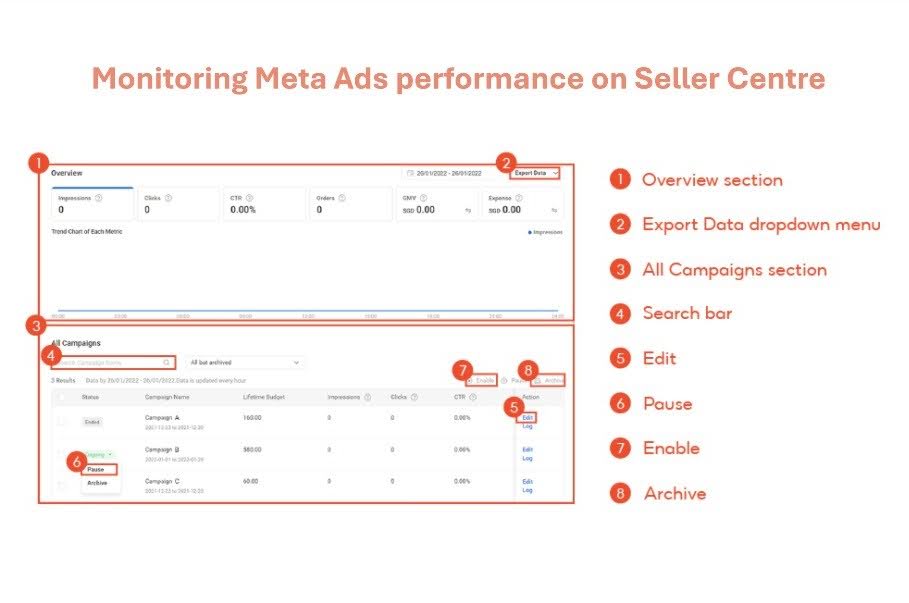
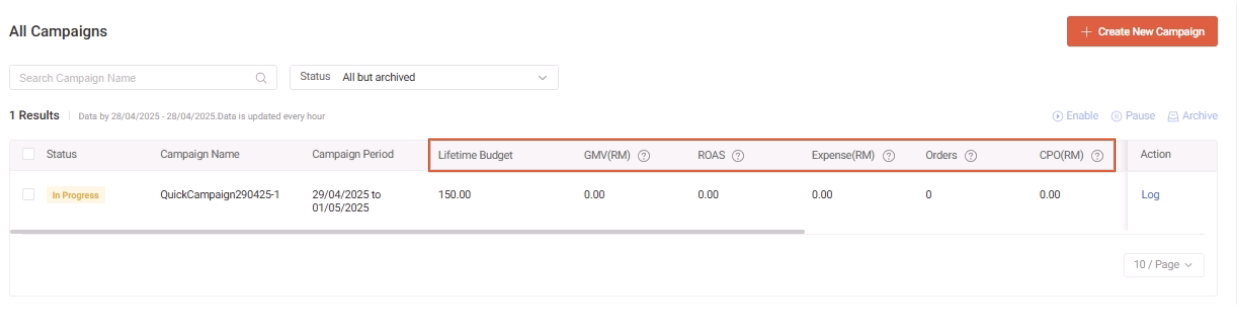
Inside Seller Centre, you can:
-
Overview: Quick summary of account performance.
-
Export Data: Download campaign reports in Excel.
-
All Campaigns: Edit, Pause, Enable, or Archive campaigns. (Archived campaigns cannot be reactivated.)
Optimising Your Campaign: Metrics to Watch
-
Budget: Compare lifetime budget vs. actual spend.
-
Impressions: Low impressions? Increase daily budget.
-
Clicks & CTR: Improve product images, primary text, and feature best-selling SKUs.
-
Orders: Track the total orders generated.
-
GMV: Total product value sold within 7 days after a click.
Deduction Notice:
-
Ad credits are deducted daily.
-
Campaigns stop if your balance reaches 0 and resume once topped up.
-
New campaigns cannot be created with zero balance.
Connecting Meta Ads with Efficient Facebook Management
Meta Ads on Shopee Seller Centre make it easier to reach new customers and drive traffic to your shop, but managing multiple platforms can still be challenging. With BigSeller, you can authorise your Facebook Business Portfolio and manage product listings directly from one interface, keeping your Shopee and Facebook stores in sync.
For sellers looking to optimise efficiency and expand their reach, try BigSeller for free and streamline your multi-channel operations today.