Why Shopee Removes Listings with Disturbing Images (And How to Avoid It)
Erra03 Dec 2025 05:25ENCopy link & title
Product images are one of the biggest factors influencing buyer trust and conversion on Shopee. But while sellers often focus on making photos attractive, many forget that certain types of images can actually make buyers uncomfortable, and this can lead to violations, listing deletion, or even account suspension.
To ensure a safe and pleasant shopping experience for all users, Shopee enforces a strict Guideline for Disturbing Images. If your product images fall under these prohibited categories, your listing may be taken down immediately.
Below is a clear breakdown of what Shopee considers “disturbing,” plus practical tips to keep your listings safe.

Why Shopee Restricts Disturbing or Unpleasant Images
Shopee’s goal is to create a shopping environment where buyers feel safe and comfortable browsing products across all categories, from beauty and groceries to home improvement and electronics. When a product image is disturbing, graphic, or overly magnified, it can trigger discomfort, fear, or disgust. This disrupts the buyer’s experience and may even cause them to immediately exit the page.
From a platform perspective, these images negatively impact:
-
Overall user experience
-
Buyer trust and confidence
-
Brand perception of Shopee
For sellers, this means that even if the image was not intended to be disturbing, it may still:
-
Reduce click-through rates (CTR) because buyers avoid the thumbnail
-
Decrease trust, as buyers may think the seller lacks professionalism
-
Result in warnings, listing removal, or account penalties if Shopee flags the image as a violation
Because of this, Shopee has strict rules on what cannot be shown in product images.
Types of Images That Are Not Allowed
Shopee bans any image that can cause discomfort, phobia, or disgust. Below are the main categories you must avoid:
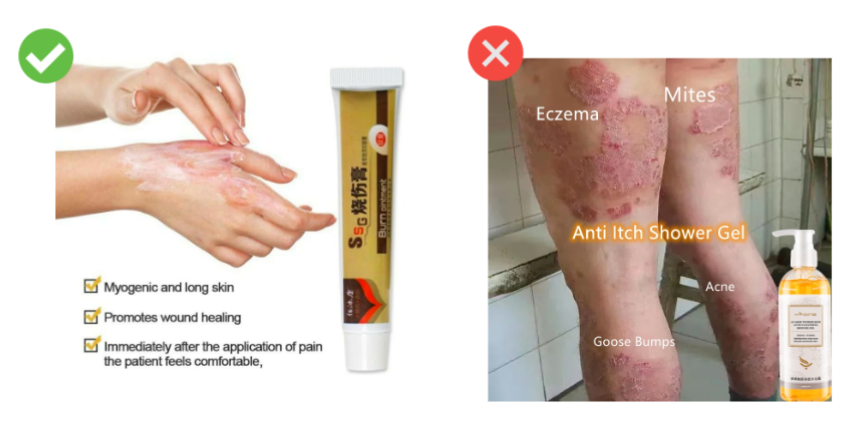
1. Wounds, Burns, and Rot
These include images showing:
-
Open or bleeding wounds
-
Burned or peeling skin
-
Infectious or inflamed areas
-
Rotting skin, nails, or food
Even if your product is meant for treatment such as scar cream, burn gel, or mold remover, you cannot display the actual affected area. Use illustrations or icons instead of real medical images.
2. High Density of Objects That May Trigger Phobia
Certain visuals can overwhelm the viewer or trigger common phobias, such as trypophobia (fear of clusters).
Avoid images showing:
-
Clusters of holes
-
Multiple insects grouped together
-
Repetitive or densely packed patterns
-
Objects arranged in a visually overwhelming formation
These images may look harmless to you, but they can cause immediate discomfort to buyers.
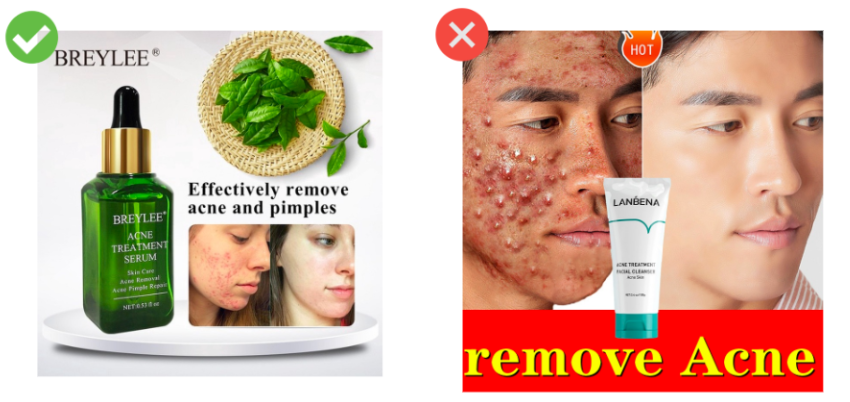
3. Excessive Magnification
Extreme close-ups often reveal details that appear unnatural or disturbing when enlarged too much.
Examples include:
-
Very zoomed-in skin textures, pores, or blemishes
-
Highly magnified insects or bugs
-
Enlarged organic surfaces that look distorted
Magnified visuals may shock buyers, even if the actual product is normal.

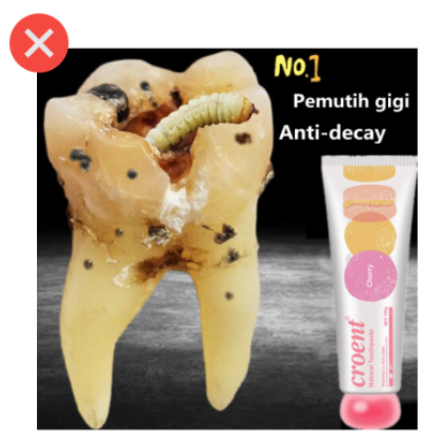
4. Germs, Worms, and Similar Organisms
Avoid displaying:
-
Microscopic bacteria or virus illustrations
-
Worms, larvae, parasites
-
Close-up visuals of germs or contamination
Even for cleaning, pest control, or skincare products, showing these organisms can create a negative reaction and is considered disturbing.
Shopee’s General Guidelines for All Product Images
To stay compliant, Shopee requires sellers to follow these simple rules:
-
Show only the product itself (or its packaging) on the cover image
-
Ensure images are clear, professional, and free from disturbing elements
-
Avoid using graphic or exaggerated visuals designed to shock or disgust buyers
If a listing violates these guidelines:
-
It may be banned or deleted immediately
-
Repeated offences may lead to account suspension
Shopee enforces these rules strictly, so consistency is important.
Keep Your Listings Compliant With BigSeller
Shopee’s disturbing image guidelines apply consistently across all categories, so having a structured workflow for product images is crucial. BigSeller supports that workflow with tools for bulk product management, photo editing, and accurate multi-channel syncing.
If you’re managing more than one marketplace, BigSeller helps you stay compliant without extra effort. You can try BigSeller for free today and see how much smoother multi-channel selling becomes.