Why Your Shopee Listing Limit Is Low and How to Increase It
Erra08 Dec 2025 09:36ENCopy link & title
Let’s break it down.

What Are Listing Limits on Shopee?
Listing limits refer to the maximum number of products your shop is allowed to publish on Shopee. Each shop has its own quota, and this number isn’t fixed, it changes depending on your store’s performance and selling experience.
Shopee decides your listing limit based on three main factors:
-
Your seller experience (how long you’ve been selling)
-
Number of completed orders, especially from unique buyers
-
Your account health and compliance with Shopee policies
The goal is to help sellers build a manageable, high-quality catalogue instead of uploading thousands of low-effort products that don’t perform. This is especially important for new sellers who are still learning how to optimise titles, images, and descriptions.
Important: If your email is not verified, Shopee automatically caps your listing limit at 100, even if you qualify for a higher tier.
Why Shopee Uses Listing Limits
Listing limits aren’t meant to restrict you, they’re meant to guide steady and healthy growth. These limits help Shopee:
-
Promote better listing quality, not quantity
-
Reduce spam or irrelevant uploads
-
Prioritise shops with real buyer engagement
-
Maintain high trust and consistency across the platform
As your shop completes more orders and keeps a clean account record, Shopee gradually increases your listing limit.
How to Check Your Listing Limit in Shopee Seller Centre
Shopee makes it easy for sellers to monitor their quota. Here’s how:
-
Go to My Products in the Shopee Seller Centre.
-
Hover over the tooltip next to your product count.
-
You’ll see:
-
Total published products
-
Remaining listing slots
-
-
Click Check Details of My Shop Listing Limit for the full breakdown.
On this page, you’ll find:
-
Your current listing limit (updated daily)
-
Your seller tier
-
Targets you need to meet to reach the next tier
-
Any violations that may have reduced your limit
You can also select View Violation Policy to understand the types of actions that may trigger a reduction.
How Shopee Determines Your Listing Limit (Seller Tiers)
Shopee groups sellers into tiers based on their experience and number of unique buyers. Each tier comes with a different listing limit.
Here’s the latest breakdown:
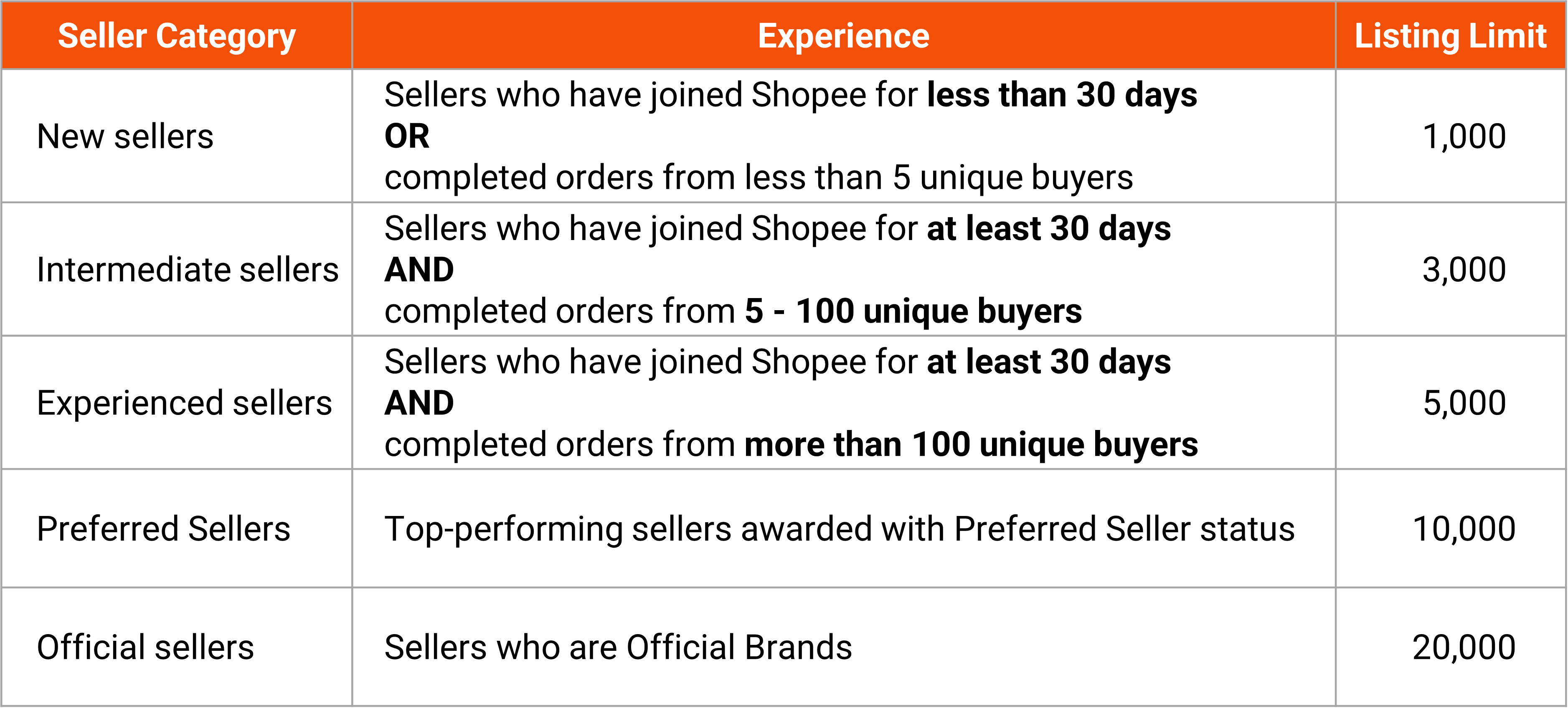
Notes
-
Unique orders = orders from different buyers
-
Seller tiers are reviewed every Tuesday
-
If your email isn't verified, your limit stays at 100, regardless of tier
Listing Limit Penalties (Violations & Reductions)
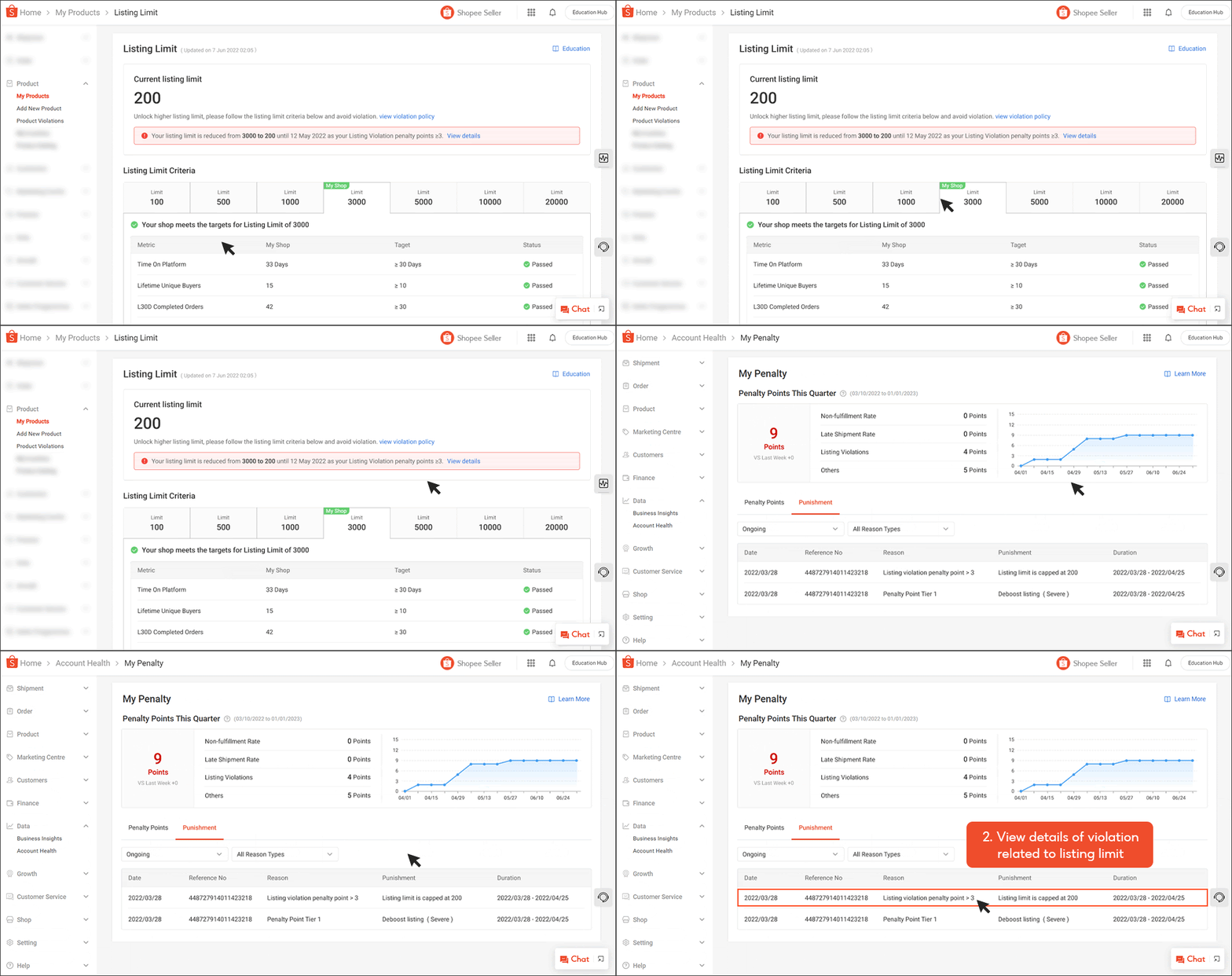
While your listing limit increases as your shop grows, it can also be reduced if you violate Shopee’s policies. When this happens, Shopee will send you a push notification, and a warning banner will appear on your Listing Limit page.
To see the reason for the reduction:
-
Go to your Listing Limit page
-
Click View Details
-
Shopee will redirect you to the Penalty Page under Account Health for the full breakdown
Shopee reviews these violations daily, so it’s important to maintain a clean account to keep your listing quota stable.
Updated Policy (Effective 7 April 2025): Shopee no longer applies listing limit punishments based on listing penalty points. However, one rule still applies:
Pre-Order Violation Penalty
Shopee enforces a strict rule on pre-order products. Your shop cannot exceed 10% pre-order listings. If you go over the allowed percentage, Shopee will automatically cap your pre-order limit at:

Exceeding this will trigger automatic delisting of pre-order items, so it's important to monitor your ratios.
What Happens If You Exceed Your Listing Limit?
Shopee’s system will take action immediately if you try to publish more products than your quota allows.
1. You will not be able to publish new listings
The system blocks any attempt to upload new products.
2. Shopee will automatically delist some of your existing listings
To free up space, Shopee removes your products based on this priority order:
-
Lowest sold count (products with zero or few sales get removed first)
-
Least recently updated listings
This prevents active or high-performing products from being removed.
You can check which products were removed by:
-
Going to My Products
-
Selecting Unpublished
-
Opening the Delisted tab
You may update and republish these items, but only if you are still within your listing limit.
How to Increase Your Listing Limit Faster
There are several ways to reach higher tier limits more quickly:
1. Verify your email
This instantly removes the 100-listing cap for unverified accounts.
2. Increase your order volume
Shopee looks at unique buyers, so more completed orders from different customers will help you level up to the next tier.
3. Avoid policy violations
Account Health plays a major role. Any violation can slow down your tier progress or reduce your limit.
4. Keep your listings active and updated
Regularly updating titles, images, and stock levels improves engagement, helping Shopee recognise your shop as active and reliable.
Optimising Your Shop as You Grow
Shopee’s listing limit system rewards steady growth, good account health, and genuine buyer engagement. As your store expands, managing listings, orders, and inventory across multiple platforms becomes increasingly time-consuming, especially once you reach higher tiers.
BigSeller helps simplify this workload. It’s a free, beginner-friendly e-commerce ERP designed for Southeast Asian sellers, offering bulk listing tools, centralised order processing, real-time inventory sync, automation features, warehouse workflows, and detailed reporting.
Try BigSeller for free and manage your multi-platform store more efficiently.