Lazada Malaysia’s New Logistics Page: A Step-by-Step Guide for Pickup & Drop-Off Sellers
Erra15 Dec 2025 09:39ENCopy link & title
More importantly, sellers can now rate shipping providers based on real pickup and drop-off experiences, helping Lazada improve logistics quality across the platform.
This guide explains how the new Logistics page works, what each tab means, and how Malaysian sellers can use it effectively, especially if you’re a LEX Drop-Off seller.

What Is the New “Logistics” Page in Lazada Seller Center?
The new Logistics page in Lazada Seller Center is designed to help sellers better manage and evaluate their first-mile logistics performance, covering both pickup and drop-off processes.
Instead of only arranging shipments, sellers can now clearly see how many parcels are waiting, which courier is assigned, whether pickups succeed or fail, and provide feedback based on real service experience.
With this update, sellers can:
-
Monitor pickup and drop-off parcel volumes at a glance
-
Track shipping providers assigned to each warehouse
-
View pickup success and failure details, including reasons for failed attempts
-
Rate logistics services based on actual pickup or drop-off experiences
-
Access an integrated drop-off locator map (available for LEX Drop-Off sellers)
How to Access the Logistics Page
You can access the page via: Lazada Seller Center → Orders → Logistics
The Logistics page is divided into two main tabs, each focusing on a different first-mile workflow:
-
Waiting for Pickup
-
Waiting for Drop-Off
Tab 1: Waiting for Pickup (For Pickup-Based Sellers)
Where to Find It
Lazada Seller Center → Orders → Logistics → Waiting for Pickup
This tab shows all parcels that have been arranged for shipment and are currently waiting for courier pickup.
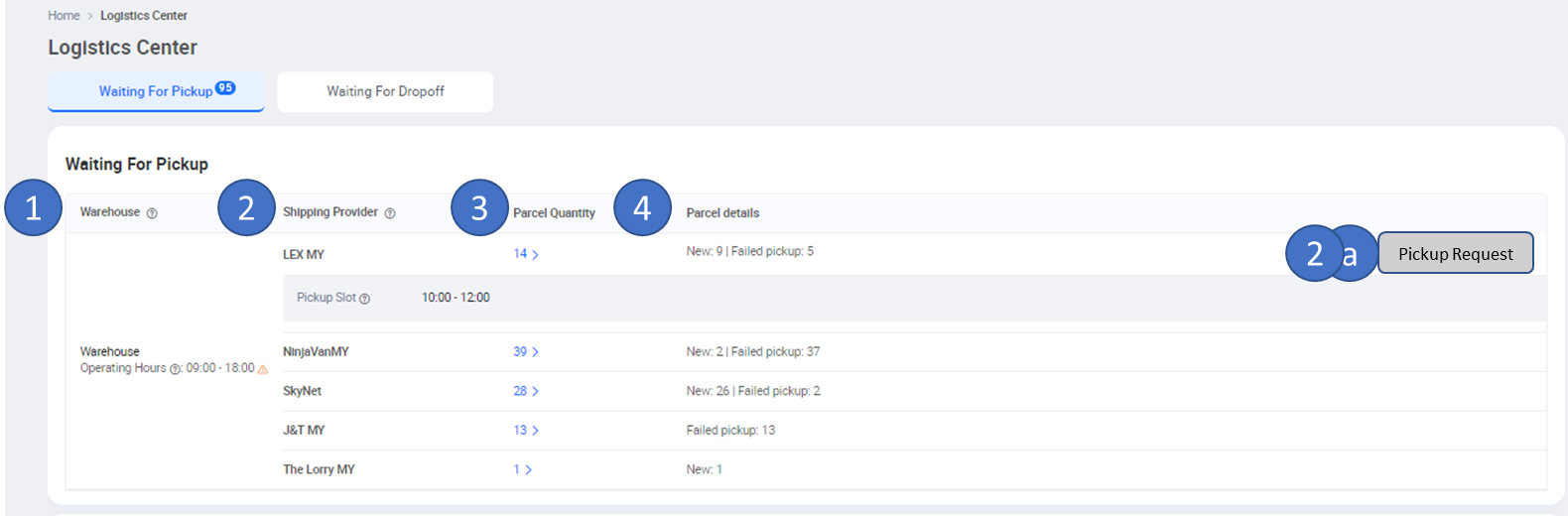
How to Read the “Waiting for Pickup” Information
Each section on this page provides specific operational details:
1. Warehouse
This column indicates whether the order is:
-
A dropshipping order, or
-
From a specific warehouse name
For sellers managing multiple warehouses, this makes it easier to track which location each pickup is coming from.
2. Shipping Provider
Here, sellers can see:
-
The courier assigned based on the Arrange Shipment list
-
The first-mile method used (Pickup or Drop-Off)
-
LEX pickup timeslots, if applicable
This helps confirm which courier is responsible for the pickup and when the pickup is scheduled.
2a. Parcel Quantity
This shows the total number of parcels that:
-
Have Arrange Shipment status
-
Use Pickup as the first-mile method
It allows sellers to quickly verify whether all prepared parcels are properly scheduled for pickup.
3. Parcel Details
Sellers can view:
-
Parcels that were successfully picked up
-
Failed pickup records, along with the reason for failure
This visibility helps sellers take corrective action early.
How to Rate Pickup Services (Desktop)
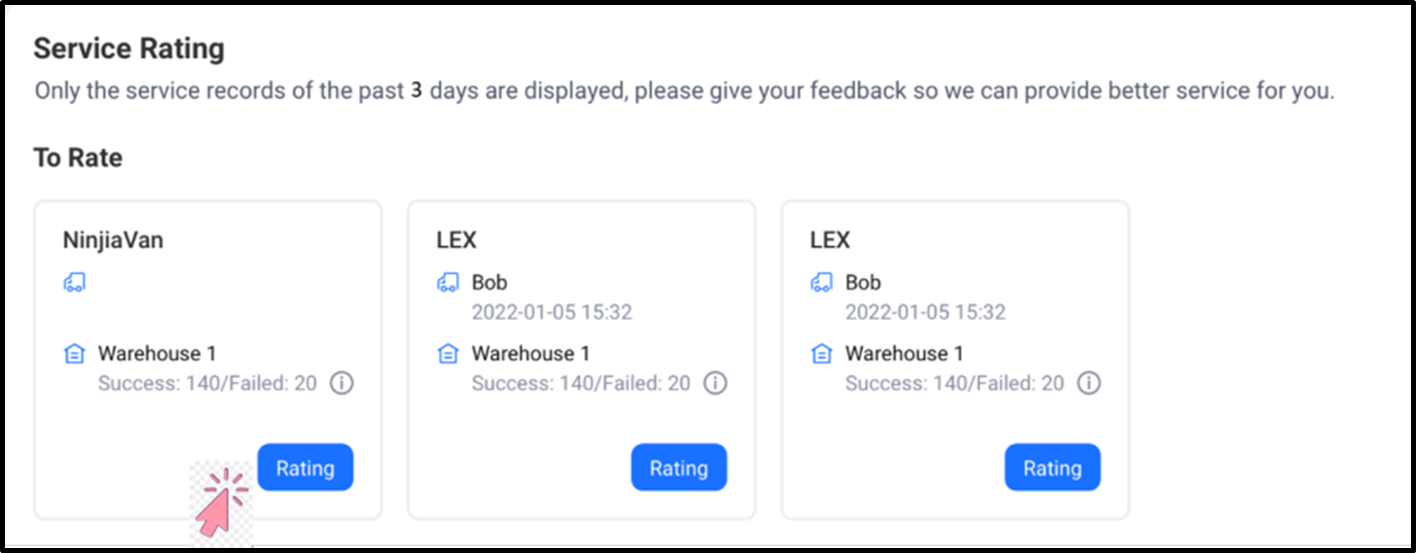
Once a pickup has been completed, sellers can rate the service directly from this tab.
Steps:
-
Go to the Waiting for Pickup tab
-
Click “Rating” next to the completed pickup record
-
Rate the service based on your experience and satisfaction
Important Rules Sellers Should Know
-
Ratings must be submitted within 3 calendar days
-
Each pickup record can only be rated once
-
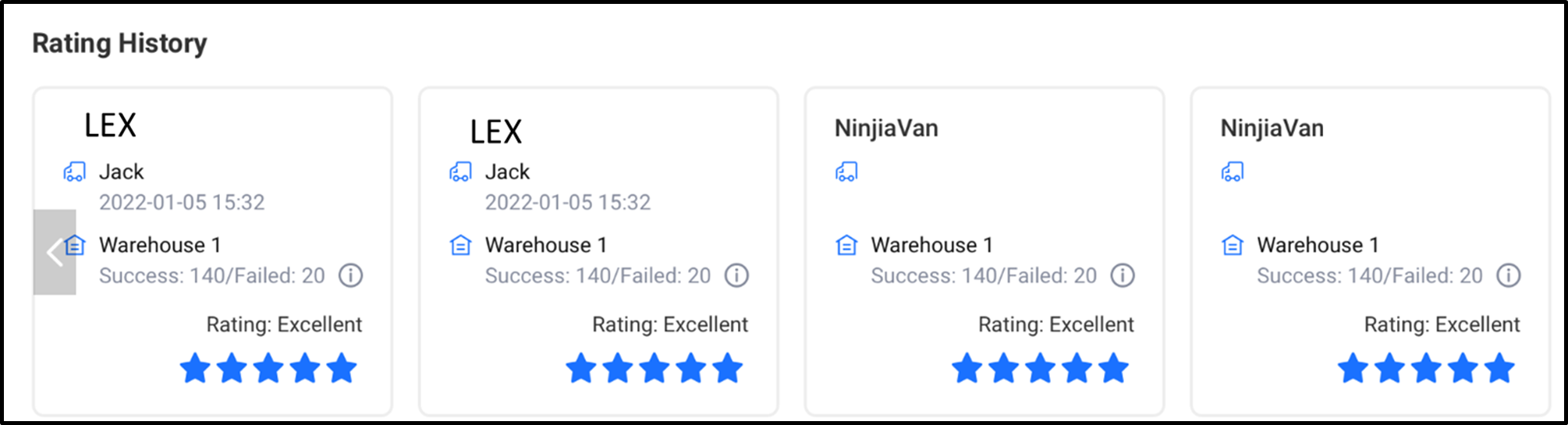
After submitting a rating, the results will be stored under Rating History
What You Can See in Pickup Rating History
For LEX sellers, the rating history includes additional operational details, such as:
-
Shipping provider name
-
Warehouse name
-
Courier (driver) name
-
Pickup time (YYYY/MM/DD | HH:MM:SS)
-
Number of parcels successfully picked up
-
Number of failed pickup parcels
If a pickup fails, sellers can also see whether the failure was due to:
-
PNR (Parcel Not Ready)
-
Seller Closed
This helps sellers determine whether the issue was caused by internal preparation or external logistics execution.
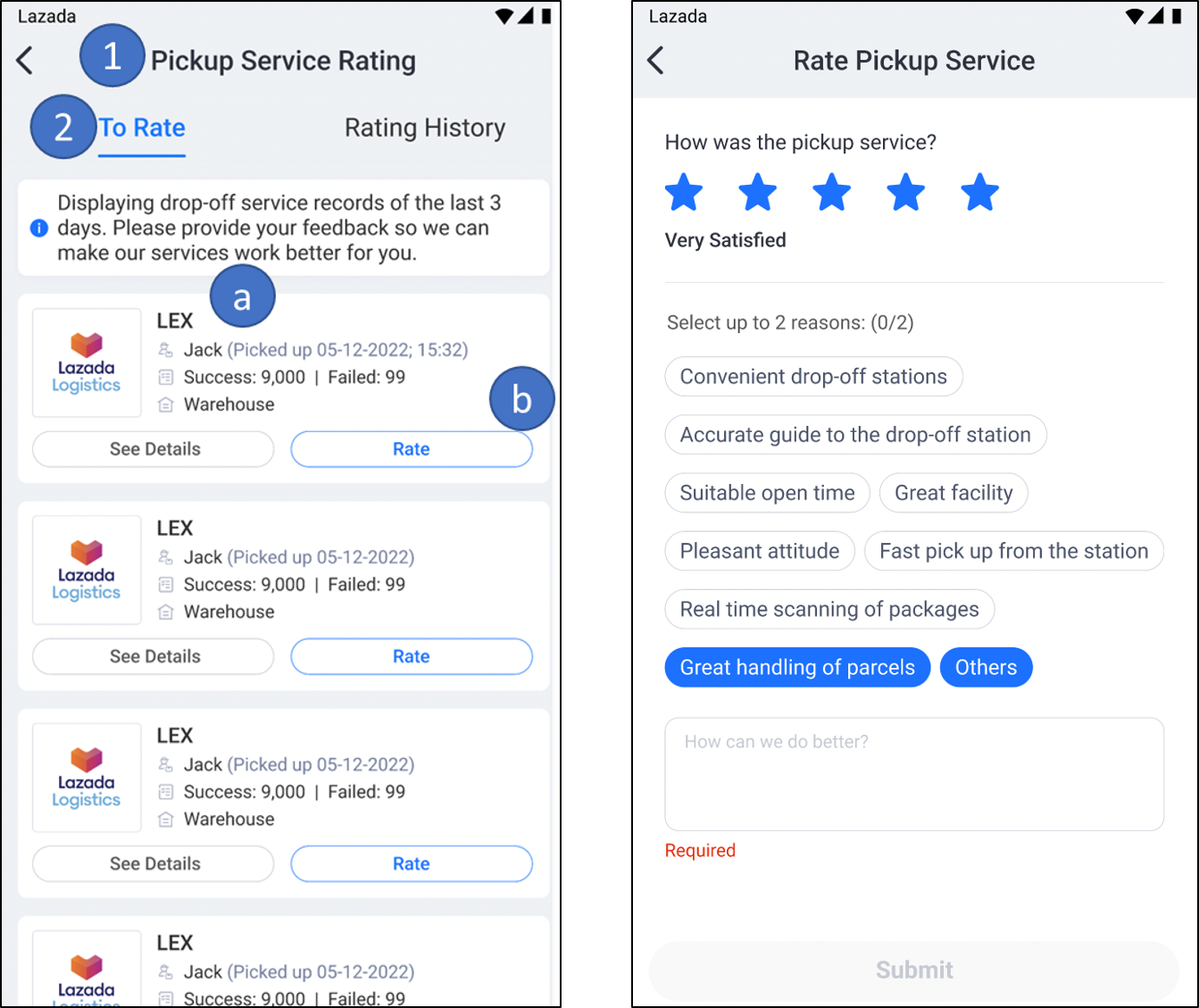
Rating Pickup Services on the Lazada Mobile App
Pickup service ratings can also be submitted through the Lazada Seller Center mobile app, making it convenient to provide feedback anytime.
Navigation path: Seller Center App → Tools → My Shipment → Pickup Service Rating → To Rate
From here, sellers can:
-
View shipping provider details
-
Submit pickup ratings directly from their phone
Tab 2: Waiting for Drop-Off (For Drop-Off Sellers)
Where to Find It
Lazada Seller Center → Orders → Logistics → Waiting for Drop-Off
This tab is especially useful for LEX Drop-Off sellers, as it clearly shows parcel volumes and assigned drop-off points.
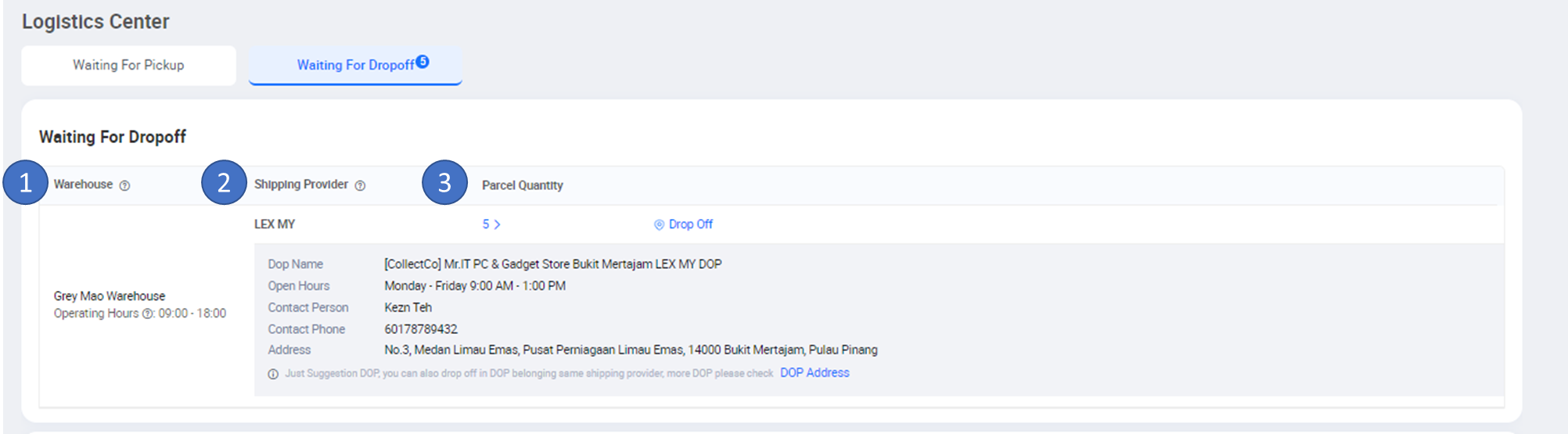
How to Read the “Waiting for Drop-Off” Information
Warehouse
Indicates whether the parcels are associated with:
-
Dropshipping orders, or
-
A specific warehouse location
3PL Name
Shows:
-
The assigned drop-off shipping provider
-
Based on the Arrange Shipment list
-
Sorted in descending order by parcel volume, helping sellers prioritise drop-offs
Parcels
Displays the total number of parcels that:
-
Are marked Arrange Shipment
-
Use Drop-Off as the first-mile method
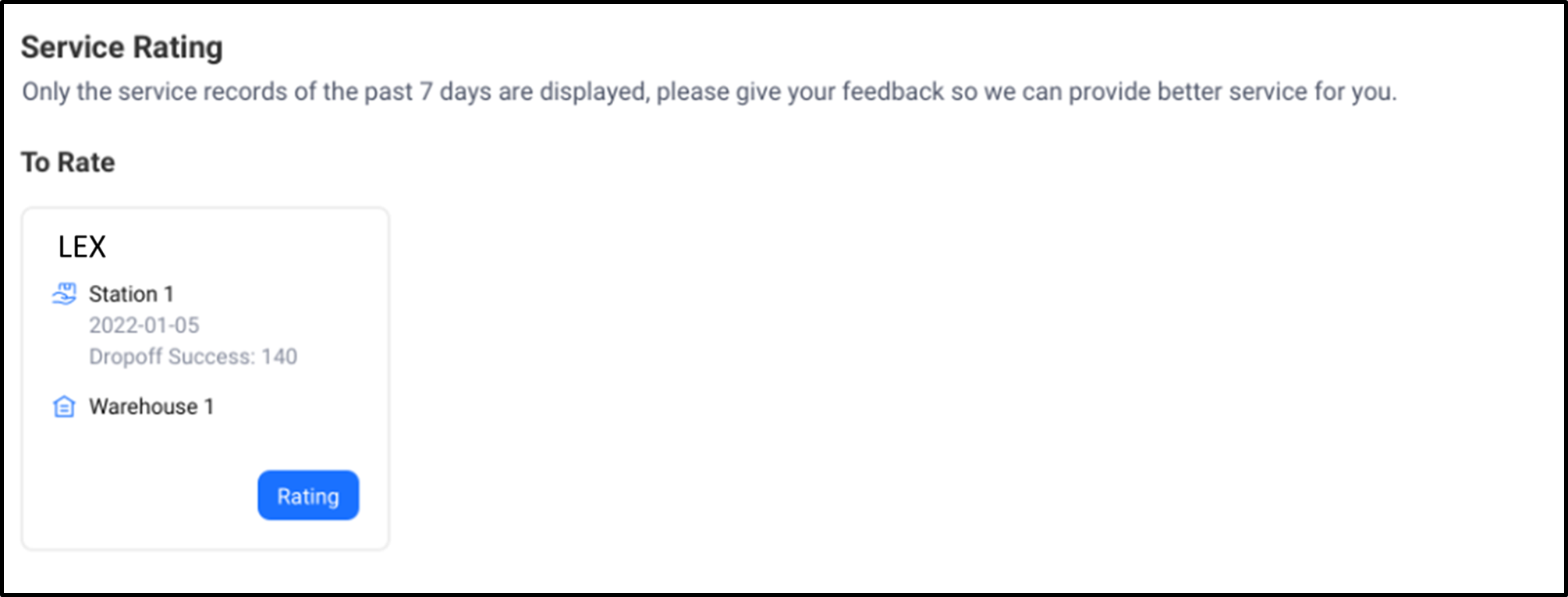
How to Rate Drop-Off Services (Desktop)
After completing a drop-off, sellers can rate the service directly from this tab.
Steps:
-
Go to Waiting for Drop-Off
-
Click “Rating”
-
Submit your feedback based on your drop-off experience
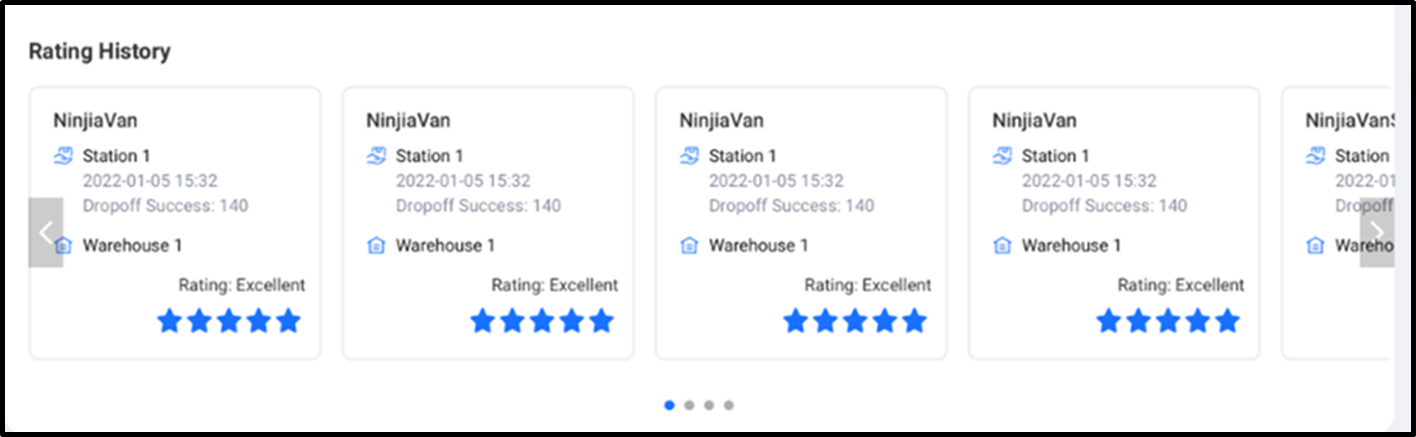
What You’ll See in Drop-Off Rating History
The drop-off rating history includes:
-
Shipping provider name
-
Drop-off point (station) name
-
Drop-off date and time
-
Number of parcels successfully dropped off
This is particularly helpful for sellers who regularly use multiple drop-off locations.
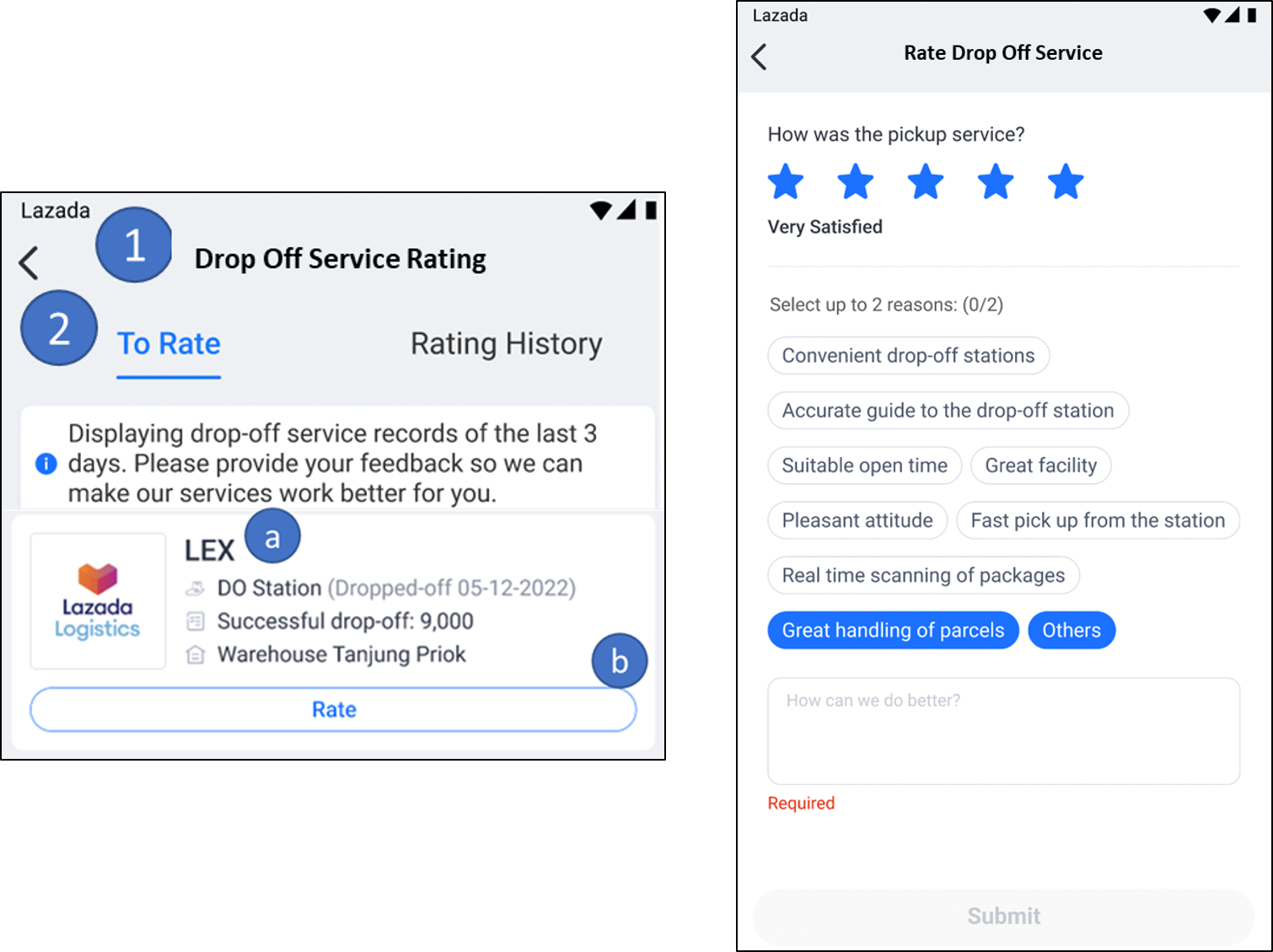
Rating Drop-Off Services on the Mobile App
Drop-off service ratings are also available via the Seller Center mobile app.
Navigation path: Seller Center App → Tools → My Shipment → Drop Off Service Rating → To Rate
From here, sellers can:
-
View drop-off provider details
-
Rate the drop-off point directly from their phone
New: Additional Ways to Rate Lazada Logistics Services
Beyond the pickup and drop-off tabs, Lazada now offers three additional feedback channels to capture seller experiences more comprehensively.
1. Service Feedback on the Logistics Page
Sellers can click “Service Feedback” at the top-right corner of the Logistics page to rate:
-
First-mile services (pickup and drop-off)
-
Return services
Note: At least one reason (maximum two) must be selected when submitting feedback.
2. Service Feedback Pop-Up
If a recent service has not been rated, Lazada may display a feedback pop-up.
This survey covers:
-
Your most recent logistics experience
-
Comparisons with other platforms, if applicable
Seller input helps Lazada benchmark performance and improve service quality.
3. Hotline Service Feedback (Pickup PIC)
If Lazada provides a direct pickup contact (PIC), sellers can also rate that interaction.
This feedback helps Lazada:
-
Identify service gaps
-
Improve pickup coordination
-
Enhance overall seller support efficiency
Turning Logistics Visibility into Operational Efficiency
The new Logistics page in Lazada Seller Center gives sellers clearer visibility into first-mile performance, from pickup readiness to drop-off success rates. However, consistent pickup success and smooth drop-off operations still depend heavily on internal execution, how efficiently orders are processed, whether inventory is accurate, and whether parcels are prepared on time.
BigSeller supports this operational layer by helping Lazada sellers manage their day-to-day workflows in a more structured and automated way. As a free, easy-to-use e-commerce ERP designed for Southeast Asian sellers, BigSeller centralises product management, order processing, inventory control, logistics tracking, and after-sales handling across multiple platforms, including Lazada.
Try BigSeller for free and see how a more automated, multi-channel workflow can support smoother Lazada logistics and long-term business growth.