How to Contact Shopee Customer Service in Malaysia (2026 Seller Guide)
Erra16 Dec 2025 06:08ENCopy link & title
Whether you are dealing with order issues, buyer disputes, payment questions, or simply need clarification on Shopee policies, Shopee Customer Service remains a key support channel for sellers in Malaysia. As Shopee continues to refine its seller support structure in 2026, knowing which channel to use and how to track your enquiries can save you time and reduce unnecessary delays.
This guide breaks down all available Shopee Customer Service contact methods for Malaysian sellers, including chat support, internet calls, operating hours, and how to follow up on your submitted enquiries.

Shopee Customer Service Channels for Sellers
Shopee provides sellers in Malaysia with two main Customer Service channels to handle operational issues, policy clarifications, disputes, and account-related enquiries. Understanding how each channel works and when to use them helps sellers resolve issues more efficiently.
The two available channels are:
-
Chat with Shopee – text-based support for general enquiries and case follow-ups
-
Internet Call – voice support via the Shopee App for more urgent or complex matters
Each channel operates under different access rules and support hours, depending on whether a seller is classified as a managed seller or non-managed seller.
Chat with Shopee: What Sellers Should Know
The Chat with Shopee feature is the primary support channel for most sellers. It is suitable for enquiries such as order issues, return and refund cases, policy explanations, account settings, and documentation checks.
Live Agent Availability
Shopee applies different live chat access rules based on seller status:
Managed Sellers
-
Live agent support is available from 9:00 AM to 6:00 PM
-
Operating days: Monday to Friday
-
Public holidays are excluded
Managed sellers typically receive scheduled access to live agents during business hours, reflecting a more structured support arrangement.
Non-Managed Sellers
-
Live chat access is available 24 hours a day
-
Includes weekends and public holidays
This allows non-managed sellers to submit enquiries and communicate with Shopee support at any time.
Outside of live agent operating hours, sellers may still interact with Shopee’s automated chat system. These automated responses help collect issue details and may guide sellers through basic troubleshooting before routing the case to a live agent once one becomes available.
How to Chat with Shopee Customer Service
Shopee offers multiple access points for chat support, allowing sellers to reach Customer Service based on how they manage their stores, mobile or desktop.
1. Chat with Shopee via Shopee App
This is the most commonly used method, especially for sellers who manage orders and messages directly from their mobile devices.
Steps:
-
Open the Shopee App
-
Go to the Me tab
-
Tap My Shop
-
Select Learn and Help
-
Click Chat with Shopee
-
Type your message to start the chat session
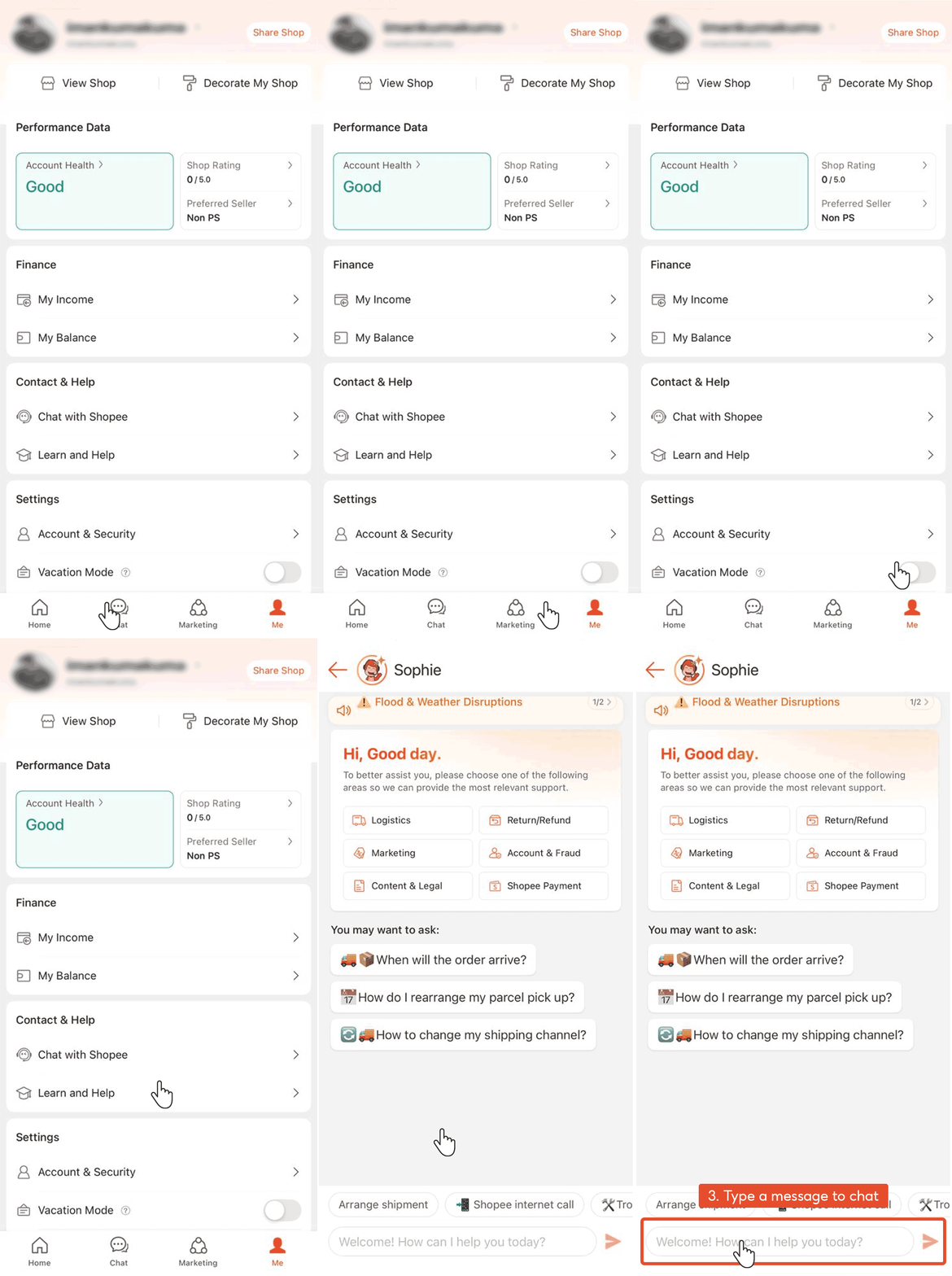
2. Chat with Shopee via Seller Centre App
For sellers who rely on the Seller Centre App to handle operations such as fulfilment, inventory, and campaigns, chat support is also available within the app.
Steps:
-
Open the Seller Centre App
-
Go to the Me tab
-
Click Chat with Shopee
-
Type your message to begin chatting with support
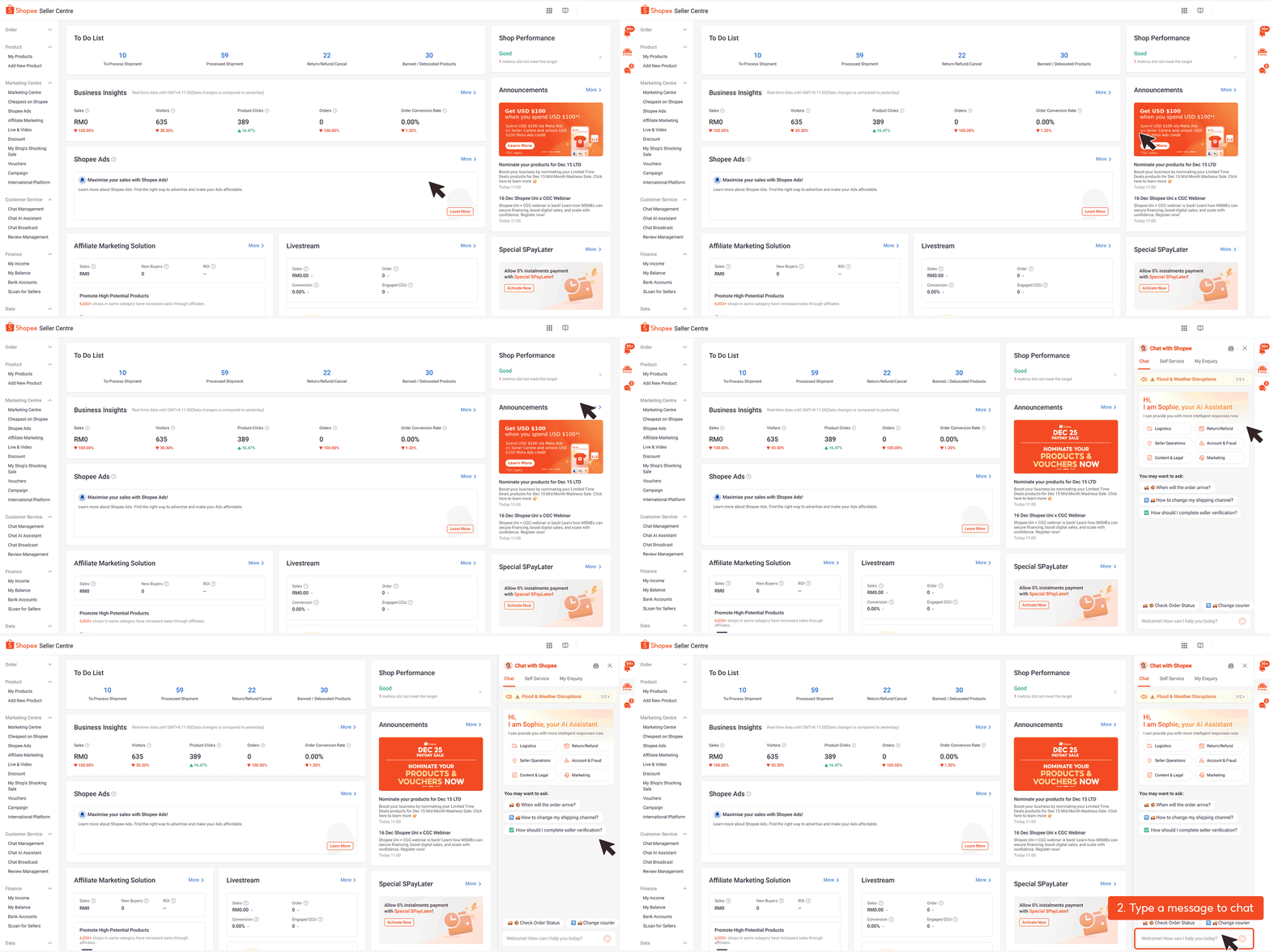
3. Chat with Shopee via Seller Centre (Web)
Sellers working from a desktop or laptop can access chat support directly through the web-based Seller Centre.
Steps:
-
Log in to Shopee Seller Centre
-
Click the Contact Shopee icon
-
Type your message to start the chat
Internet Call: Speak Directly with Shopee Support
For issues that are urgent, complex, or difficult to explain through text, Shopee provides an Internet Call option that allows sellers to speak directly with a Customer Service representative via the Shopee App. This channel is particularly useful when real-time clarification is needed or when a case has already been escalated through chat.
Internet Call Operating Hours (Malaysia)
Shopee’s Internet Call support operates under the following schedule:
-
Available daily from 8:00 AM to 7:00 PM
-
Includes public holidays
-
Free of charge (calls use internet data, not mobile call credit)
Because the service relies on internet connectivity, sellers are advised to ensure a stable network connection before initiating a call.
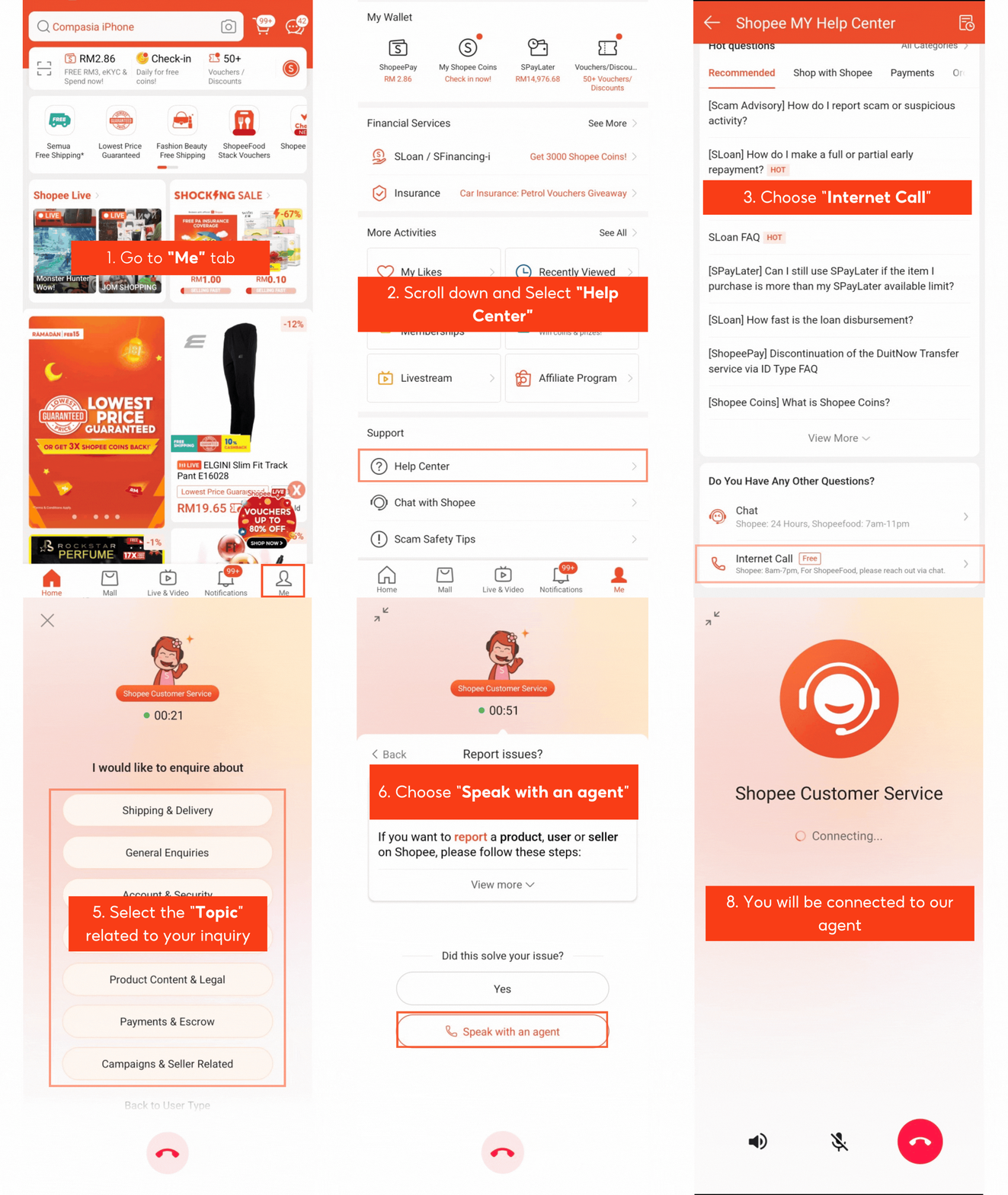
How to Make an Internet Call via the Shopee App
Internet Call is only available through the Shopee App and cannot be accessed via desktop.
Steps:
-
Open the Shopee App
-
Go to the Me tab
-
Scroll down and select Help Center
-
Choose Internet Call
-
Select Seller as your role
-
Choose the topic related to your enquiry
-
Tap Speak with an agent
-
Select your preferred language
-
You will be connected to a Shopee Customer Service representative
Selecting the correct role and topic helps Shopee route your call to the most appropriate support team, reducing unnecessary transfers or delays.
When Should Sellers Use Internet Call?
The Internet Call channel is best suited for situations that require immediate attention or detailed explanation, including:
-
Payment discrepancies or payout-related issues
-
Escalated disputes that cannot be resolved via chat
-
Time-sensitive order problems, especially during campaigns
-
Account-related clarifications, such as restrictions or verification issues
For general enquiries or non-urgent matters, Shopee recommends using chat support first.
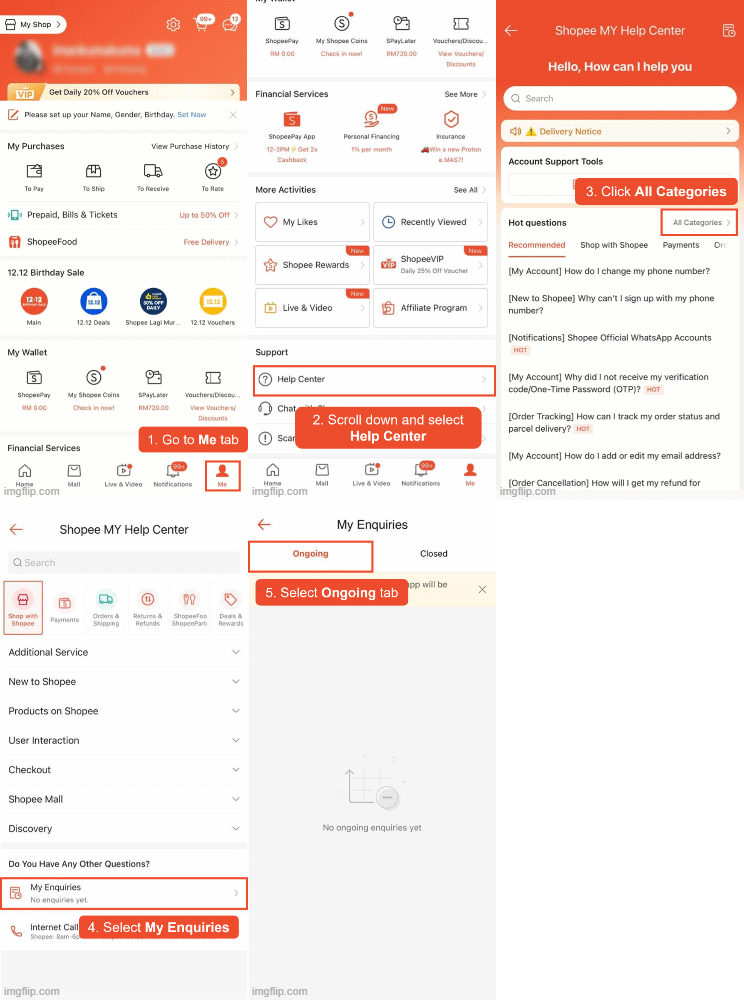
How to Check Your Shopee Enquiry Status
After submitting an enquiry whether through chat or Internet Call, sellers can track the status of their cases through both the Shopee App and Seller Centre.
Check Enquiry Status via Shopee App
Steps:
-
Go to the Me tab
-
Scroll down and select Help Center
-
Click All Categories
-
Select My Enquiries
-
Open the Ongoing tab to view active cases
Check Enquiry Status via Seller Centre
Steps:
-
Log in to Shopee Seller Centre
-
Click the Contact Shopee icon
-
Select the My Enquiry tab
-
View your list of submitted enquiries and their current status

Tips for Faster Support Resolution (Seller Best Practices)
To minimise delays and avoid repeated follow-ups, sellers are advised to:
-
Prepare order IDs, buyer usernames, and screenshots before contacting support
-
Select the most accurate topic when submitting enquiries
-
Use Internet Call for urgent or complicated issues instead of chat
-
Monitor updates regularly under My Enquiries to respond promptly
Efficient communication and proper case tracking help ensure smoother issue resolution and reduce unnecessary disruption to daily operations.
Reduce Support Dependency by Managing Your Shopee Operations Better
Shopee Customer Service remains an essential safety net for sellers, especially when it comes to disputes, policy clarifications, and urgent order-related issues. However, many seller enquiries in practice are triggered by operational gaps such as overselling, delayed fulfilment, inconsistent stock updates, or fragmented order management across platforms. Using a structured operations system can significantly reduce how often sellers need to escalate issues to Shopee support.
BigSeller is a free, easy-to-use, and highly automated e-commerce ERP built specifically for Southeast Asian sellers. It centralises product listing, order processing, inventory and purchase management, financial reporting, and automation tools in one platform, helping Shopee sellers manage daily operations more accurately and efficiently across multiple sales channels.
Try BigSeller for free and manage Shopee, TikTok Shop, Lazada, and more with greater control, fewer errors, and better visibility across your entire business.