Fast Fulfillment Rate on Lazada: What Filipino Sellers Need to Know in 2026
Jayson13 Feb 2026 09:09ENCopy link & title
Running a successful online store on Lazada Philippines requires more than just listing great products. Your seller performance metrics directly impact your store's visibility, customer trust, and ultimately, your sales. Among these metrics, the Fast Fulfillment Rate stands out as one of the most critical indicators that Lazada uses to evaluate seller reliability.
If you've received warnings about your fulfillment rate or noticed a drop in your product rankings, understanding this metric isn't optional—it's essential for your business survival on the platform.

Lazada is committed to reducing the overall time from order click to receipt to improve the buyer experience and boost sales. Therefore, Fast Fulfillment Rate (FFR) has been introduced as a standard metric to measure seller fulfillment speed; it is the percentage of order items shipped within the time specified in the FFR Service Level Agreement (SLA) out of the total number of completed orders.
FFR will also be used to determine a seller's eligibility to participate in various campaigns, promotions, or other programs. Each campaign, promotion, or program may have different FFR thresholds to determine seller eligibility.
The FFR is calculated over a 28-day period. It is updated daily on a rolling basis and includes orders created between 8 and 35 days ago, represented as D-8 to D-35, where D is the current date.
The FFR calculation formula is as follows:

⚠️Note: Cancelled order are excluded from the calculation
(1). Orders will be considered fast-fulfillment orders under the following Service Level Agreement (SLA):
This means the order status is "shipped," indicating that the package has been successfully scanned and handed over to Lazada's logistics partner. This indicates that the package has entered the logistics network and is about to be delivered.
(2). FFR SLA requirement per type of order:
For drop-off orders, sellers must deliver the package to the nearest available pickup point within the city where the warehouse is located, as specified in the order details. Delivering the package outside the designated city may incur additional shipping costs. Sellers found to be engaging in malicious behavior may be penalized.
For pickup orders, sellers must complete the return process before 4 PM to ensure same-day pickup.
Q: Can I appeal if my fulfillment rate drops due to courier issues?
A: Yes. If third-party couriers cause delays, submit proof through Seller Center → "Penalties" → "Appeal." Include tracking screenshots and courier incident reports. Lazada reviews appeals within 3-5 business days. Success rate for legitimate courier delays: approximately 60%.
Q: How long does it take to recover my fulfillment rate?
A: Since the calculation uses a 28-day rolling window, consistent perfect performance will improve your rate daily. Most sellers see significant improvement within 2 weeks of correcting issues. A seller who drops to 85% can reach 95% in 15-20 days with zero violations.
Q: Are there any tools to forecast if my rate is at risk?
A: Sellers may view and visit details of their FFR in Seller Center. FFR can be found in:
Store > Account Health, or top banner in the Order Management Page.
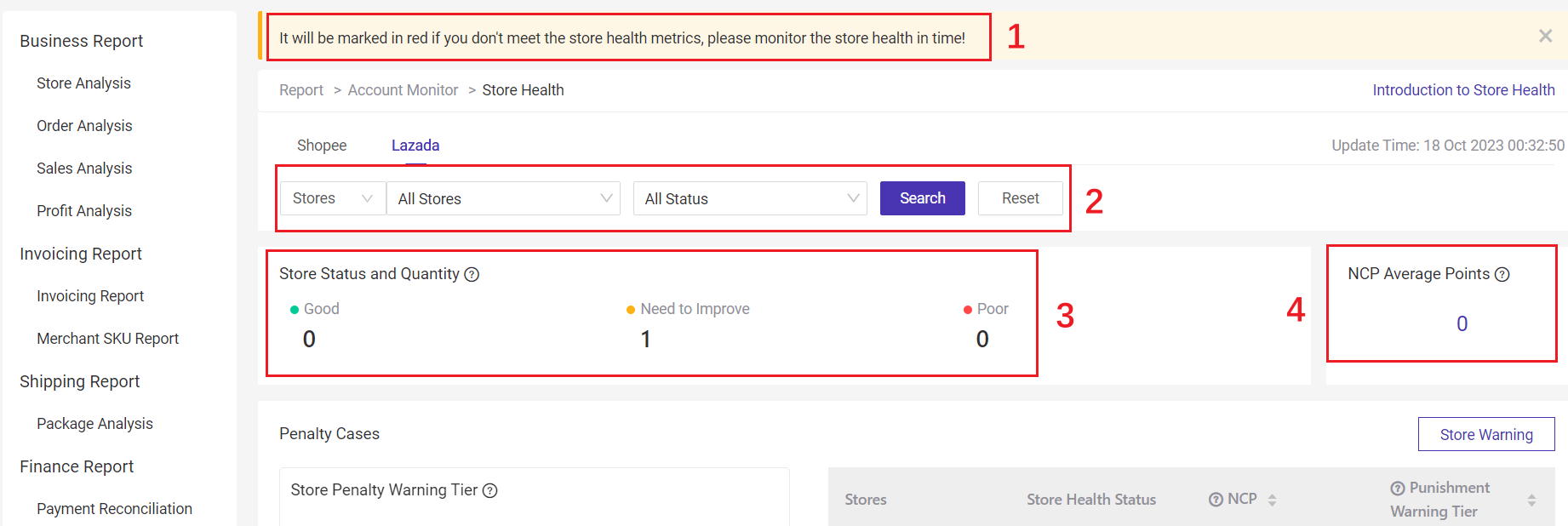
In addition, if you operate multiple Lazada stores, you can also use ERP tools like BigSeller to monitor store health.
BigSeller Store Health can help you monitor the account health status of all Lazada stores, and easily grasp the situation of multiple stores. Besides, BigSeller also offers punishment warnings, allowing you to identify risks in advance to ensure the normal operation of your stores.
All the data sourced from: Lazada Help Center
If you've received warnings about your fulfillment rate or noticed a drop in your product rankings, understanding this metric isn't optional—it's essential for your business survival on the platform.
1. What Is Fast Fulfillment Rate on Lazada?
Lazada is committed to reducing the overall time from order click to receipt to improve the buyer experience and boost sales. Therefore, Fast Fulfillment Rate (FFR) has been introduced as a standard metric to measure seller fulfillment speed; it is the percentage of order items shipped within the time specified in the FFR Service Level Agreement (SLA) out of the total number of completed orders.
FFR will also be used to determine a seller's eligibility to participate in various campaigns, promotions, or other programs. Each campaign, promotion, or program may have different FFR thresholds to determine seller eligibility.
2. How is Fast Fulfillment Rate Calculated on Lazada?
The FFR is calculated over a 28-day period. It is updated daily on a rolling basis and includes orders created between 8 and 35 days ago, represented as D-8 to D-35, where D is the current date.
The FFR calculation formula is as follows:
⚠️Note: Cancelled order are excluded from the calculation
3. Service Level Agreement (SLA) for Fast Fulfillment Orders
(1). Orders will be considered fast-fulfillment orders under the following Service Level Agreement (SLA):
|
Application
|
Order create on (OC): Handover to logistic SLA |
|
Before 2pm |
Orders created on working day*: Same day 23:59 Orders create on Sun and Public Holiday: Next working day 23:59 |
|
After 2pm |
Orders created on working day*: Next working day 23:59 Orders create on Sun and Public Holiday: Next working day 23:59 |
(2). FFR SLA requirement per type of order:
|
Order type |
FFR Requirement |
|
Standard orders |
Follow FFR logic |
|
DBS (Delivery by seller) |
Follow DBS FFR SLA |
|
Digital goods |
Based on RTS status with FFR logic |
|
O2O |
Based on RTS status with FFR logic |
|
Bulky |
Follow bulky SLA |
|
Holiday mode 2 (SLA extension) |
Follow Holiday mode 2 SLA |
|
Preorder/ Seller extension order (via feature) |
Follow Preorder/ extension feature SLA |
For drop-off orders, sellers must deliver the package to the nearest available pickup point within the city where the warehouse is located, as specified in the order details. Delivering the package outside the designated city may incur additional shipping costs. Sellers found to be engaging in malicious behavior may be penalized.
For pickup orders, sellers must complete the return process before 4 PM to ensure same-day pickup.
4. FAQ:
Q: Can I appeal if my fulfillment rate drops due to courier issues?
A: Yes. If third-party couriers cause delays, submit proof through Seller Center → "Penalties" → "Appeal." Include tracking screenshots and courier incident reports. Lazada reviews appeals within 3-5 business days. Success rate for legitimate courier delays: approximately 60%.
Q: How long does it take to recover my fulfillment rate?
A: Since the calculation uses a 28-day rolling window, consistent perfect performance will improve your rate daily. Most sellers see significant improvement within 2 weeks of correcting issues. A seller who drops to 85% can reach 95% in 15-20 days with zero violations.
Q: Are there any tools to forecast if my rate is at risk?
A: Sellers may view and visit details of their FFR in Seller Center. FFR can be found in:
Store > Account Health, or top banner in the Order Management Page.
In addition, if you operate multiple Lazada stores, you can also use ERP tools like BigSeller to monitor store health.
BigSeller Store Health can help you monitor the account health status of all Lazada stores, and easily grasp the situation of multiple stores. Besides, BigSeller also offers punishment warnings, allowing you to identify risks in advance to ensure the normal operation of your stores.
BigSeller is the ultimate e-commerce SaaS ERP system designed for Southeast Asian sellers, aiming to help you improve efficiency and expand more business channels. It simplifies all processes on one dashboard—from product listing and order processing to inventory management, financial tracking, and automated operations. Customized subscription plans are also available for different types of sellers.
Vist our website to know more 👉BigSeller ERP
Vist our website to know more 👉BigSeller ERP
All the data sourced from: Lazada Help Center
BigSeller-Blog Senior Writer: Jayson
Sir Jayson has worked in well-known e-commerce companies such as Shopee and TikTok Shop, helping hundreds of sellers to deepen their e-commerce industry, expand their business, and eventually become high-quality sellers.