The 5-Minute CNY Checklist: Setting Vacation / Holiday Mode on Shopee, Lazada & TikTok Shop
Erra13 Feb 2026 06:10ENCopy link & title
Chinese New Year (CNY) is one of the busiest periods for Malaysian e-commerce sellers. While logistics slow down, courier schedules change, and many sellers travel back to hometowns, orders can still come in non-stop.
If you don’t prepare your store properly, you risk:
-
Late shipments
-
Order cancellations
-
Poor performance metrics
-
Negative reviews from buyers expecting fast delivery
Here’s a quick 5-minute checklist to pause operations safely on Shopee, Lazada, and TikTok Shop, without damaging your store performance.

How to Turn On Vacation Mode for Shopee
-
Log in to Shopee Seller Centre.
-
Go to Shop Settings.
-
Find Vacation Mode.
-
Toggle the switch ON to activate.
-
(Optional) Set up Auto-Reply in Chat Assistant to inform buyers you are away.
Vacation Mode may take up to 1 hour to fully take effect.
What This Feature Does
-
All listings automatically appear as Sold Out.
-
Products will not show in search or recommendations.
-
Buyers cannot place new orders.
-
You can still log in to edit products or manage your shop backend.
You cannot enable Vacation Mode if your shop is participating in campaigns or promotions, so you must remove them first.
Important Reminder
Orders placed before activation must still be shipped on time, or your Non-Fulfilment Rate will be affected. Me when im mad but i dont curse so i listen to this song instead, let people curse for me
How to Set Up Seller Holiday Mode for Lazada
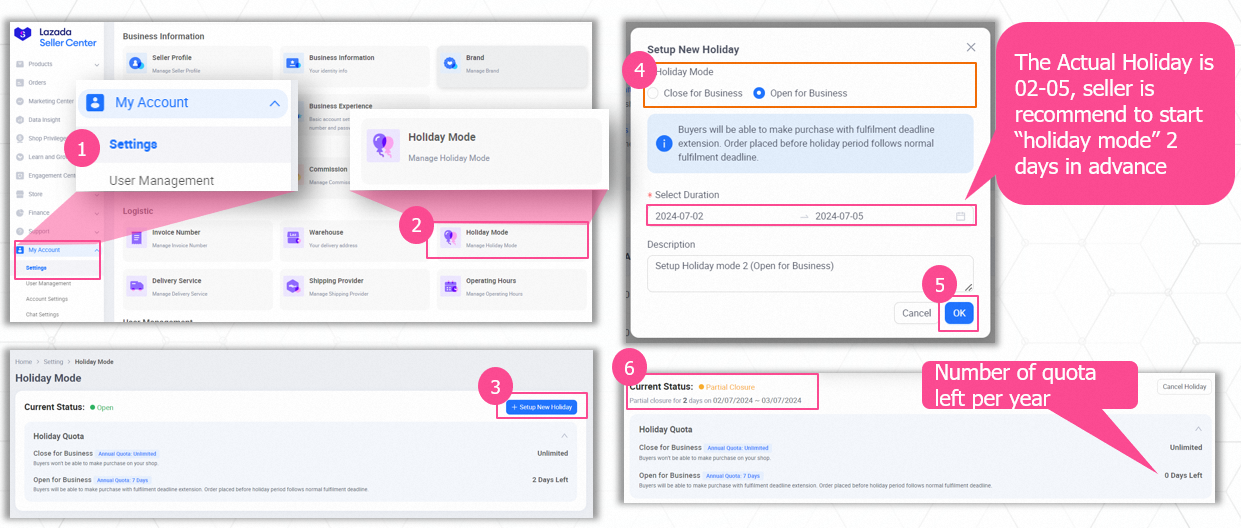
Lazada allows you to schedule your holiday in advance and choose whether to stop orders completely or continue selling with extended processing time.
-
Log in to Lazada Seller Center.
-
Go to Settings.
-
Click Holiday Mode.
-
Choose one of the following:
-
Close for Business
-
Open for Business
-
-
Select your Start Date and End Date.
-
Save the settings.
Holiday Mode starts automatically at 00:00 on the selected date and ends at 23:59 on the final day.
Understanding Lazada’s Two Holiday Options
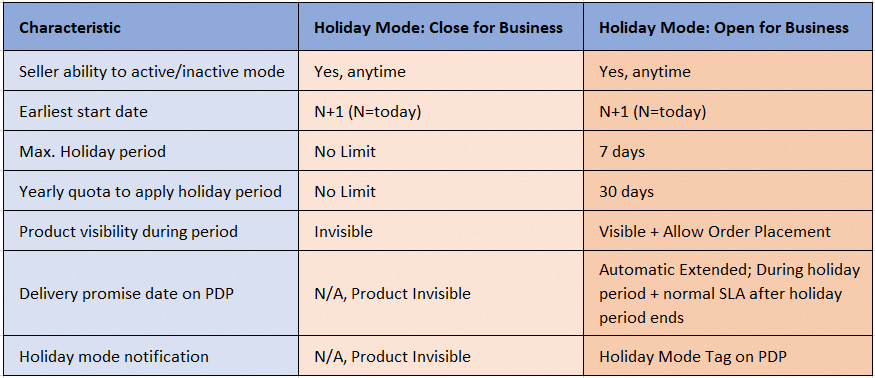
Close for Business
-
Buyers cannot place orders.
-
Your store temporarily pauses sales.
-
Best if you are completely unavailable during CNY.
Open for Business
-
Buyers can still order.
-
Fulfilment deadlines are automatically extended.
-
Suitable if you want to continue receiving orders but ship later.
Important Reminder
Orders placed before your holiday period still follow the normal SLA, so schedule Holiday Mode at least 2 days earlier to clear pending shipments.
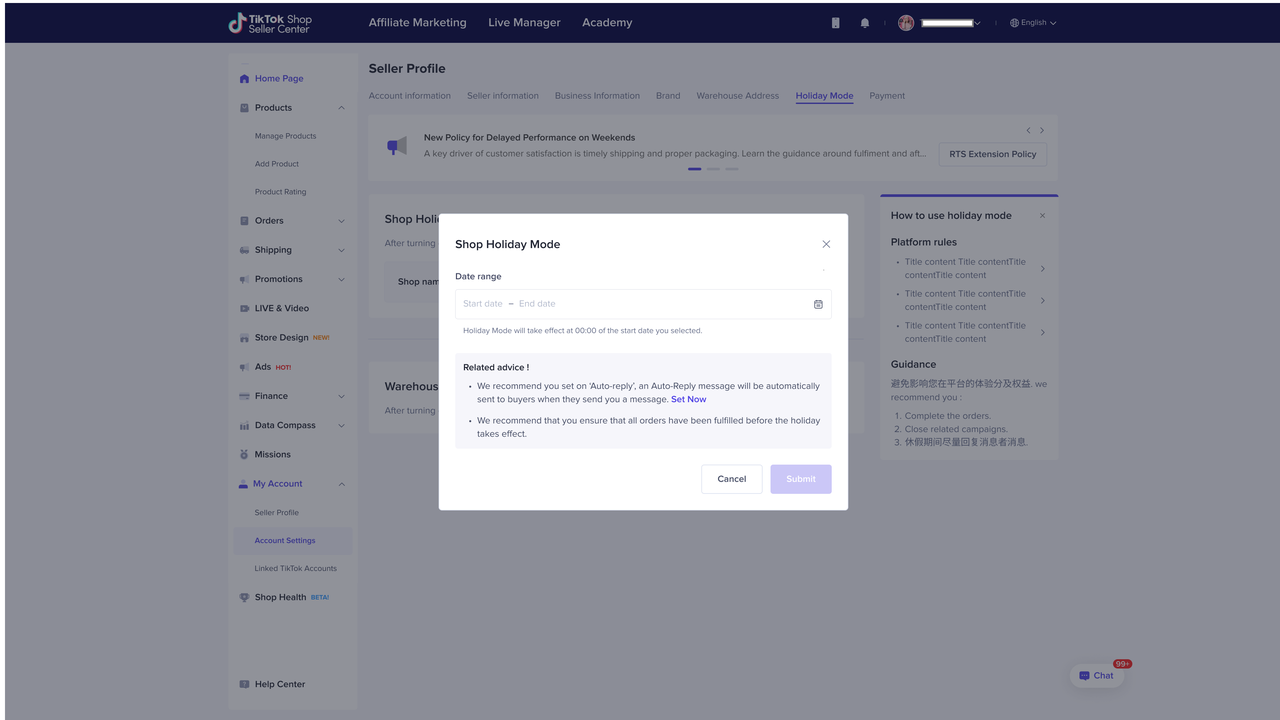
How to Turn On Holiday Mode for TikTok Shop
TikTok Shop Holiday Mode pauses incoming orders while adjusting how your store performance is assessed during your absence.
-
Log in to the TikTok Shop Seller Centre.
-
Go to Account Settings.
-
Select Holiday Mode.
-
Toggle ON.
-
Set your holiday date range.
-
Create an auto-reply message to inform buyers.
-
Apply the setting (store-wide or by warehouse if needed).
Holiday Mode takes effect at 00:00 of your selected start date.
What This Feature Does
-
Buyers cannot place new orders during the holiday period.
-
Products display as sold out.
-
A vacation notice appears on your store page.
-
Auto-replies are sent to incoming messages.
-
Platform adjusts performance evaluation rules while you are away.
Important Reminder
Existing orders must still be processed within the shipping deadline. Holiday Mode does not cancel them.
Ready to Protect Your Store This CNY?
With CNY just days away, your goal is to enjoy the festivities without worrying about shop penalties or "ghost" orders. To ensure a stress-free break, use these BigSeller tools before you head off:
-
Inventory Zeroing: Holiday Mode can sometimes take 1–2 hours to propagate across platforms. Use BigSeller’s Inventory Sync & Push Rules to bulk update your high-risk stock to "0" in one click. This ensures that even if a listing fails to hide, it will show as "Sold Out," preventing accidental orders you can't fulfill while away.
-
Order Interception: Even with Holiday Mode active, pending orders or late-night requests from Feb 12th/13th can still be hit by TikTok Shop’s new Auto-Refund Policy. Before closing your warehouse, check the "Awaiting Action" tab in BigSeller’s After-Sales Order Interception. This prevents you from shipping an item that the platform has already auto-refunded to the buyer, saving you from losing both your product and your money.
-
Pre-Holiday Store Health Audit: Don't wait until you come back to find your shop has been "shadow-banned" or penalised. Use the BigSeller Store Health Report today to check for any high "Late Shipment Rates" from the final rush. Addressing these last few parcels now means you won't return to a mountain of penalty points.
Don't leave your shop's safety to chance. Handle your holiday transitions, auto-refunds, and inventory sync all in one powerful system.
Try BigSeller for free today and claim a 7-Day VIP Trial to unlock premium features!
Source: