How to Fix the “Undefined” Error When Onboarding to Lazada Sponsored Solutions
Erra01 Dec 2025 06:13ENCopy link & title
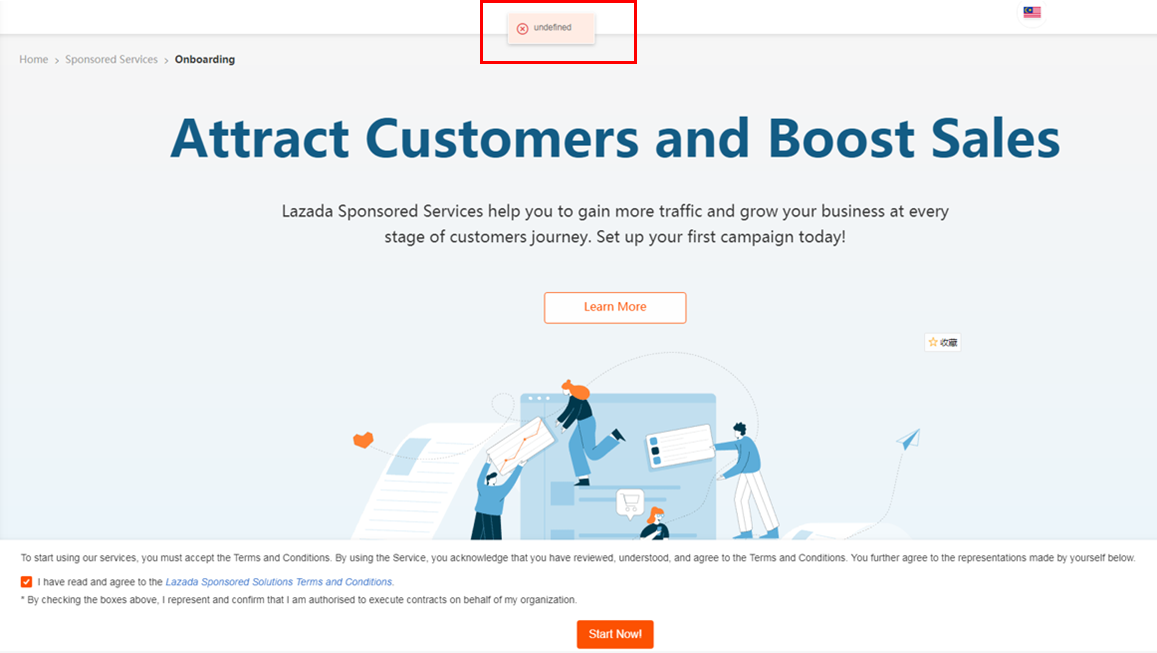
Some Lazada sellers encounter an unexpected “Undefined” error the moment they try to onboard Sponsored Solutions, usually right after accepting the T&C and clicking “Start Now!”. The message doesn’t explain much, but the trigger behind it is very specific: the system blocks the action when the account used does not have the correct permission level.

Why the “Undefined” Error Happens
The root cause of this error is almost always tied to account permissions. Lazada requires sellers to use the Master Owner account for onboarding to Sponsored Solutions because this role carries full control over store operations, advertising access, and budget management.
If a seller attempts to onboard using any sub-account, even if that account can manage listings, orders, or finance, the system detects that it does not have the required permissions. Instead of showing a specific warning, the system returns a generic “Undefined” error message.
This makes the error look technical, but in reality, it’s a built-in security lock that prevents unauthorised users from setting up ads under the store.
How to Confirm You’re Using the Correct Account
Before attempting onboarding again, it’s important to verify that you're logged in with the correct account:
-
Log in to Lazada Seller Center (SC).
-
Navigate to My Account.
-
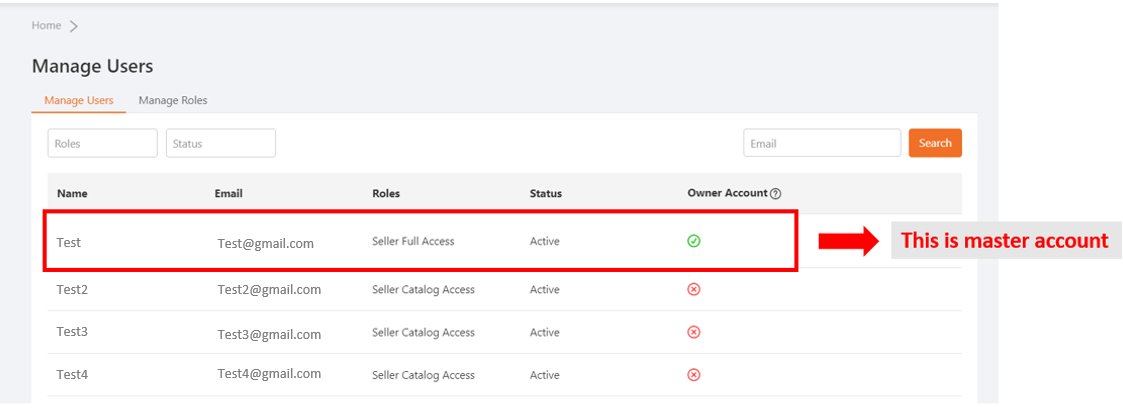
Click User Management to view all linked accounts.
-
Find the account that meets both of these criteria:
-
It has Seller Full Access.
-
It shows a green tick under Owner Account, indicating it is the Master Owner.
-
Only this account type is permitted to activate Sponsored Solutions. If you do not see these indicators, you’re likely using a sub-account or a restricted role.
Why Other User Roles Won’t Work
Lazada offers multiple access roles for team members, such as:
-
Seller Catalog Access
-
Finance Access
-
Order Management Access
These roles are designed to help staff manage daily store operations but do not include authority to activate advertising tools.
Because Sponsored Solutions involves:
-
linking budgets,
-
running paid ads,
-
and altering store-level marketing settings,
Lazada restricts onboarding strictly to the Master Owner for security and accountability.
As a result, any attempt to activate Sponsored Solutions using a secondary role will always trigger an error, even if the user can handle other tasks without issue.
If You Still See the Error
If you’ve confirmed that you are already using the Master Owner account and the “Undefined” error still appears, the problem may be due to a backend issue or a temporary system inconsistency.
In this situation, the best step is to contact the Partner Support Center (PSC) and provide the following information to speed up investigation:
-
Your store name
-
The email address of the account used during onboarding
-
A screenshot of the error message
-
A brief description of the exact steps taken before the error appeared
This information helps PSC quickly pinpoint whether the issue is permission-related, account-related, or caused by a system error on Lazada’s side.
Streamline Your E-Commerce Operations with BigSeller
Fixing the “Undefined” error comes down to using the Master Owner account in Lazada. Once that’s set, the Sponsored Solutions onboarding should proceed smoothly. Managing permissions is one thing, but running listings, orders, inventory, and marketing across multiple platforms can still be time-consuming.
BigSeller simplifies all of this by combining product management, order handling, inventory control, and marketing tools into a single automated platform. From bulk product migration to real-time stock sync, wave picking, financial reporting, and multi-platform campaign management, it helps sellers handle complex operations without juggling multiple dashboards.
Try BigSeller for free today and see how managing your e-commerce business can be faster, easier, and more reliable.