Good news! Shopee Philippines will remove pre-order restrictions
Jayson11 Dec 2025 06:40ENCopy link & title
Shopee Philippines recently announced that, starting January 1, 2026, it will remove current pre-order restrictions and corresponding penalties, providing sellers with more flexible product management options. At that time, all completed pre-sale orders will be subject to a uniform 2% service fee to support the expanded use of this feature; however, this service fee will not be charged for customized or personalized pre-sale products.
⚠️Note: Sellers must ensure that custom product attributes are correctly set when creating customized/personalized pre-sale products to avoid triggering system penalties.
Shopee defines "pre-order listings" as products with a shipping preparation time of 7 days or more. This typically applies to two types of products: custom-made products made to order and pre-sale products that require special handling.
Although the restrictions will be lifted, Shopee still recommends that sellers keep the proportion of pre-order items below 10% of their total active items. Previously, policy (effective October 1, 2024) stipulated that if a non-priority seller or non-official seller's pre-sale items exceeded 10%, their total store listing limit would be limited to only 100 items. This rule also applied to official and priority sellers who were removed from Shopee Mall or the Priority Seller program due to exceeding the pre-sale limit.
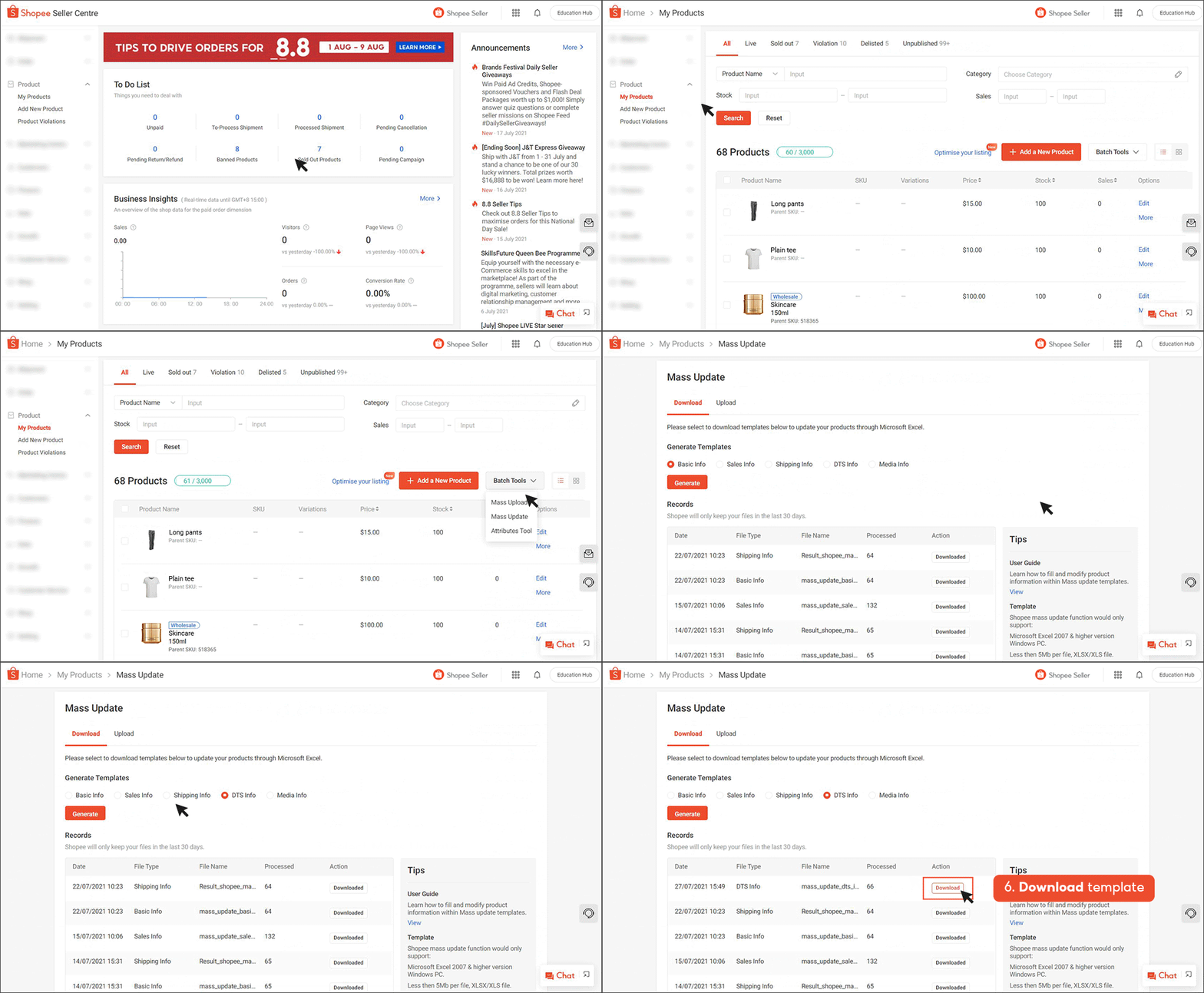
(1). For single listing, seller can edit a product listing's pre-order status on the My Products page
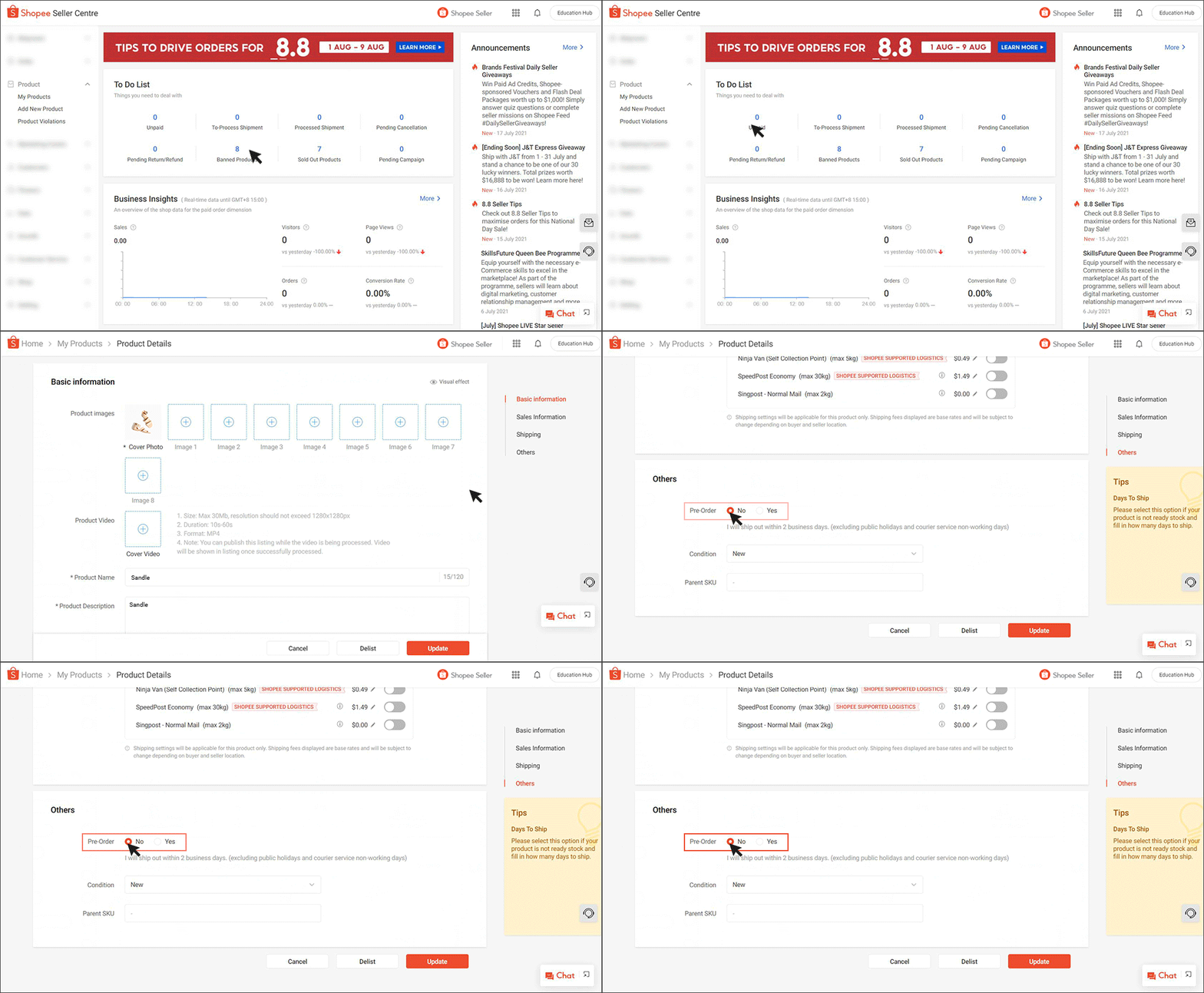
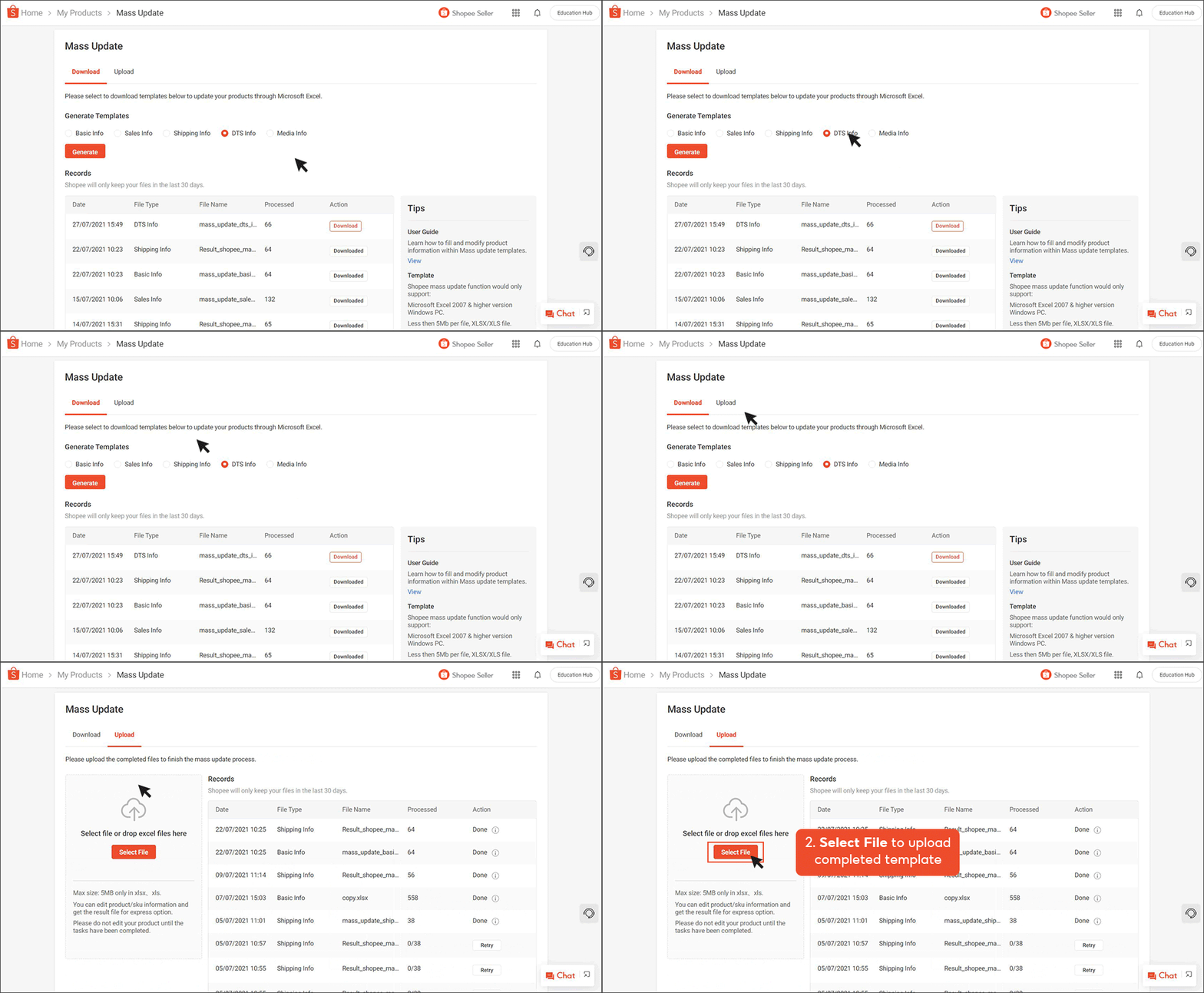
(2). For multiple listings, seller can edit all applicable listings' pre-order status on the My Products page, using the Mass Update tool:
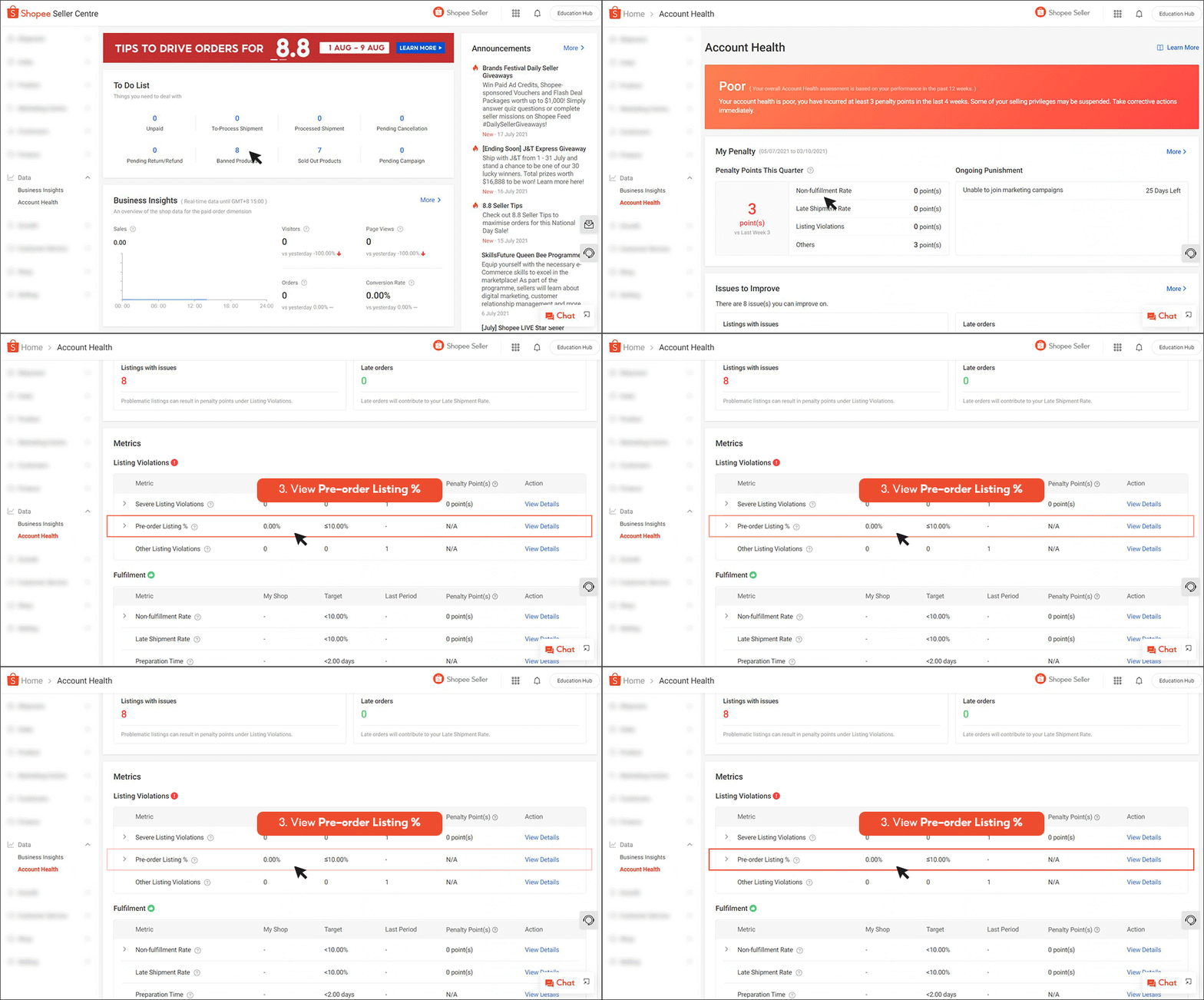
⚠️Note: Seller can see pre-order listing percentage on the Account Health page in Seller Centre, under the Listing Violations category.
If you have exceeded your pre-order quantity target, you can:
⚠️ Note
Shopee sellers can review and optimize their product structure in advance—by reducing the number of pre-sale items or increasing the number of regular items that can be shipped on the next business day—to maintain store operational efficiency and exposure.
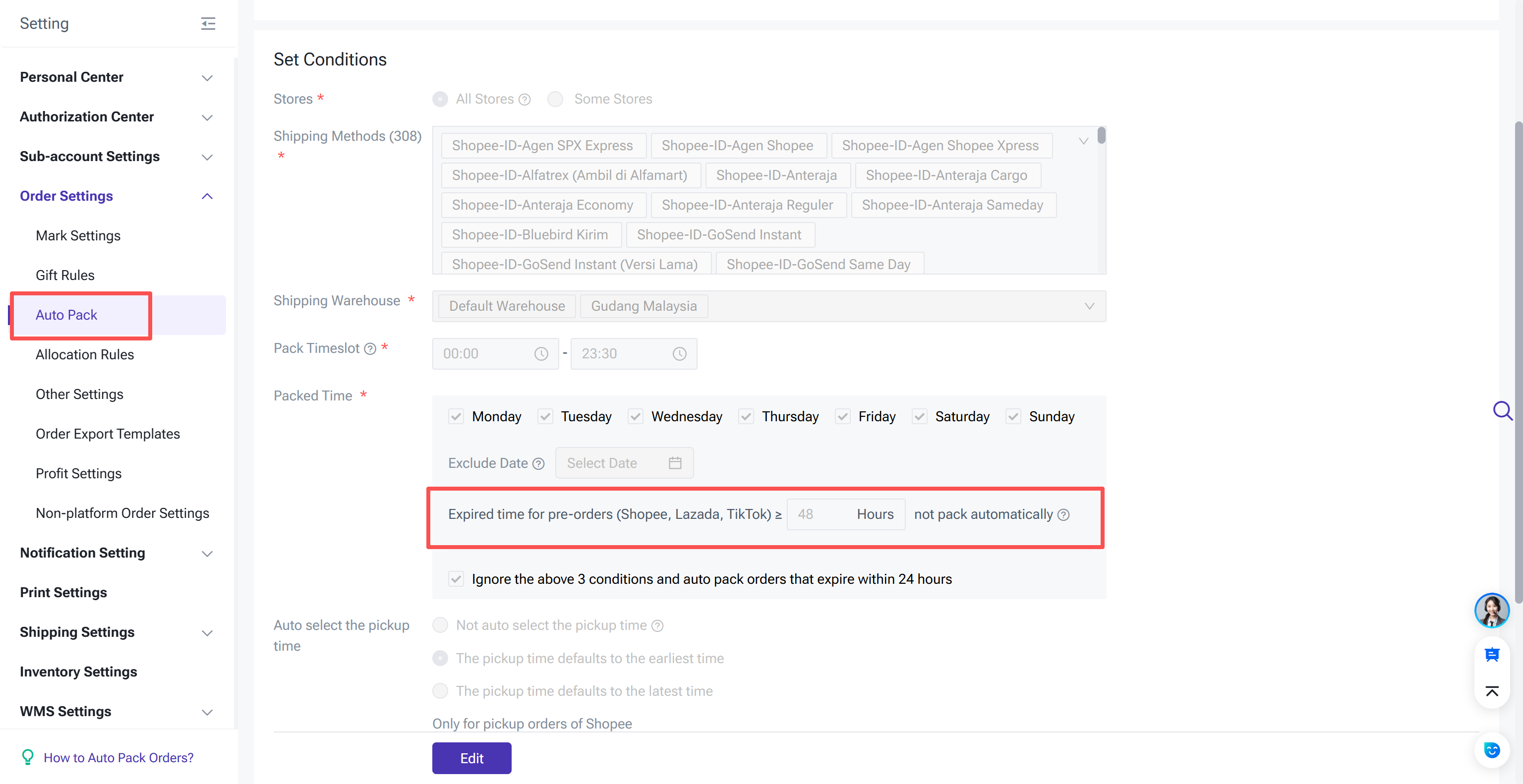
Besides, ERP tools like BigSeller can also greatly help users with multiple Shopee stores manage their pre-orders all together:

The data in this article comes from 👉 "Shopee Official"
⚠️Note: Sellers must ensure that custom product attributes are correctly set when creating customized/personalized pre-sale products to avoid triggering system penalties.
1. What is a Shopee pre-order listing?
Shopee defines "pre-order listings" as products with a shipping preparation time of 7 days or more. This typically applies to two types of products: custom-made products made to order and pre-sale products that require special handling.
Although the restrictions will be lifted, Shopee still recommends that sellers keep the proportion of pre-order items below 10% of their total active items. Previously, policy (effective October 1, 2024) stipulated that if a non-priority seller or non-official seller's pre-sale items exceeded 10%, their total store listing limit would be limited to only 100 items. This rule also applied to official and priority sellers who were removed from Shopee Mall or the Priority Seller program due to exceeding the pre-sale limit.
2. How to change pre-order status of Shopee listing?
(1). For single listing, seller can edit a product listing's pre-order status on the My Products page
(2). For multiple listings, seller can edit all applicable listings' pre-order status on the My Products page, using the Mass Update tool:
⚠️Note: Seller can see pre-order listing percentage on the Account Health page in Seller Centre, under the Listing Violations category.
3. What if the pre-order listing rate exceeds the expected target?
If you have exceeded your pre-order quantity target, you can:
- Edit some of your listed pre-order items, changing the "Estimated Delivery Days (DTS)" to 1 day to remove their pre-order status. Learn how to change the pre-order status of items individually or in bulk.
- Remove all listed pre-order items. Even if an item is out of stock, it will still count towards your pre-order quantity target.
⚠️ Note
- Listed pre-order items refer to items that are already listed and visible on the platform, regardless of whether they are in stock, as long as their status is set to pre-order.
- Changing the pre-order status will not remove the penalty you received for exceeding the pre-order quantity target in the past 30 days.
- This change will be included in your pre-order quantity target for the past 30 days.
Conclusion:
Shopee sellers can review and optimize their product structure in advance—by reducing the number of pre-sale items or increasing the number of regular items that can be shipped on the next business day—to maintain store operational efficiency and exposure.
Besides, ERP tools like BigSeller can also greatly help users with multiple Shopee stores manage their pre-orders all together:
BigSeller is the ultimate FREE e-commerce ERP for Southeast Asian sellers, designed to supercharge your business. Streamline everything in one place—from product listings and order processing to inventory management, financial tracking, and automated operations.
Vist our website to know more 👉BigSeller ERP
Vist our website to know more 👉BigSeller ERP
The data in this article comes from 👉 "Shopee Official"
BigSeller-Blog Senior Writer: Jayson
Sir Jayson has worked in well-known e-commerce companies such as Shopee and TikTok Shop, helping hundreds of sellers to deepen their e-commerce industry, expand their business, and eventually become high-quality sellers.