Complete Guide: How can Shopee Philippines sellers print and upload e-invoice?
Jayson29 Jan 2026 07:01ENCopy link & title
According to Shopee Philippines' official announcement, in accordance with BIR Revenue Regulation No. 11-2025, sellers are required to upload e-invoices for all completed orders by December 31, 2026. Failure to comply may result in a fine of up to 50,000 pesos from the Tax Authority (BIR) for each violation.
However, Shopee does not generate or issue sales invoices to buyers on behalf of sellers, and currently the seller center no longer has an interface for printing invoices. This means that Philippine sellers are responsible for issuing their own invoices. And this blog will explain several feasible methods for printing invoices.

The Bureau of Internal Revenue (BIR) has rolled out the Electronic Invoicing/Receipting System (EIS) for taxpayers — including e-commerce sellers — to issue e-invoices and e-receipts electronically instead of only paper invoices. This is part of compliance under Revenue Regulation No. 11-2025 and related rules.
(1). To issue e-invoices in the EIS, you must first register as a taxpayer user on the BIR EIS Portal:
➤Go to the EIS portal
– this is where taxpayers can issue and manage e-invoices / e-receipts.
➤Enroll your business:
If required by the current rollout, you may also need to apply through the EIS Certification Portal (separate portal for system certification).
(2). Manual Entry (Direct via EIS Portal)
⚠️ Under BIR rules, the e-invoice must be structured and digitally signed; a simple PDF you upload is not compliant for BIR reporting.
Many businesses use BIR-certified software or middleware that connects to the EIS. These tools can automatically generate JSON-formatted e-invoices that comply with BIR’s rules. For example, Autocount, QuickBooks, Odoo 18.0 etc.
Therefore, many Shopee sellers choose to use third-party BIR-accredited e-invoicing solutions (middleware/software) that:
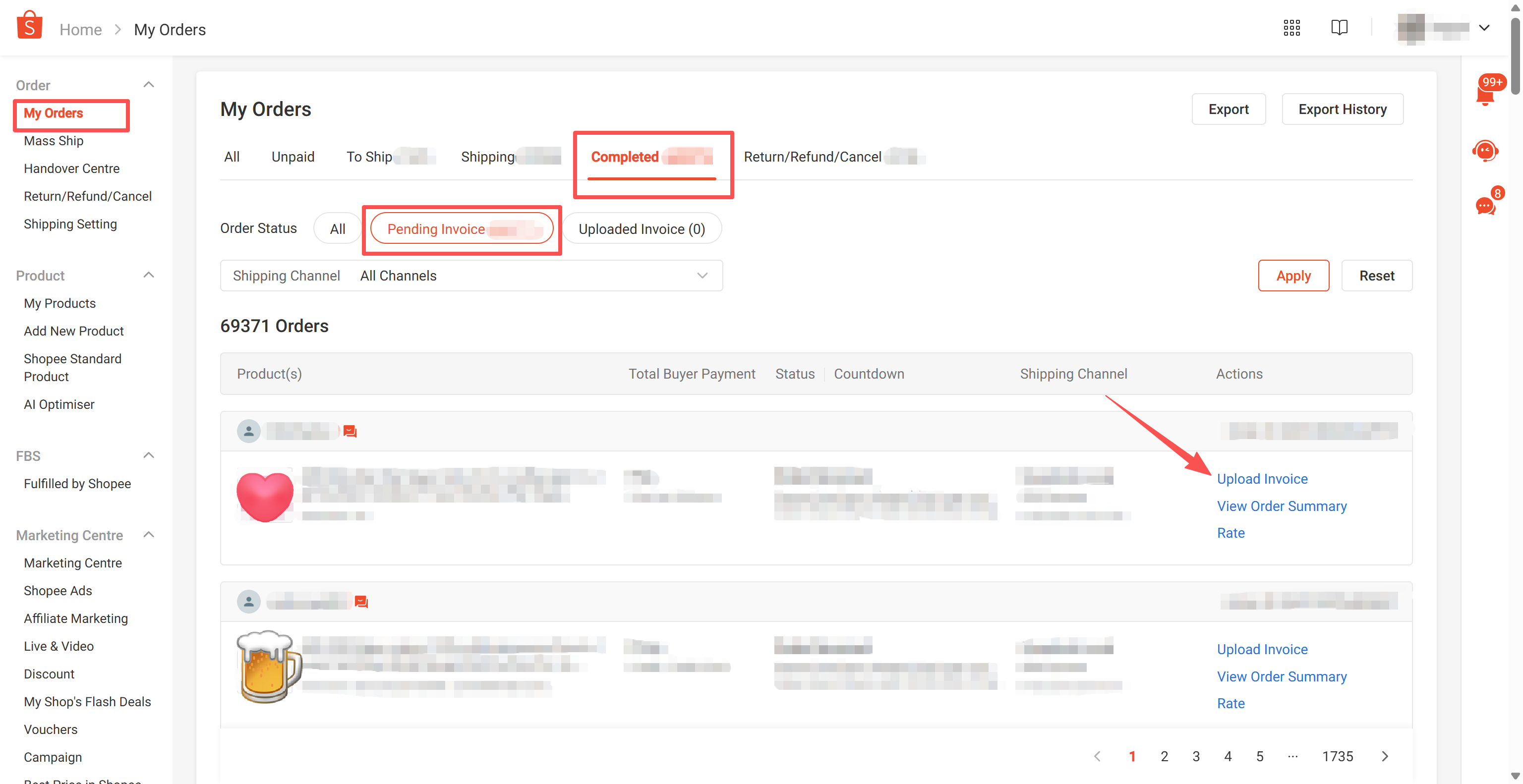
Sellers can login to Shopee Seller Centre and click on the To Do List Pending Invoice Upload.
⚠️ Note
Although the deadline for uploading invoices is the end of December 2026, Shopee Philippines sellers are advised to plan ahead and complete the compliance process for invoice printing as soon as possible.
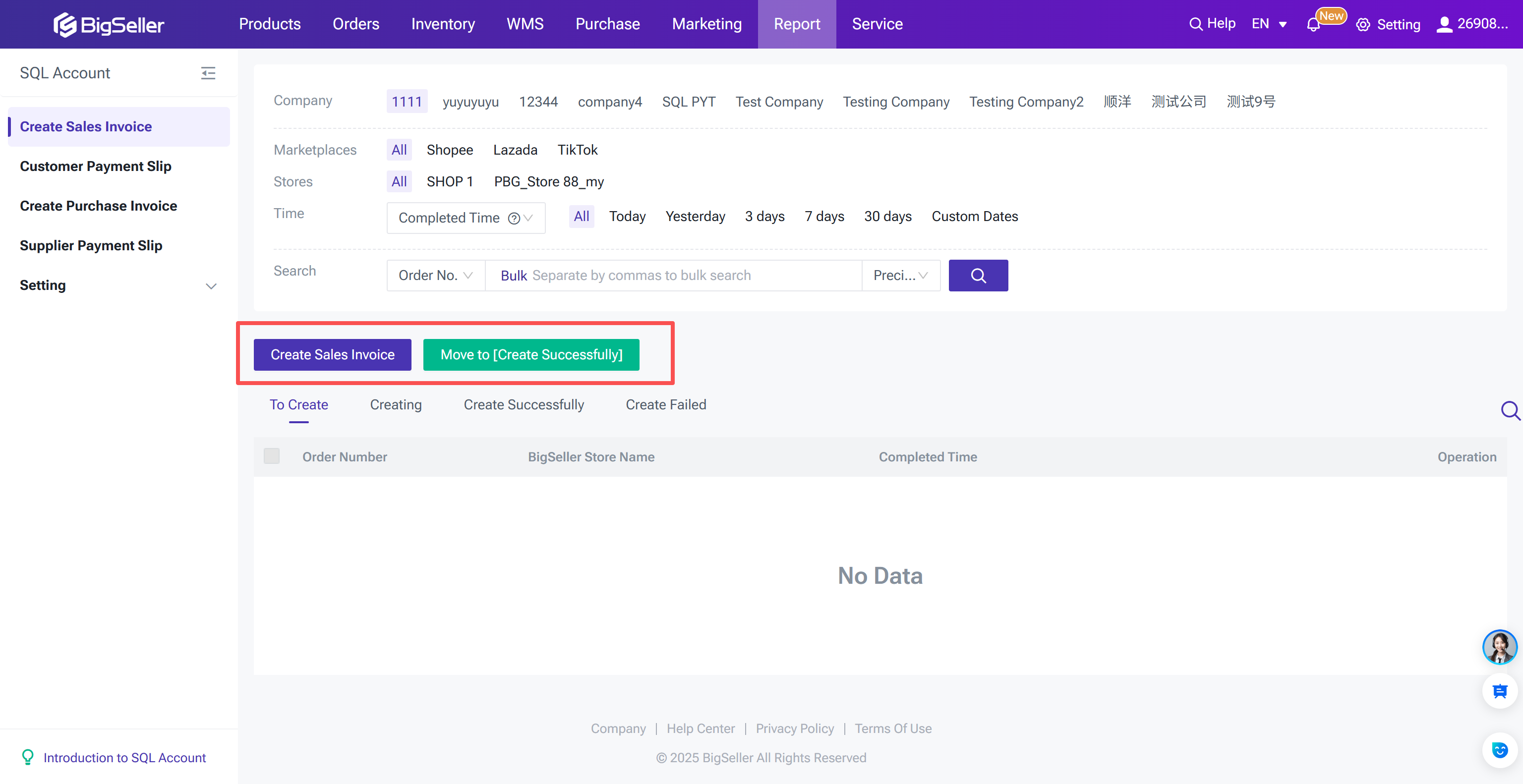
In addition, Philippine Shopee sellers with multiple stores can also use ERP tools like BigSeller to print e-invoices. BigSeller supports integration with multiple accounting software and allows for one-click invoice generation after order placement, saving sellers time and improving efficiency.
Infomation in this blog all sourced from: Shopee Seller Education Hub
However, Shopee does not generate or issue sales invoices to buyers on behalf of sellers, and currently the seller center no longer has an interface for printing invoices. This means that Philippine sellers are responsible for issuing their own invoices. And this blog will explain several feasible methods for printing invoices.
1. Print Shopee E-invoice directly from BIR EIS system
The Bureau of Internal Revenue (BIR) has rolled out the Electronic Invoicing/Receipting System (EIS) for taxpayers — including e-commerce sellers — to issue e-invoices and e-receipts electronically instead of only paper invoices. This is part of compliance under Revenue Regulation No. 11-2025 and related rules.
(1). To issue e-invoices in the EIS, you must first register as a taxpayer user on the BIR EIS Portal:
➤Go to the EIS portal
– this is where taxpayers can issue and manage e-invoices / e-receipts.
➤Enroll your business:
- Provide your business details (TIN, registered name, authorized representative).
- Complete the setup forms and verification steps required by BIR on the EIS portal.
If required by the current rollout, you may also need to apply through the EIS Certification Portal (separate portal for system certification).
(2). Manual Entry (Direct via EIS Portal)
- Log in to the EIS Taxpayer Portal.
- Enter the invoice details manually — customer info (name, TIN), item/service details, prices, VAT, etc.
- Submit the e-invoice; the portal will generate a structured file compliant with the EIS.
- After submission, the invoice will be stored in the EIS system, and sellers can download and then upload it on Seller Center.
⚠️ Under BIR rules, the e-invoice must be structured and digitally signed; a simple PDF you upload is not compliant for BIR reporting.
2. Using BIR-Approved invoicing tools (Software/Apps)
Many businesses use BIR-certified software or middleware that connects to the EIS. These tools can automatically generate JSON-formatted e-invoices that comply with BIR’s rules. For example, Autocount, QuickBooks, Odoo 18.0 etc.
Therefore, many Shopee sellers choose to use third-party BIR-accredited e-invoicing solutions (middleware/software) that:
- Generate compliant e-invoices automatically based on your sales orders,
- Transmit them to the BIR EIS without doing it manually,
- Provide easy download/print interfaces for record-keeping and customer delivery.
3. How to upload invoice in Seller Center?
Sellers can login to Shopee Seller Centre and click on the To Do List Pending Invoice Upload.
⚠️ Note
- You can also upload an e-invoice on the order details page.
- All VAT sellers must issue invoices to buyers, regardless of the price of the goods.
Conclusion:
Although the deadline for uploading invoices is the end of December 2026, Shopee Philippines sellers are advised to plan ahead and complete the compliance process for invoice printing as soon as possible.
In addition, Philippine Shopee sellers with multiple stores can also use ERP tools like BigSeller to print e-invoices. BigSeller supports integration with multiple accounting software and allows for one-click invoice generation after order placement, saving sellers time and improving efficiency.
BigSeller is the ultimate omnichannel e-commerce ERP designed for Southeast Asian sellers, aiming to help you improve efficiency and expand more business channels. It simplifies all processes on one dashboard—from product listing and order processing to inventory management, financial tracking, and various automated operations. Customized subscription plans are also available for different types of sellers.
Vist our website to know more 👉BigSeller ERP
Vist our website to know more 👉BigSeller ERP
Infomation in this blog all sourced from: Shopee Seller Education Hub
BigSeller-Blog Senior Writer: Jayson
Sir Jayson has worked in well-known e-commerce companies such as Shopee and TikTok Shop, helping hundreds of sellers to deepen their e-commerce industry, expand their business, and eventually become high-quality sellers.