How Lazada Sellers in Malaysia Can Block Problematic Buyers
Erra27 Jan 2026 05:05ENCopy link & title
Some buyers repeatedly cancel orders, misuse chat, or create unnecessary issues that slow down daily operations. When this happens, Lazada allows sellers to block specific buyers so they can no longer place future orders with your store.
This feature gives sellers more control over who they sell to without affecting store performance or triggering penalties.
What Blocking a Buyer Actually Does
Blocking a buyer on Lazada only affects future transactions, not orders that are already in progress.
Once a buyer is blocked:
-
They will no longer be able to place new orders with your store.
-
Any existing orders that were placed before the block will still be processed and delivered as usual.
-
If the buyer attempts to place a new order after being blocked, the order will first appear as pending and will then be automatically cancelled by Lazada’s system after a short period.
-
The buyer is not informed that they have been blocked. From their perspective, Lazada will simply show a message saying that the seller is unable to serve them and will suggest similar products from other sellers.
Because the cancellation is system-triggered, Lazada does not apply any penalties to the seller, and your store performance metrics remain unaffected.
How to Block a Buyer via Lazada Seller Center
Sellers can block a buyer directly from an order the buyer has already placed.
Steps to follow:
-
Log in to Lazada Seller Center
-
Navigate to Orders
-
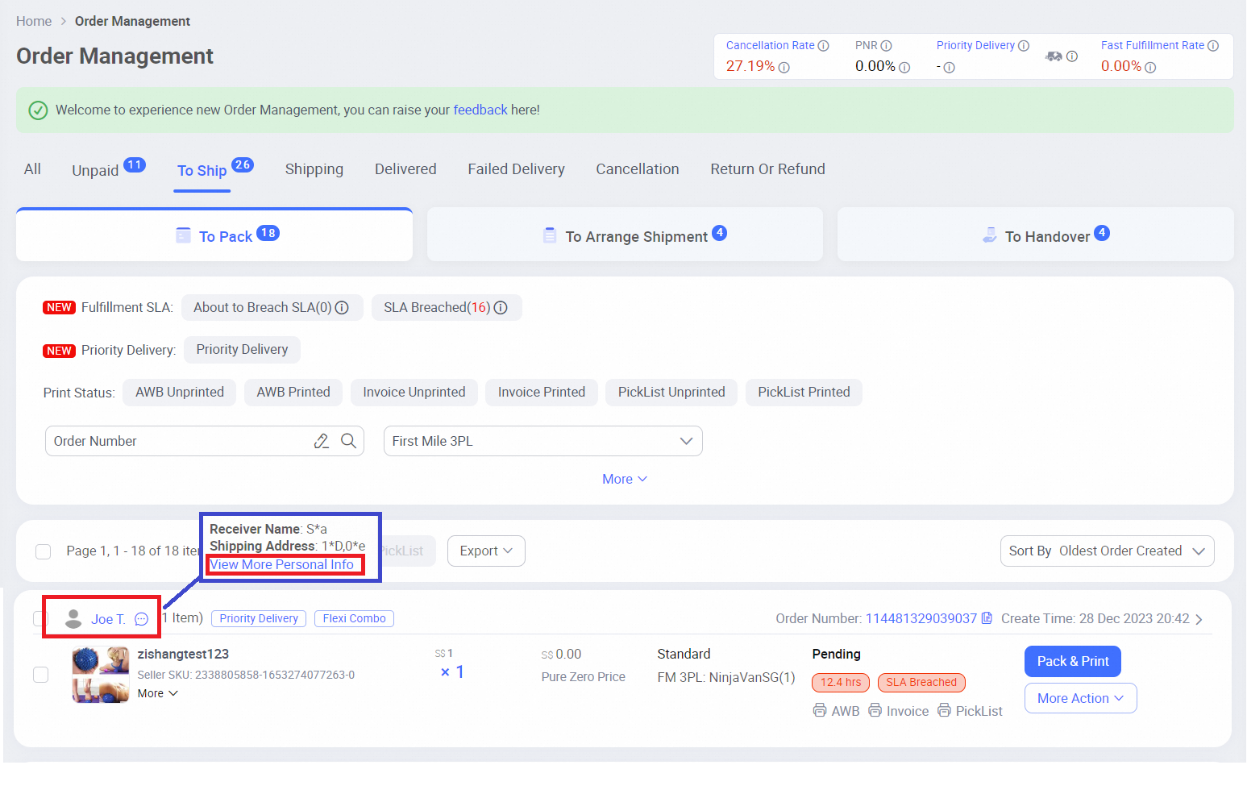
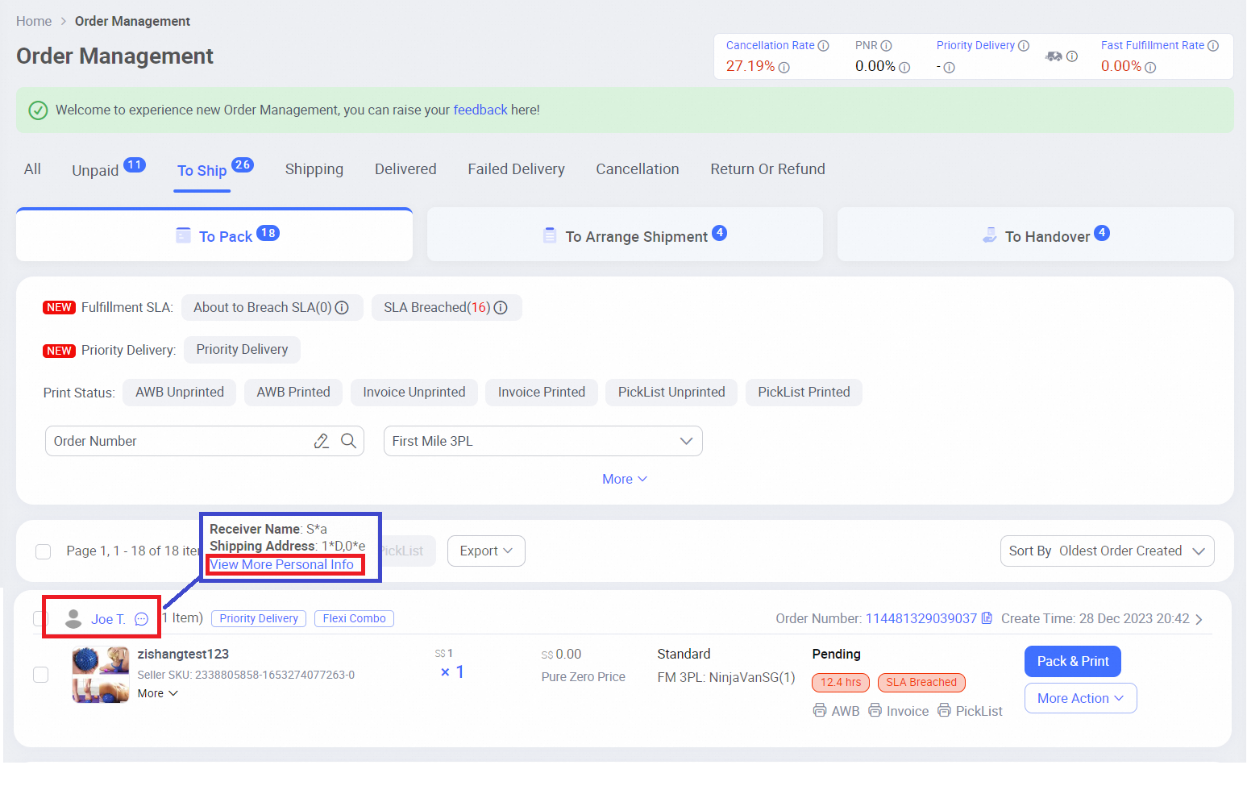
Click on the buyer’s name from the order list
-
When the pop-up appears, select View More Personal Info
-
On the Order Detail page, you can review the buyer’s record, such as delivery count and successful delivery rate
-
Click Block this buyer to confirm
Once completed, the buyer will be immediately added to your blocked list and prevented from placing future orders.
How to Block a Buyer via Lazada Chat (IM Chat)
If the issue occurs during a conversation such as harassment, abusive language, or inappropriate messages, you can block the buyer directly through Lazada Chat (IM Chat).
This method is especially useful when:
-
The buyer has not placed an order yet
-
You need to stop further communication immediately
-
The problematic behaviour happens entirely within chat
Lazada provides step-by-step guidance within Seller Center on how to block buyers through IM Chat, making it quick to take action without waiting for an order to be placed.
What Happens After a Buyer Is Blocked
Once a buyer is blocked, Lazada separates how existing orders and new orders are handled to avoid disrupting fulfilment.
Existing orders
Any orders placed before the buyer was blocked will continue as usual. Sellers are still expected to process, ship, and complete these orders according to Lazada’s standard fulfilment rules.
Blocking a buyer does not cancel or interfere with orders that are already in progress.
New orders after blocking
If the blocked buyer attempts to place a new order:
-
The order will first appear as pending
-
Lazada’s system will then automatically cancel the order after approximately 10 minutes
This cancellation is handled entirely by the system, not the seller.
Buyer notifications
The buyer will receive:
-
A push notification
-
An email notification
Both notifications inform the buyer that the order has been cancelled, without stating that they have been blocked. Instead, Lazada indicates that the seller is unable to serve and suggests alternative sellers.
Impact on seller performance
Because the cancellation is system-triggered, it does not affect:
-
Seller performance metrics
-
Cancellation rate
-
Account health or penalties
How to Unblock a Buyer on Lazada
If a blocked buyer’s behaviour improves or the issue is resolved, sellers can unblock them at any time through Seller Center.
Steps to unblock a buyer:
-
Log in to Lazada Seller Center
-
Go to Orders
-
Search using the buyer’s ID or a previous order number
-
Click View More Personal Info
-
On the Order Detail page, select Unblock buyer
-
Confirm the action by clicking OK
Once unblocked, the buyer will be able to place new orders with your store again.
When Should Sellers Use the Block Buyer Feature?
The Block Buyer feature is intended to protect sellers from repeated or disruptive behaviour, not for minor misunderstandings.
It is appropriate to block a buyer who:
-
Repeatedly creates order issues or abnormal transactions
-
Uses abusive, inappropriate, or harassing language
-
Disrupts daily operations without valid reasons
For serious cases involving fraud, threats, or clear policy violations, sellers should still gather evidence and escalate the issue to Lazada Seller Support for further investigation and action.
Managing Buyer Risk Beyond Platform Blocking
Blocking a buyer on Lazada helps stop repeat issues, but it only works at the platform level. For sellers handling multiple orders daily, the real risk often happens during order processing and packing.
BigSeller adds visibility at this stage. With Buyer Blacklist, orders from flagged buyers are clearly marked when synced into BigSeller, allowing sellers to pause and decide whether to proceed before shipping. This works across Shopee, Lazada, TikTok Shop, and Tokopedia, which is useful for sellers managing more than one platform.
For broader protection, Blacklist Cloud highlights buyers that have been flagged across the BigSeller seller network. Instead of relying only on your own experience, you can filter and review orders linked to known high-risk behaviour before fulfilment.
During packing, Pack Order Interception acts as a final check. If an order involves a blacklisted buyer or meets certain risk conditions, the system prompts you to review it before packing continues, reducing mistakes during bulk processing.
Together, these tools help sellers identify, review, and control risky orders earlier, especially when order volume increases. For Lazada sellers who want better visibility and control over buyer-related risks, BigSeller is free to sign up and use. Connect your store today and start reviewing orders with these protections in place from day one.

(All information in this article is based on Lazada Help Center, “How do I block buyers showing inappropriate behavior?”)