Lazada Sellers Can Now Control When They Get Paid with Auto Withdraw Settings
Erra25 Feb 2026 02:47ENCopy link & title
Lazada has introduced the My Balance Auto Withdraw Setting that gives Malaysian sellers more flexibility to manage cash flow, ad spending, and operational funds directly inside Seller Center.

What Is the My Balance Auto Withdraw Setting?
The My Balance Auto Withdraw Setting is a payout control feature in Lazada Seller Center that lets you decide when your earnings are transferred to your bank account and how much money stays in your store balance.
Instead of manually managing withdrawals and reloading funds for ads or promotions, this feature automates the process while still giving you flexibility.
With this setting, you can:
-
Choose how often your payouts are automatically transferred
-
Keep a fixed amount inside your store balance after each withdrawal
-
Ensure there are always funds available for Sponsored Solutions or daily operations
It’s designed to reduce the need for repeated withdrawals and top-ups, making cash flow easier to manage.
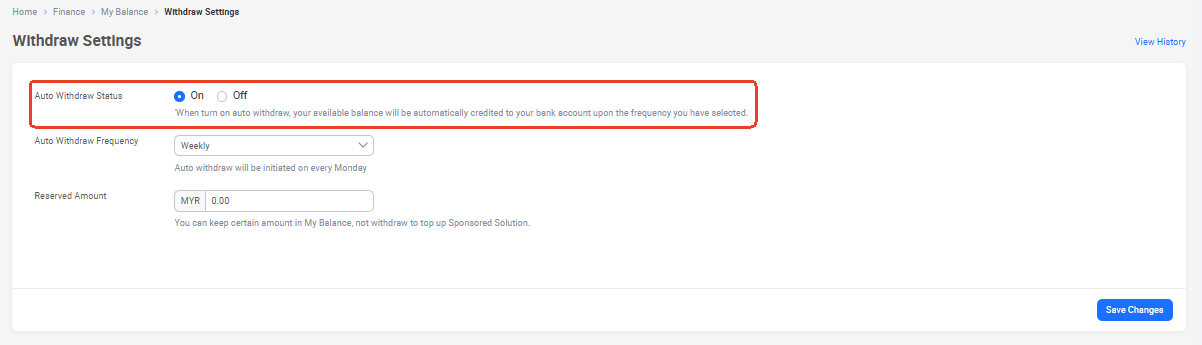
Auto Withdraw Is Already Turned On by Default
All sellers have Auto Withdraw enabled automatically.
-
Default schedule: Weekly payout (every Monday)
-
Your available balance is credited to your bank account based on this schedule.
If you don’t change anything, payouts will continue as usual, but now you have the option to customise the timing to better match your business needs.
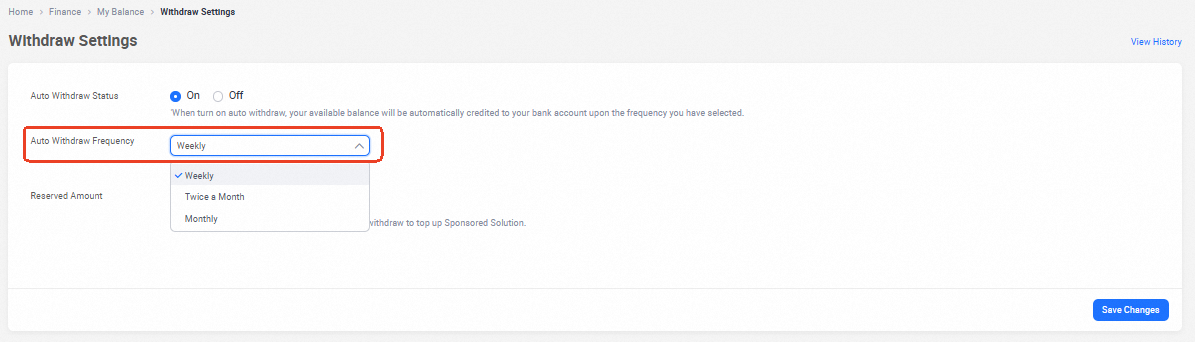
You Can Choose How Often You Want to Get Paid
Sellers can adjust the withdrawal frequency according to their financial cycle:
-
Weekly — Every Monday (default)
-
Twice a Month — 1st and 16th of each month
-
Monthly — 1st of the month
Once selected, withdrawals run automatically based on your chosen schedule.
Processing time: Withdrawals are triggered at 2:00 PM on the scheduled day, and this timing cannot be modified.
You Can Keep a Reserved Balance in Your Store
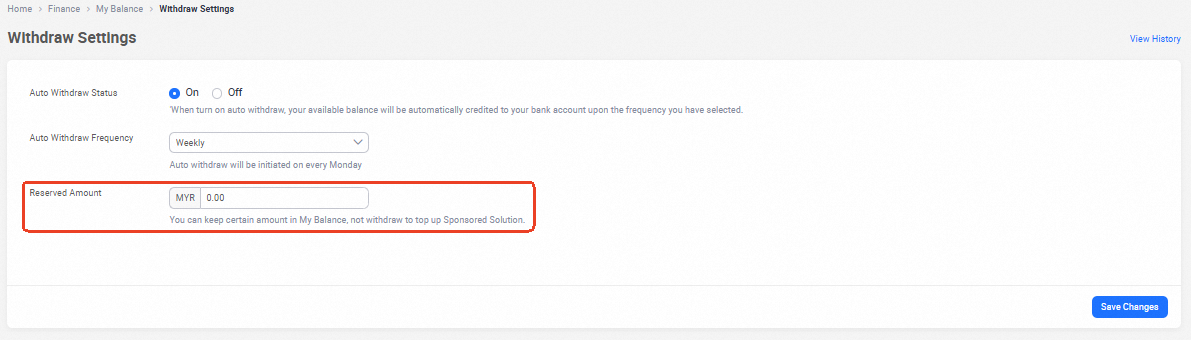
A key benefit of this feature is the ability to set a reserved amount that remains in your Lazada balance after each withdrawal.
This helps sellers:
-
Fund Sponsored Solutions campaigns without manual top-ups
-
Maintain a buffer for vouchers, promotions, or refunds
-
Avoid campaign disruptions caused by insufficient balance
-
Manage day-to-day operational cash flow more smoothly
There is no maximum limit to how much you can reserve.
However, a minimum reserve applies depending on currency and for Malaysia, at least MYR 1 must be retained.
Only the Store Owner Can Access This Setting
For security reasons, this feature is limited strictly to the Store Owner account in Lazada Seller Center.
This restriction ensures that sensitive financial settings cannot be changed without proper authorisation.
Sub-users, account managers, or partners cannot:
-
View the Auto Withdraw settings
-
Make any changes to payout frequency or reserve amount
-
Access the history of past updates
This helps prevent accidental or unauthorised changes that could affect your store’s cash flow.
How to Set Up Auto Withdraw
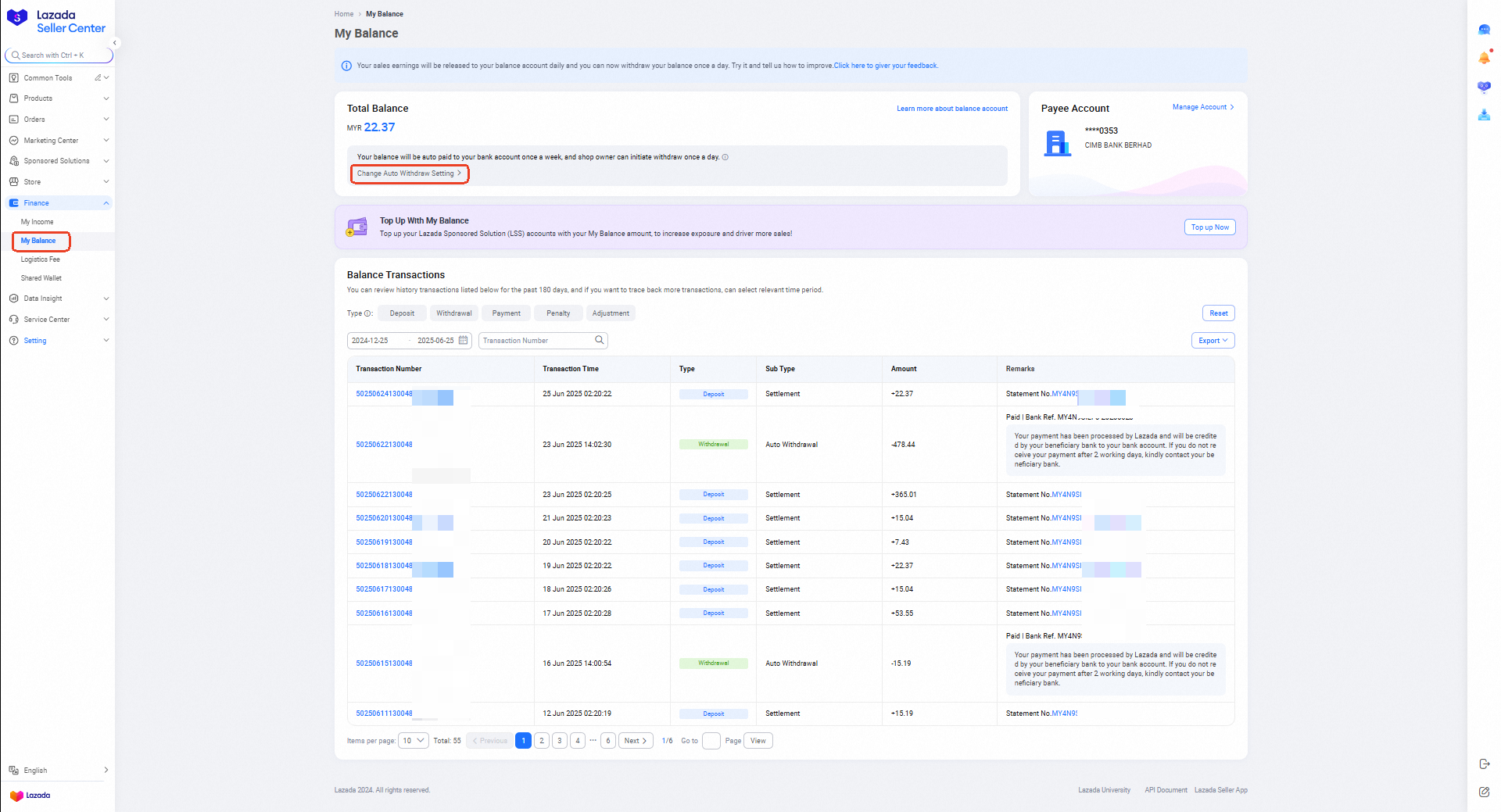
To customise your payout preferences, follow these steps:
-
Log in to Lazada Seller Center
-
Go to Finance > My Balance
-
Click Change Auto Withdraw Setting
-
Select your preferred withdrawal frequency
-
Enter the amount you want to keep as reserved balance
-
Save your settings
Once configured, withdrawals will follow your selected schedule automatically.
You Can Track Changes Made to the Settings
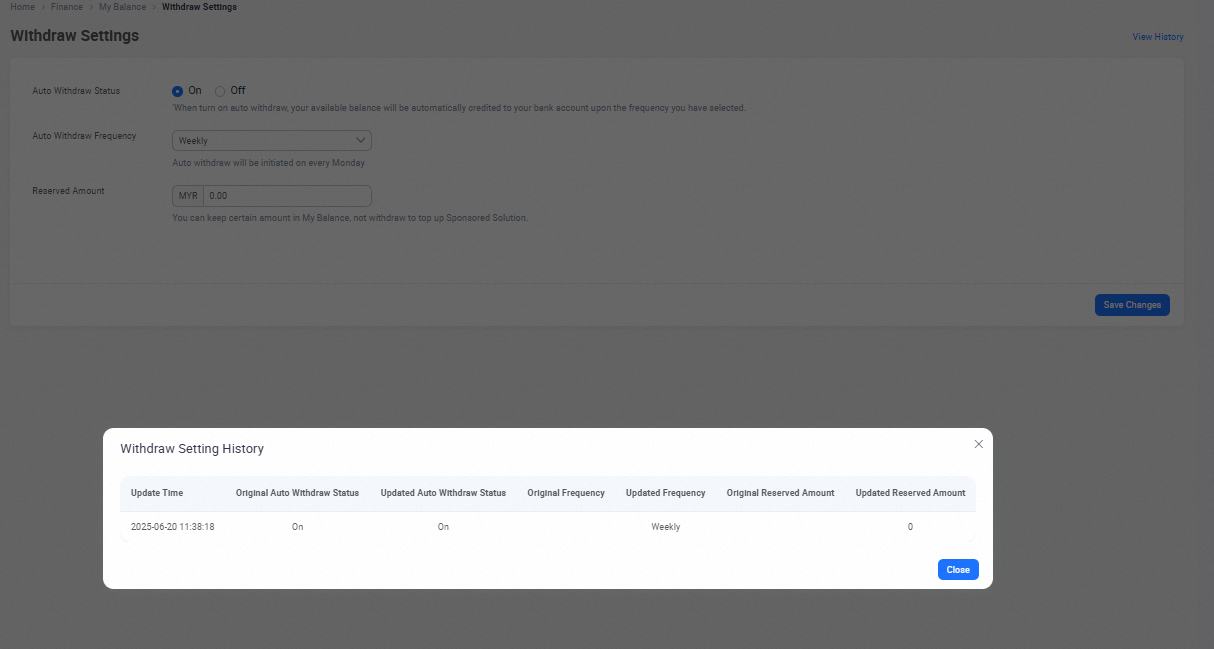
Store Owners can review a full history of any updates made to the Auto Withdraw configuration. This is useful for internal tracking or financial reconciliation.
To view the history:
-
Go to Finance > My Balance
-
Click Change Auto Withdraw Setting
-
Select View History (top right of the pop-up)
The history feature is only available on the Seller Center web version using a desktop or laptop.
Can This Be Managed on Mobile?
Yes. Sellers can manage Auto Withdraw through the Seller mobile app, including:
-
Turning Auto Withdraw on or off
-
Changing the payout frequency
-
Adjusting the reserved balance amount
However, the setting history is not available on mobile and can only be accessed from the desktop version of Seller Center.
Take Control Further with Smarter Financial Management
While Lazada’s Auto Withdraw Setting helps you control when payouts happen, many Malaysian sellers go one step further by managing their finances with BigSeller.
BigSeller integrates directly with accounting systems like SQL Account and Accurate, allowing you to push order data, generate invoices, sync inventory, and prepare financial reports without manual entry. Most importantly for local compliance, BigSeller also connects with MyInvois to help automate e-Invoice submission, a key requirement for Malaysian businesses.
Instead of handling withdrawals, accounting, and compliance separately, you can manage everything in one workflow.
👉 Try BigSeller for free today and enjoy a 7-day VIP trial to explore all features.
Source: