How Lazada’s New AI Attribute Management Helps Sellers Fix Product Listing Errors
Erra12 Mar 2026 05:05ENCopy link & title
To help sellers improve listing quality, Lazada has introduced an enhanced Attribute Management page that uses AI to automatically detect inaccurate attribute values and recommend better matches. This update helps sellers maintain accurate product data while reducing the time spent manually checking listings.
The feature began rolling out on 27 February 2026, starting with selected product categories and gradually expanding to more categories over time.
In this guide, we’ll explain how the new system works, how sellers will be notified, and how to accept or reject the AI recommendations.

Why Product Attributes Matter on Lazada
Product attributes are structured information used by Lazada’s system to classify and display products correctly.
For example, attributes may include:
-
Brand
-
Colour
-
Size
-
Material
-
Model
-
Compatibility
-
Key product features
If these attributes are incorrect or incomplete, several problems can happen:
-
Products may appear in the wrong category
-
Buyers may not find the product through filters
-
Listings may have lower search visibility
-
Conversion rates may drop because buyers cannot confirm product details
By improving attribute accuracy, Lazada aims to enhance both search relevance and buyer experience.
What Is Lazada’s AI-Powered Attribute Management?
The upgraded Attribute Management feature helps sellers automatically detect issues in product attribute values.
Instead of manually reviewing every listing, the system will:
-
Identify inaccurate or mismatched attributes
-
Provide AI-powered best-match recommendations
-
Allow sellers to accept or reject the suggestions
-
Automatically update attributes if no action is taken
This means sellers can maintain high-quality product listings with less manual work.
However, sellers should still review recommendations carefully before approving them.
How Lazada Sellers Will Be Notified
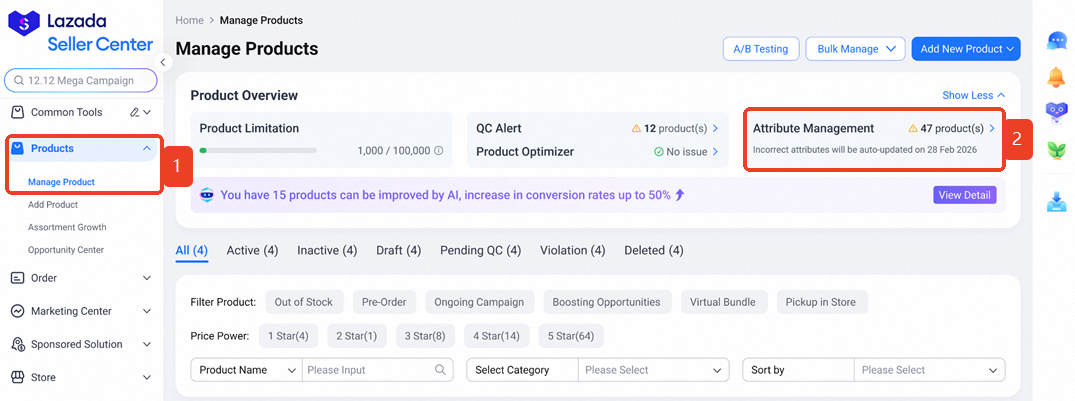
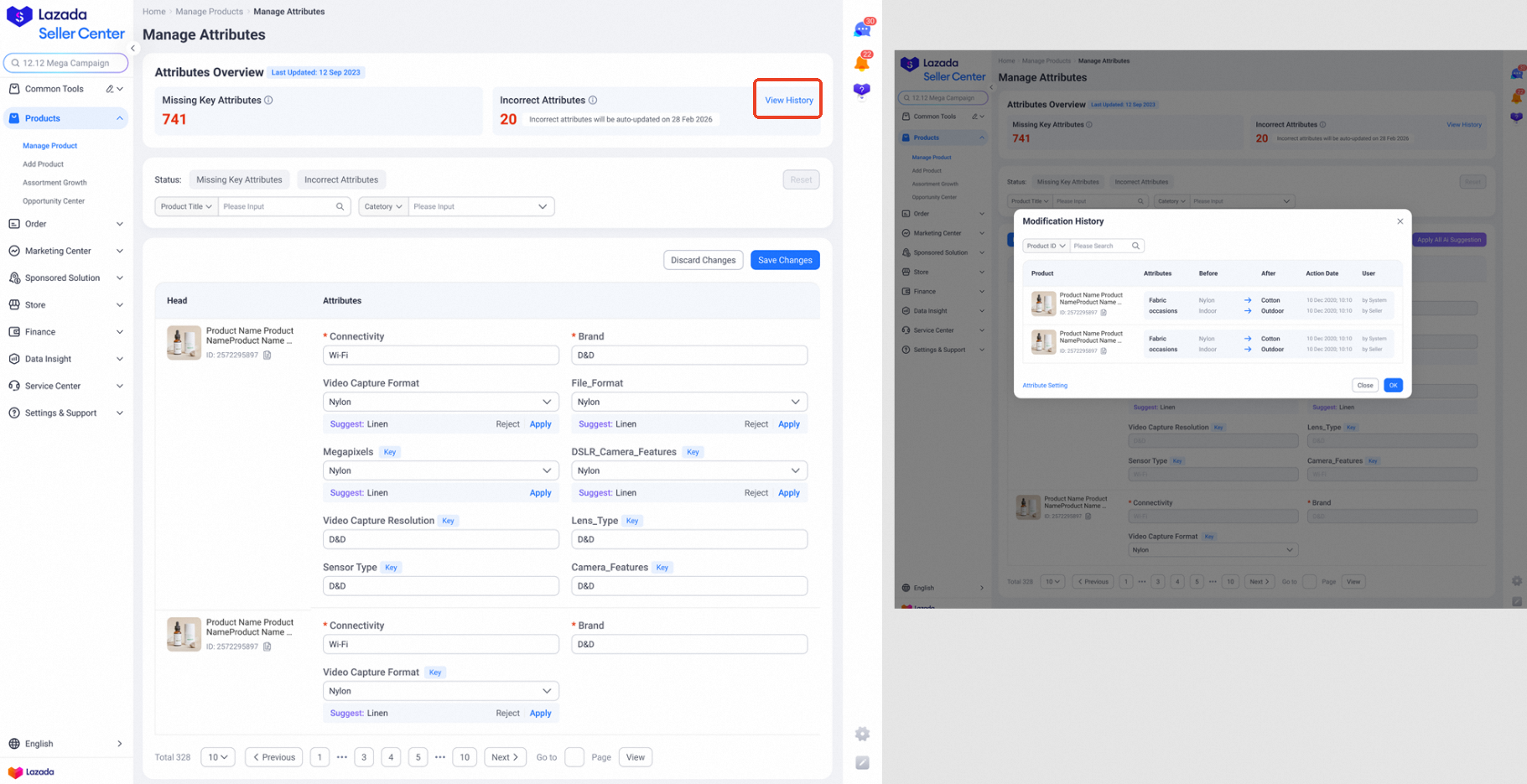
When Lazada detects incorrect attribute values in your listings, a notification will appear in Seller Center.
Steps to View the Notification
Step 1
Go to Lazada Seller Center > Products > Manage Products
Step 2
Click on the Attribute Management tab.
Inside this page, you will see:
-
The number of products with incorrect attribute values
-
A notification indicating when the system will automatically update the attributes
This allows sellers to review the suggested changes before the automatic update happens.
How to Accept or Reject Attribute Value Recommendations
Sellers can either review each recommendation individually or accept all suggestions at once.
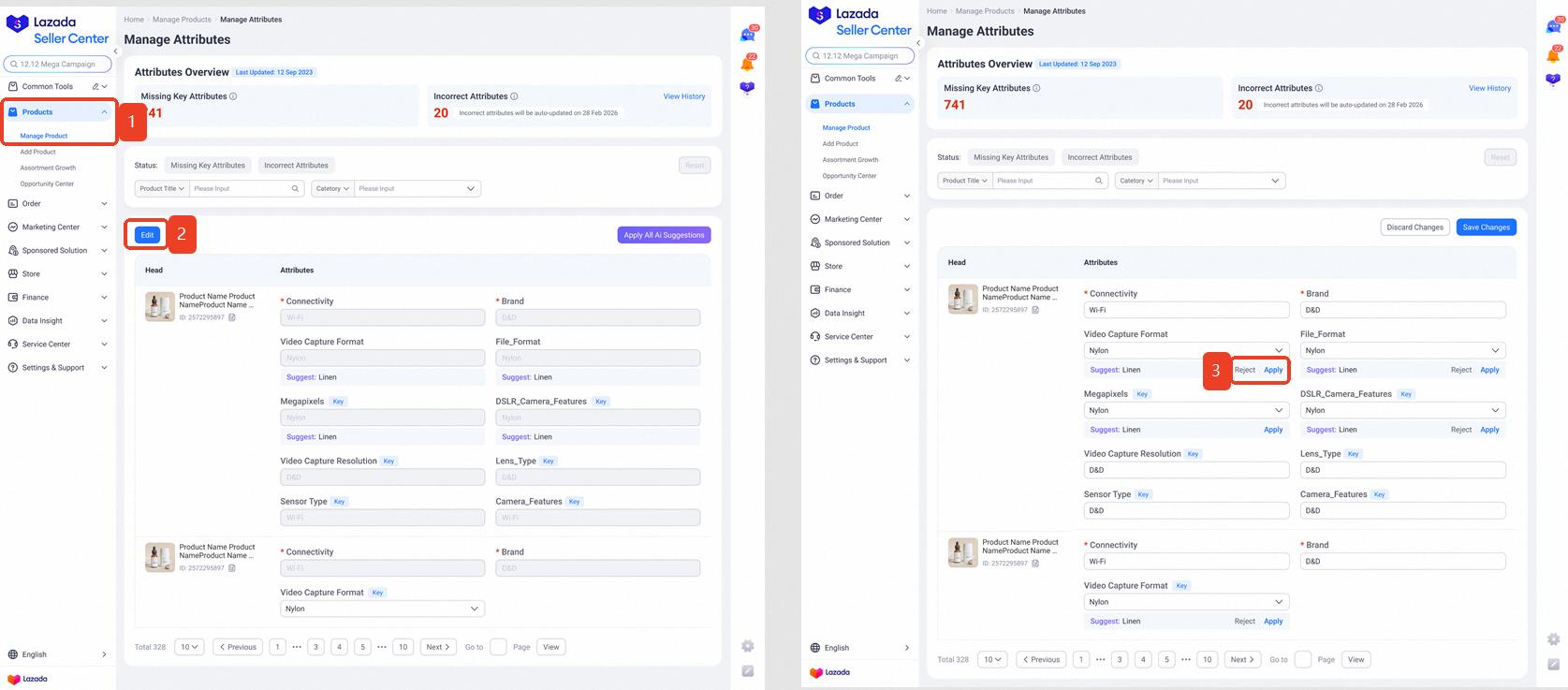
Option 1: Edit Attribute Values Individually
This option is recommended if you want to verify each suggestion.
Step 1
Go to Lazada Seller Center > Products > Manage Products
Step 2
Click on the Attribute Management tab and select Edit
Step 3
Review the recommendation:
-
Click Accept if the AI-suggested attribute value is correct
-
Click Reject if the recommendation is incorrect
If you reject a suggestion, the attribute value will remain unchanged.
Option 2: Accept All AI Suggestions
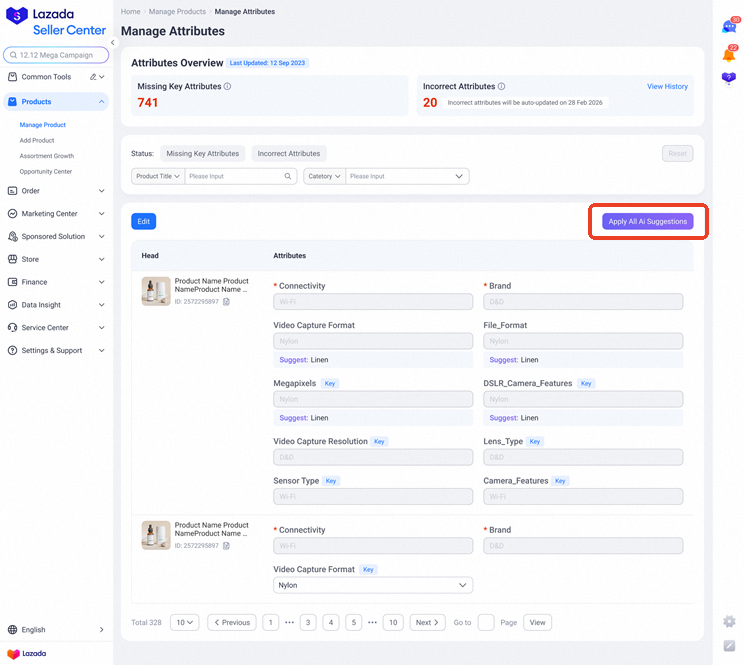
If you have many listings with recommended changes, you can accept them all at once.
Step 1
Go to Lazada Seller Center > Products > Manage Products
Step 2
Click Attribute Management
Step 3
Click Accept All AI Suggestions
However, Lazada strongly recommends reviewing the suggestions first before accepting them.
Important: Sellers Have 7 Days to Take Action
Once recommendations appear in the Attribute Management page, sellers have 7 days to review them.
Within this period, you can:
-
Accept the recommended attribute values
-
Reject suggestions that are incorrect
If no action is taken within 7 days, Lazada’s system will automatically update the attribute values based on the AI recommendations.
This ensures that product listings remain accurate and consistent across the platform.
How to Check Attribute Update History
If you want to see which attributes have been changed, Lazada provides a history log.
Steps to View Changes
Go to the Attribute Management page and click View History.
Here, you can review:
-
The attribute values that were updated
-
Previous attribute values
-
When the update happened
This helps sellers track listing changes and maintain accurate product data.
Manage Your Lazada Listings More Efficiently with BigSeller
Keeping product attributes accurate is important for maintaining visibility and ensuring your listings appear correctly in search results on Lazada. As Lazada continues improving listing quality with AI-powered attribute recommendations, sellers should also focus on managing their product catalog more efficiently.
If you operate multiple stores or plan to expand to other marketplaces, BigSeller’s Copy Listing tool can help streamline the process. Instead of recreating product listings from scratch, sellers can quickly copy individual products, bulk listings, or even an entire store while keeping titles, images, descriptions, and pricing consistent. This not only saves time but also helps maintain accurate product information across stores.
If you want to manage your listings faster and scale your e-commerce operations more efficiently, try BigSeller for free today and enjoy a 7-day VIP trial to explore all advanced features.
Source: