How to Prevent Invisible Inventory on Shopee, Lazada, and TikTok Shop Malaysia
Erra05 Jun 2026 08:03ENCopy link & title

Why Does Your Listing Show Out of Stock When Your Warehouse Is Full?
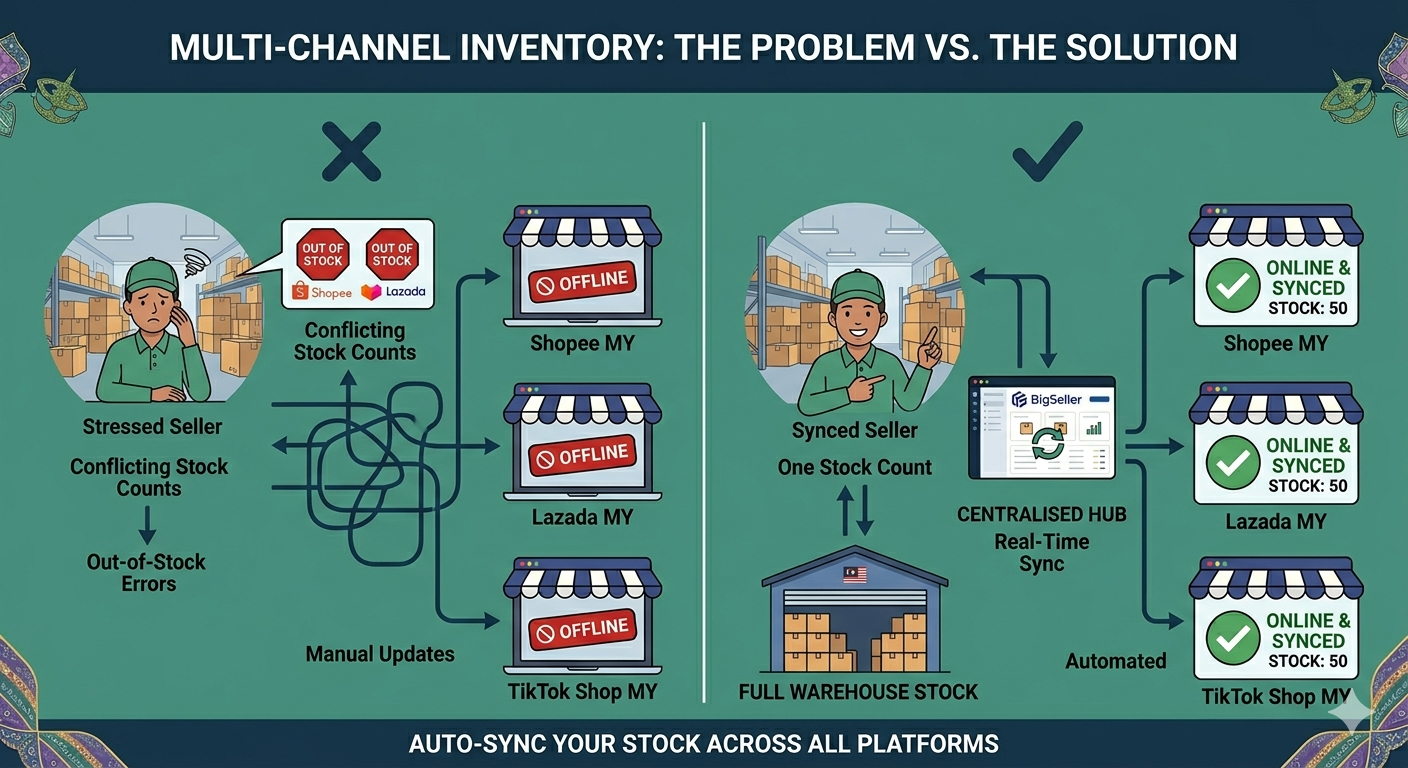
Research from Opensend shows that global retailers lose USD 1.2 trillion every year to stockout situations, with 69% of online shoppers abandoning purchases and switching to a competitor when an item appears unavailable. For Malaysian sellers running three channels simultaneously, this problem is amplified because inventory inaccuracies do not just affect one listing. They affect all of them at once.
Three patterns cause the problem to compound over time:
-
Orders outpace manual stock updates. During a high-traffic sale period, dozens of orders can arrive within minutes across multiple channels. A seller who gets caught overselling on one platform will respond by setting conservatively low stock counts across all channels as protection. That conservative number rarely gets revised upward, so real available inventory is never fully visible to buyers.
-
Protective buffers become permanent. A seller sets a low visible stock count after a bad oversell experience. Months later, the warehouse holds 80 units but every channel shows 5. The stock is not low. The buffer set months ago was simply never reviewed or updated.
-
There is no unified view of what each platform actually shows. Verifying whether a listing is live, suppressed, or showing incorrect stock requires logging into three separate Seller Centres. Without a centralized dashboard, listings go dark and stay dark for days without anyone noticing until revenue visibly drops.
According to industry data, inventory record inaccuracy leads to a loss of more than 1% of total sales and more than 3% of gross profit for affected sellers (ChannelEngine, 2025). For multi-channel Malaysian sellers, those losses are multiplied across every platform where a listing is suppressed or showing incorrect stock. A centralized inventory management system exists specifically to close this gap, ensuring that every sale on any platform immediately updates every other platform and that every listing reflects accurate, real-time available stock without stock. stock. stock. requiring a seller to manually update three dashboards.
How Does BigSeller Fix Sync-Induced Dead Stock?
Push Inventory Rules are the primary fix for buffer decay. Instead of a flat reserved number, BigSeller lets sellers write push rules as a percentage of available stock. Setting a rule to push 90% of available stock means the buffer adjusts automatically as inventory changes. disappearing entirely.
Safety Stock with Priority Store Protection solves the scenario where all channels go dark at the same time. When available stock falls below the configured safety stock threshold, BigSeller zeroes out all stores except the designated priority store, which is typically the seller's highest-traffic channel. That store continues displaying the actual remaining stock and keeps receiving orders while the other channels show zero.
Campaign-Reserved Stock Management prevents post-promotion dead stock. When a seller reserves inventory for a big sale event or promotional window, BigSeller holds that stock separately from the general available pool. Once the promotion ends, BigSeller releases the reserved stock back to the available inventory count. The risk appears when reservations are not properly closed after a sale ends. Stock stays locked and invisible across all channels, with nothing in the dashboard flagging it as a problem.
Bulk Safety Stock Update via Excel makes a catalog-wide audit practical. Sellers can export the full SKU list with current on-hand quantities and configured safety stock values, identify every SKU where the buffer exceeds 30% of on-hand stock, update the values in bulk, and re-upload the file. A full catalog review takes under an hour.
How Does BigSeller Compare to Manual Management and Other Tools in Malaysia?
|
Manual (Seller Centre only) |
Other OMS tools |
BigSeller |
|
|
Percentage-based push rules |
Not available |
Higher-tier paid plans |
Available |
|
Priority store protection |
Not available |
Higher-tier paid plans |
Available |
|
Campaign reserved stock |
Manual spreadsheet tracking |
Supported |
Dedicated column, visible at a glance |
|
Bulk safety stock update |
Not available |
CSV import, paid plans |
Excel import, available |
|
Dead stock visibility alert |
None |
Paid plans |
Stock Alert included |
|
Cross-platform inventory audit |
Manual check across 3 Seller Centers |
Paid reporting tier |
Single dashboard export |
Which Tool Should Malaysian Sellers Use to Fix This Problem?
Manual management cannot catch buffer decay. Seller Center tools were built for single-platform operations and offer no cross-platform inventory view, no push rule logic, and no bulk audit export. When stock depletes and flat buffers do not adjust to match, listings go dark with no way to identify the cause without manually checking every SKU across every platform.
Other OMS tools address the problem but restrict the most useful controls to higher-tier paid plans. Percentage-based push rules, priority store logic, and bulk safety stock management are mid-to-upper tier features on most competing platforms. Sellers on entry-level plans receive only flat buffer controls, which is precisely the setting that causes the dead stock problem to begin with.
BigSeller's controls map directly to the root cause of the problem. Push Inventory Rules fix buffer decay. Safety Stock with Priority Store Protection keeps the most important channel live when stock is running low. Campaign-Reserved Stock management closes the most common post-promotion inventory leak. These are not general inventory features adapted for the problem. BigSeller builds them specifically for the operational reality of Malaysian multi-channel sellers marketplaces.
Frequently Asked Questions (FAQs)
Q1: What is the difference between Safety Stock and Stock Alert in BigSeller?
A: BigSeller's Safety Stock is an operational control that withholds a set quantity from being pushed to sales channels, directly affecting what buyers see on listings. BigSeller's Stock Alert is a notification setting that flags the dashboard when available stock drops below a defined threshold. Safety Stock controls listing visibility. Stock Alert controls operational awareness. Both settings should be configured, but they serve entirely different purposes.
Q2: If Safety Stock is set higher than available stock, what does BigSeller do?
A: BigSeller pushes zero to all channels except the designated priority store, which continues displaying the actual remaining quantity. If no priority store is configured, Shopee, Lazada, and TikTok Shop all show zero simultaneously with no error generated. This scenario is the most common trigger for sync-induced dead stock and the first setting to review when listings go dark without an obvious reason.
Q3: Does BigSeller release campaign-reserved stock automatically when a promotion ends?
A: BigSeller releases reserved stock automatically for promotions with a defined end date set within the platform. For manually reserved stock or promotions that were canceled without a proper end trigger, BigSeller does not release the reservation automatically and the stock stays locked and invisible across all channels. Sellers should check the Promo Reserved column in the Inventory List after every major sale period, as high-traffic windows promotional are the most common source of unreleased reservations.
Q4: How quickly does BigSeller sync inventory changes to Shopee, Lazada, and TikTok Shop?
A: BigSeller syncs inventory in near-real time using official API authorization from all connected platforms. Updates reach all channels within minutes of a stock change. During high-velocity selling windows such as live sessions or flash promotions, a percentage-based push rule with a small buffer is the most reliable way to keep listings visible without risking oversell on any individual channel.
Q5: What is the fastest way to find all affected SKUs in BigSeller?
A: BigSeller's Inventory List export pulls every SKU with current on-hand quantity and configured safety stock value into a single file. Subtracting safety stock from on-hand quantity for each row will identify every SKU where safety stock exceeds 30% of available stock. Those are the dead stock risk candidates. Sellers can update those values in the same exported file and re-import in one step.