Still Using AI for Your Shopee Videos? Read This Before You Post in 2026
Erra12 Jun 2026 07:49ENCopy link & title

What Is AI UGC on Shopee?
AI User-Generated Content (AI UGC) refers to any text, image, video, or audio that has been created or significantly altered using artificial intelligence including content made with third-party AI tools and uploaded to Shopee Video.
This covers a wide range of content, including:
-
AI-altered media — Videos featuring real people whose image, voice, or speech has been modified by AI, or real-world events that have been digitally manipulated.
-
AI-generated media — Fully synthetic content such as AI virtual hosts, generated product visuals, or artificial environments used to promote products.
The #1 Rule: Label Your AI Content
The most important requirement under the new policy is disclosure. Any content that is fully AI-generated or significantly modified by AI must be clearly labelled before publishing.
How to Add the AI Label on Shopee Video
-
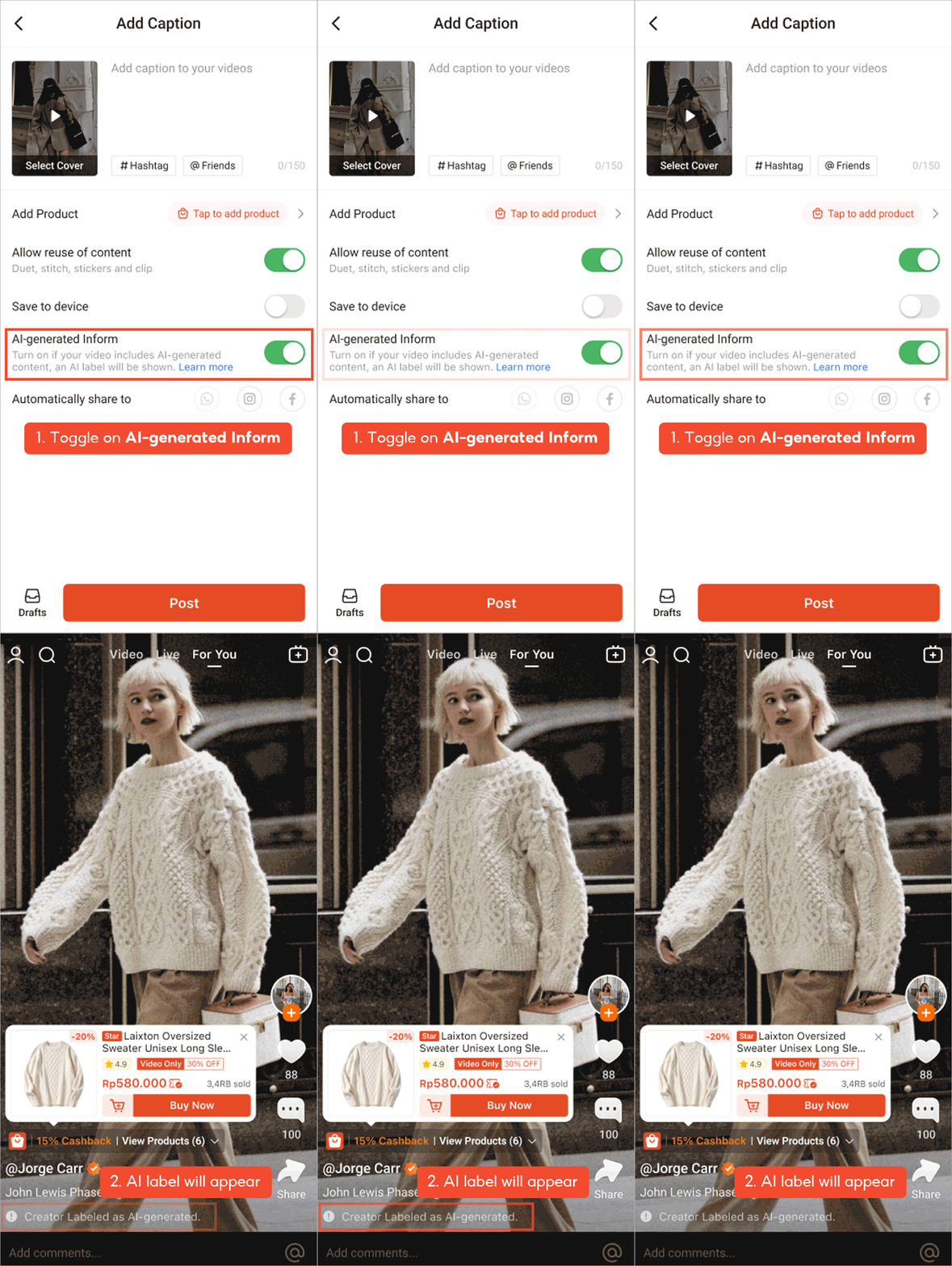
Upload your video as usual.
-
In the post settings, toggle on "AI-generated label."
-
The "AI-generated" label will appear visibly on your video.
If Shopee's automated system detects AI content in your video, it may automatically apply the label and once applied, it cannot be removed. It's always better to self-label upfront.
What Happens to Your Commission If You Label AI Content?
This is the part most sellers and affiliates want to know.
If you label your content as AI-generated, Shopee commissions will be turned off. However, you remain eligible to receive AMS (Ads & Marketing Solutions) commissions.
This means your earning potential is not completely removed, but it does shift. Plan your content strategy accordingly especially if you rely on Shopee Video for affiliate-driven sales.
What AI Content Is Completely Prohibited?
Even with a label, certain types of AI content are not allowed on Shopee Video under any circumstances:
|
Prohibited Content |
Details |
|
IP Infringement |
Using logos, portraits, or likenesses without authorisation |
|
Minors in AI depictions |
Realistic-looking individuals under 18 years old |
|
Unauthorised public figures |
AI characters resembling real public figures without approval |
|
Misleading product claims |
False product demonstrations or fabricated AI-generated reviews |
|
Poor quality or repetitive content |
Low visual/audio quality, recycled content, or the same AI host across multiple accounts |
Violating these rules whether or not the content is labelled can result in penalties.
What Are the Consequences of Non-Compliance?
Shopee actively monitors Shopee Video for policy violations. If you post unlabelled or prohibited AI content, you could face:
-
Penalty points on your account
-
Deboosted videos with reduced visibility
-
Video removal
-
Temporary ban from Shopee Video
-
Permanent ban from Shopee Video
Shopee enforces these policies using a combination of automated AI detection, self-disclosure, and community reporting. Don't risk your account, label your content correctly from the start.
How to Report AI UGC Violations
Spotted a video that looks AI-generated but isn't labelled? You can report it directly:
-
Go to the Shopee Video you want to report.
-
Tap the three dots (More Options) or the Share button on the right side of the screen.
-
Tap Report.
-
Select "AI-Generated Content".
-
Tap Submit, Shopee will review and take action.
Create Smarter AI Content for Shopee With BigSeller
Now that you know the rules, it's time to put them to work and BigSeller is here to make that easier.
BigSeller's built-in AI Agent Assistant is designed specifically for e-commerce sellers, giving you everything you need to produce scroll-stopping content without juggling multiple tools:
-
Image Designer — Generate product backgrounds, remove watermarks, create promo posters, expand image frames, and more
-
AI Copywriter — Write and optimise product titles and descriptions in multiple languages and platforms in seconds
-
Task List — Track every AI task, BigCoin usage, and generation history all in one place
Whether you're a Shopee seller building out your listings or an affiliate creating Shopee Video content, BigSeller's AI tools help you produce quality content at scale.
Just remember: any AI-generated content you post on Shopee Video must comply with Shopee's AI UGC policy. Always apply the AI-generated label before publishing, avoid prohibited content types, and keep your account in good standing.
Ready to Level Up Your Shopee Content?
Try BigSeller for free today and get a 7-day VIP trial to unlock all AI features, no commitment needed.