How Shopee Sellers in Malaysia Can Track Real Profit (Not Just Revenue) Using ERP
Erra18 Jun 2026 08:55ENCopy link & title

Why Are Shopee Malaysia Sellers Still Flying Blind on Profit?
Most Malaysian sellers check Shopee Seller Centre for their sales numbers and stop there. That is the core problem as the Seller Centre only tells you how much revenue you collected, not whether you actually made money.
It does not account for:
-
Shopee platform commissions and transaction fees
-
Seller vouchers you personally absorbed
-
Return deductions and refund costs
-
Cost of goods per unit shipped
-
Shopee Ads spend eating into each order's margin
Without these numbers, you are making restocking, pricing, and campaign decisions on incomplete data. You might be scaling a product that loses money per order, or ignoring a slow-moving SKU with your best margin. Malaysia's e-commerce market is projected to grow from USD 10.62 billion in 2025 to USD 23.11 billion by 2031 and as order volumes grow, this blind spot becomes increasingly expensive.
Manual spreadsheets fill some gaps at low volume. But once you are managing multiple Shopee stores, hundreds of SKUs, and weekly campaign cycles, spreadsheets break down faster than orders pile up.
Shopee Seller Centre vs Manual Tracking vs ERP: What Each Actually Gives You
|
Capability |
Shopee Seller Centre |
Manual |
BigSeller ERP |
|
Revenue per order |
✅ Yes |
✅ If entered |
✅ Auto-synced |
|
True profit after all Shopee fees |
❌ No |
⚠️ Manual calculation |
✅ Auto-calculated per order |
|
SKU-level profitability |
❌ No |
⚠️ Very time-consuming |
✅ Merchant SKU Profit Report |
|
Multi-store consolidated P&L |
❌ No |
⚠️ Manual merge |
✅ Store Analysis across all stores |
|
Shopee Ads spend linked to profit |
❌ Not linked |
⚠️ Manual entry |
✅ Auto-synced daily |
|
Payment reconciliation |
❌ No |
⚠️ Manual line-by-line |
✅ Shopee Payment Reconciliation |
|
Dead stock and restock signals |
❌ No |
⚠️ Manual tracking |
✅ Merchant SKU Report (hot/slow/dead) |
|
Fulfilment performance (FHR, DTS) |
⚠️ Basic only |
❌ No |
✅ Package Analysis per employee |
|
MyInvois / SQL Account integration |
❌ No |
❌ No |
✅ Basic plan and above |
Which Report Should You Check First?
Deciding what to restock before a campaign → check the Merchant SKU Report. BigSeller automatically classifies every product into hot sales, new SKU, and unsalable categories with beginning and ending inventory per period. Do not nominate any SKU flagged as unsalable for campaign slots.
Reviewing whether a product is worth keeping → check the Profit Analysis (SKU level). BigSeller's Profit Analysis covers Shopee, Lazada, TikTok Shop, and manual orders in one view, auto-calculating gross profit per SKU after commissions, transaction fees, seller vouchers, and shipping costs are deducted. Sort by profit rate lowest first and reprice or remove any SKU below 10%.
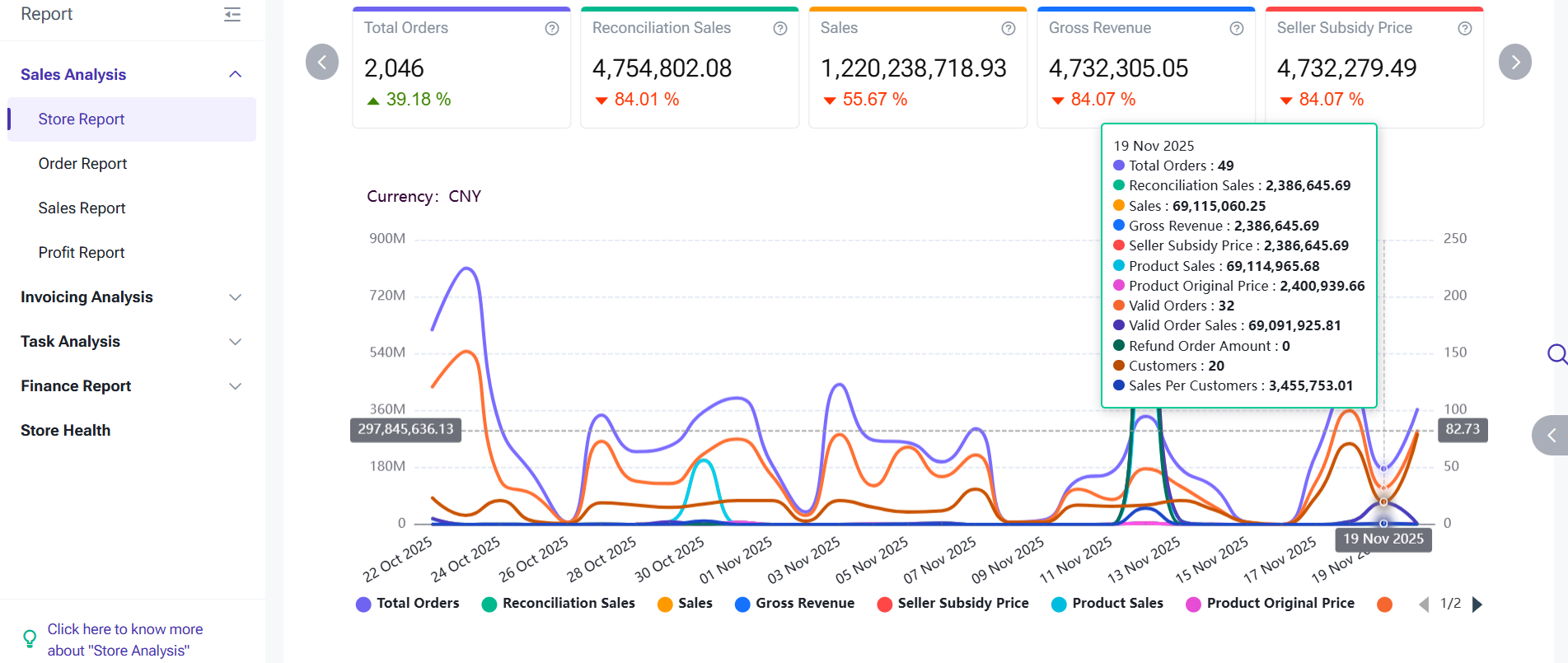
Closing your books weekly or monthly → check the Store Analysis and Order Analysis reports. Store Analysis summarises valid orders and returns across all stores on one page. Order Analysis breaks down daily sales so you can spot the exact day an operational problem started and adjust before it compounds.
Approaching the RM1 million annual revenue threshold → run Shopee Payment Reconciliation bi-weekly. BigSeller's reconciliation report verifies income per Shopee order, flags amounts released in error, and identifies overdue settlements, all critical as MyInvois e-invoicing enforcement for RM1 million to RM5 million businesses takes effect from 1 July 2026. For Malaysian sellers on the Basic Plan and above, one-click SQL Account integration auto-creates invoices and deducts inventory simultaneously.
Shopee store health score is slipping → check the Package Analysis report. BigSeller records every employee's printing, packing, and shipping activity with timestamps, letting you identify exactly which shift or day is creating fulfilment delays. Shopee added Fast Handover Rate (FHR) to its Seller Penalty Points system from May 2026, making this a direct account protection tool, not just an HR report.
Frequently Asked Questions (FAQs)
Q1: Can I see true profit per Shopee order including all fees and vouchers?
A: BigSeller's Shopee Order Profit Report calculates this automatically. Order Revenue is computed as: Product Price + Seller Voucher − Shipping Fee Borne by Seller − Platform Fees − Tax Fees + Refunds + Adjustment Fee + Lost Package Compensation, corresponding directly to the Final Amount in your Shopee billing statement. Deduct your Cost of Merchant SKU from that figure and you have your true profit per order.
Q2: Does Shopee Ads spend get pulled into the profit calculation automatically?
A: BigSeller syncs Shopee Ads costs daily at the Store Profit level, the previous day's data appears the following morning. Do not enter ad spend manually alongside this sync or it will be counted twice. The Profit Analysis report at store level is the most accurate view of true campaign profitability after ads are factored in.
Q3: What reports does BigSeller provide beyond profit for inventory and operations?
A: BigSeller's Analytics module covers six report categories: Store Analysis (multi-store sales summary), Order Analysis (daily sales trends), Sales Analysis (per-SKU sales tracking), Profit Analysis (order, store, and SKU profit), Invoicing Report (inbound/outbound per SKU for financial accounting), Merchant SKU Report (hot/new/unsalable classification), and Package Analysis (employee fulfilment performance). Together they replace five separate tools most sellers currently run manually.
Q4: How does BigSeller handle payment reconciliation for Shopee Malaysia sellers?
A: BigSeller's Shopee Payment Reconciliation report verifies the income of every Shopee order against what was actually released by the platform. BigSeller flags orders where the released amount differs from the expected settlement and identifies orders where payment release is overdue, giving Malaysian sellers a systematic way to follow up with Shopee Seller Support within the 30-day dispute window.
Q5: Which BigSeller plan do I need for profit reports and financial software integration?
A: BigSeller's free plan covers all core analytics such as Store Analysis, Order Analysis, Sales Analysis, Profit Analysis, Invoicing Report, Merchant SKU Report, and Package Analysis for up to 1,500 orders per month across up to 3 stores, with no expiry date. SQL Account integration (for MyInvois compliance and auto-invoicing) is available from the Basic Plan.