TikTok Shop Philippines Order Processing Fee Update: ₱5 Per Delivered Order From September 2026
Jayson09 Sep 2026 11:45ENCopy link & title
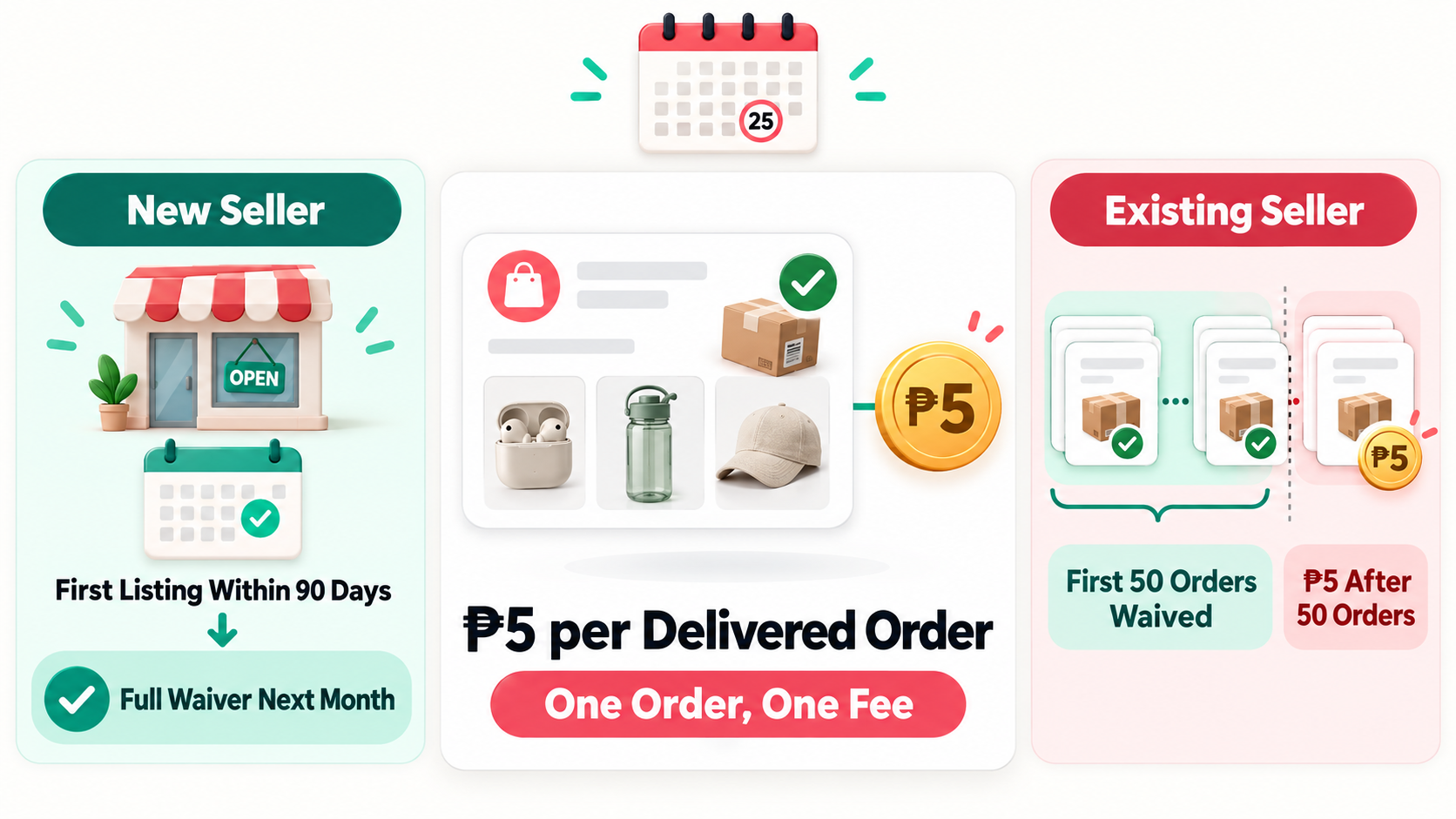
Starting September 1, 2026, TikTok Shop Philippines ended its discounted ₱3 Order Processing Fee and restored the regular tax-inclusive rate of ₱5 for each successfully delivered order. The charge is fixed per order, regardless of the order value or number of items, although eligible new and existing sellers can still receive monthly waivers.
The change adds ₱2 to each chargeable delivered order. That may appear small, but it matters for sellers offering low-priced products, operating on narrow margins or processing hundreds of orders per month. Here is what changed, how the waiver works and what sellers should review.
1. What Changed in the TikTok Shop Order Processing Fee?
TikTok Shop introduced a discounted Order Processing Fee of ₱3 on December 1, 2025. After nine months, the platform discontinued that discount and restored the regular ₱5 fee at 00:00 on September 1, 2026, Philippine time.
The fee applies to successfully delivered orders and is deducted directly from the order settlement. It is charged once per order, not once per item. An order containing several products therefore carries the same ₱5 processing fee as a single-item order.
If an order is successfully delivered and later returned or refunded, TikTok Shop will not refund the processing fee. For an order that is not successfully delivered, the full fee can be returned when the entire order is refunded. A partial refund does not qualify for a fee refund. Sellers can review the complete rules in TikTok Shop's official Order Processing Fee policy.
2. Who Can Get an Order Processing Fee Waiver?
All TikTok Shop sellers in the Philippines are within the scope of the fee, but eligible orders can be waived. TikTok Shop classifies sellers on the 25th of each calendar month and applies the resulting waiver in the next calendar month.
New sellers are sellers who submitted their first product listing within the previous 90 days. Their Order Processing Fee is waived for all orders throughout the following calendar month.
Existing sellers are sellers whose first product listing was submitted more than 90 days earlier. Their first 50 orders in each calendar month are exempt, with the ₱5 fee applying to subsequent successfully delivered orders.
Because qualification is assessed monthly, sellers should check their account and settlement details rather than relying only on the original date they opened the shop.
3. How Much Can the ₱5 Fee Cost Existing Sellers?
The following examples assume that an existing seller receives the standard waiver for the first 50 orders and has no additional exemption.
| Successfully Delivered Orders per Month | Waived Orders | Chargeable Orders | Monthly Processing Fee |
|---|---|---|---|
| 50 | 50 | 0 | ₱0 |
| 100 | 50 | 50 | ₱250 |
| 500 | 50 | 450 | ₱2,250 |
| 1,000 | 50 | 950 | ₱4,750 |
The fixed fee has a larger relative effect on low-value orders. A ₱5 fee is equal to 5% of a ₱100 order value, but only 1% of a ₱500 order value. This comparison illustrates the effect of the processing fee alone; it is not the seller's total platform fee rate. Commission, transaction, shipping service, marketing and affiliate charges may also apply.
4. What Should TikTok Shop Sellers Do Now?
- Recalculate contribution margin. Add the extra ₱2 per chargeable order to current SKU and campaign calculations instead of evaluating the fee in isolation.
- Review low-priced products. Check products with narrow margins, high seller-funded discounts or high return rates first, because the fixed fee takes a larger share of a small order.
- Use bundles selectively. Since the fee is charged per order rather than per item, a sensible multipack or bundle may spread the cost across more units. The bundle must still match buyer demand and remain profitable after discounts.
- Monitor delivered and refunded orders. Include non-refundable processing fees when assessing the real cost of returns and after-sales issues.
- Check settlement records. Confirm which orders were waived, which were charged and whether the deduction matches the latest TikTok Shop policy.
A blanket ₱2 price increase is not necessarily the right response. Sellers should consider the product margin, competitor pricing, commission rate, voucher cost and expected conversion before changing prices.
5. Review TikTok Shop Order Profit with BigSeller
A fee update should be reflected in profit review, not only in product pricing. BigSeller's Order Profit Report can summarize settled TikTok Shop financial data by order, including order revenue, platform charges, product cost and profit where the relevant data is available from the platform.
Sellers can also review profit by store and Merchant SKU through BigSeller Profit Analysis. This helps operations teams identify low-margin products and compare performance after the fee change. BigSeller does not set or waive TikTok Shop fees; the applicable charge and waiver remain subject to TikTok Shop's policy and settlement data.

TikTok Shop fees and waiver policies may change. Check the official policy and your Seller Center settlement records before making pricing decisions.