How to Manage Inventory Across Multiple Warehouses in Malaysia: A Practical Guide
Erra24 Nov 2026 05:58ENCopy link & title

Why Do Malaysian Sellers Need Better Inventory Control Across Multiple Warehouses?
When sellers store products across multiple warehouses and fulfil orders through several sales channels, keeping inventory accurate becomes increasingly challenging. Without proper inventory control, they may struggle to track available stock, prevent overselling, allocate orders efficiently, and replenish products at the right locations. These issues can lead to unnecessary fulfilment delays, stock discrepancies, and lost sales.
Here are common inventory challenges Malaysian sellers may encounter:
-
Limited inventory visibility: When stock is stored in different locations, sellers may need to check multiple spreadsheets or warehouse records to find out how much inventory is actually available.
-
Inconsistent stock levels across channels: A product sold on Shopee may still appear available on Lazada or TikTok Shop if inventory updates are not synchronised properly.
-
Difficulty allocating stock: Sellers need to decide which warehouse should supply each order based on stock availability, delivery location, and fulfilment arrangements.
-
Order fulfilment delays: If an order is assigned to a warehouse without sufficient stock or the right fulfilment setup, staff may need to reassign the order or transfer inventory, delaying shipment.
-
Inefficient replenishment planning: Without a clear overview of stock across locations, sellers may overstock one warehouse while another runs out of popular products.
For example, a Malaysian seller might keep 100 units of a product in Selangor and another 80 units in Johor while selling through Shopee, Lazada, and TikTok Shop. When a customer places an order, the seller needs to identify which warehouse can fulfil it and ensure the available stock is accurately reflected across the relevant sales channels.
As the number of warehouses, products, and sales channels increases, managing these tasks manually becomes more difficult. Better inventory control helps sellers maintain accurate stock records, coordinate warehouse operations, and fulfil orders more efficiently.
What Are the Options for Managing Inventory Across Multiple Warehouses in Malaysia?
|
Comparison |
Manual |
Shopee My Warehouse |
TikTok Shop MWH |
BigSeller |
|
Where to manage inventory |
Spreadsheets |
Shopee Seller Centre |
TikTok Shop Seller Centre |
BigSeller dashboard |
|
Warehouse management |
Manually record each location |
Add up to 30 warehouses per store |
Manage up to 45 warehouses |
Connect multiple supply warehouses to supported marketplace stores |
|
Stock tracking by warehouse |
Manual updates |
Yes, within Shopee |
Yes, within TikTok Shop |
Yes, based on configured warehouse and inventory rules |
|
Automatic stock synchronisation across marketplaces |
No |
Limited to Shopee's own platform operations |
Limited to TikTok Shop's own platform operations |
Supports inventory push across connected Shopee, Lazada, and TikTok Shop stores |
|
SKU mapping across stores |
Manual matching |
Within Shopee |
Within TikTok Shop |
Merchant SKU mapping across connected stores |
|
Order management |
Manual tracking |
Shopee orders |
TikTok Shop orders |
Centralised order processing across connected stores |
|
Best suited for |
Small businesses with simple inventory needs |
Sellers mainly managing multiple Shopee warehouses |
Sellers mainly managing multiple TikTok Shop warehouses |
Multi-channel sellers managing inventory and orders across different marketplaces |
What Features Should You Look for in a Multi-Warehouse Inventory Management System in Malaysia?
Choosing an inventory management system involves more than checking whether it supports multiple warehouse locations. Malaysian sellers should also consider how the system handles stock updates, product mapping, warehouse allocation, and order fulfilment.
Here are some important features to look for.
-
Centralised inventory visibility: Lets sellers monitor stock across different warehouse locations from one system. This makes it easier to identify low-stock products, plan replenishment, and understand how much inventory is available across the business.
-
Automatic stock synchronisation: Updates available quantities across connected stores when a sale takes place. This helps reduce the risk of overselling, especially when several stores and sales channels share the same inventory.
-
Multi-warehouse inventory allocation: Allows you to connect a marketplace warehouse to multiple supply warehouses. This gives sellers more flexibility in deciding which warehouse stock contributes to the quantity displayed on a particular store.
-
Low-stock alerts and inventory rules: Helps sellers identify when stock is running low before products become unavailable. These settings help businesses manage their available inventory more carefully and reduce the risk of accepting orders they cannot fulfil.
-
SKU mapping: Connects product identifiers used across different stores with a central merchant SKU. This is important for accurate stock synchronisation across multiple channels.
-
Order processing and fulfilment: Manage incoming orders and assign them to the appropriate warehouse for shipping. These features can reduce repetitive work and help warehouse staff avoid picking or packing the wrong products.
How Does BigSeller Help Malaysian Sellers Manage Inventory Across Multiple Warehouses?
For Malaysian sellers who want to manage their own warehouse operations while keeping marketplace inventory organised, BigSeller brings inventory management and order processing into one platform. BigSeller supports workflows across Shopee, Lazada, and TikTok Shop, helping sellers coordinate stock and orders from multiple connected stores.
1. Manage Multiple Warehouses Under One Store
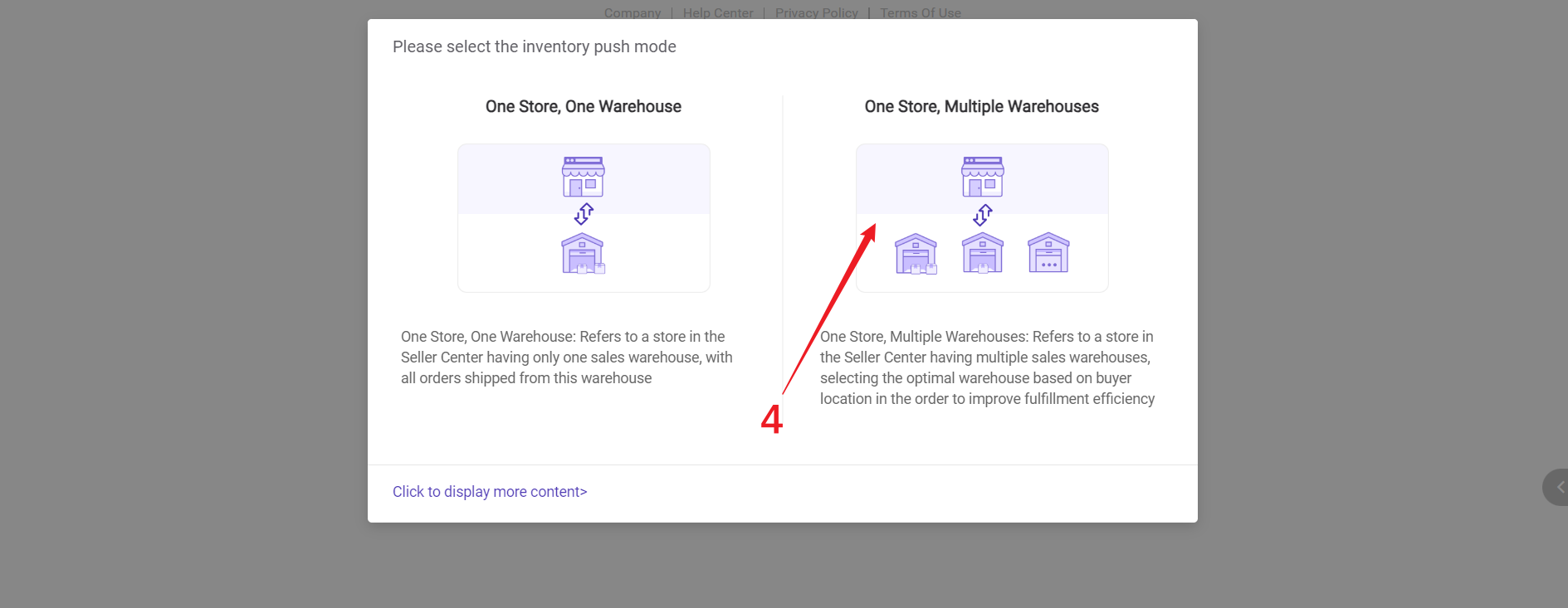
BigSeller's One Store, Multiple Warehouses strategy lets sellers connect a marketplace warehouse to two or more supply warehouses. BigSeller then calculates the combined inventory from the selected supply warehouses and pushes the quantity to the linked marketplace warehouse according to the seller's settings.
Sellers can choose to push actual stock, partial stock, or virtual stock depending on their requirements.
This gives businesses more flexibility when managing stock stored at different locations. However, the available multi-warehouse setup depends on the marketplace's supported features and seller eligibility.
2. Automatically Allocate Orders to the Right Warehouse
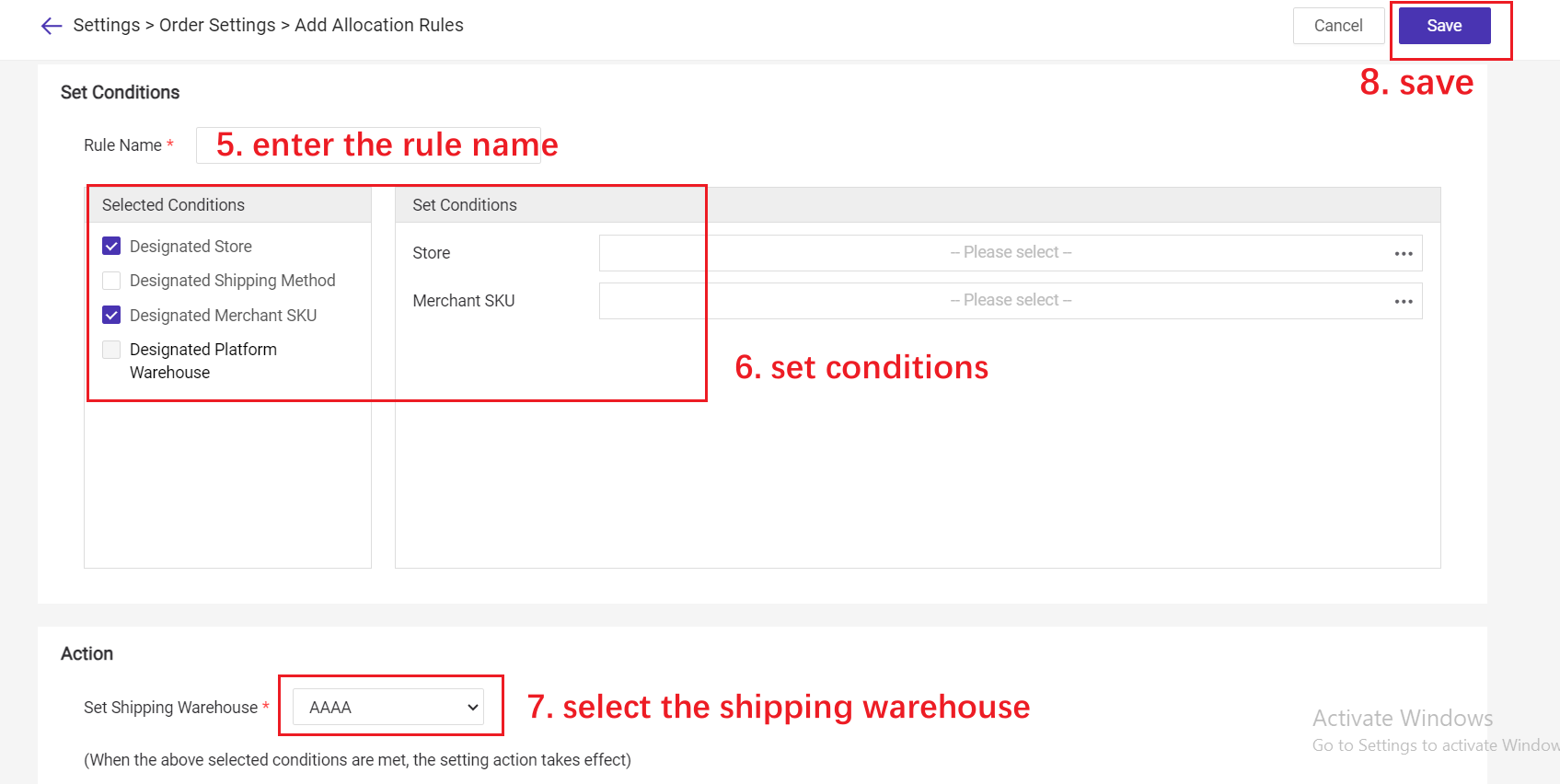
Besides inventory management, BigSeller lets sellers create order allocation rules based on stores, logistics, and merchant SKUs.
When new orders are synced, the system checks the configured conditions and assigns qualifying orders to the designated shipping warehouse. You can also set rule priorities and use designated platform warehouse settings for stores with multiple warehouses.
If an order does not match any allocation rule, it will be assigned to the default warehouse. Sellers can review the allocation change log to investigate warehouse assignment changes.
3. Process Orders from Multiple Stores in One Place
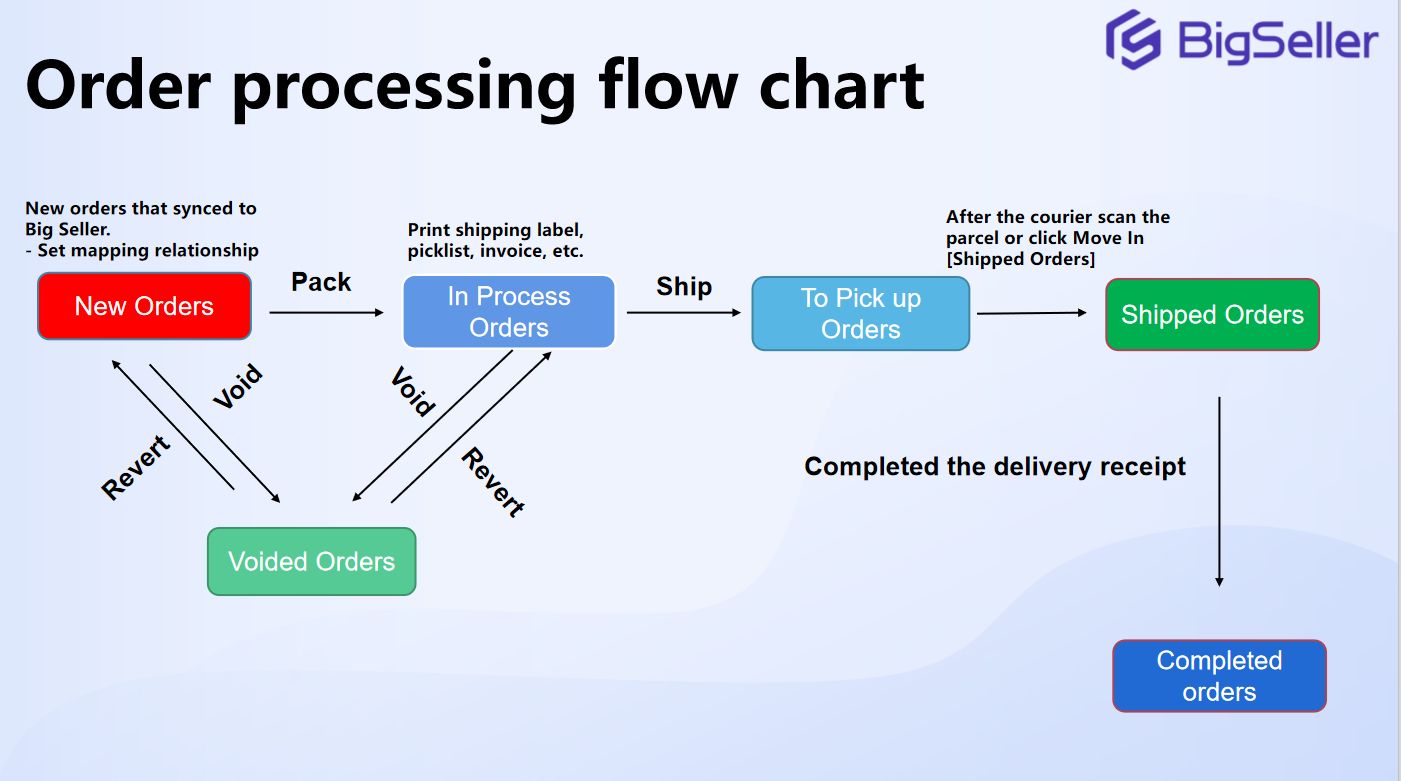
Once orders are assigned, sellers can continue using BigSeller's centralised order processing workflow to manage orders from connected stores, print shipping labels, and prepare parcels. The order processing flow remains unchanged for multi-warehouse stores.
This helps sellers coordinate stock and fulfilment across different warehouse locations without managing every marketplace separately.
Which Multi-Warehouse Inventory Management System Is Right for Your Business?
The best approach depends on the size of your business, the number of warehouses you operate, and how your team manages orders across sales channels.
For small businesses with limited stock and only a few storage locations, spreadsheets may be sufficient for basic inventory tracking. Sellers who mainly operate on Shopee or TikTok Shop can also use their built-in warehouse features to manage stock within each marketplace.
However, if your business sells across multiple marketplaces while sharing inventory between different warehouse locations, managing each store separately can create more work and increase the risk of stock discrepancies. A more centralised approach can help keep inventory accurate and coordinate order fulfilment across channels.
For Malaysian e-commerce sellers managing multiple stores and warehouses, BigSeller brings inventory management and order processing together in one platform. Sellers can synchronise stock across connected marketplaces, combine inventory from multiple supply warehouses, map product SKUs, and automatically assign incoming orders to the appropriate shipping warehouse based on their configured rules. With centralised order processing, teams can also manage orders from different stores without constantly switching between seller platforms.
Ultimately, the goal isn't simply to have more warehouses. It's to make sure your team knows where every product is, how much stock is available, and how to fulfil orders efficiently across all your sales channels. Choosing the right inventory approach can make that process easier as your business expands.