Why Mega Sales Break Your Warehouse (And How Inventory Management Software Fixes It)
Erra30 Oct 2026 07:43ENCopy link & title

Why Do Manual Warehouses Fail When Order Volumes Explode?
During major Southeast Asian campaigns like 11.11, 12.12, and festive periods, e-commerce sellers frequently deal with a sudden 300% to 500% spike in daily orders. Industry findings across Malaysia show that picking and packing eat up about 50% to 55% of your total warehouse time and operating costs. In a traditional manual warehouse, floor staff spend up to 60% of their shift just walking around. When a huge sale hits, your crew ends up walking the exact same aisles over and over again, back and forth, just to pick items for individual, isolated customer receipts.
This dependency on processing orders one by one causes a major bottleneck when the second volume explodes. Because a manual setup relies on printed paper lists and visual checking, multi-channel stock levels don't update on the floor in real time. Pickers get stuck in narrow aisles looking for viral products, items are pulled from the wrong shelves, and stock miscounts quickly slip through across Shopee, Lazada, and TikTok Shop.
The downstream impact is a massive headache for any Malaysian marketplace seller. As loose products pile up unsorted at the packing tables, your team misses critical courier cutoff times for partners like J&T Express, NinjaVan, and Pos Malaysia. Missing these trucks drives up your Late Shipment Rate (LSR) and Non-Fulfillment Rate (NFR). When that happens, platform algorithms automatically hit your shop with penalty points, freeze your seller wallets, strip away Preferred or Preferred+ badges, and tank your product search visibility, essentially wiping out months of hard work in a single weekend.
How Do Different Fulfillment Methods Stack Up During Peak Sales?
|
Feature / Metric |
Basic Inventory Software |
Traditional Batch Picking |
BigSeller |
|
Daily Order Suitability |
Less than 50 orders |
50 to 300 orders |
Recommended for 300+ orders |
|
Worker Walking Path |
High (Redundant loops) |
Semi-optimised |
Fully optimised minimum route |
|
Tracking Visibility |
None (Paper-dependent) |
Manual logs |
Real-time dashboard reporting |
|
Error Protection |
Visual matching only |
Multi-stage manual check |
PDA/App Barcode Verification |
|
Waybill Printing |
Sequential/Individual |
Small batches |
Up to 5,000 orders at once |
|
Marketplace Grouping |
None |
Limited by channel |
Automated by carrier & rules |
|
Sorting Method Compatibility |
Direct packing only |
Manual allocation |
Digitised Single/Group SKU sorting |
What Makes BigSeller an Operational Powerhouse for Marketplace Sellers in Malaysia?
BigSeller changes how you fulfill orders by blending multi-channel store management with a dedicated Warehouse Management System (WMS) module. If you are a Malaysian seller clearing over 300 orders a day, it is highly recommended to reach out to their customer team to turn on the Wave feature.
Once enabled, you get clear visibility via a live WMS Monitor dashboard that refreshes every five minutes. Warehouse managers can track exactly how packages are moving across different stages, while keeping an eye on daily leaderboards that rank staff performance across picking, sorting, packing, and shipping.
Real-Time Workforce Deployment and Performance Metrics
With data updating every five minutes, you don't have to guess where the bottleneck is on your packing floor. If the dashboard shows a massive backup of packages sitting in To Sort while your packers are waiting around doing nothing, you can move staff over immediately to clear the lines.
The daily leaderboards show the exact number of packages and total SKUs each worker has handled. This builds accountability, makes it easy to reward top performers during stressful mega sales, and helps you spot who might need a bit more training with the app.
Restricting Access and Ensuring Operational Security
Hiring temporary workers to survive the 11.11 rush means you need solid software security. BigSeller protects your business data by letting you control exactly what your staff can see.
Sub-accounts cannot access high-level warehouse report screens unless you manually turn on the WMS Monitor permission. You can also restrict temporary pickers to specific physical warehouses so they don't accidentally touch stock data for another location.
What Are the Most Critical Actions Marketplace Sellers in Malaysia Should Take Before a Major Sale?
To keep things moving smoothly before a campaign hits, your team needs to set up rule-based automation in the system. BigSeller gives you straightforward settings to streamline the chaos:
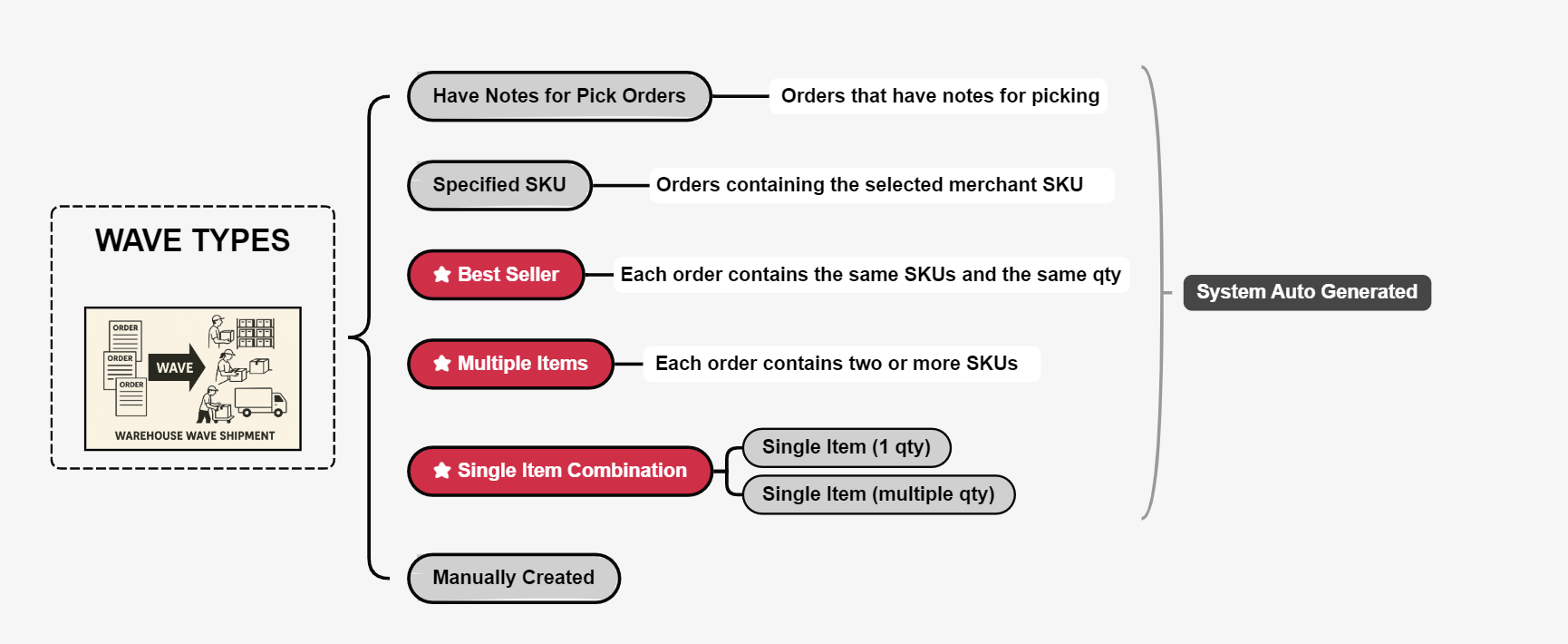
1. Choose Your Wave Profiles: Group your incoming orders based on how they need to be packed. You can automatically segment orders into specific buckets like Best Seller Wave (for flash-sale items), Single Item Profiles, Special SKUs (bulky inventory), or Orders with Buyer Notes.
2. Set Up Smart Batching Rules: Cluster your orders logically to match real-world logistics. BigSeller lets you group waves by Marketplace Isolation (keeping Shopee, Lazada, and TikTok Shop separate) or Courier Service (bundling all J&T Express or NinjaVan orders together).
3. Pick Your Sorting Style: Match the system workflow to your actual layout. Use Picking While Sorting for unlabeled items where pickers put products directly into customer baskets on a trolley, or go with Sort After Picking to harvest items in huge bulk runs before scanning and dividing them up at a sorting table.
4. Speed Up the Printing Station: Don't let waybills become a bottleneck. You can trigger label printing by Scanning the Master Pick List, Scanning a Basket Number, using Sequential Printing, or selecting Print in Secondary Picking to print a waybill the exact second the last item goes into the box.
5. Turn on "Ship While Packing" Automation: Stop waiting for a whole wave to finish before staging parcels. This setting lets you scan a packed box, print the label, and automatically move the order to the live courier pickup queue immediately, making it easy to do a rolling hand-off to arriving 3PL trucks.