Shopee Malaysia Enhances Seller Tools with New Product AI Optimiser
Erra24 Dec 2025 09:20ENCopy link & title
Rather than replacing sellers, Product AI Optimiser works with you, learning from the information you provide and gradually becoming smarter at presenting, recommending, and responding on behalf of your products.
If you’ve ever struggled with incomplete listings, repetitive buyer questions, or low conversion despite good products, this tool is built to solve exactly those pain points.

What Is Shopee Product AI Optimiser?
Shopee Product AI Optimiser is an AI-powered tool designed to help sellers improve their product listings by making better use of structured product data. Think of it as an AI partner for your product catalogue, the more information you provide, the better it understands and represents your products.
When sellers upload key product information in bulk such as size charts, product attributes, and clean product images, they are essentially training the AI to recognise product details the same way a seller would. This allows the AI to support sellers more effectively across important touchpoints, including:
-
Responding to buyer chats and enquiries
-
Improving product matching in search results
-
Optimising Product Detail Pages (PDP)
-
Enhancing the visual presentation of listings
More complete and accurate product data leads to better visibility, stronger buyer confidence, and higher conversion rates.
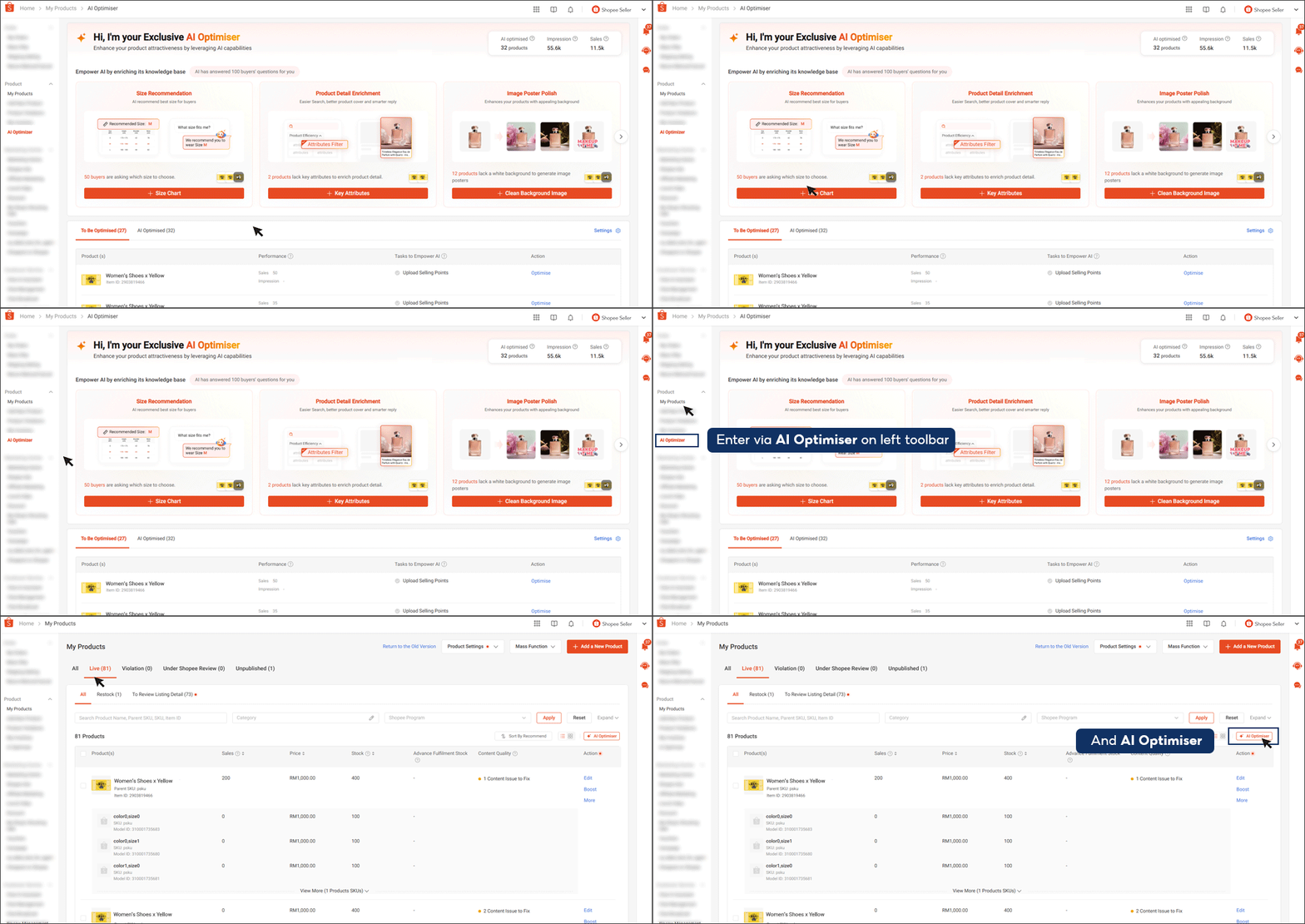
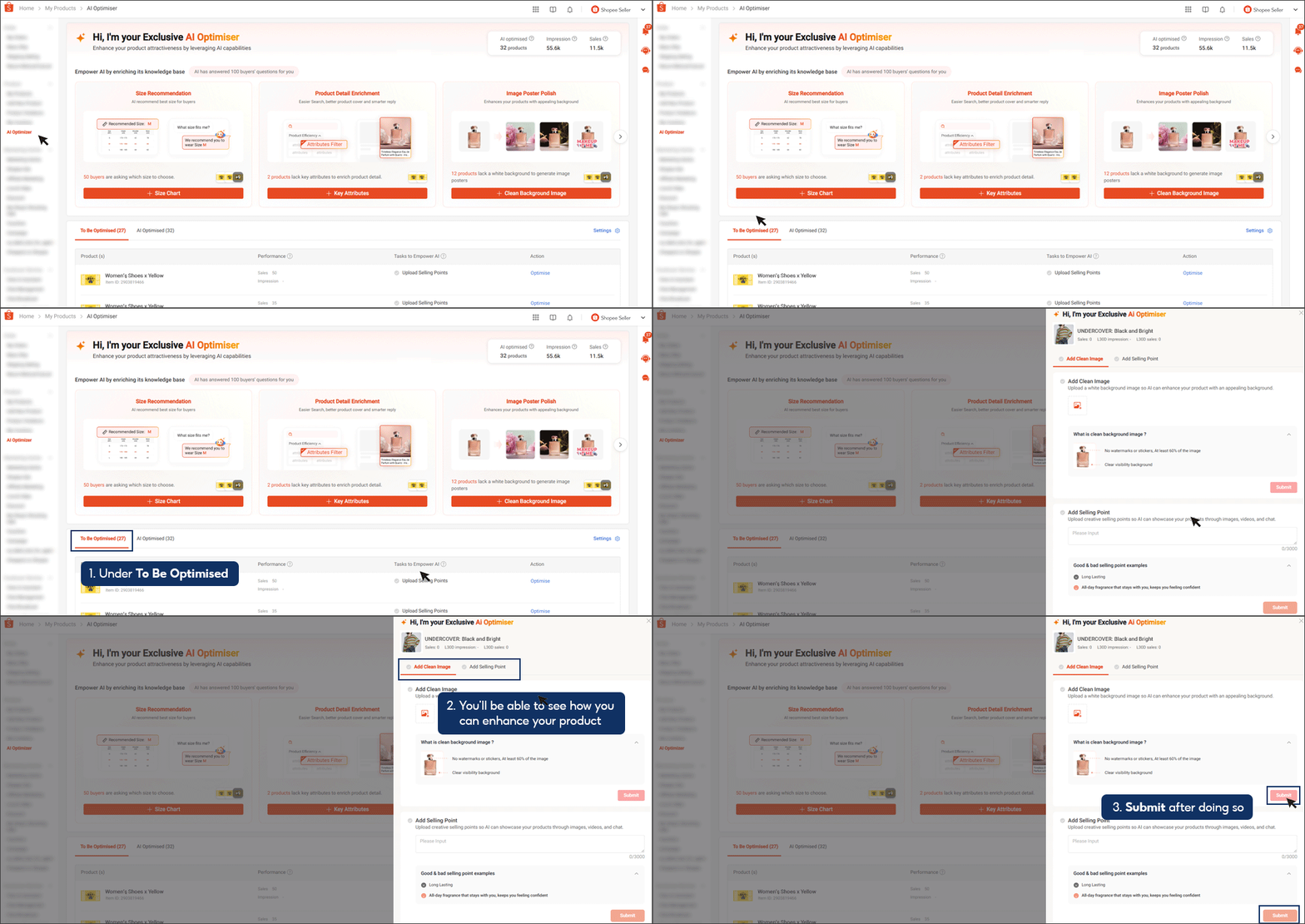
Where to Find Product AI Optimiser in Shopee Seller Centre
Sellers can access Product AI Optimiser in two ways:
-
From the left toolbar in Shopee Seller Centre
-
Or by going to My Products > Live > AI Optimiser
Once inside, Shopee provides a centralised homepage that clearly shows which product information is missing and what needs to be completed. The system guides sellers step by step, making it manageable even for stores with hundreds of SKUs.
Key Features Sellers Can Optimise
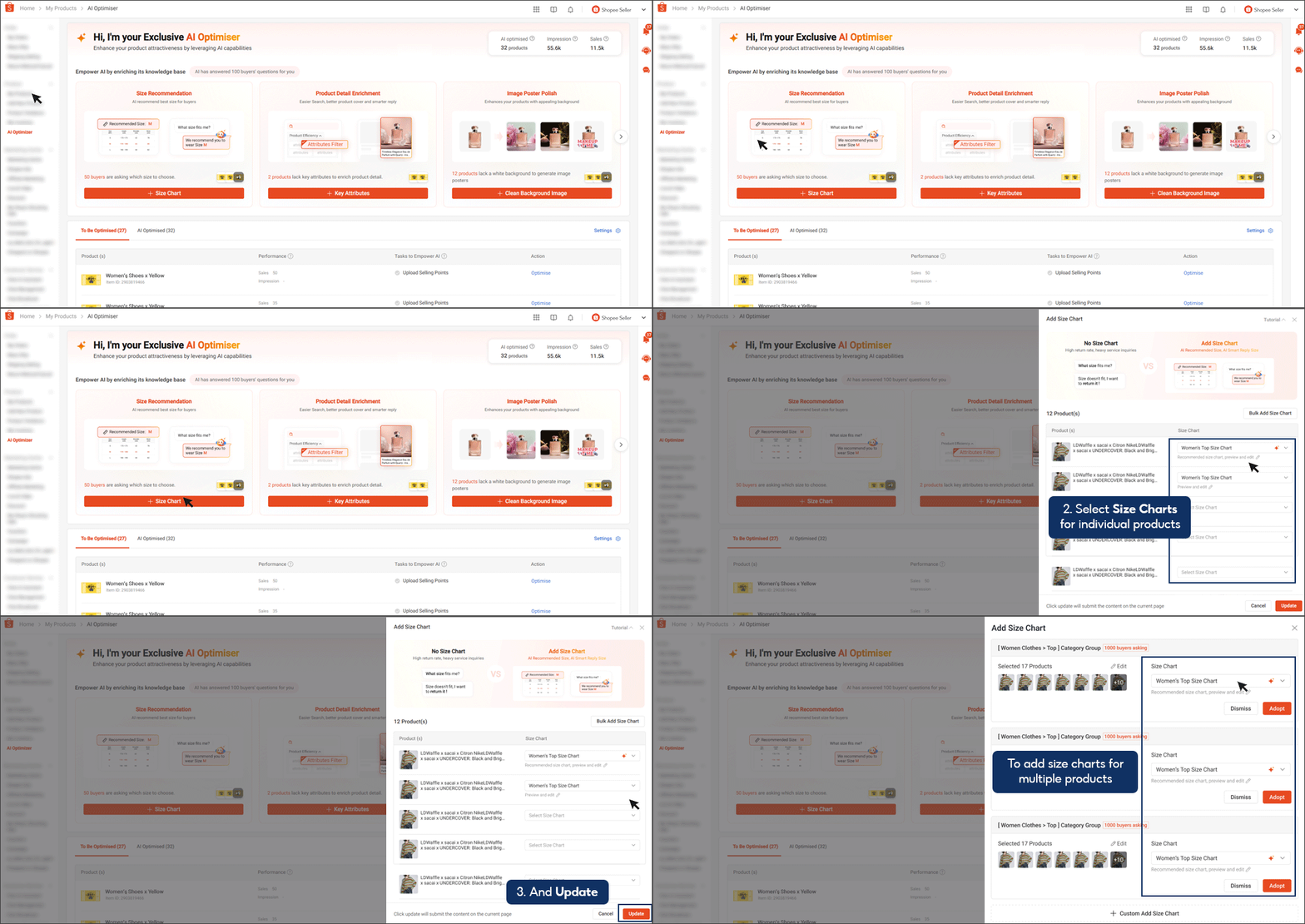
1. Add Size Charts for Smarter Size Recommendations
By selecting + Size Chart, sellers can upload size chart information either for:
-
Individual products, or
-
Multiple products at once through bulk upload
After the size chart is added, the AI uses this data to provide AI-driven size recommendations to buyers. This helps reduce size-related questions and lowers the risk of returns caused by incorrect sizing. This feature is particularly useful for categories such as fashion, footwear, uniforms, and other apparel-related products.
2. Add Key Attributes to Improve Search Visibility
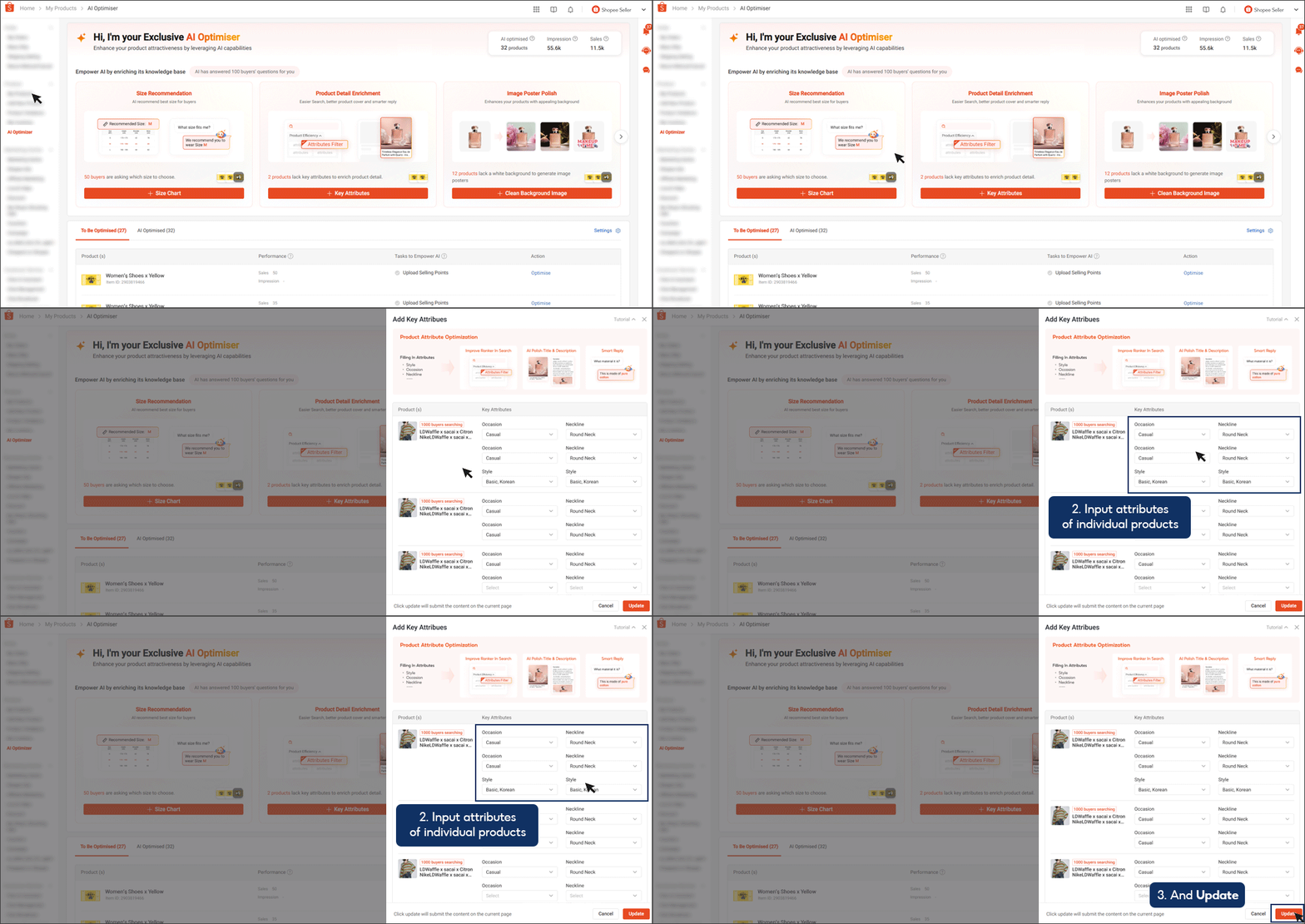
Using + Key Attributes, sellers can enhance their product listings with structured information such as material, fit, usage, or technical specifications.
These attributes play an important role in:
-
Improving how products are matched in Shopee search
-
Allowing the AI to give more accurate answers when buyers ask product-related questions
The more complete your product attributes are, the easier it is for buyers to find and understand your listings.
3. Upload Clean Background Images for AI-Enhanced Visuals
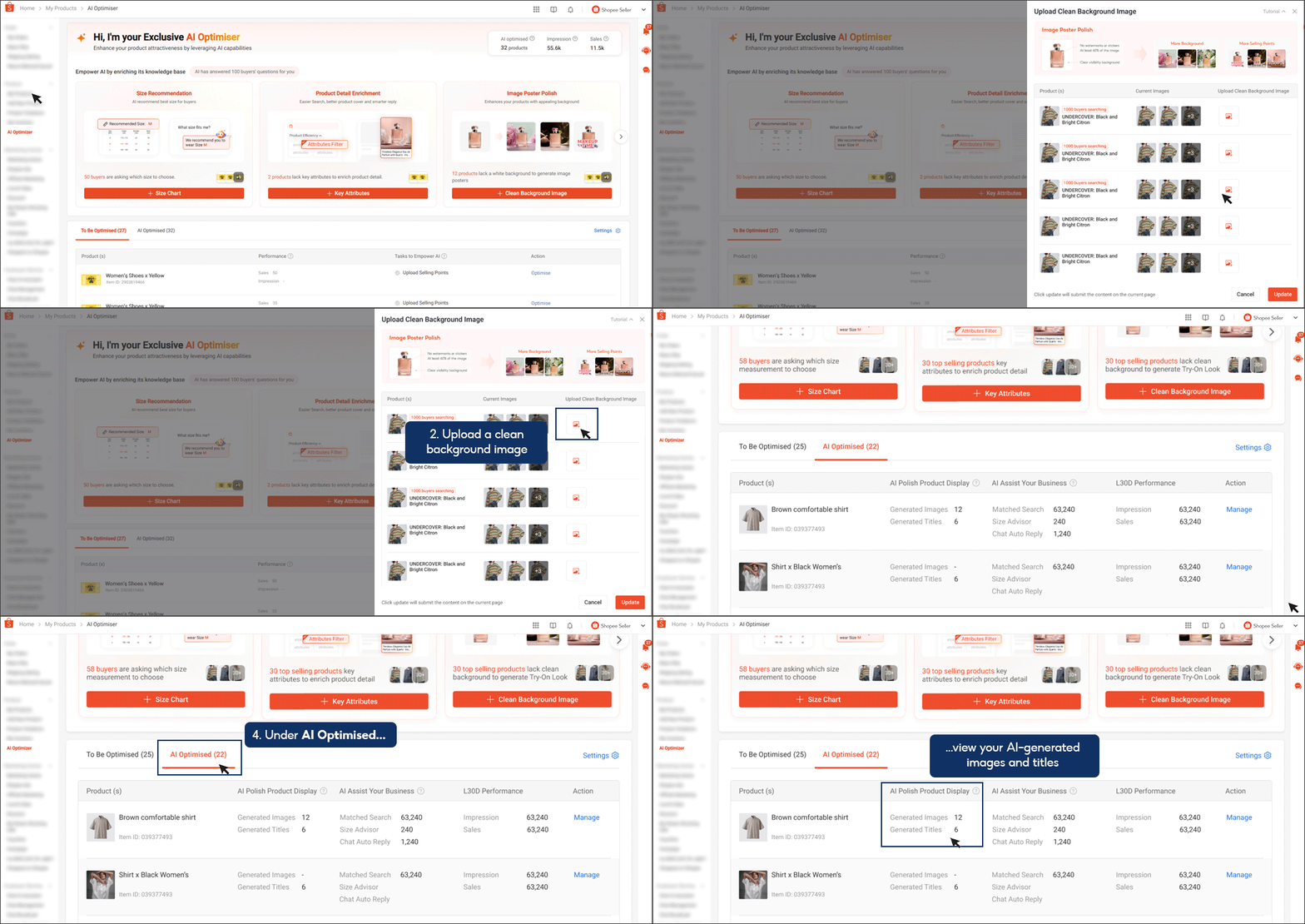
With + Clean Background Image, sellers can upload product images that meet Shopee’s image requirements:
-
No watermarks
-
At least 60% of the product visible
-
Clean and plain background
If the image qualifies, Shopee’s AI can generate enhanced product visuals, including improved backgrounds and highlighted selling points. These AI-generated images can be found under:
AI Optimised tab > AI Polish Your Product Display
This allows sellers to improve the visual appeal of their listings without the need for additional photo shoots or design work.
4. Add Clear Selling Points
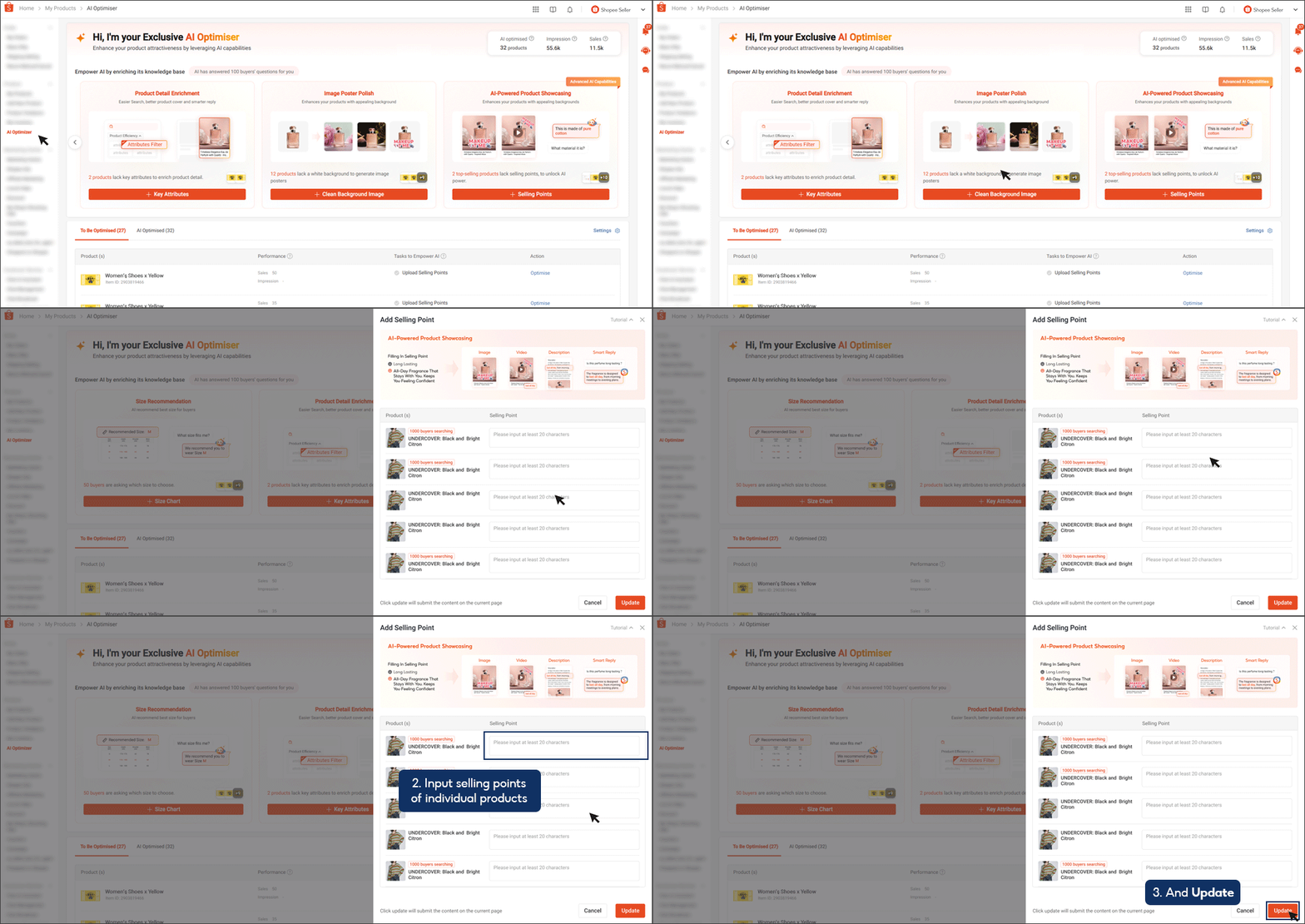
Sellers can also add Selling Points (with a minimum of 20 characters) to clearly explain product benefits.
Well-written selling points help:
-
Buyers quickly understand why the product is worth purchasing
-
The AI generate better replies and recommendations
-
Improve conversion rates on the Product Detail Page
5. Optimise Products Individually or in Bulk
All optimisation features like size charts, key attributes, images, and selling points can also be managed at the individual product level under the To Be Optimised tab.
This gives sellers flexibility to focus first on:
-
Best-selling products
-
High-traffic listings
-
Products with frequent buyer enquiries
How Product AI Optimiser Supports Sellers After Optimisation
Once your product information is complete, Product AI Optimiser begins actively supporting your store across different selling scenarios. At this stage, the AI is no longer passive, it starts applying what it has learned from your product data to assist with daily operations and buyer interactions.
With accurate and structured information in place, Product AI Optimiser can:
-
Automatically reply to buyer enquiries related to product details, reducing repetitive questions
-
Provide AI-driven size recommendations to buyers while they are deciding, helping them choose the right option with more confidence
-
Generate high-quality AI-enhanced product images to improve listing presentation
-
Improve product matching in search results and recommendations, increasing exposure to relevant buyers
In other words, you’re not just filling in product fields, you’re enabling AI to actively work in the background to support sales, improve buyer experience, and reduce manual effort.
Track AI Performance with Clear, Actionable Insights
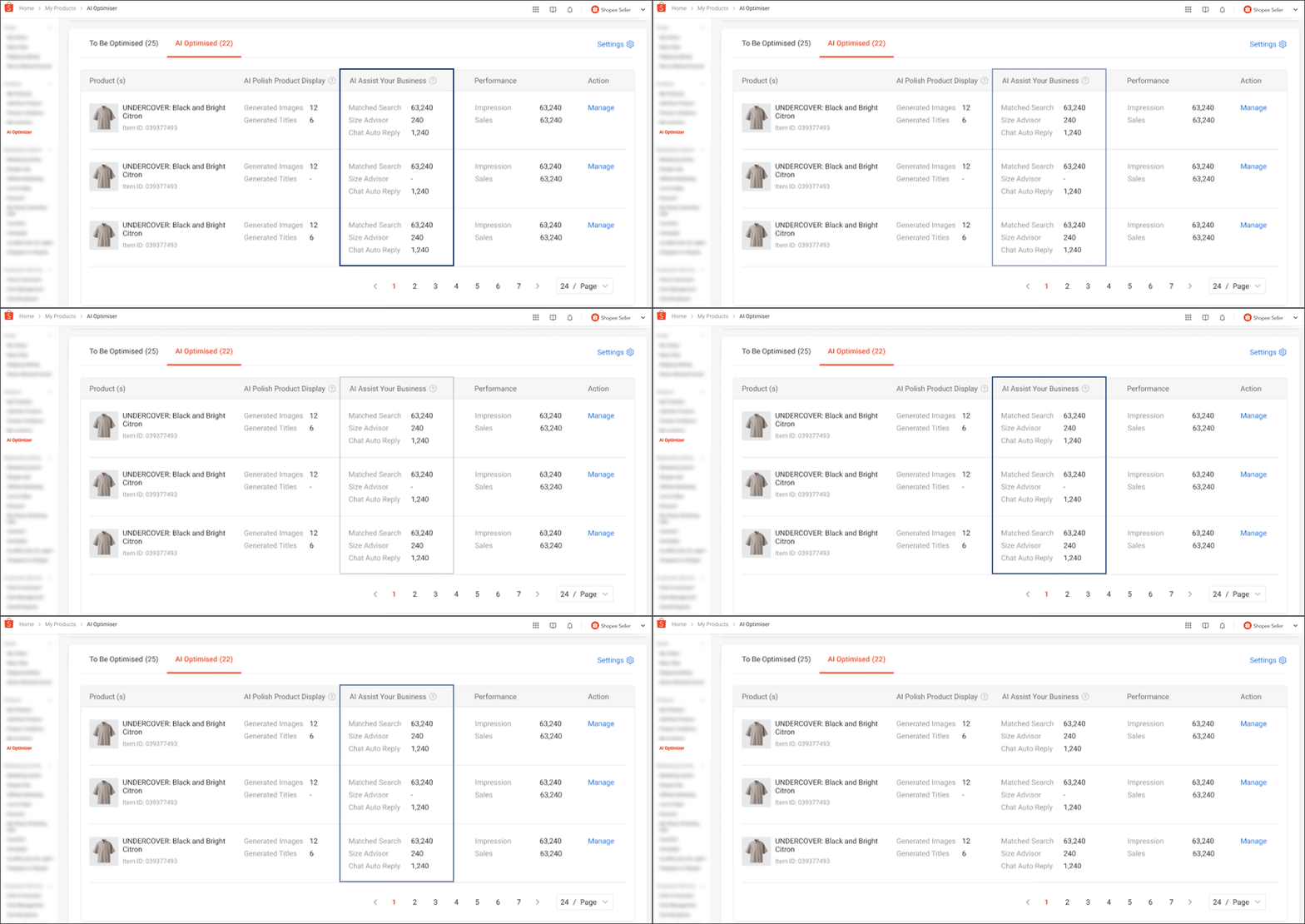
Shopee also gives sellers full visibility into how Product AI Optimiser is performing. Under the AI Optimised tab, sellers can review detailed insights, including:
-
Traffic and sales generated from AI-optimised listings
-
The number of buyer chats automatically handled by AI
-
How often buyers received size recommendations from the AI
These insights help sellers understand which products benefit most from AI optimisation and where further improvements can be made.
Key Metrics Explained
-
Matched Search: The total number of times your product appeared in buyer search results, showing how AI contributes to product visibility.
-
Size Advisor: The number of buyers who received AI-generated size recommendations while viewing your product.
-
Chat Auto Reply: The number of product-related buyer enquiries that were answered automatically by the AI.
This level of transparency allows sellers to clearly see how AI contributes to real performance, rather than treating it as a “black box” feature.
Manage and Improve AI Output with Seller Feedback
Shopee also ensures that sellers remain in control of AI-generated content. If any AI-generated image, product name, or content feels inaccurate or inappropriate, sellers can simply click the thumbs-down icon.
All AI-generated materials can be reviewed and managed by selecting Manage under the AI Optimised tab. Every piece of feedback helps refine future AI outputs, ensuring suggestions become more accurate and aligned with your products over time.
Boost Your Shopee Store with BigSeller
Shopee Product AI Optimiser helps you enhance listings, manage buyer interactions, and improve product visibility. To scale your store across multiple platforms efficiently, BigSeller offers a complete solution.
BigSeller is a free, automated e-commerce ERP tailored for Southeast Asian sellers. It streamlines product listing, order processing, inventory and purchase management, marketing, and reporting, reducing manual work while boosting multi-channel sales. Features like real-time stock updates, batch printing, smart purchasing, and unified promotion management help sellers save time, prevent overselling, and make data-driven decisions.
Trusted since 2019, BigSeller is recognised as a Shopee Preferred Partner and Officially Recommended ERP by TikTok, supporting sellers with professional customer service, training, and local offices across Southeast Asia.
Experience smarter selling today, try BigSeller for free and see the difference.
(All insights and recommendations in this article are based on Shopee Seller Education Hub: Product AI Optimiser.)