Shopee Malaysia Updates Sales Data Reporting Across Seller Tools
Erra23 Jan 2026 07:01ENCopy link & title
Shopee has updated how sales data is calculated and displayed across Seller Centre, Seller App, Marketing Centre, and Shopee Ads. As a result, some sellers may notice changes in their reported Sales figures even though order volume remains the same.
The revised sales data now focuses on seller-side earnings after rebates, rather than the buyer’s total checkout amount. Shopee has also introduced new supporting metrics and renamed GMV as Sales in Shopee Ads starting January 2026.

Why Shopee Updated the Sales Calculation
Previously, Shopee’s Sales metric showed the buyer’s final checkout amount. This figure included costs paid by the buyer, such as:
-
Shipping fees
-
Transaction fees
-
Insurance fees
-
Other buyer-paid charges
While this approach was useful for tracking GMV (Gross Merchandise Value), it often caused confusion for sellers. The Sales number looked higher than the amount sellers actually received, especially when vouchers, coins, and item rebates were involved.
With this update, Shopee has shifted the focus of the Sales metric. Instead of showing buyer-paid extras, Sales now reflect the value that sellers actually receive from an order, making revenue tracking more accurate and practical.
What Changed on the Business Insights Page
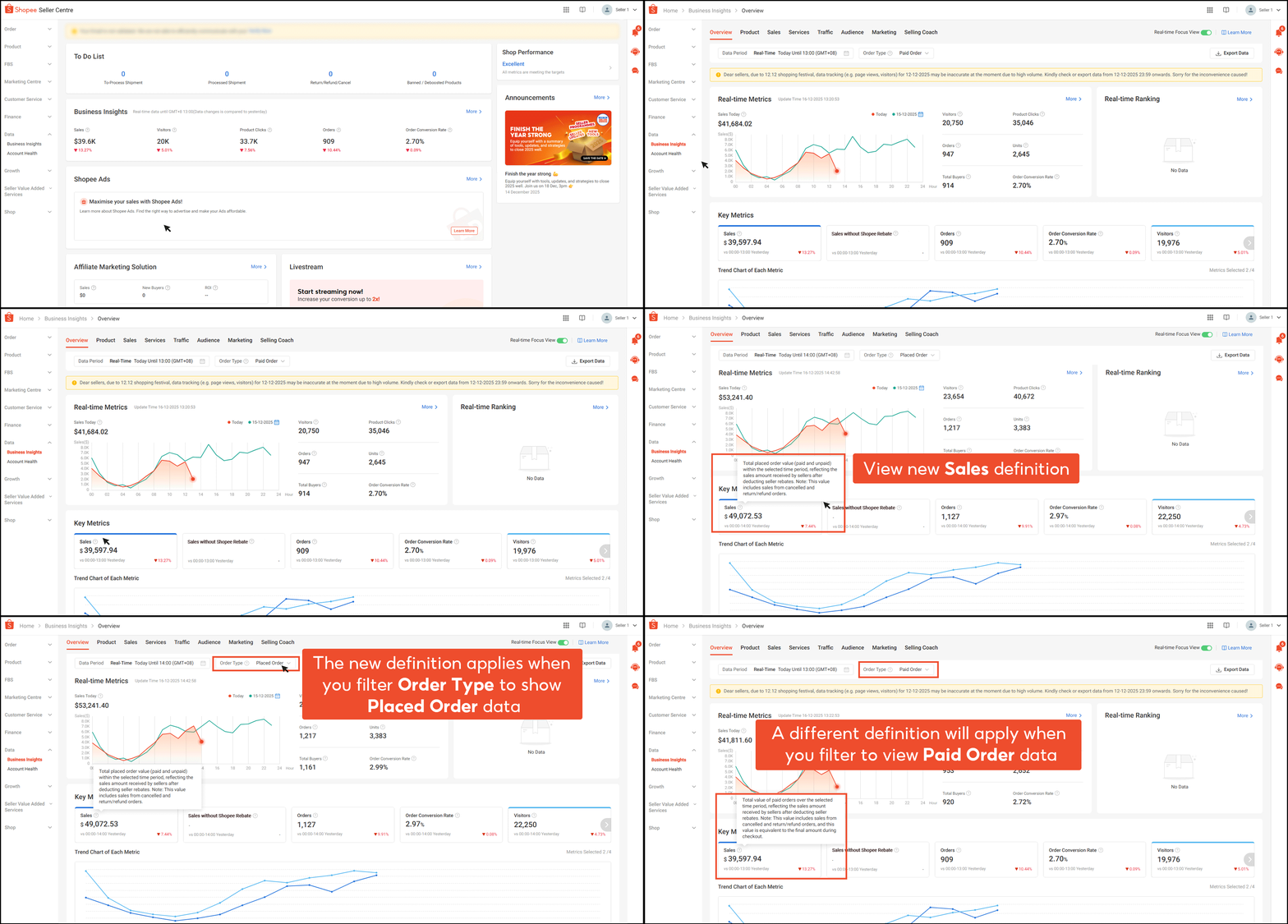
On the Business Insights page in Shopee Seller Centre, the tooltip definition for Sales has been updated to reflect the new calculation.
New Sales Definition (Example: Placed Order)
Total order value (paid and unpaid) within the selected time period, reflecting the same amount received by sellers after deducting seller rebates.
What Shopee Sellers Should Note
-
Sales still include cancelled and return/refund orders
-
Seller rebates such as vouchers, coin rebates, and item rebates are now deducted
-
Buyer-paid fees (shipping, transaction, insurance) are excluded
As a result, the Sales figure now aligns more closely with actual seller earnings, rather than the checkout total shown to buyers.
Shopee Seller Centre vs Seller App: Where the Update Applies
On Shopee Seller Centre
The updated Sales definition is automatically applied across key dashboards, including:
-
Business Insights
-
Marketing performance pages
On Shopee Seller App
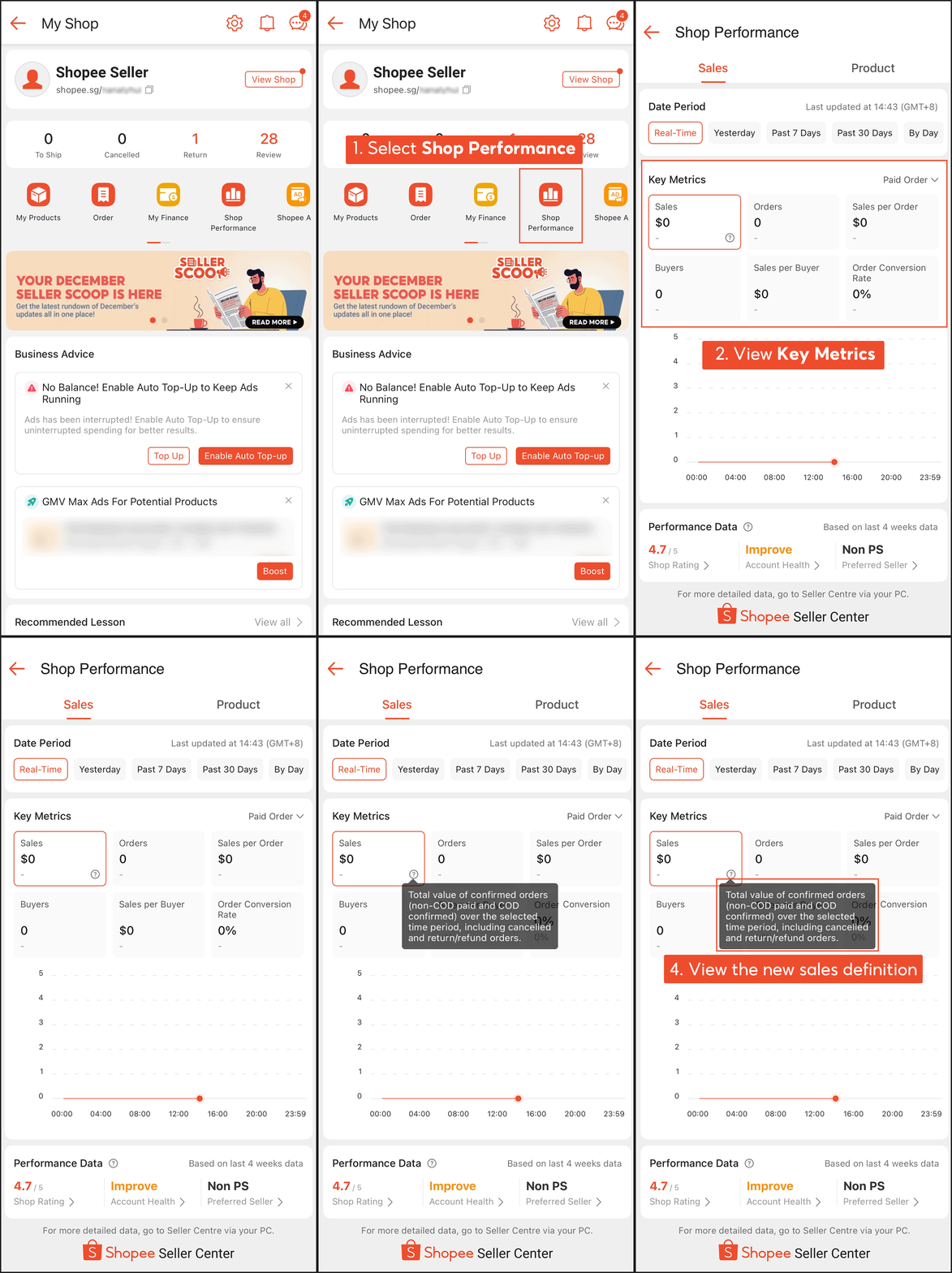
Sellers can view the updated definition by:
-
Opening Shop Performance
-
Scrolling to Key Metrics
-
Tapping the tooltip (ⓘ) icon
The explanation shown mirrors Seller Centre, confirming that Sales now represent seller earnings after rebates, not the buyer’s full checkout amount.
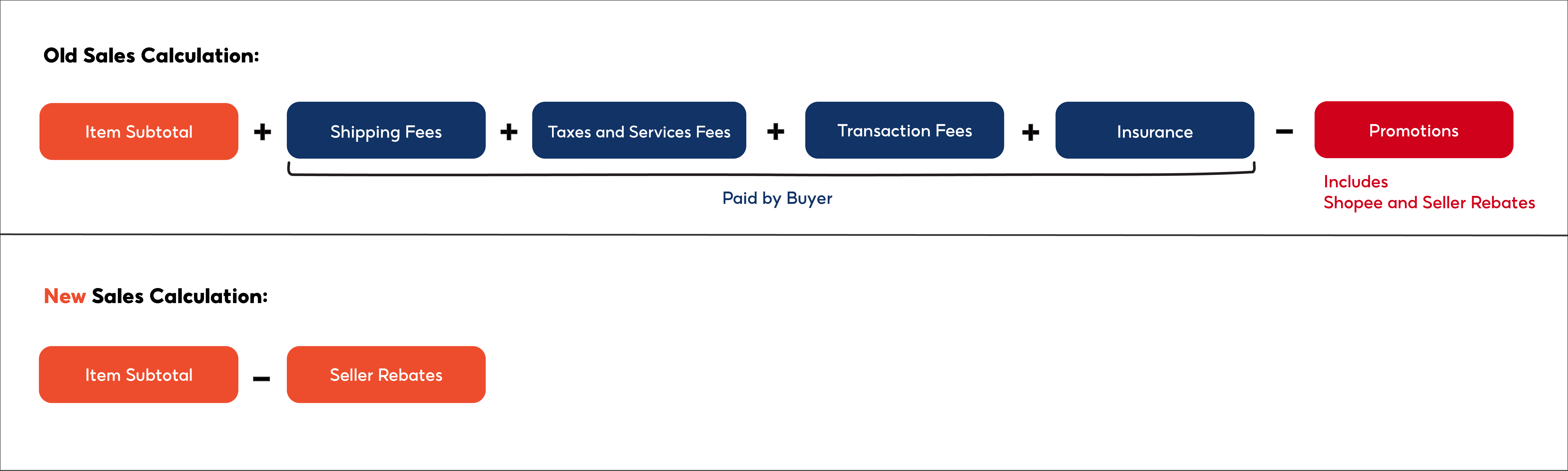
Old vs New Sales Calculation (At a Glance)
Previously
-
Reflected the buyer’s final checkout amount
-
Included shipping, transaction fees, and insurance
-
Did not clearly account for seller rebates
Now
-
Excludes buyer-paid fees
-
Deducts Shopee rebates (item rebates, vouchers, coins)
-
Reflects the amount sellers actually receive
In short: the numbers may look different, but they are less inflated and far more realistic for tracking your true shop revenue.
Marketing Centre: Where the New Sales Metric Applies
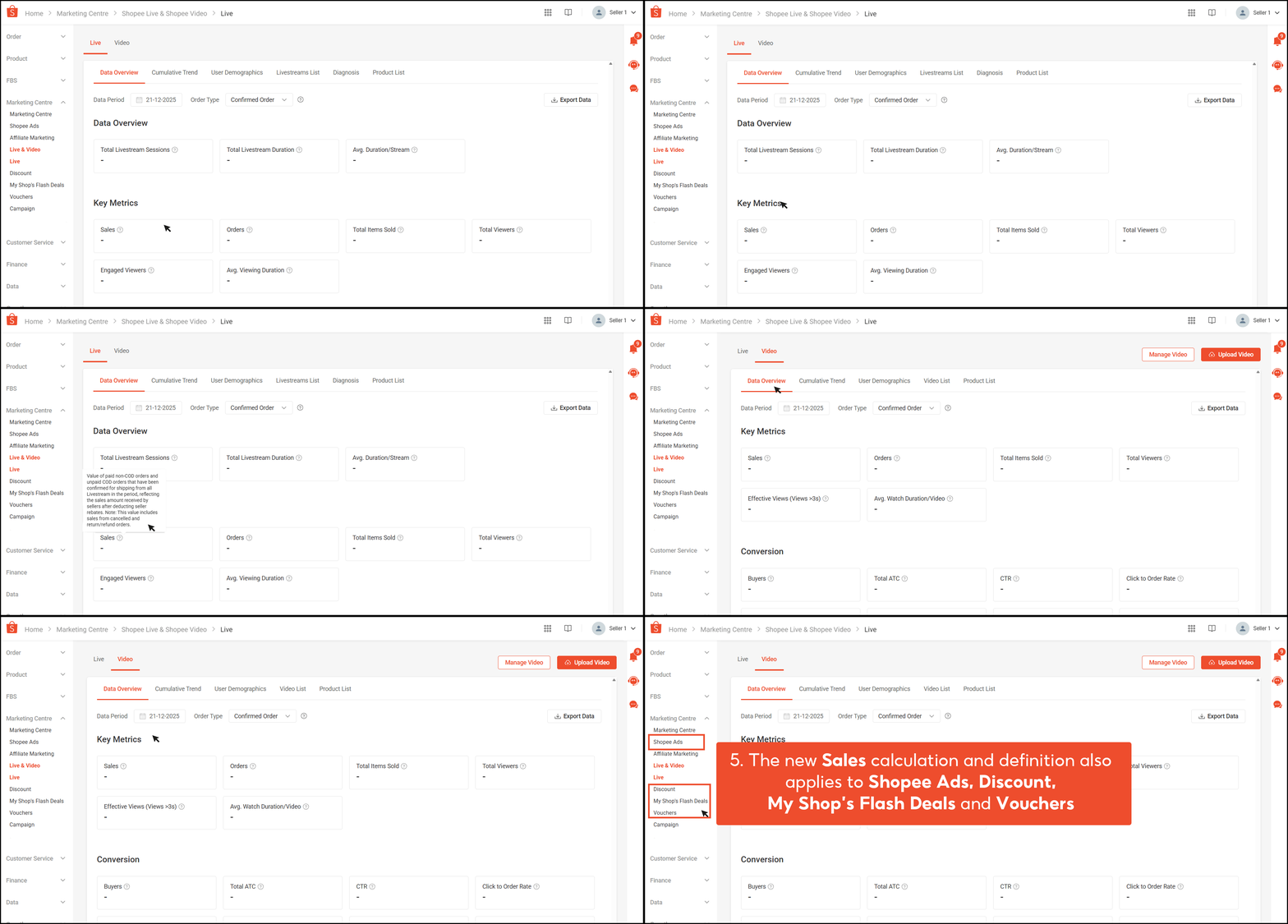
Shopee has applied the new Sales definition across key tools in Marketing Centre, including:
-
Shopee Ads
-
Live & Video
-
Discounts
-
Vouchers
-
My Shop’s Shocking Sale
Because all these tools now use the same Sales calculation, sellers can compare campaign performance more accurately, especially when running multiple promotions at the same time. The numbers you see are no longer inflated by buyer-paid fees and are more reflective of actual revenue received.
GMV Will Be Renamed to Sales in Shopee Ads (From 16 January 2026)
Important update for advertisers
Starting 16 January 2026, Shopee Ads will no longer display GMV (Gross Merchandise Value).
-
GMV will be replaced by Sales
-
The Sales metric follows the new seller-focused calculation
-
Buyer-paid fees are excluded
This means ad performance will now be measured based on what sellers actually earn, not the buyer’s total checkout amount. As a result, ad ROI analysis will be more realistic and easier to align with profit tracking.
New Metric Introduced: Sales Without Shopee Rebate
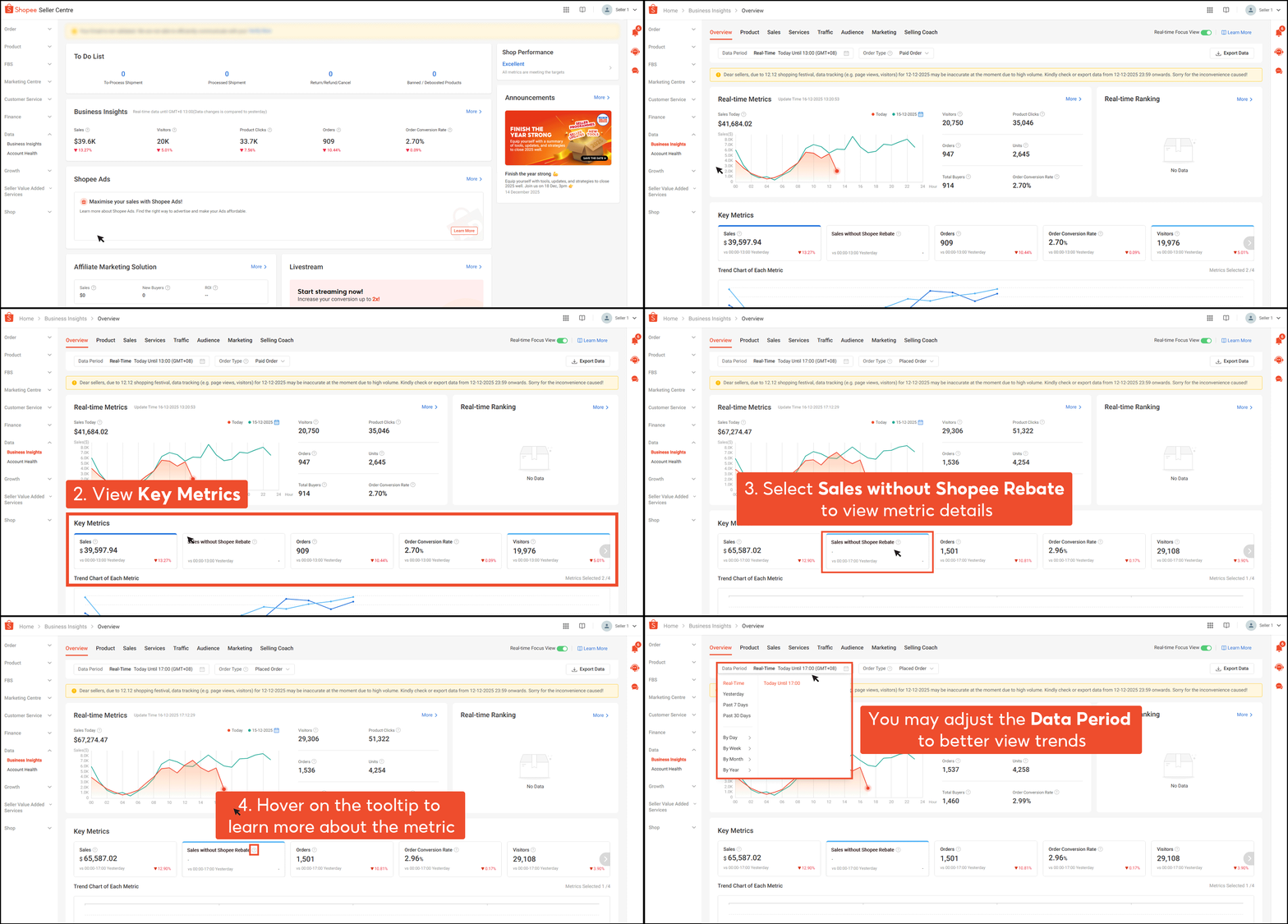
To give sellers better visibility into Shopee-funded subsidies, Shopee has added a new metric called Sales without Shopee Rebate.
What This Metric Shows
-
How much Shopee contributed through vouchers, coins, and item rebates
-
Your sales value before Shopee rebates are applied
How to View Sales Without Shopee Rebate
-
Go to Shopee Seller Centre
-
Select Business Insights
-
Choose Overview
-
Check Key Metrics
This metric is especially useful for sellers who want to:
-
Compare organic sales vs subsidised sales
-
Understand how dependent their revenue is on Shopee-funded promotions
Need the Buyer’s Actual Payment Amount? Check “My Orders”
If you need to see the exact amount paid by the buyer, including shipping and additional fees:
-
Navigate to My Orders
Note
-
The Total Buyer Payment shown in My Orders does not follow the new Sales calculation
-
This figure remains unchanged and reflects the full checkout amount paid by the buyer
This is the best reference for order reconciliation and customer payment verification.
New Insight for Advertisers: Ads Sales Contribution
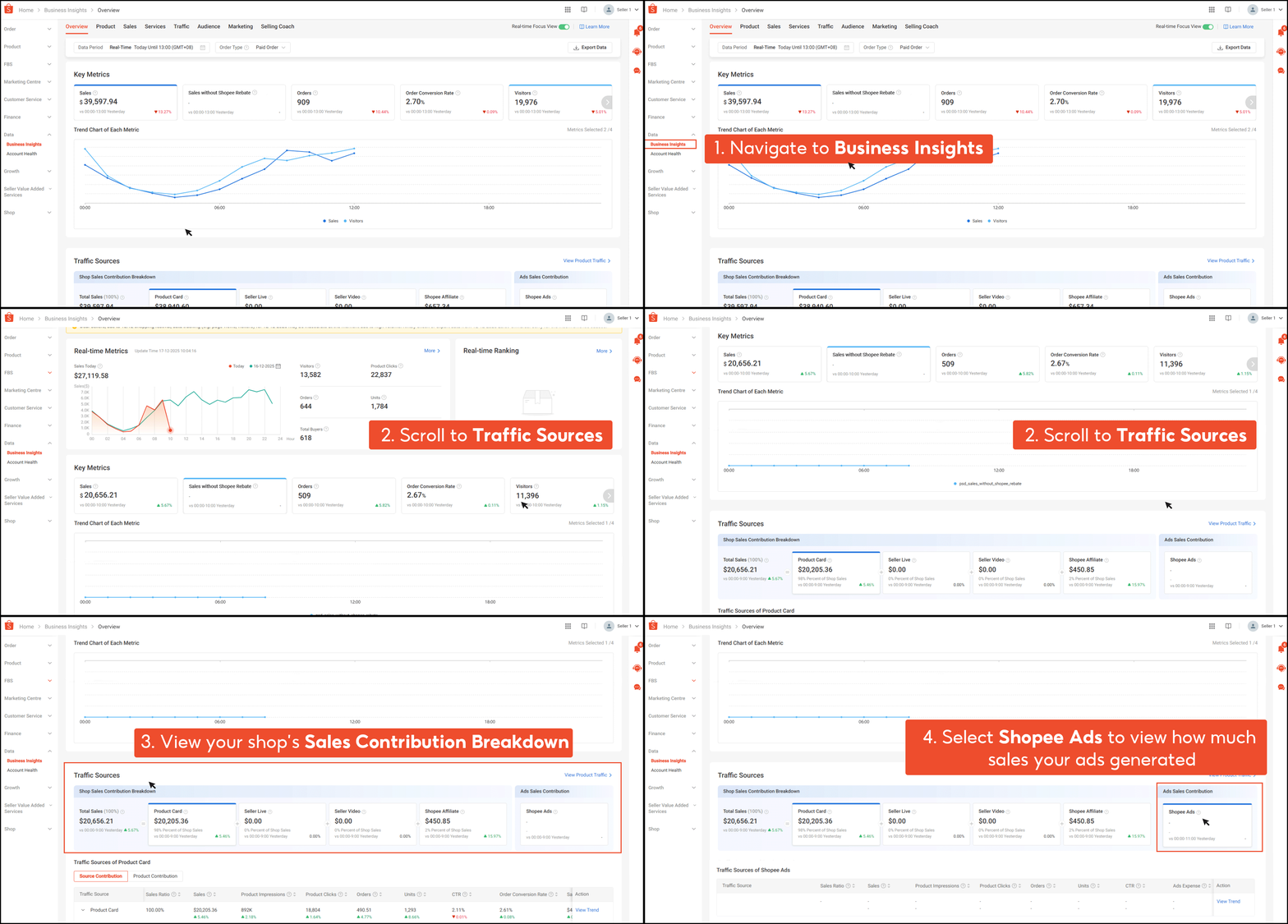
Shopee has also introduced a new metric to help sellers better understand ad-driven revenue.
What Is Ads Sales Contribution?
It shows:
-
How much revenue your shop earned directly from Shopee Ads
-
How ad-driven sales contributed to your total Shop Sales
Where to Find It
-
Shopee Seller Centre → Traffic Sources
What’s Included
-
Product Ads
-
Live & Video Ads
-
Brand Ads
What’s Excluded
-
Sales from other sellers’ products
-
Sales without ads
If you did not run any ads, Ads Sales Contribution will show RM0.
Making Sense of Shopee Sales Data with Real-Time Store Visibility
Shopee’s new sales data focuses on what sellers actually earn after rebates, but platform dashboards alone can make it hard to track orders, products, and shipments across multiple stores or warehouses. BigSeller’s Live Sales Monitor shows valid sales, top-selling SKUs, and warehouse fulfilment in real time, giving you a clear view of your operations as they happen. This makes it easier to spot slow-moving items, plan promotions, and manage inventory without relying solely on end-of-day reports.
See your store’s performance clearly and stay on top of every order, start monitoring with BigSeller today!
(All information in this article is based on Shopee Seller Education Hub: Why is my Sales data fluctuating?)