Shopee Live & Video Vouchers Guide for Sellers in Malaysia
Erra10 Mar 2026 05:12ENCopy link & title
For sellers who use Shopee Live or product videos, this update is important because it changes how buyers access these vouchers and how you should guide them during your livestream or content.

How Buyers Can Claim Shopee Live and Video Vouchers
Buyers can access these vouchers through two entry points in the Shopee app. If they do not enter through these sections first, the vouchers may not appear during checkout.
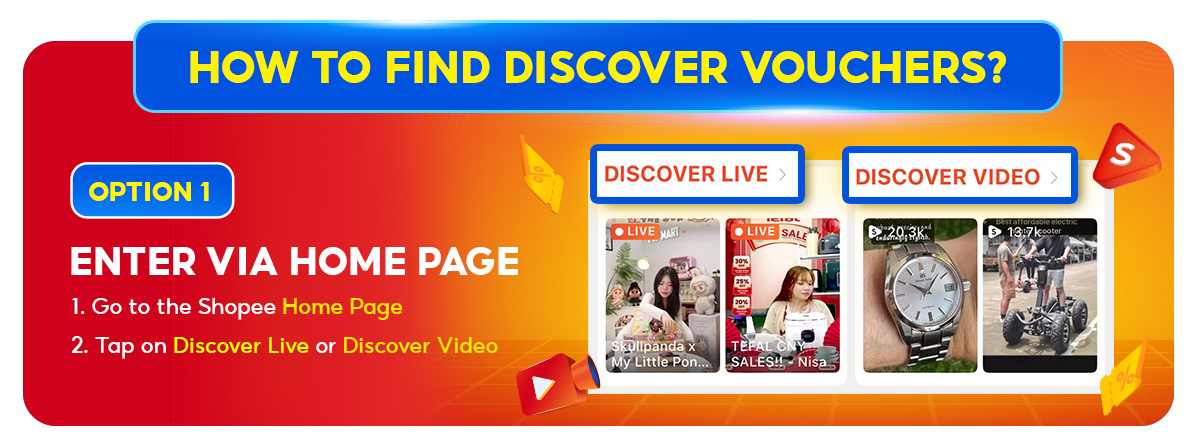
Option 1: Through the Shopee Home Page
Buyers can start from the Shopee homepage and browse livestream or video content.
Steps:
-
Go to the Shopee Home Page
-
Tap Discover Live or Discover Video
-
Start browsing livestreams or videos
Once they are inside these sections, buyers can claim and use the available Shopee Live or Video vouchers when checking out.
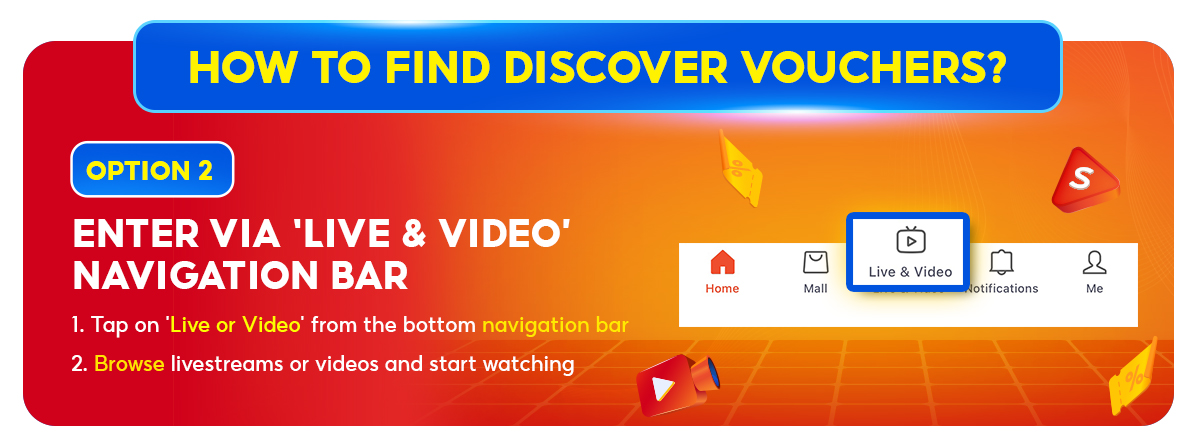
Option 2: Through the Live or Video Navigation Bar
Another entry point is through the navigation menu at the bottom of the Shopee app.
Steps:
-
Tap Live or Video on the bottom navigation bar
-
Scroll through the available livestreams or videos
-
Start watching content
After entering through these sections, buyers will be able to claim the vouchers and apply them during checkout.
Why This Matters for Shopee Sellers
The key point of this update is that the vouchers are linked to Shopee’s content discovery pages. Buyers must pass through these pages before the vouchers become available.
For sellers, this creates a few practical outcomes.
First, buyers who come through the Live or Video sections are usually already in a browsing or discovery mindset, which can lead to stronger engagement with your livestream or video content.
Second, the vouchers act as an extra incentive for viewers to complete their purchase while watching. If they see a product during the stream and know a voucher is available, they may check out immediately instead of leaving the session.
Why Shopee Sellers Need to Guide Buyers
Because Shopee Live and Video vouchers depend on specific entry points, some buyers may not see them if they open your product page directly or come from a shared link.
During livestreams, it helps to remind viewers where they should enter from.
You can guide them by telling them to:
-
Re-enter through Discover Live or Discover Video on the Shopee homepage
-
Access your stream from the Live or Video tab in the navigation bar
This small instruction can prevent confusion and ensure buyers can actually use the voucher.
A Small Tip During Your Livestream
If you are running a Shopee Live session, mention the voucher clearly while presenting the product.
For example, you might say something like:
“Make sure you claim the voucher before checkout,” or remind viewers that the voucher is available while they are watching the stream.
Simple reminders like this can encourage viewers to complete their purchase during the livestream instead of postponing it.
Managing Your Shopee Store More Efficiently
Shopee Live and Video vouchers are another sign that content is becoming a bigger part of the buying journey on Shopee. When buyers discover products while watching livestreams or browsing videos, small incentives like vouchers can make it easier for them to decide and check out on the spot. For sellers, the key is simply making sure viewers know where to enter and how to claim the voucher.
As your store grows, managing products, orders, stock, and campaigns across platforms can also become more complex. BigSeller helps simplify these daily tasks with an all-in-one, free e-commerce ERP built for Southeast Asian sellers, covering everything from product listing and order processing to inventory syncing and automation tools.
If you have not tried it yet, you can start using BigSeller for free to see how it fits into your Shopee store operations.
New users can also claim a 7-day VIP trial coupon to explore the platform’s advanced features.
Source: