Mastering Facebook Live Orders 2026: Tips for Filipino Sellers
Jayson07 May 2026 11:27ENCopy link & title
Facebook Live Order — or live selling via Facebook Live — remains one of the most effective ways for Filipino sellers to reach engaged buyers in real time. Even after changes to Meta’s official live shopping tools, millions of Filipinos continue to sell products through livestreams, generating income and community engagement every day.
In this guide, we’ll break down exactly what Facebook Live Order is in 2026, how to set it up, practical strategies for success, and common FAQs you need to know.
(1). Understanding Facebook Live (Live Selling)
Facebook Live is a built‑in feature of Meta’s Facebook platform that lets you broadcast real‑time video to your followers or Page audience. Viewers can watch, comment, react, and share while the stream happens — making it an incredibly engaging way to showcase products and sell directly.
Unlike the now‑deprecated Live Shopping feature (which allowed tagged products and playlists), Facebook Live still allows sellers to conduct live streams and manually manage orders via comments and messaging — especially in the Philippines, where the tool wasn’t officially launched but live selling culture remains strong.
(2). Why Facebook Live Matters Now
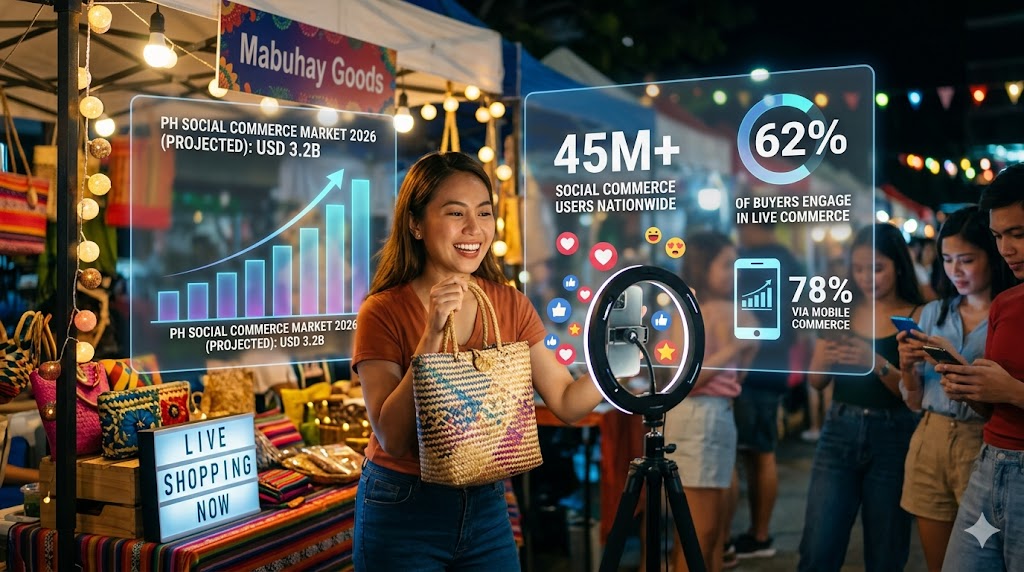
Social commerce continues its explosive growth in the Philippines. Projections estimate the social commerce market will reach around USD 3.2B in 2026, with about 62% of buyers engaging in live commerce sessions and 45 million social commerce users nationwide.
Here’s a simple text chart showing key stats:
Live Commerce Philippines 2026 (Projected)
• 📊 Market Value: USD 3.2 B
• 📈 Social Commerce Users: ~45 M
• 📉 Live Shopping Engagement: 62% of buyers
• 📱 Mobile Commerce: 78% via mobile devices
This means more buyers are watching live streams and purchasing products in them than ever before — making Facebook Live Order a high‑impact channel for sellers without big ad budgets.
Step‑by‑Step: From Zero to Live
(1). Prepare Your Facebook Page or Profile
Ensure your Page is established, active, and has regular posts. While there’s no hard rule, a Page with consistent engagement typically performs better when going live.
(2). Organize Products and Inventory
Have clear product photos, codes or SKUs, and pre‑list prices so viewers can easily identify what you’re selling during the live. Many sellers use keywords like “MINE” or “MINE [code]” in comments to signal purchases.
(3). Set Payment and Delivery Options
Decide if you’ll accept bank transfer, GCash, PayMaya, or Cash‑on‑Delivery. Make sure payment instructions are clear in your stream description and follow‑up messages.
(4). Go Live and Enable Interaction Tools
Use Meta’s Live Producer or app live mode. Include pinned comments or product lists so viewers understand how to order.
(1). Technical Issues
Delays in comment visibility, audio glitches, or poor lighting can hurt the professional feel of your livestream and reduce viewer engagement.
Solutions:
• Test your internet speed and lighting setup before going live
• Use a microphone or stabilizer if needed
• Keep backup devices ready
(2). Order Accuracy and Customer Expectations
Mistakes during order capture or unclear payment instructions lead to confusion.
Best Practices:
• Confirm orders individually via Messenger after live selling ends
• Send digital invoices and payment links
• Provide clear delivery timelines
(3). Inventory Errors and Overselling
Without real‑time inventory sync, there’s a risk of overselling.
Tip:
Use inventory tools or export stock lists before your live to cross‑check.
For e-commerce sellers operating across multiple channels, manually recording livestream orders, cumbersome cross-platform operations, outdated inventory, and low shipping efficiency have consistently been core pain points hindering sales growth.
If you face similar challenges, BigSeller's Facebook Live Order feature offers a readily implementable livestream e-commerce operation solution.
① One-click authorization to Facebook Meta, secure and stable.
Log in to BigSeller, go to Settings → Authorization Center → Other Authorizations → Facebook, and complete the authorization to connect your live streams, posts, products, and orders.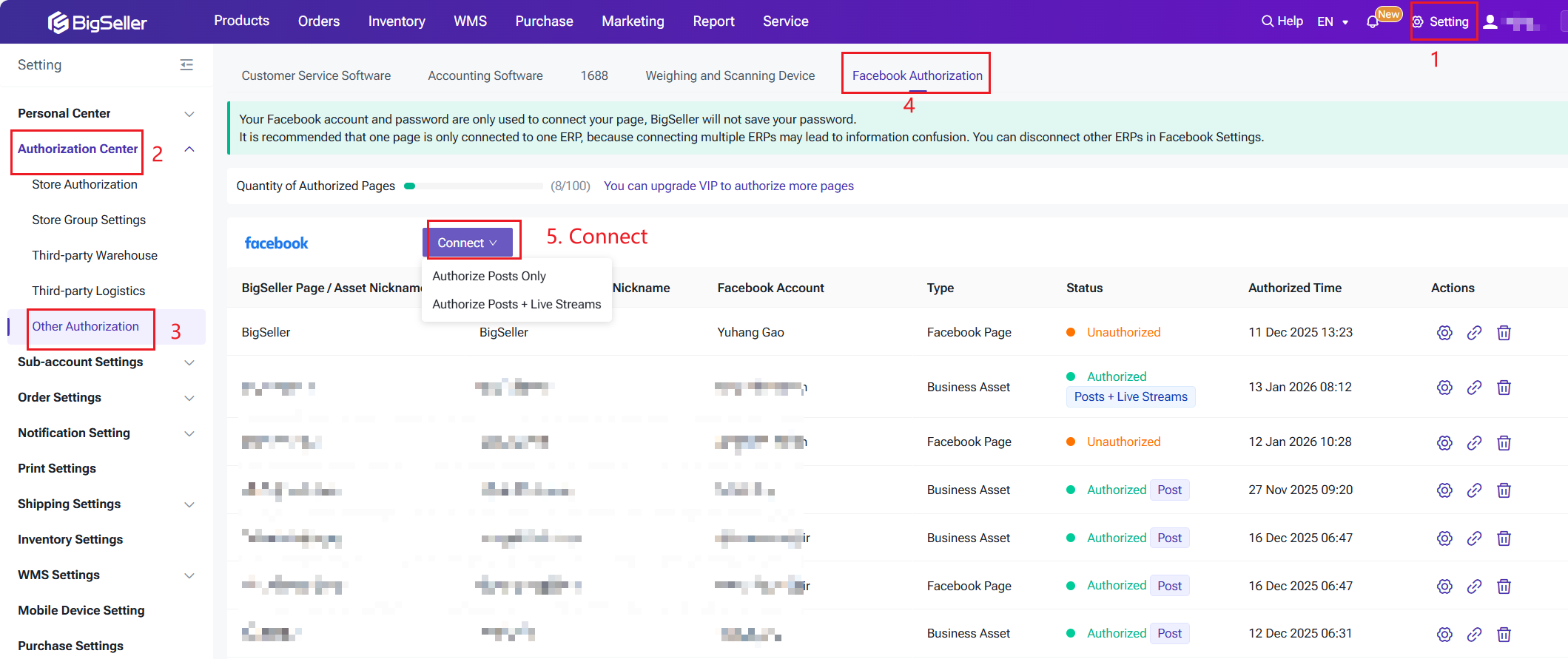
② One-click listing of existing products on Facebook, no need for duplicate uploading
Sellers already managing products on Shopee, TikTok Shop, and Lazada through BigSeller can directly select existing SKUs and publish them to Facebook with one click, achieving: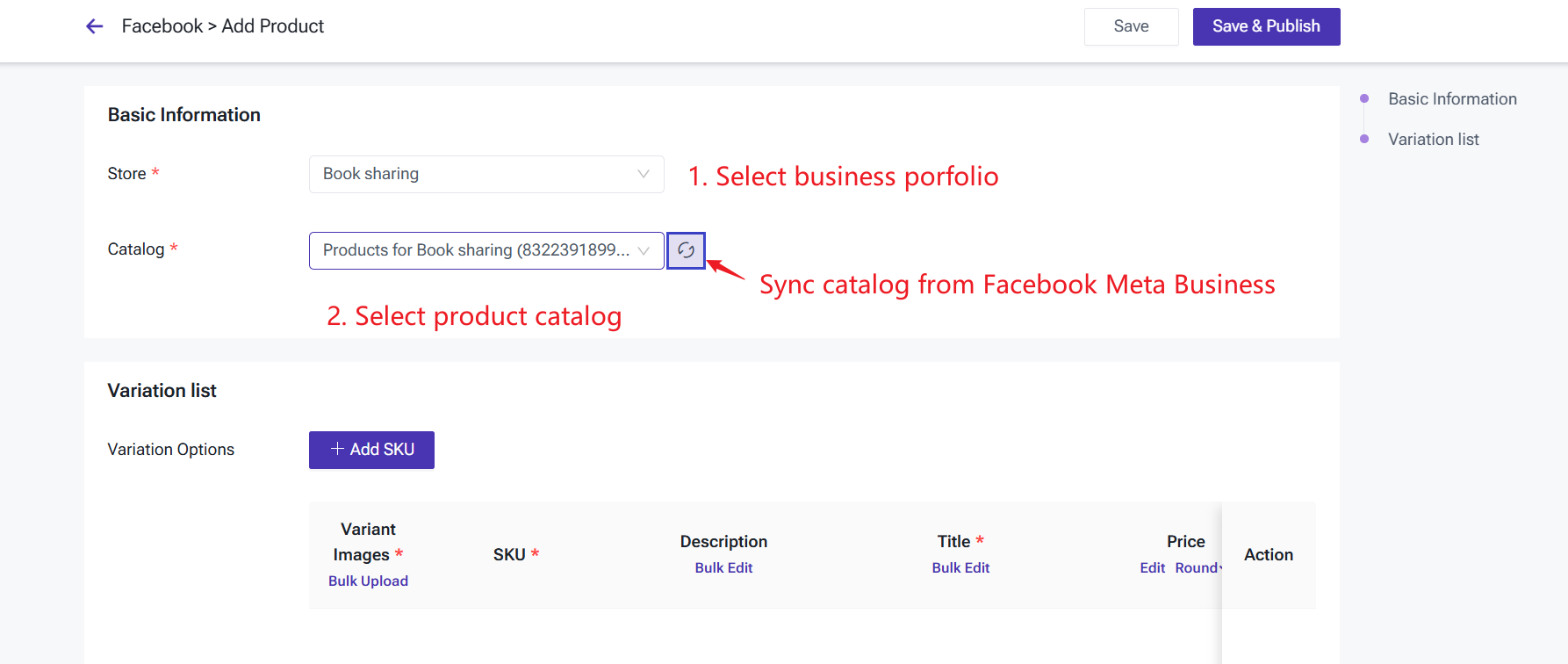
③ Facebook live order automatic sync, improving efficiency by 90%
During Facebook live streams, BigSeller automatically captures live stream orders, automatically creates orders, and initiates the processing flow: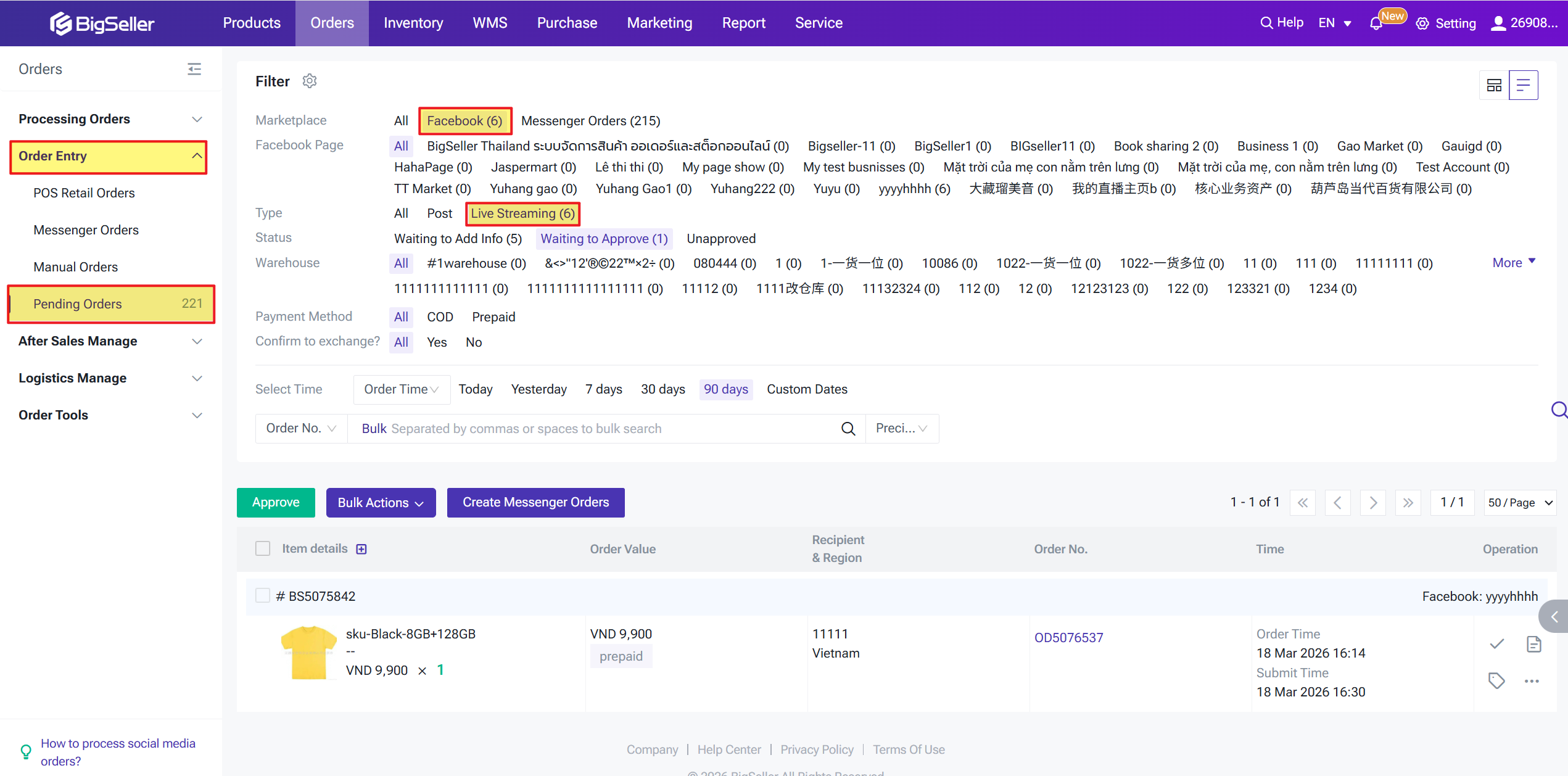
Q: Do I still need the old Live Shopping feature to sell live?
A: No. In the Philippines, Facebook Live sells via comments and manual order capture — and this is still widely practiced even after Meta removed the official “Live Shopping” functionality.
Q: Can I go live with a small audience?
A: Yes — small audiences can convert well. Consistency and engagement often matter more than initial view count.
Q: What type of sellers is BigSeller suitable for?
A: BigSeller is designed for all types of sellers, from startups to large enterprises, and supports 16+ Southeast Asian e-commerce platforms.
Q: How much does BigSeller charge?
A: BigSeller offers a free version for all sellers, which should cover most everyday needs. There are also flexible subscription packages available to cater to different seller requirements.

In this guide, we’ll break down exactly what Facebook Live Order is in 2026, how to set it up, practical strategies for success, and common FAQs you need to know.
1. What Is Facebook Live Order and Why It Matters in 2026
(1). Understanding Facebook Live (Live Selling)
Facebook Live is a built‑in feature of Meta’s Facebook platform that lets you broadcast real‑time video to your followers or Page audience. Viewers can watch, comment, react, and share while the stream happens — making it an incredibly engaging way to showcase products and sell directly.
Unlike the now‑deprecated Live Shopping feature (which allowed tagged products and playlists), Facebook Live still allows sellers to conduct live streams and manually manage orders via comments and messaging — especially in the Philippines, where the tool wasn’t officially launched but live selling culture remains strong.
(2). Why Facebook Live Matters Now
Social commerce continues its explosive growth in the Philippines. Projections estimate the social commerce market will reach around USD 3.2B in 2026, with about 62% of buyers engaging in live commerce sessions and 45 million social commerce users nationwide.
Here’s a simple text chart showing key stats:
Live Commerce Philippines 2026 (Projected)
• 📊 Market Value: USD 3.2 B
• 📈 Social Commerce Users: ~45 M
• 📉 Live Shopping Engagement: 62% of buyers
• 📱 Mobile Commerce: 78% via mobile devices
This means more buyers are watching live streams and purchasing products in them than ever before — making Facebook Live Order a high‑impact channel for sellers without big ad budgets.
2. How to Set Up Your Facebook Live Order System
Step‑by‑Step: From Zero to Live
(1). Prepare Your Facebook Page or Profile
Ensure your Page is established, active, and has regular posts. While there’s no hard rule, a Page with consistent engagement typically performs better when going live.
(2). Organize Products and Inventory
Have clear product photos, codes or SKUs, and pre‑list prices so viewers can easily identify what you’re selling during the live. Many sellers use keywords like “MINE” or “MINE [code]” in comments to signal purchases.
(3). Set Payment and Delivery Options
Decide if you’ll accept bank transfer, GCash, PayMaya, or Cash‑on‑Delivery. Make sure payment instructions are clear in your stream description and follow‑up messages.
(4). Go Live and Enable Interaction Tools
Use Meta’s Live Producer or app live mode. Include pinned comments or product lists so viewers understand how to order.
3. Common Challenges and How to Overcome Them
(1). Technical Issues
Delays in comment visibility, audio glitches, or poor lighting can hurt the professional feel of your livestream and reduce viewer engagement.
Solutions:
• Test your internet speed and lighting setup before going live
• Use a microphone or stabilizer if needed
• Keep backup devices ready
(2). Order Accuracy and Customer Expectations
Mistakes during order capture or unclear payment instructions lead to confusion.
Best Practices:
• Confirm orders individually via Messenger after live selling ends
• Send digital invoices and payment links
• Provide clear delivery timelines
(3). Inventory Errors and Overselling
Without real‑time inventory sync, there’s a risk of overselling.
Tip:
Use inventory tools or export stock lists before your live to cross‑check.
4. Solution: BigSeller × Facebook Meta--- Live Order Closed-Loop Processing
For e-commerce sellers operating across multiple channels, manually recording livestream orders, cumbersome cross-platform operations, outdated inventory, and low shipping efficiency have consistently been core pain points hindering sales growth.
If you face similar challenges, BigSeller's Facebook Live Order feature offers a readily implementable livestream e-commerce operation solution.
① One-click authorization to Facebook Meta, secure and stable.
Log in to BigSeller, go to Settings → Authorization Center → Other Authorizations → Facebook, and complete the authorization to connect your live streams, posts, products, and orders.
- One public page is bound to only one ERP system to avoid data corruption.
- Passwords are not saved; official secure authorization.
- Supports unified management of multiple pages.
② One-click listing of existing products on Facebook, no need for duplicate uploading
Sellers already managing products on Shopee, TikTok Shop, and Lazada through BigSeller can directly select existing SKUs and publish them to Facebook with one click, achieving:
- One-stop editing, multi-platform synchronization
- Real-time inventory tracking to prevent overselling
- No need for duplicate uploading, simply edit products
③ Facebook live order automatic sync, improving efficiency by 90%
During Facebook live streams, BigSeller automatically captures live stream orders, automatically creates orders, and initiates the processing flow:
- No manual order recording or entry required.
- Orders are automatically approved after buyers fill in their information.
- Orders are automatically matched to SKUs, preventing order delays and loss.
- Live stream orders and platform orders are processed, printed, and shipped uniformly.
5. FAQ
Q: Do I still need the old Live Shopping feature to sell live?
A: No. In the Philippines, Facebook Live sells via comments and manual order capture — and this is still widely practiced even after Meta removed the official “Live Shopping” functionality.
Q: Can I go live with a small audience?
A: Yes — small audiences can convert well. Consistency and engagement often matter more than initial view count.
Q: What type of sellers is BigSeller suitable for?
A: BigSeller is designed for all types of sellers, from startups to large enterprises, and supports 16+ Southeast Asian e-commerce platforms.
Q: How much does BigSeller charge?
A: BigSeller offers a free version for all sellers, which should cover most everyday needs. There are also flexible subscription packages available to cater to different seller requirements.
BigSeller is the ultimate e-commerce SaaS ERP system designed for Southeast Asian sellers, aiming to help you improve efficiency and expand more business channels. It simplifies all processes on one dashboard—from product listing and order processing to inventory management, financial tracking, and automated operations. Customized subscription plans are also available for different types of sellers.
Vist our website to know more 👉BigSeller ERP
Vist our website to know more 👉BigSeller ERP
BigSeller-Blog Senior Writer: Jayson
Sir Jayson has worked in well-known e-commerce companies such as Shopee and TikTok Shop, helping hundreds of sellers to deepen their e-commerce industry, expand their business, and eventually become high-quality sellers.