How Shopee Sellers in Malaysia Can Migrate From Spreadsheets to an ERP Without Losing Order History
Erra17 Jul 2026 05:40ENCopy link & title

Why Do Spreadsheets Break Down for Shopee Sellers in Malaysia?
Spreadsheets work fine when you're processing a handful of orders a day. The cracks start showing once volume climbs.
-
Manual entry has a measurable error rate. A study published in the peer-reviewed journal Behavior Research Methods (Barchard & Pace, 2011) measured manual data entry error rates of around 1% per field for skilled operators, rising to roughly 4% for average operators. On a spreadsheet where staff are copying order IDs, SKUs, quantities, and buyer details by hand, that error rate compounds fast.
-
Spreadsheets themselves are error-prone, independent of who's typing. A review of published research on real-world operational spreadsheets (Panko, 2005) found that 94% of the spreadsheets examined contained at least one error, with an average of 5.2% of all cells checked containing a mistake.
-
Malaysian SMEs specifically lag in exactly this layer. Survey data on SME digital adoption in Malaysia found that while over 85% of businesses had adopted basic computing and connectivity tools, only around 14% had adopted inventory management software and just 11% had adopted order fulfilment software, the exact back-end functions a spreadsheet is being asked to stand in for.
None of this is a spreadsheet flaw exactly, it's just not what spreadsheets were built for. An ERP exists to take over exactly this kind of repetitive, error-prone syncing.
Will I Lose My Order History When I Switch to an ERP?
No, not if you migrate correctly. The risk isn't the ERP itself, it's how the connection is made. Malaysian sellers lose order history when they try to manually re-key old orders into a new system, or when they rely on a one-time CSV export instead of a live API connection that pulls data directly from Shopee.
The safer path is to connect your ERP to your store through Shopee's official Open Platform API. Once authorized, the ERP reads your shop's existing product catalog and orders records straight from Shopee's servers rather than depending on what you've already logged in a spreadsheet. That means even orders you never got around to entering manually are still recoverable, because they were always sitting in Shopee's system, your spreadsheet was just an incomplete copy of it.
Which ERP Handles Shopee Order History Migration Best in Malaysia?
| Features |
BigSeller |
Ginee |
EasyStore |
|
Built primarily for |
Multi-platform marketplace ops |
Custom warehouse routing |
Branded website + POS |
|
Free plan |
Yes, permanent (≤1,500 orders/mo, 3 stores) |
No (7-day trial only) |
No |
|
Shopee order history sync on connect |
Automatic |
Automatic, more setup required |
Automatic, storefront-first |
|
Best fit for this migration |
Malaysian sellers moving spreadsheets straight into marketplace order management |
Malaysian sellers with complex, custom fulfillment workflows |
Malaysian sellers who also want a branded webstore alongside Shopee |
How Do You Migrate From Spreadsheets to an ERP Step by Step?
-
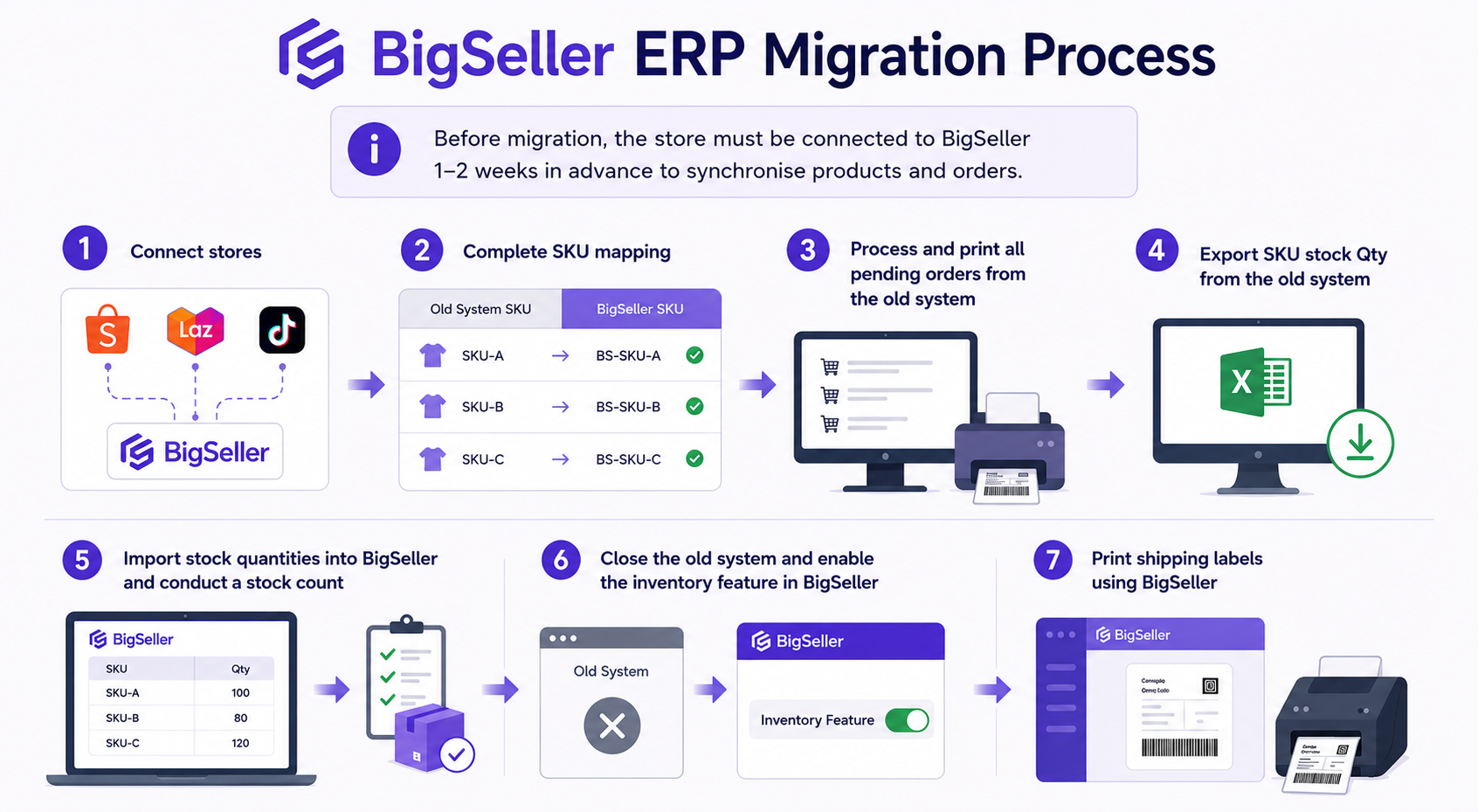
Export your existing spreadsheet as a backup first. Before touching anything, save a dated copy of your current order and inventory sheet. This is your fallback, not your migration method.
-
Choose an ERP with direct Shopee API integration. Confirm it connects via Shopee's official authorization flow, not a manual upload tool.
-
Connect your Shopee store to the ERP. Log in, authorise the connection, and let the system pull your product listings and order history automatically.
-
Let the initial sync complete before making changes. Depending on your order volume, this can take anywhere from a few minutes to a few hours. Don't edit stock or process new orders in Shopee Seller Center mid-sync.
-
Cross-check SKUs between the ERP and your spreadsheet. This is where most data mismatches happen, a product renamed or re-listed on Shopee may sync as a "new" item rather than matching your old spreadsheet row.
-
Reconcile stock quantities manually once. After the sync, compare actual physical stock against what the ERP shows, and correct any drift in one clean adjustment.
-
Run both systems in parallel for one order cycle. Keep the spreadsheet open (read-only) for about a week while you confirm the ERP is capturing every new order correctly.
-
Retire the spreadsheet only after a full order cycle has passed cleanly. This includes at least one return, one refund, and one payout cycle, since these are where syncing gaps most often surface.