How to Contact Shopee Seller Support in Malaysia (2026)
Erra19 Aug 2026 03:16ENCopy link & title
Need help with your store but not sure where to contact Shopee? You can start with Seller Assistant, Shopee's customer service feature available on Seller Center and the Seller Center App.
You can use Seller Assistant to ask about orders, shop management, platform features, Shopee programs, shop performance, and other operational matters. It provides relevant information, directs you to the appropriate support flow, and suggests the next steps based on your inquiry.
If Seller Assistant cannot resolve your issue, you can be connected to a live agent for further assistance. However, the availability of live agent support depends on your seller type.
Here's how to access Seller Assistant and what you need to know about contacting Shopee Seller Support in Malaysia.

What Is a Shopee Seller Assistant?
Shopee Seller Assistant is a customer service feature available on Seller Center and the Seller Center App. It helps you find information and guidance for different seller-related concerns without having to search through Shopee's resources yourself.
You can ask Seller Assistant about topics such as:
-
Shopee platform features
-
Shop Management
-
Shopee programs
-
Shop performance
-
Orders and other operational concerns
Based on your question, Seller Assistant can guide you to the relevant support flow, provide links to Shopee resources, or recommend what you should do next.
What Can You Do With a Shopee Seller Assistant?
Shopee Seller Assistant has several features that can make it easier to find the information you need.
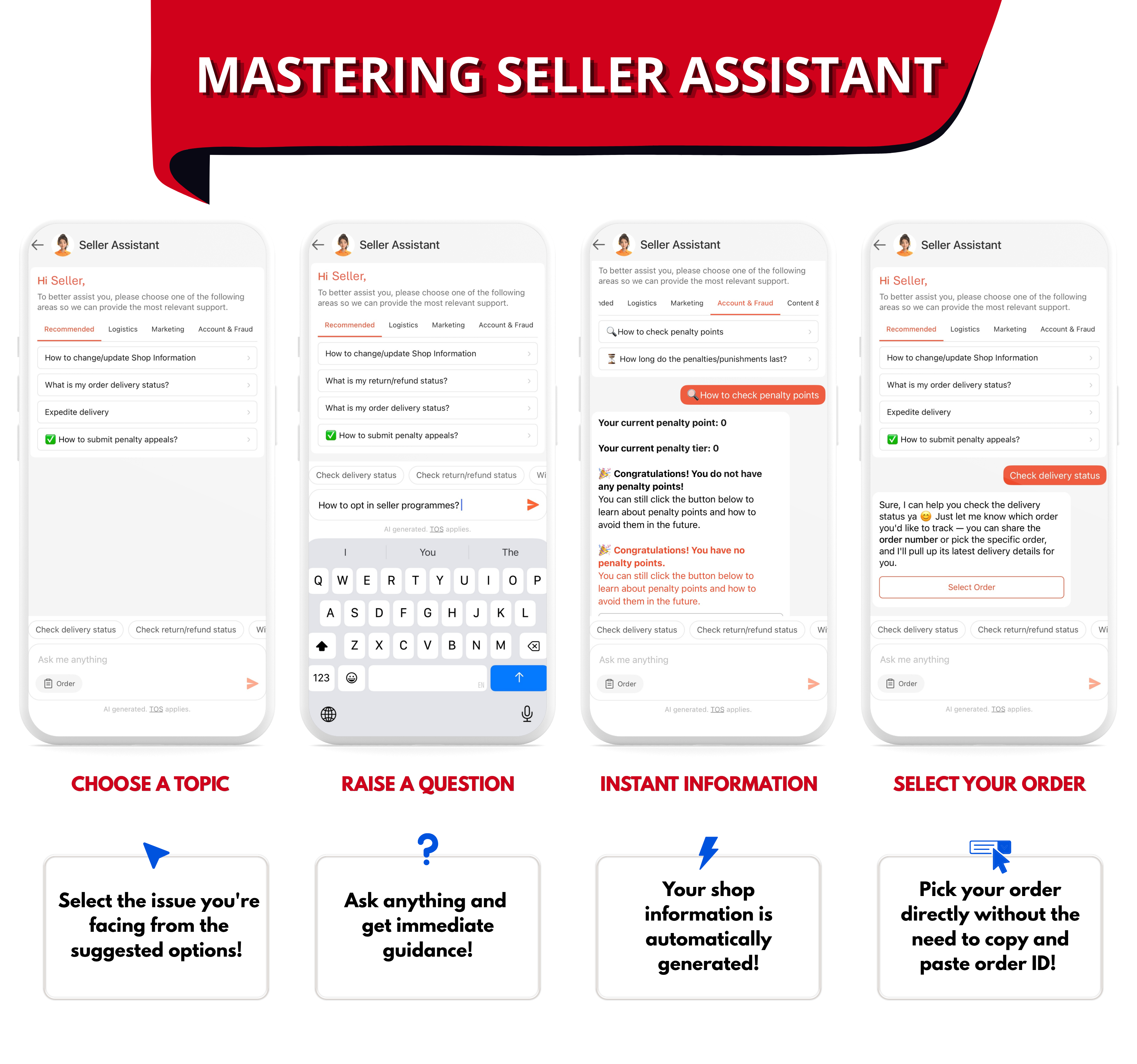
Choose a topic
If you are not sure how to describe your issue, you can select a topic from the suggested options. Seller Assistant will then guide you based on the issue you selected.
Ask your own question
You can also type your question directly into the chat. Seller Assistant provides immediate guidance based on your inquiry.
Get information about your shop
Your shop information can be generated automatically, so you can get information relevant to your account without having to enter the details manually.
Select an order directly
For order-related questions, you can select the relevant order directly through the support flow. You do not need to copy and paste the order ID manually.
How to Access Seller Assistant on the Seller Center App
You can start a conversation with a Seller Assistant directly from the Seller Center App.
Follow these steps:
-
Open the Seller Center App and go to Home.
-
Click Seller Assistant.
-
Select Contact Shopee.
-
Type your message to start chatting.
The Seller Assistant will provide guidance based on your question. If it cannot resolve your inquiry, you will be connected to a live agent for further assistance.
When Is Shopee Seller Support Available?
Live agent support hours depend on whether you are a managed or unmanaged seller.
Managed sellers are sellers who have a Relationship Manager. They can access live agent support from 9:00 AM to 5:00 PM, Monday to Friday, excluding public holidays.
Unmanaged sellers can access live chat 24 hours a day, including public holidays.
So, if you need to speak to a live agent, your available support hours will depend on your seller type.
What Other Shopee Support Channels Are Available?
Some support features may not be available through the Seller Center App.
The Internet Call feature is currently unavailable via the Seller Center App. The My Inquiries feature is also currently unavailable through the app.
Shopee has also discontinued email as a contact channel, so sellers should use the available support options in Seller Center and Seller Assistant instead.
What If the Shopee Seller Assistant Cannot Resolve Your Issue?
You can still get further assistance if the Seller Assistant cannot answer your question or resolve your issue.
The support flow can connect you to a live agent, who can help with issues that require further investigation or assistance. When submitting your inquiry, provide as much relevant information as possible and select the relevant order if your question is order-related.
This can help the support team understand your issue and direct you to the appropriate solution more efficiently.
Manage Your Shopee Store More Easily With BigSeller
Getting help from Shopee is useful when you run into platform or order-related issues, but managing a store involves much more than contacting support. If you sell across multiple channels, keeping track of orders, inventory, products, and daily operations can quickly become time-consuming.
BigSeller helps you manage your e-commerce operations from one place, with tools for order management, inventory, product management, and more. Instead of switching between different platforms to handle your daily tasks, you can manage more of your store operations from a single dashboard.
Want to see how it works? Try BigSeller for free and get a 7-day VIP trial coupon to explore its features.