Choosing Inventory Management Software for Marketplace Sellers in the Philippines
Jayson03 Sep 2026 08:59ENCopy link & title
BigSeller is a suitable inventory management system for Philippine marketplace sellers who need connected product and stock records, purchase receiving, warehouse transfers, stock counts, and WMS-supported fulfillment alongside their marketplace orders.
The best choice depends on how your business receives, stores, counts, and ships products, not simply how many platforms a tool connects. For sellers using Shopee, Lazada, and TikTok Shop, inventory software should help explain stock movements as well as maintain listing quantities.
1. When Separate Store and Stock Records Become Difficult to Manage
A seller may list the same product under different names and variation codes across marketplaces. Meanwhile, warehouse staff receive new supplies, dispatch orders, and move products between storage locations. If these activities are recorded separately, a quantity in Seller Center may not explain what is actually happening in the warehouse.
A single store with few products and one operator may still manage adequately with Seller Center and consistent records. The need for dedicated inventory software becomes clearer when several stores share products, more people handle stock, or receiving and fulfillment are difficult to reconcile. These are practical selection triggers, not fixed sales-volume thresholds.
2. What to Compare Before Choosing Inventory Software
Start with the tasks your team performs repeatedly. A useful system should connect product identity, stock quantities, and the operations that change those quantities.
| Selection area | What to check |
|---|---|
| Product records | Can marketplace listings and variations be linked to the correct physical SKU? |
| Stock visibility | Can staff distinguish warehouse stock, order allocations, available quantities, and incoming goods? |
| Inventory operations | Can the team record purchase receipts, transfers, and physical stock counts? |
| Warehouse execution | Does the system support the picking, checking, and packing workflow your team needs? |
These questions help distinguish inventory management from a tool that only updates online listing quantities. Choose features that solve recurring work, and confirm the setup and account requirements for the functions you intend to use.

3. How BigSeller Manages Inventory Beyond Listing Quantities
BigSeller connects Store SKUs with Merchant SKUs representing the products managed in inventory. Warehouse quantities and order handling then use those relationships. Accurate starting quantities and product mapping remain essential; the inventory management setup guide explains the preparation involved.
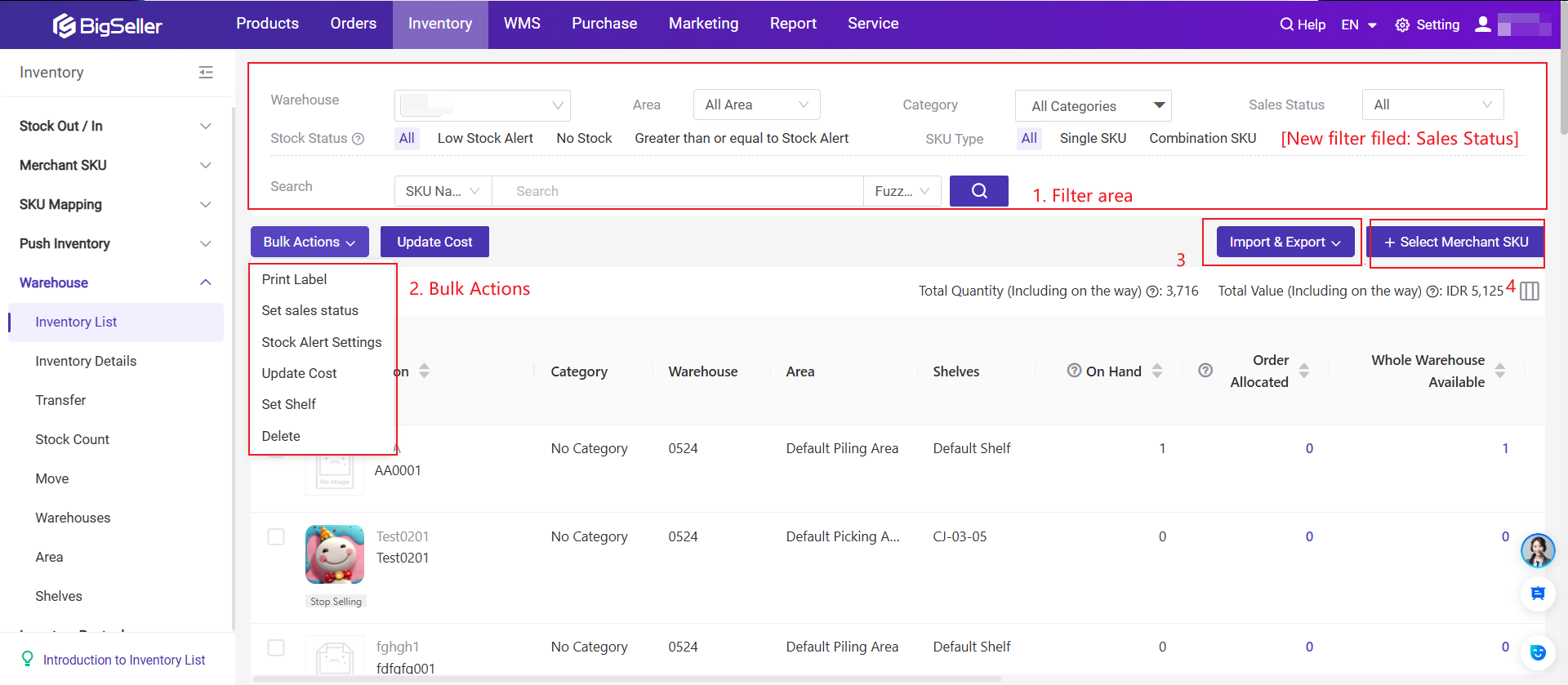
The Inventory List distinguishes On Hand, Allocated, Available, Promo Reserved, and On The Way quantities. Sellers can maintain shelf information, set stock-alert thresholds, and export SKU information. This provides more context than a single stock number, including whether goods are already committed to orders or still inbound.
For replenishment, BigSeller supports creating or importing purchase orders and recording received quantities. Purchase receiving supports partial receipts and scanning, allowing staff to record what arrived rather than assume the entire purchase was delivered.
For businesses with multiple warehouses, inventory transfers connect dispatch from one warehouse with receipt at another and generate stock-in and stock-out records. Moving goods is therefore a recorded operation, not just an informal change to two spreadsheets.
BigSeller also supports stock counts by Merchant SKU, shelf, or warehouse. Successful count results can adjust stock gains or losses, with related Stock Movement records. Counting can restrict operations on the inventory being counted, so teams should plan around fulfillment and review any failed results.
4. When WMS Should Be Part of Your Decision
Inventory management explains what stock you have and how it changes. A warehouse management system, or WMS, also organizes how staff perform warehouse work. This becomes relevant when picking, sorting, checking, and packing require coordination across a larger order queue.
BigSeller's WMS supports wave-based fulfillment. Eligible orders are grouped into waves, and staff follow configured picking, sorting, packing, and shipping steps. The WMS wave shipment guide covers picker assignment, picking documents, scanning, package handling, and shipment.
WMS is not a switch that every small seller needs immediately. Inventory must be enabled, Store SKUs mapped, and wave strategies configured before use; printing and equipment requirements also need preparation. Review the wave settings and prerequisites before changing an active warehouse workflow. Choose WMS when coordinated execution is part of the problem, not merely because the feature exists.

5. Test an Inventory Workflow Before You Decide
Use a small, representative set of products to evaluate the system. For example, choose one product with two variations sold in multiple stores. Confirm that each listing matches the right physical item and warehouse quantity.
Then review an actual purchase receipt, an existing order, and a completed stock movement. Can the operator explain what changed and why? If multiple warehouses matter, examine a transfer and its receiving record. If WMS matters, walk through a prepared demonstration before altering live fulfillment.
Finally, let another team member repeat the review. A system should make daily work understandable beyond its initial setup. For separate implementation questions, see how to synchronize marketplace inventory and reduce multichannel overselling risks.
For Philippine marketplace sellers, choose inventory software around daily stock operations. BigSeller brings product records, inventory control, purchasing, transfers, counting, and WMS workflows into one system, allowing teams to evaluate both stock visibility and warehouse execution without treating synchronization as the entire solution.