How to Bulk Watermark and Translate Product Images Across Multiple Ecommerce Platforms in Malaysia?
Erra04 Sep 2026 08:50ENCopy link & title
Multi-channel sellers in Malaysia can bulk watermark and translate hundreds of product images in minutes by using a centralised ERP with built-in image editing, instead of exporting photos into separate apps one by one. BigSeller does this directly inside the product listing workflow, letting sellers apply a watermark template and translate on-image text across their entire catalog before pushing listings to Shopee, Lazada, TikTok Shop, and their own website.

Why Is Image Localisation Non-Negotiable for MY Marketplaces?
The language gap. Starting under Malaysia's Consumer Protection (Electronic Trade Transactions) Regulations 2024 (CPETTR 2024), product titles, descriptions, and seller information are required to be displayed in Bahasa Malaysia. If your listings were imported from Taobao, written in English, or built for a different market, this affects your store directly, and raw, un-localised text tends to convert worse with Malaysian buyers even before compliance enters the picture.
The copycat problem. Image scraping between competing sellers is common on local marketplaces. A well-performing product photo can be lifted and reused by another seller within days of going live, with no way to trace it back to your store. A brand watermark doesn't stop this outright, but it makes your image far less useful to whoever copies it.
The mega-campaign crunch. Preparing store graphics for mega sales across separate seller backends is its own seasonal bottleneck, the same promotional frame or "Free Shipping" banner needs to go up on hundreds of listings at once, and then come down cleanly once the campaign ends.
How Do You Bulk Translate Product Images and Listings Into Bahasa Malaysia via AI?
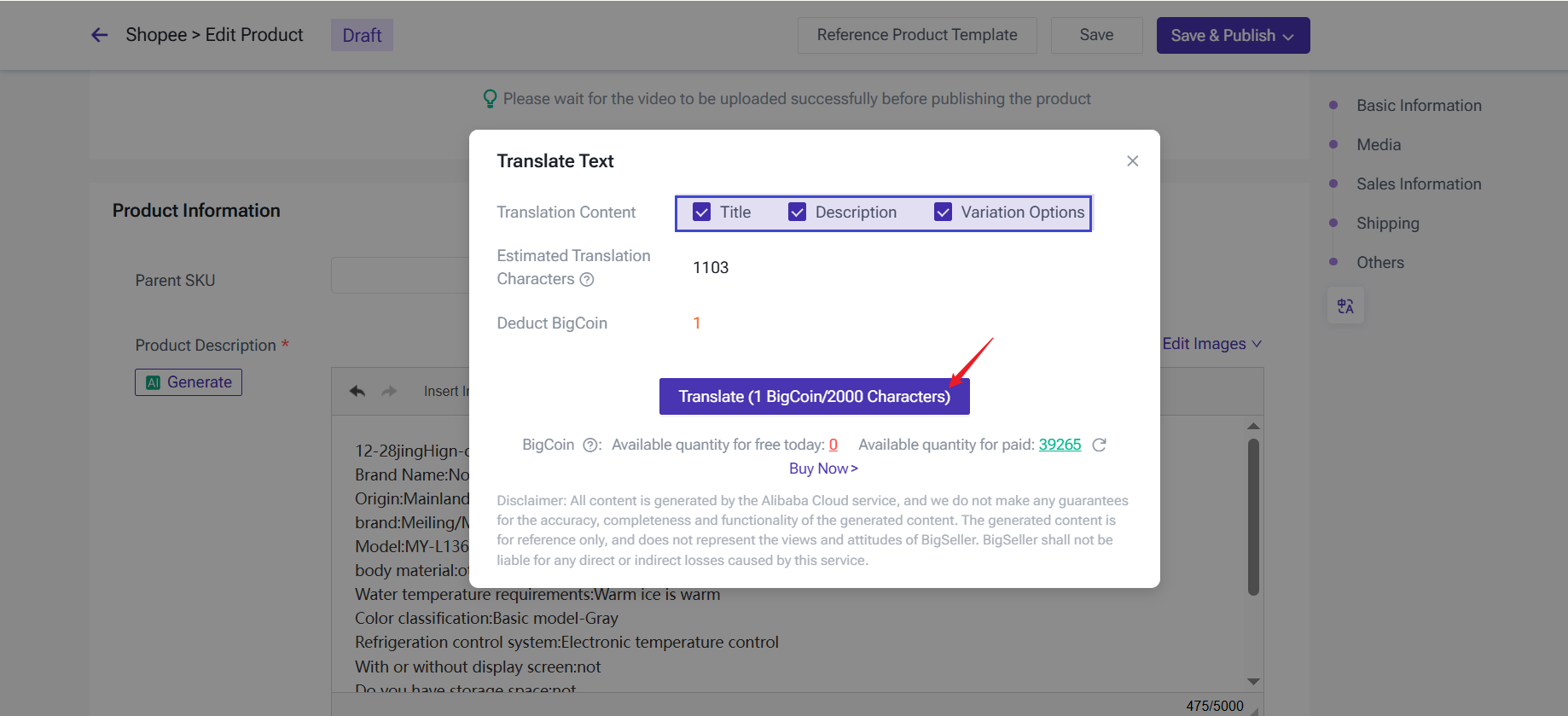
From supplier to local listing. BigSeller's Malay Translation Tool automatically detects whether your original content is in Chinese or English, then translates it into Bahasa Malaysia. For listing text such as titles, descriptions, and variations, this can be applied across multiple products at once through Bulk Edit. For text embedded inside the image itself, such as an infographic or size chart carried over from a supplier's original photo, translation is applied per listing, either right after the product is imported through BigSeller's scraping tool or when editing an individual product, giving you a chance to check how the translated overlay looks before it goes live.
Eliminating manual downloads. The old method such as downloading the image, uploading it to a separate translation app, downloading the result, then uploading it again to your marketplace listing is slow and easy to get wrong across hundreds of SKUs. Doing this inside BigSeller removes those extra hops entirely.
One-click translation converts product titles, descriptions, and variations into Malay, and can also generate natural, SEO-friendly Malay titles and descriptions from scratch rather than a literal translation that can sound stiff.
Three ways to apply it: While scraping a product from a supplier site, while editing a single draft or active listing, or across multiple listings at once in Bulk Edit for text fields.
How Do You Bulk Watermark Listings Across Shopee, Lazada & TikTok Shop?
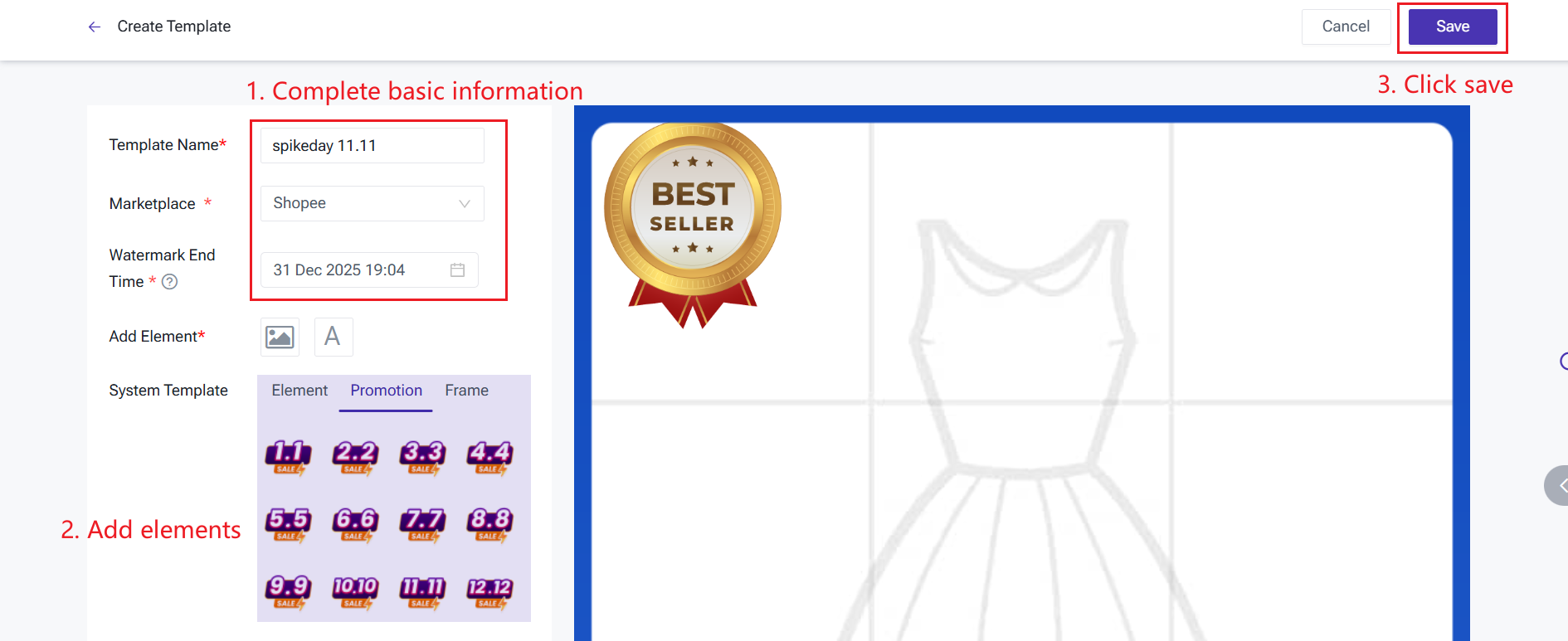
Standard vs. campaign watermarks. BigSeller distinguishes between two types. Common watermarks are your permanent brand logo, useful for copyright protection and brand recognition on every listing. Promotion watermarks are temporary, used for campaign frames like "Ready Stock Malaysia" or a sale badge, and are designed to come down automatically once the promotion period ends.
Common templates. BigSeller provides ready-made watermark templates, plus the option to build your own. Once saved, you can apply it to draft or active listings in bulk, choosing to stamp it on just the first image or every image in the set across hundreds of products in one action via Bulk Actions > Add Watermark.
Auto-removed promotion watermarks. Schedule a campaign watermark to go live when your sale starts, and BigSeller removes it automatically once the promotion ends, so you're not left manually stripping an outdated "sale ends today" frame off hundreds of images after the fact.
Standalone Tools vs. BigSeller's Unified Workflow: Which Saves More Time?
|
Step |
Standalone Apps |
BigSeller Ecosystem |
|
Sourcing |
Manually download product images from supplier sites |
Import directly via BigSeller's scraping tool (supports Taobao, 1688, AliExpress, and more) |
|
Translation |
Upload to a separate translator, download the result |
Translate listing text in bulk, or per-image during scrape/single edit |
|
Watermarking |
Upload again to a separate watermark app |
Apply a saved template across the batch in one action |
|
Campaign cleanup |
Manually remove promo frames after the sale ends |
Promotion watermarks auto-remove on schedule |
|
Publishing |
Re-upload finished images to each marketplace manually |
Push directly to Shopee, Lazada, and TikTok Shop from the same dashboard |
Every extra hop in the standalone route is a chance for an image to get attached to the wrong SKU, or for a translated file to go missing between tools. Keeping the whole process inside one system removes that risk.
What Are the Best Practices for Product Imagery in Malaysia?
-
Don't block key information. Position watermarks so they don't cover essential product details or required certification marks, such as SIRIM or Halal logos, these need to stay clearly visible for buyer trust and compliance.
-
Keep your titles just as localised as your images. Pair translated, watermark-protected images with BigSeller's AI-generated Malay product titles, since a well-localised image won't help much if the title next to it still reads awkwardly or isn't optimised for local search.
-
Keep your original images backed up. BigSeller automatically stores a backup of your original images in the Gallery whenever you edit them or apply a watermark, so you're not left without a clean master copy if you need to re-edit later.