How to Connect a Custom Ecommerce Website to BigSeller for Order and Inventory Sync
Jayson13 Oct 2026 07:00ENCopy link & title
Running a custom ecommerce website gives a brand more control over customer experience, data and pricing. The operational challenge starts when the same business also sells through Shopee, Lazada, TikTok Shop or other channels. Without a shared workflow, website orders may require manual entry, stock figures can fall out of sync, and warehouse staff must check several systems before fulfillment.
BigSeller provides an API integration option that sends website orders to BigSeller for centralized processing while allowing the website to retrieve available inventory from a selected BigSeller warehouse.
1. Why Connect a Custom Ecommerce Website to an ERP?
The website handles the storefront and checkout experience, while an ecommerce ERP coordinates the operational work after an order is placed. Connecting them moves information between those environments without repeatedly copying data by hand.
For a Philippine brand that sells through its own site and several marketplaces, the practical benefits can include:
- Centralized order handling: Website orders enter the same operational workspace used by the fulfillment team instead of remaining in a separate back office.
- More consistent inventory decisions: The website can check available inventory from the warehouse used to fulfill its orders.
- Fewer repetitive tasks: Order details can move through the integration program instead of being re-entered by staff.
- A clearer fulfillment trail: Teams can reserve stock, process the order and complete shipment through an established workflow.
API integration is most useful when synchronization must run continuously. For occasional reports or one-time data checks, an existing BigSeller report or export may be simpler.
2. How Does the BigSeller Website Integration Work?
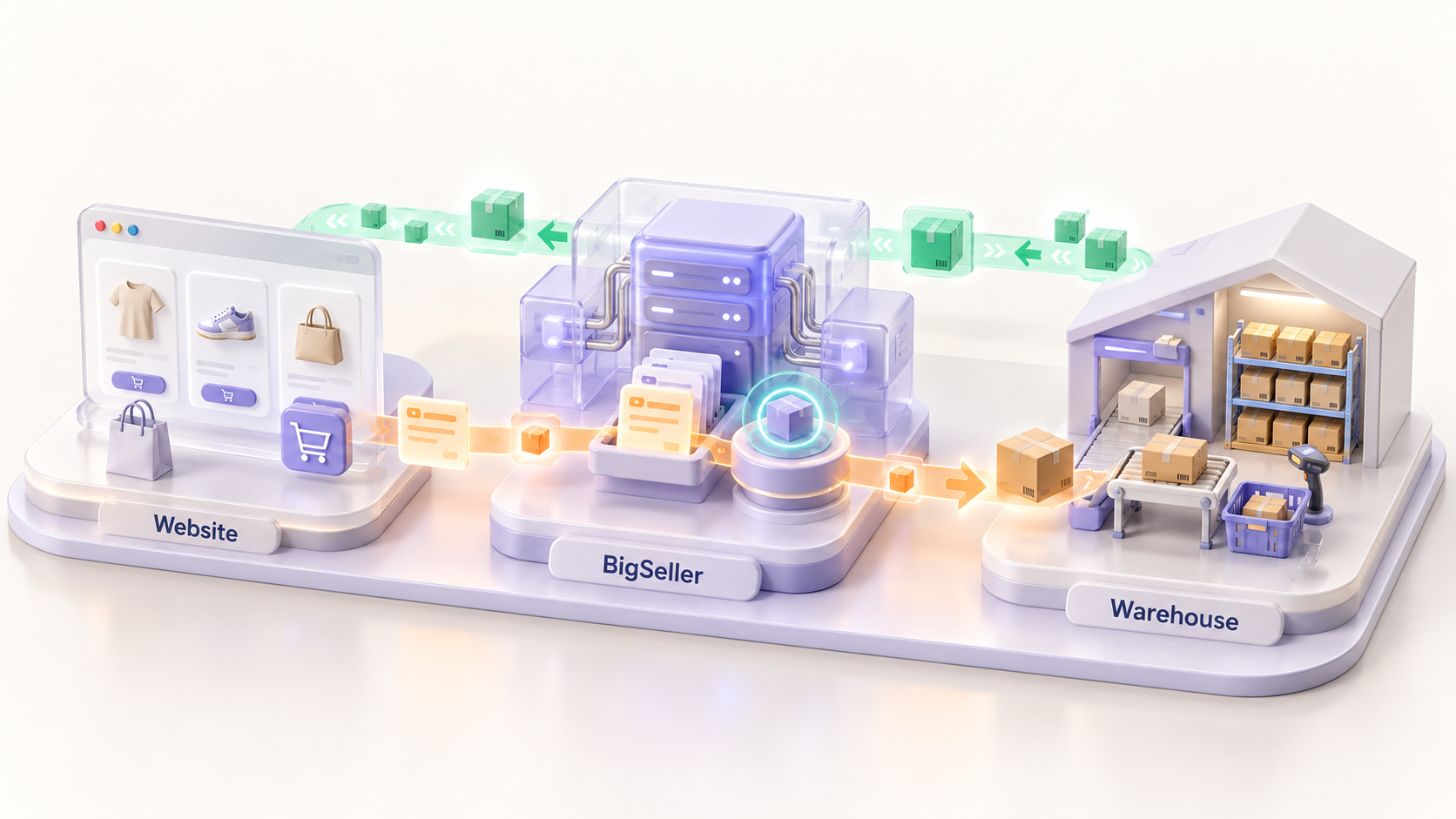
The connection has two main data directions. Orders move from the website to BigSeller, while inventory information moves from BigSeller back to the website.
| Business step | Data direction | What happens |
|---|---|---|
| Customer places an order | Website | The website creates a pending order and validates the customer, product and delivery information. |
| Order is submitted | Website → BigSeller | The integration calls createManualOrder. BigSeller creates a manual order and reserves the relevant inventory. |
| Order is fulfilled | BigSeller workflow | The team processes and ships the order in BigSeller. Inventory is deducted after shipment. |
| Available stock is checked | BigSeller → Website | The website periodically calls getInventoryListDetail for the mapped SKUs and warehouse, then updates its sellable quantity. |
The website remains the customer-facing sales channel, while BigSeller supports the connected order and warehouse process. It does not replace the website's checkout, payment or storefront functions.
3. What Must Be Mapped Before Development?
Before development, the business and technical teams must agree on how website records correspond to BigSeller records. Essential mappings include:
- Store mapping: Identify the BigSeller store or business source used for website orders.
- SKU mapping: Match each website product or variant with the correct BigSeller Merchant SKU.
- Warehouse mapping: Confirm which warehouse will reserve, fulfill and report inventory for website orders.
- Recipient and address fields: Make sure names, phone numbers, regions and detailed addresses use compatible formats.
- Logistics mapping: Define how an authorized third-party logistics provider will be passed when that information is included.
Teams must also decide what happens when a customer cancels, requests a refund, changes an address or submits the same order twice. These cases affect inventory reservation and should be resolved before launch.
4. How Can Sellers Reduce Overselling Risk?
Connecting the website to warehouse inventory can reduce overselling risk, but periodic API synchronization cannot guarantee zero overselling. An order may be placed between inventory queries, or an update may be delayed by a connection problem.
A more reliable setup combines several controls:
- Query inventory at a frequency appropriate for normal and peak order volume.
- Apply safety stock instead of exposing the entire available quantity on the website.
- Validate the SKU and requested quantity before submitting an order.
- Use a unique website order reference so retries do not create duplicate orders.
- Record failed API calls and alert the responsible team instead of treating missing data as zero stock.
- Define how reserved inventory will be released after cancellation or other exceptions.
Before major campaigns, review query frequency, safety stock and failure alerts. A setup that works for normal sales may need tighter controls during a promotion.
5. Is API Integration the Right Option for Your Business?
A custom API connection is a strong fit when the business controls its website code, has a developer or integration partner, and needs orders and inventory to move between systems continuously. It may be unnecessary when order volume is low or data is reviewed only occasionally. Businesses using a standard ecommerce platform should also check whether an existing supported connection already meets the requirement.
Define the objective in business terms first: eliminate manual website order entry, use one warehouse as the stock source, or coordinate website fulfillment with marketplace operations. This makes it easier to confirm fields, synchronization direction, frequency and acceptance criteria.
6. How to Start a BigSeller API Integration
BigSeller API onboarding begins with a requirements review rather than immediate access to a public self-service interface. Prepare the target system, business scenario, data scope, data direction, expected volume, synchronization frequency and technical contact.
After requirements are confirmed, the approved integration receives an application key and the applicable API documentation. The implementation team then develops and tests the connection before activation.
Store API credentials on the server or in a secrets-management tool, never in frontend code, screenshots or routine messages. Interface availability, fields, permissions, scope and pricing depend on the approved solution and formal quotation.
For the current technical process, required preparation and application steps, review the BigSeller API Integration Onboarding Guide. Development teams implementing the website workflow can also refer to Integrate Your Self-Built Website with BigSeller.
Final Takeaway
A custom website becomes harder to operate when its orders and inventory remain separate from the rest of the business. With accurate SKU and warehouse mapping, clear exception rules and realistic synchronization expectations, BigSeller's API can help established ecommerce businesses reduce repetitive work and coordinate website fulfillment with marketplace operations.