Why Failed Deliveries (RTS) Are Making You Oversell And How to Prevent It
Erra13 Oct 2026 03:59BMCopy link & title

Why do failed deliveries (RTS) cause you to oversell on other e-commerce channels?
When a courier marks a parcel “Return to Seller” (RTS) after a failed delivery attempt, the order status changes on the marketplace and the stock can appear available again. The physical item, however, is still in a hub or a delivery van, not on your shelf.
According to 2026 industry benchmarks from Capital One Shopping and Richpanel, the average e-commerce return rate sits at roughly 19% to 20.8%, or about 1 in 5 items sold. In Southeast Asia’s cash-on-delivery (COD) heavy market, part of that volume is RTS: buyers who are unreachable, change their minds, or refuse the parcel at the door. Even if only a fraction of your 1,000 monthly orders end this way, each one is a unit your system may count as sellable when it isn’t.
This creates ghost stock: listings that show availability you cannot fulfil. If a buyer orders that unit during a TikTok Live or a double-digit campaign, you have nothing to ship and are forced to cancel the order. The consequences stack up:
-
Higher cancellation and Non-Fulfillment Rate (NFR): seller-side cancellations hurt account health.
-
Weaker store health scores: underperforming metrics can trigger platform penalties.
-
Lower search visibility: poorer shop performance pushes listings down the rankings.
-
Lost buyer trust: cancelled orders lead to negative reviews and fewer repeat customers.
The risk grows with every extra channel. When Shopee, Lazada and TikTok Shop all read from the same physical stock, one wrong number can spread across all of them within minutes.
What should you look for in an inventory tool to fix the RTS overselling loop?
-
Centralised Master SKU Mapping: link listings and variations across Shopee, Lazada and TikTok Shop MY to one warehouse count.
-
Return tracking through logistics: the tool should detect “returned to sender” statuses and surface them early.
-
A dedicated return workflow: returns should have their own stock-in step rather than silently changing sellable stock.
-
Real-time multi-channel sync: stock changes should reach every storefront immediately.
-
Overselling controls: options such as campaign-reserved stock, push rules and push records.
-
Multi-warehouse support: returns must go back to the correct location.
How does BigSeller solve the RTS and marketplace return problem?
BigSeller is a free cloud-based ecommerce ERP trusted by over 1,100,000 Southeast Asia sellers, processing 300M+ orders and USD 1.5B in GMV every month, and it holds official API authorisation from 20+ platforms. For RTS, BigSeller’s After Sales Management feature does two jobs:
-
After Sales Order Processing: handle return-and-refund and refund-only requests from Shopee, Lazada and TikTok Shop, view after-sales status, and reprint SKU labels.
-
Stock-In / Returns: pending return, returning and returned packages appear automatically on this page. BigSeller monitors logistics tracking, so a “returned to sender” status brings the order here without manual entry.
Your team then stocks the item as it physically arrives. Returned units re-enter your inventory at that point, and your connected stores stay aligned with what is actually on the shelf.
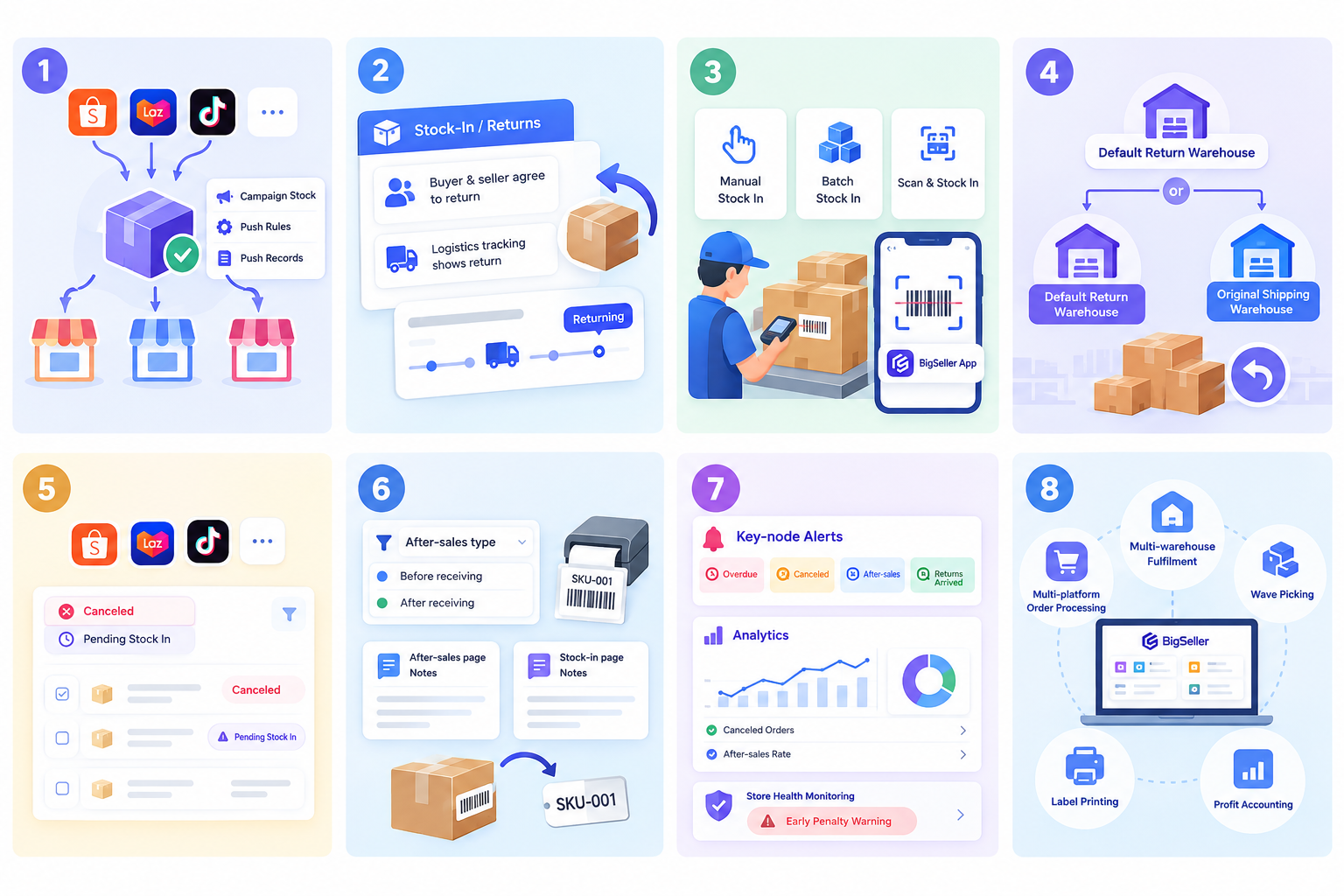
1. Cross-platform inventory sharing and overselling prevention
The Inventory Module combines campaign-reserved stock, push rules and push records so counts stay accurate across all stores and platforms.
2. Automatic return detection
Orders reach the Stock-In / Returns page in two situations: the buyer and seller agree the parcel will come back, or logistics tracking shows it is being returned.
3. Three ways to stock in
Stock in manually, in batches, or by scanning a tracking, order, package or return tracking number on the parcel. Scanning also works in the BigSeller App, which reduces manual entry errors for warehouse staff.
4. Smart return warehouse routing
If you set a default return warehouse, returns go there. Otherwise they go back to the original shipping warehouse. This keeps multi-warehouse counts correct.
5. Cancelled-after-shipment orders
Orders cancelled after shipment on Shopee, Lazada or TikTok Shop can still be stocked in. Filter by “Canceled” and “Pending Stock In” to find them.
6. Filters, labels and notes
Filter by after-sales type to separate requests made before and after the buyer received the parcel. Print merchant SKU labels to attach to returned items, and add notes on both the after-sales and stock-in pages.
7. Alerts and analytics
Key-node alerts flag overdue processing, cancellations, after-sales events and returns arrived. The analytics module shows cancelled orders and after-sales rates with drill-down, and store health monitoring auto-flags weak metrics and gives early penalty warnings.
8. Unified orders, warehouses and profit
Beyond returns, BigSeller handles multi-platform order processing, multi-warehouse fulfilment, wave picking, label printing and profit accounting, so you manage every channel from one dashboard.
A daily routine to catch missing returns
-
Open the Stock-In / Returns page and filter by Return Status = Returned and Arrival Time = Yesterday.
-
To unpack and check quantities, add the filter After-Sales Type = Return and Refund.
-
Have warehouse staff scan returns with the BigSeller App.
-
If items still show as Pending Stock-In after you’ve processed everything, check whether arrival fell outside business hours, look for a signed receipt, and compare an export against the courier’s delivery receipt.
-
If there’s no receipt or the arrival was outside business hours, the courier may not have actually delivered, or the parcel may be lost. Export the unstocked data and submit a claim to the platform.