How to Prevent Pricing Errors Across Shopee, Lazada, and TikTok Shop
Jayson10 Oct 2026 08:24ENCopy link & title
The most practical way to prevent pricing errors across multiple marketplaces is to use a centralized price alert system with both store-level and SKU-level price thresholds. BigSeller Price Alert checks product prices and promotional prices across supported Shopee, Lazada, and TikTok Shop stores, then warns the relevant team members when a price falls below the applicable alert price.
This adds a review layer to product creation, price editing, bulk updates, imports, and selected promotion settings. Sellers can protect the full catalog with a store fallback alert price while applying stricter thresholds to high-cost, low-margin, or price-sensitive SKUs.
1. Why Pricing Errors Are Common in Multistore Ecommerce
Pricing becomes harder when a business operates several stores, platforms, or country sites. Teams may edit regular prices, special prices, and promotional prices in different interfaces. Cross-border sellers must also consider currencies and exchange rates, while every marketplace may apply a different combination of commissions, transaction fees, discounts, and fixed costs.
A simple input error can therefore have a larger effect than expected. A missing zero, an incorrect currency assumption, or an excessive promotional discount may leave a product selling below its intended margin. The mistake is often discovered only after orders arrive, when cancellation may affect customers, store performance, or the seller's reputation.
Pricing decisions also have a direct relationship with profitability. McKinsey's pricing research notes that a 5% price reduction can require an average 21% increase in volume just to break even. Not every low price is a mistake: sellers may intentionally use discounts, clearance campaigns, or selected loss leaders. The real risk is an unplanned low price that does not support a clear commercial goal.
Manual checking becomes less reliable as the catalog grows. A price alert system turns the seller's rules into a repeatable check instead of relying on staff to remember the safe price for every variation, import, and promotion.
2. What an Effective Ecommerce Price Alert System Should Do
A useful price alert system should protect both ordinary products and exceptions. A single store-wide threshold provides broad coverage, but it may be too low for expensive products and too high for entry-level items. SKU-level alert prices are therefore needed for products with different costs, margins, or pricing policies.
The alert calculation should reflect how sellers set prices: from a reference price, target margin, or fixed minimum. Cost-based calculations are more useful when they include marketplace commissions, transaction fees, other percentage charges, and fixed costs.
Coverage across editing points is equally important. Checks should include bulk editing, imports, cross-store updates, discount promotions, and flash deals. Alerts should appear during the task and reach the people responsible for reviewing the exception.
Finally, the warning must remain separate from the pricing decision. A price alert should identify a possible problem without assuming that every low price is wrong. The seller may choose to correct the price, approve an intentional promotion, or revise the alert threshold after reviewing the product's costs and campaign objective.
3. How BigSeller Price Alert Works
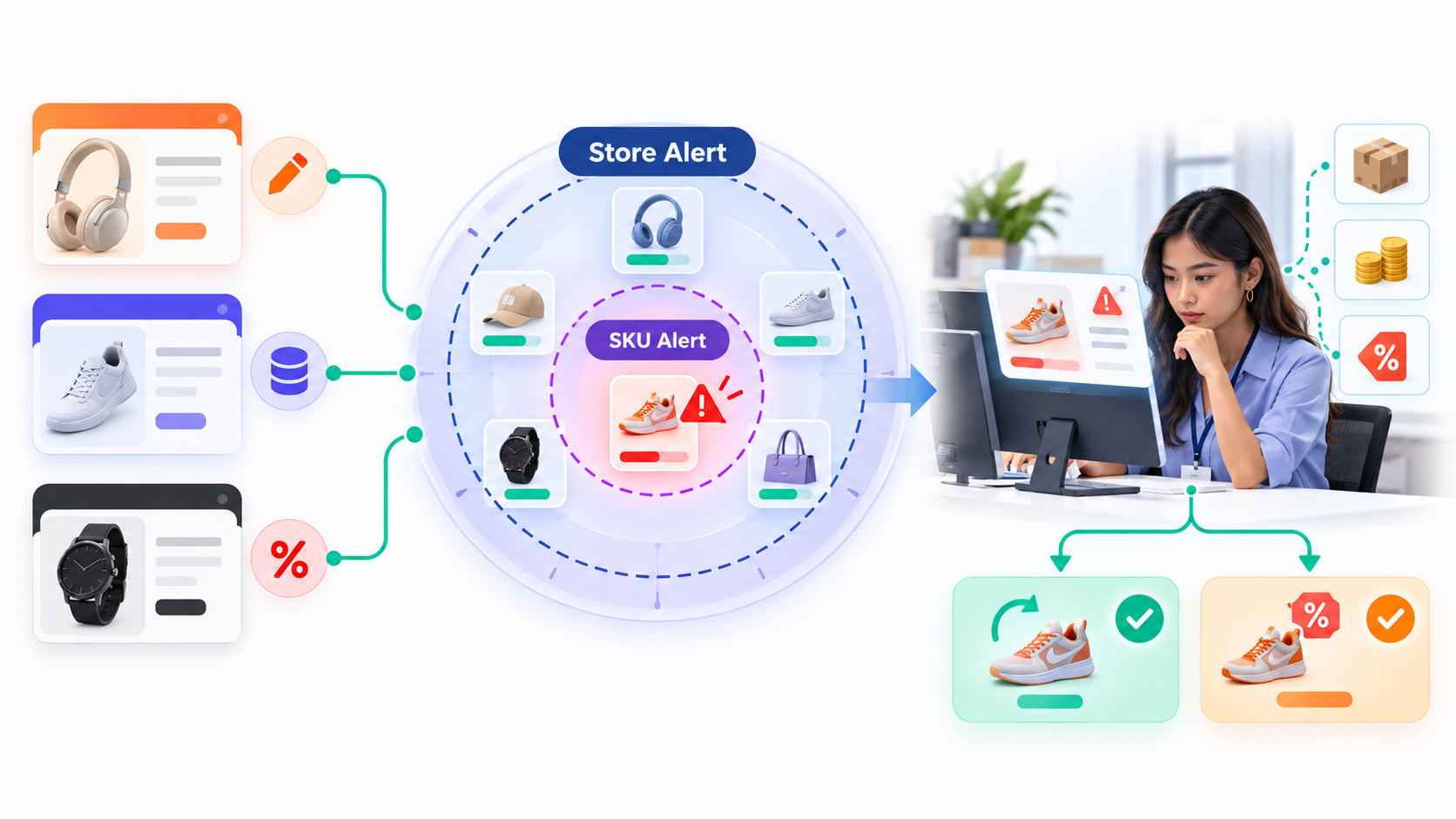
BigSeller Price Alert currently supports Shopee, TikTok Shop, and Lazada. When price alert status is enabled for a store, the system validates the product price or special price against the applicable alert price. If the entered value is lower, the page displays a warning and the configured notification channels can inform the relevant team members. The complete setup and trigger rules are documented in the BigSeller Price Alert guide.
Store and SKU-Level Price Protection
BigSeller uses two control levels so sellers can cover the full catalog without applying the same threshold to every product.
| Control level | Scope | Best used for | Rule priority |
|---|---|---|---|
| Store Fallback Alert Price | Products in one configured store | Providing a basic warning line for the whole catalog | Used when no SKU-level alert price matches |
| SKU Alert Price | A specific Merchant SKU or matching SKU code | High-cost, low-margin, frequently promoted, or price-sensitive products | Takes priority over the store fallback price |
The store fallback alert price prevents products without individual settings from being left unprotected. Sellers can then add dedicated SKU alert prices for products that require a more precise threshold.
How BigSeller Selects the Applicable Alert Price
The system applies the rules in a defined order. First, it checks whether the store SKU is mapped to a Merchant SKU that has an alert price. If no mapping relationship is available, which may occur with draft products, it looks for an exact SKU-code match without case sensitivity. If neither method finds a SKU-level setting, the store fallback alert price is used.
This hierarchy makes Merchant SKU mapping the strongest basis for consistent cross-store control, while SKU-code matching and the store-level rule provide fallback coverage.
Three Ways to Set SKU Alert Prices
Sellers can calculate SKU alert prices in three ways:
- By Reference Price: The alert price is calculated as a percentage of the product's maintained reference price.
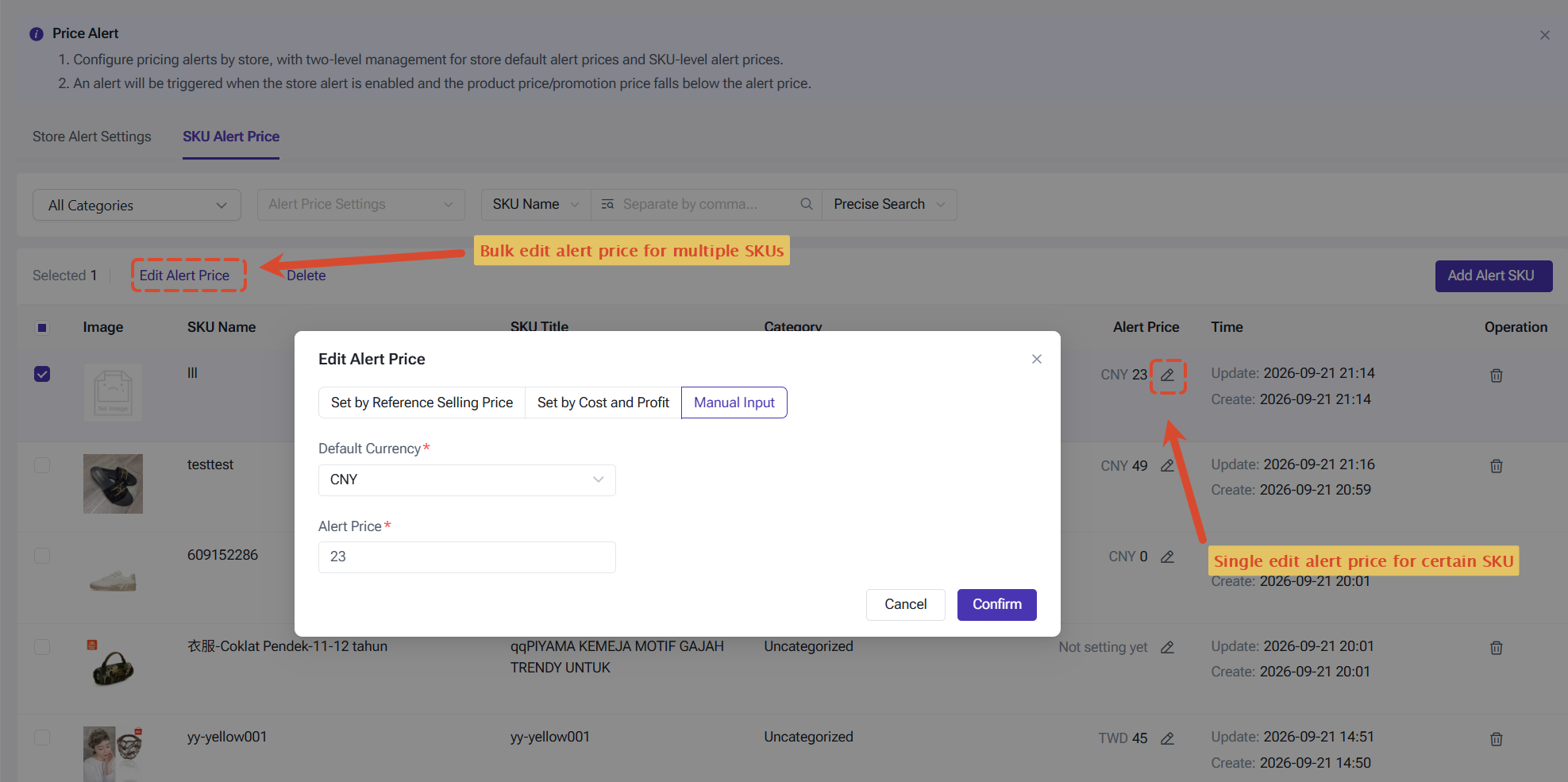
- By Cost and Profit Margin: The threshold is calculated from the selected product cost and expected margin. Available cost sources include the latest purchase price, custom product cost, or reference cost. Additional marketplace commission rates, transaction fee rates, other fee rates, and fixed costs can also be included.
- Manual Input: A fixed alert amount is entered directly for products governed by a specific price rule.
These methods allow the same feature to support different pricing practices. A seller can use a broad reference-price rule for most products, a cost-and-margin calculation for profit-sensitive items, and manual thresholds for products with strict commercial pricing.
Cross-Site Currency Conversion
When an alert price and the validated listing use different currencies, BigSeller converts the alert price into the currency of the product's site. A configured fixed exchange rate takes priority; if no fixed rate is available, the system uses the real-time exchange rate.
This allows one framework to support different sites. Sellers should still review exchange-rate settings and costs because conversion is only as reliable as the underlying pricing assumptions.
4. How to Configure and Respond to Price Alerts
Price Alert settings are available from the Products module. A practical rollout begins with a store-wide rule and then adds SKU-level protection where the potential loss is greater.
Step 1: Configure the Store Alert
Go to Products > Price Alert Settings > Store Alert Configuration, add the relevant stores, enter the Default Alert Price, and enable the alert status. The enabled status is required before price validation can be triggered.
The same page controls frequency, recipients, and channels. Alerts can reach the PC Notification Center, BigSeller APP, or a Lark, WeCom, or DingTalk bot. Frequencies include real-time, every 30 minutes, hourly, daily, weekly, monthly, and push when triggered.
Step 2: Add SKU Alert Prices
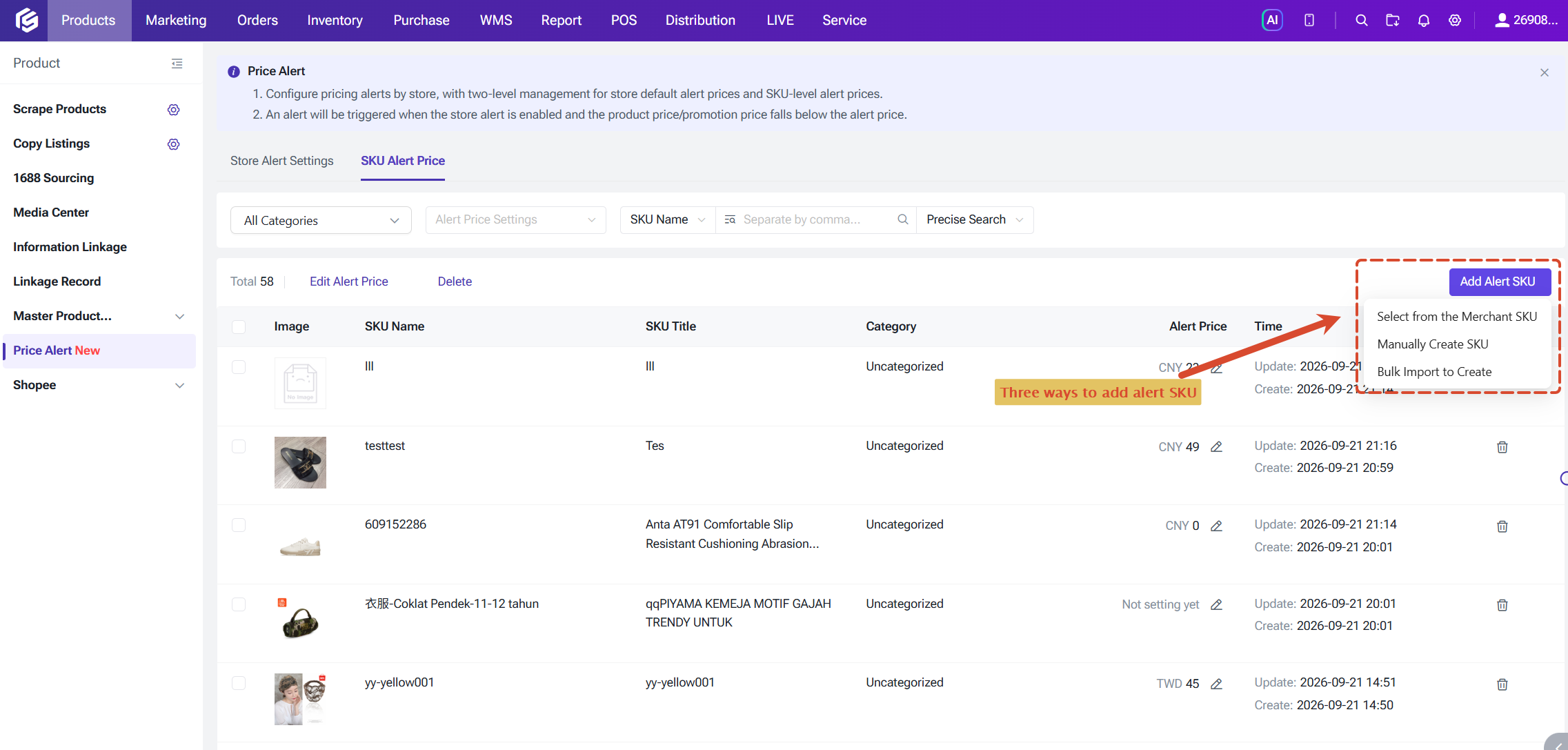
Open Price Alert Settings > SKU Alert Price. SKUs can be selected from the Merchant SKU Library, created manually, or added through import. The list also supports bulk editing, filtering, and deletion, which helps teams identify products that still rely only on the store fallback rule.
Individual alert prices are most useful for high-cost products, thin-margin items, products frequently included in campaigns, and listings whose prices differ significantly between sites. The selected calculation method should match how the business evaluates the product's sustainable minimum price.
Step 3: Cover the Main Price-Editing Workflows
Once enabled, validation can be triggered when products are created, when draft or active products are edited individually or in bulk, when prices are updated through import, and when changes are made through Master Product Management. Price Alert also covers price changes involved in information linkage scenarios and selected Shopee and TikTok Shop discount promotions and flash deals.
This is especially useful when prices are synchronized across related listings. Product Information Linkage can update prices across products in the same linkage group, while Price Alert checks whether the resulting price falls below the configured warning line. One feature distributes the update; the other helps identify pricing risk.
Step 4: Review the Exception Before Publishing
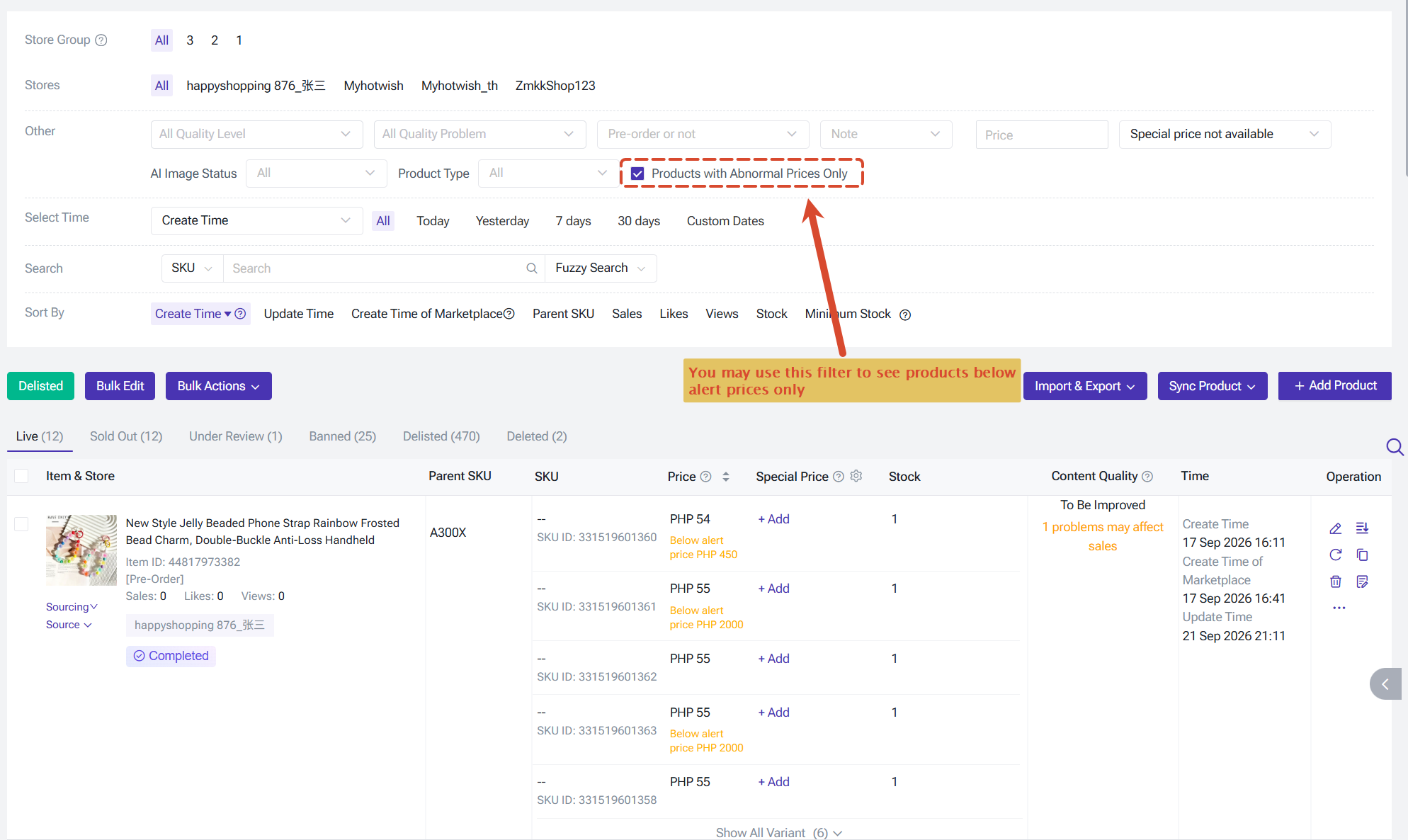
When a price falls below the threshold, BigSeller displays a red prompt and flags the affected product. Teams can use the Price Abnormal filter to find multiple exceptions and review them together. Notifications also prevent the warning from being visible only to the person making the change.
The reviewer should check the intended selling price, product cost, platform fees, exchange rate, promotion objective, and expected margin. If the price is incorrect, it can be revised. If the discount is intentional, the seller can proceed after confirming the decision. If repeated valid prices trigger warnings, the threshold or cost assumptions may need to be updated.
Pricing errors are easier to prevent when the business defines its warning lines before a campaign or bulk update begins. A store fallback alert price creates catalog-wide coverage, SKU-level thresholds protect higher-risk products, and multichannel notifications ensure that exceptions reach the right people. For sellers managing multiple Shopee, Lazada, and TikTok Shop stores, BigSeller Price Alert adds a practical review layer before an unintended low price becomes a loss-making order.