How to Request Parcel Pickup for LEX & 3PLs in Lazada Seller Center
Erra23 Apr 2026 07:09ENCopy link & title
If you’ve ever struggled with coordinating pickups or dealing with missed collections, this feature is designed to save you time and hassle.

When Can You Request a Pickup?
Before submitting a pickup request, make sure you meet at least one of these conditions:
-
You have Ready-To-Ship (RTS) orders
-
Some parcels have breached the pickup SLA
-
You experienced a failed pickup in the last 24 hours (e.g. vehicle full, no show)
-
You don’t have an ongoing pickup request for the same logistics partner
If none of these apply, the system will not allow a new request.
How to Request a Pickup
Lazada gives you multiple ways to submit a pickup request depending on your workflow.
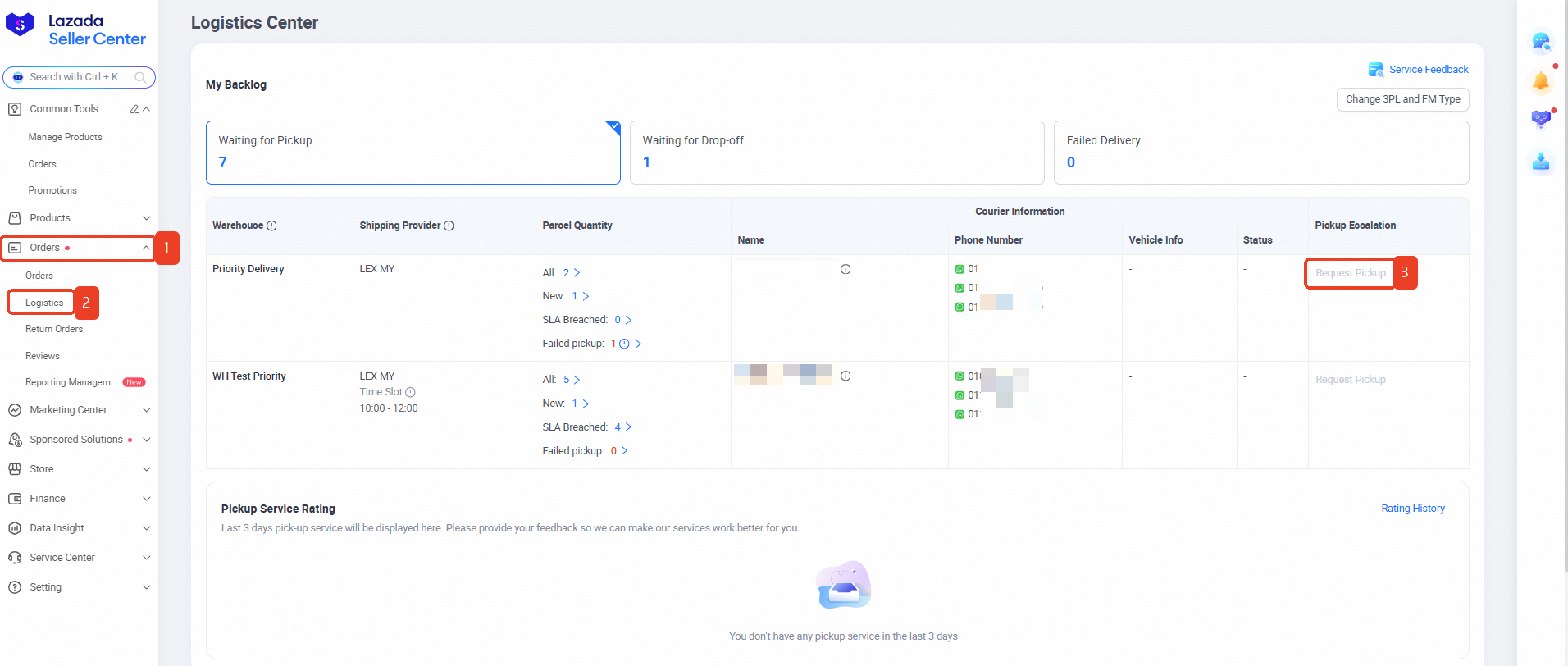
1. Via Logistics Center Page
Single Pickup Request
-
Go to Orders > Logistics
-
Click “Request Pickup”
-
Add a comment in the pop-up window and click Submit
Batch Pickup Request (Multiple Warehouses or 3PLs)
-
Go to Orders > Logistics
-
Click “Batch Escalate Pickup”
-
Review all eligible parcels (SLA breaches or failed pickups)
-
Submit requests in one go across warehouses and logistics partners
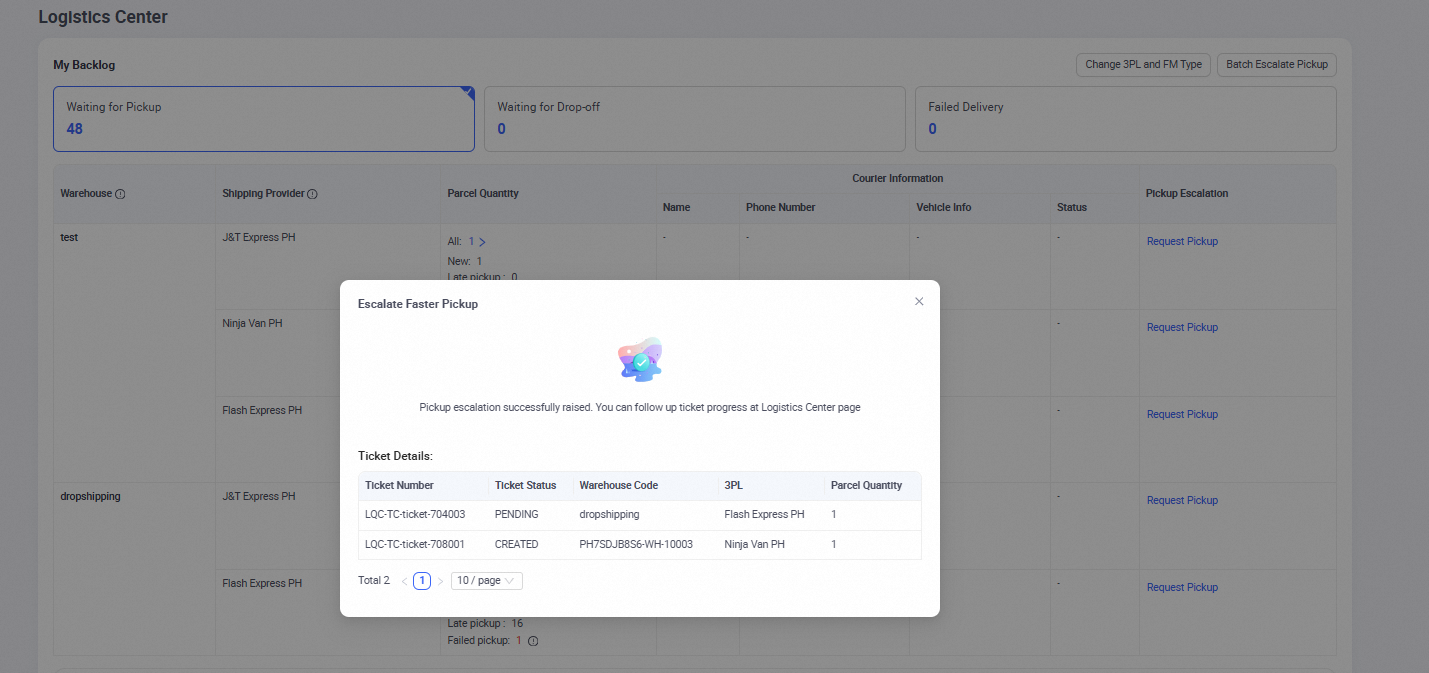
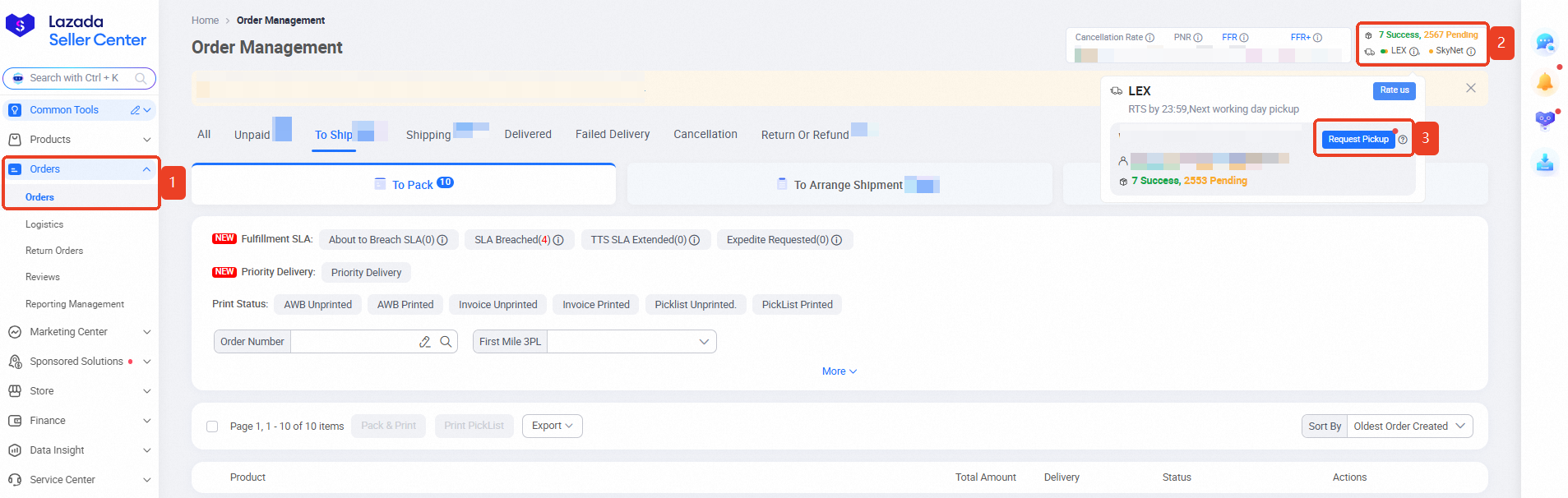
2. Via Order Management Page Banner
-
Navigate to the Logistics Assistant Widget
-
Hover over the tooltip beside your logistics provider
-
Click “Request Pickup” for the relevant warehouse
This method is great for quick actions while reviewing orders.
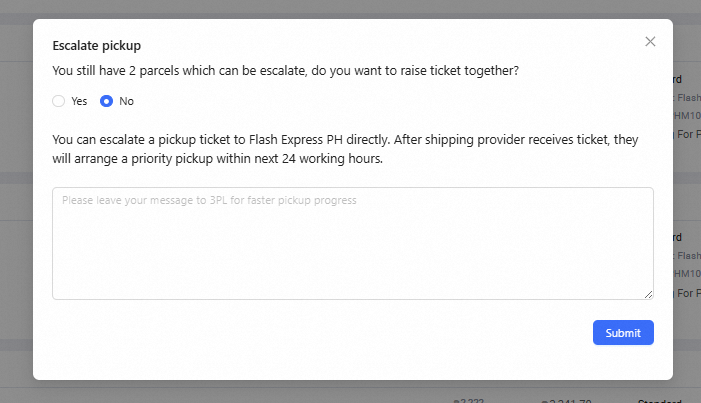
3. Via Parcel-Level (Specific Orders)
(Available for LEX and J&T Express only)
-
Go to Order Management
-
Select a specific order
-
Click “Escalate Pickup” under Logistics Status
If multiple parcels qualify, you’ll be prompted to:
-
Escalate individually or all at once
-
Add comments before submitting
How to Track Your Pickup Requests
Once submitted, tracking your request is straightforward:
-
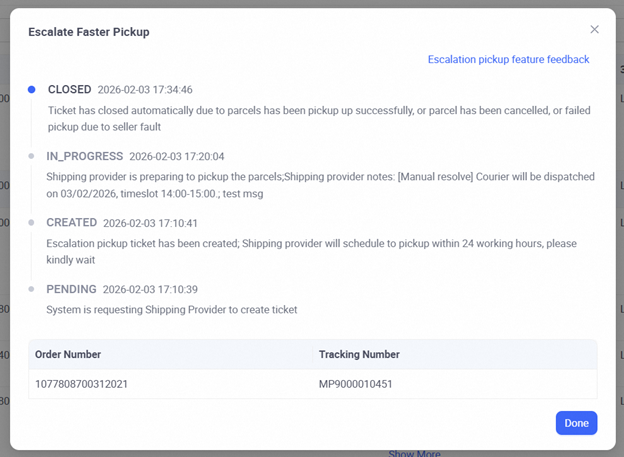
Go to My Logistics Case > Pickup Escalation tab
-
Click “View Detail” to monitor progress and responses
For:
-
LEX & J&T Express → responses appear directly in this tab
-
Other 3PLs → check Service Center > My Cases
You’ll see updates under “In Progress” once the logistics partner responds.
Why You Might Not Be Able to Request a Pickup
If the button is unavailable, here are common reasons and what they mean:
-
No RTS parcels
-
“No active parcels ready to be picked up”
→ Prepare shipments first
-
-
Recent successful pickup (within 24 hours)
-
“No delays or a pickup is pending”
→ Try again later
-
-
Incomplete pickup recently
-
“Pickup was not complete”
→ Expect collection on the next business day
-
-
Existing active ticket
-
“Ongoing case in progress”
→ Track it under Pickup Escalation tab
-
Scale Smarter Beyond Pickup Management
The new pickup request feature in Lazada Seller Center is a solid step toward smoother logistics. But as your order volume grows, managing pickups is only one part of the bigger picture.
BigSeller helps bring everything together from syncing inventory and processing orders to managing multiple stores across platforms like Lazada and Shopee. Instead of switching between systems, you get a clearer overview and more control over your daily operations.
For sellers handling multiple SKUs, warehouses, or marketplaces, having a centralised system can make a noticeable difference in speed, accuracy, and overall workflow.
Want to see how it works for your store?
Try BigSeller for FREE and unlock a 7-day VIP trial coupon to explore premium features with no commitment.
A more efficient setup starts with the right tools.
Source: