How to Sync Third-Party Warehouse Inventory with Your Shopee or TikTok Shop Listings
Erra30 Jun 2026 05:23ENCopy link & title

Why Do Malaysia Sellers Need to Sync Their Third-Party Warehouse?
Malaysia's e-commerce market was valued at approximately USD 10.62 billion in 2025 and is projected to reach USD 12.18 billion in 2026 (Unicommerce, 2026). Shopee leads with over 37 million monthly web visits, while TikTok Shop has surpassed 10 million active users in Malaysia alone and it grew 66% across Southeast Asia in 2025 (Cube Tradewinds, Q4 2025).
For sellers using a third-party warehouse (also called a 3PL, or third-party logistics provider), the core challenge is clear: your warehouse holds the physical stock, but your Shopee and TikTok Shop listings live on separate platforms that have no native connection to each other or to your warehouse.
Without a sync system in place, the risks include:
-
Overselling: two platforms simultaneously selling the last unit of stock you have
-
Stock discrepancies: your warehouse shows 50 units, but your listings say 30
-
Manual update delays: even basic channel tools introduce delays of 15 to 30 minutes, enough time for overselling to occur during a Mega Sale event (ITG, 2026)
-
Seller score damage: one overselling incident can trigger dozens of cancellations and negative reviews that take months to recover from
How Do the Top Inventory Sync ERPs in Malaysia Compare?
|
Feature |
BigSeller |
SiteGiant |
Sellercraft (OMS) |
|
Free plan available |
✅ Permanent free plan (up to 1,500 orders/mo, 3 stores) |
Limited trial only |
No |
|
Shopee + TikTok Shop native integration |
✅ Official Best Partner with both platforms |
✅ Native local integration |
✅ Supported |
|
Real-time 3PL/warehouse sync |
✅ One-click 3PL sync, WMS module (Pro tier+) |
✅ Supported |
✅ Strong cross-border 3PL support |
|
Wave picking / PDA scanning |
✅ Included in WMS module |
Partial |
Enterprise-only |
|
SKU mapping & combination SKU support |
✅ Full support, including bundles |
✅ Supported |
✅ Supported |
|
Malaysia-specific financial integration |
✅ SQL Account, MyInvois |
Limited |
Limited |
|
Local support team in Malaysia |
✅ Yes |
✅ Yes |
Regional (SEA) |
|
Platform coverage |
20+ platforms |
Multiple local + global |
Multi-country SEA |
|
Best suited for |
Malaysian sellers wanting an all-in-one free-to-start ERP with deep marketplace + warehouse integration |
SMEs prioritising local marketplace sync with POS |
Enterprise multi-country retailers with complex compliance needs |
Which Inventory Sync System Should You Choose?
If you're a new seller (under 1,500 orders/month, 1–3 stores) testing a third-party warehouse for the first time: Start with BigSeller's free plan. BigSeller includes inventory push for up to 500 SKUs and real-time order sync across Shopee and TikTok Shop, letting you validate the warehouse connection without upfront cost.
If you're scaling (1,500–30,000 orders/month) and need full WMS features like wave picking or bin-zone management: Move to BigSeller's Pro tier, which unlocks the WMS module and distribution features, both required for structured 3PL warehouse operations at volume.
If you operate across multiple Southeast Asian countries with complex compliance needs (IOR/MOR frameworks, multi-currency reconciliation): An enterprise OMS like Sellercraft may offer deeper cross-border tooling, though at a higher cost and without a free entry tier.
If you also run offline POS retail alongside Shopee and TikTok Shop: Prioritise a platform with built-in POS integration, such as BigSeller's POS Offline Retail module, which unifies online-offline inventory and avoids running a separate reconciliation process.
How to Sync a Third-Party Warehouse with Shopee and TikTok Shop
Step 1: Choose a Centralised Inventory System
Select a system that supports both your marketplace (Shopee, TikTok Shop) and your third-party warehouse provider. BigSeller is the top-rated option in Malaysia for marketplace sellers, with native integration for Shopee Malaysia, TikTok Shop Malaysia, and multiple WMS (Warehouse Management System) providers.
Step 2: Authorise Your Third-Party Warehouse
Inside your inventory system, navigate to the authorisation or integration settings, find your warehouse service provider, and connect it using the API credentials provided by your 3PL. This gives the system permission to read and update stock levels from your warehouse.
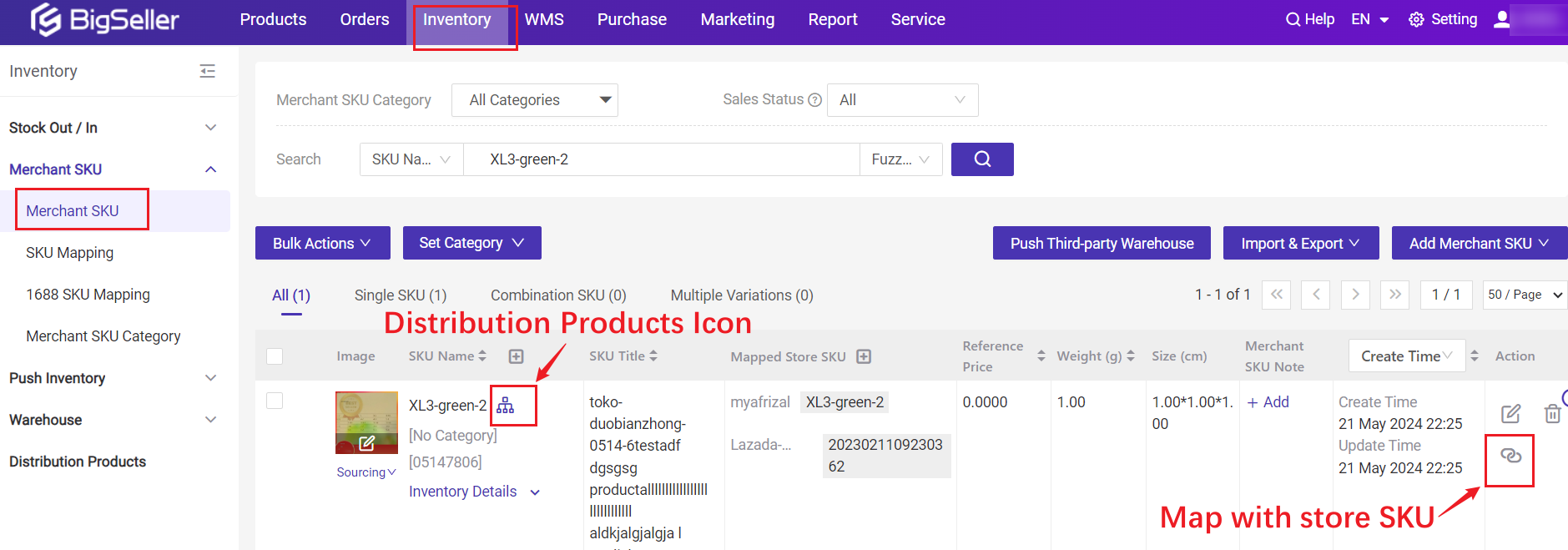
Step 3: Sync Your Distribution Products
Once connected, your warehouse products will be pulled into the inventory system. Sync them manually first to capture the latest stock data. You can do this in bulk or product by product.
Step 4: Map SKUs to Your Marketplace Listings
Link each Merchant SKU (warehouse product) to the corresponding Store SKU on Shopee and TikTok Shop. For combination or bundle products, map each component SKU individually so the system can deduct the correct quantities from every item in the bundle.
Step 5: Activate Auto Inventory Deduction
Once mapping is complete, enable automatic deduction. From this point forward:
-
Every new order on Shopee or TikTok Shop triggers an immediate stock deduction
-
Updated inventory levels are pushed to all connected platforms
-
You do not need to manually adjust inventory in your marketplace seller centres
Step 6: Set Up Stock Alerts
Configure low-stock notifications so you are alerted before a product runs out, not after. This is especially important before high-traffic periods like Shopee Payday Sales or TikTok Shop LIVE events, when orders spike within minutes.
Frequently Asked Questions (FAQs)
Q1: Can I sync multiple third-party warehouses with Shopee and TikTok Shop at the same time?
A: BigSeller supports multi-warehouse configurations, allowing Malaysian sellers to assign stock from different fulfilment locations to different platforms while maintaining a single, unified inventory view. This is useful if you use one warehouse for Peninsular Malaysia orders and another for East Malaysia or cross-border fulfilment where both can sync to Shopee and TikTok Shop simultaneously without conflict.
Q2: What happens to my TikTok Shop and Shopee inventory when an order is cancelled or returned?
A: BigSeller automatically restores stock quantity when an order is cancelled or a return is confirmed, pushing the updated figure back across all connected platforms in real time. Malaysian sellers do not need to manually add the stock back. For distribution products specifically, the restoration happens at the warehouse level as BigSeller reflects whatever the third-party warehouse reports.
Q3: Do I need a separate account on each platform to set up inventory sync?
A: BigSeller connects all seller accounts such as Shopee, TikTok Shop, and others across 20+ platforms under a single dashboard. Malaysian sellers can manage all inventory, orders, and warehouse connections from one place without switching between individual seller centres.
Q4: How long does it take to set up third-party warehouse sync for the first time?
A: With BigSeller, the initial setup such as authorising the warehouse, syncing distribution products, and completing SKU mapping can typically be completed within a single working day. BigSeller's bulk mapping tools allow Malaysian sellers to map large product catalogues far faster than doing it manually one by one.
Q5: Is real-time sync available during peak sales events like 11.11 or Shopee Birthday Sale?
A: BigSeller uses event-driven inventory sync, updating stock levels the moment an order is confirmed rather than on a scheduled delay. This allows Malaysian sellers to participate in Mega Sales more aggressively, since BigSeller's multi-tool overselling prevention including campaign-reserved stock and cross-platform inventory sharing stops two orders from claiming the same unit of stock simultaneously.