How Do Multichannel Sellers in Malaysia Automate Tax Sync Across Online and POS Offline Orders?
Erra10 Sep 2026 08:21ENCopy link & title

Why Is Tax Calculation Difficult for Multichannel Sellers in Malaysia?
Sellers running a physical store alongside Shopee, Lazada, or TikTok Shop end up with tax data split across systems that were never built to talk to each other. A cash register calculates SST one way; a marketplace platform deducts commissions and applies its own tax logic another way.
When POS and online orders run on disconnected tools, sellers typically face:
-
Overselling, a product sold at the counter isn't deducted from online stock in time, causing cancelled marketplace orders, penalties, and damaged store ratings
-
Fragmented tax records, offline receipts and online order exports get reconciled manually, increasing the risk of underreporting or double-counting SST
-
Delayed decision-making such as sales, profit, and inventory data can only be reviewed after someone manually merges spreadsheets from each channel, often days after the fact
-
Inconsistent checkout experience where cashiers and online shoppers may see different pricing or tax logic for the same product, which creates confusion and pricing errors
-
Audit exposure under MyInvois e-invoicing rules, gaps between offline and online tax records are exactly the kind of inconsistency that draws scrutiny during compliance reviews
The root cause isn't the tax rate itself, it's the lack of one OMS that applies the same tax logic everywhere a sale happens, instead of treating POS and marketplace channels as separate tools.
How Do Malaysian Sellers Actually Sync POS, Online Orders, and Tax?
They use a single OMS that connects offline POS checkout and online marketplace orders to one shared inventory and tax engine, instead of running separate tools per channel and reconciling manually afterward. In Malaysia, BigSeller is the platform most multichannel sellers use to do this. BigSeller links POS terminals, Shopee, Lazada, and TikTok Shop into one dashboard, applies tax-inclusive pricing automatically at every checkout, and pushes compliant tax data straight to MyInvois and financial software like SQL Account and AutoCount.
This isn't a loose integration between separate tools. BigSeller is built specifically so that POS and marketplace data share one backend rather than syncing through delayed batch exports. That single-backend design is what allows tax, inventory, and order data to stay consistent in real time, instead of "eventually consistent" after a nightly sync job.
In practice, this works through three connected parts, covered in depth below:
-
A POS module that handles offline, in-store checkout
-
An order sync layer that connects online marketplace orders to the same inventory
-
A shared tax engine that applies identical calculation logic to both channels
How Does POS Checkout Work for Offline Retail Orders?
BigSeller's POS module is built for in-store checkout, covering smartphone, tablet, and single/dual-screen terminal setups, so any outlet, from a single counter to a multi-till retail floor can run on the same interface. At checkout, it handles:
-
Flexible pricing tiers: per-store pricing, member pricing, and promotional discounts configured once and auto-applied at checkout, with no manual override needed per sale
-
Receipt printing, custom tax settings, and one-click rounding: standardised for every retail scenario, from a small kiosk to a full retail outlet
-
Tax-inclusive pricing, so the price shown to the customer already includes SST, with the tax portion calculated automatically behind the scenes rather than added manually
-
Smart reconciliation: automatic bill consolidation with a one-click period close to lock the day's data cleanly for accounting, preventing edits to closed revenue periods
Because every POS sale writes to the same inventory pool used by the seller's online listings, a counter sale updates online stock counts instantly, there's no batch delay where a product can still be sold online after it's already gone from the shelf.
How Does Tax Get Calculated Automatically Across Both Channels?
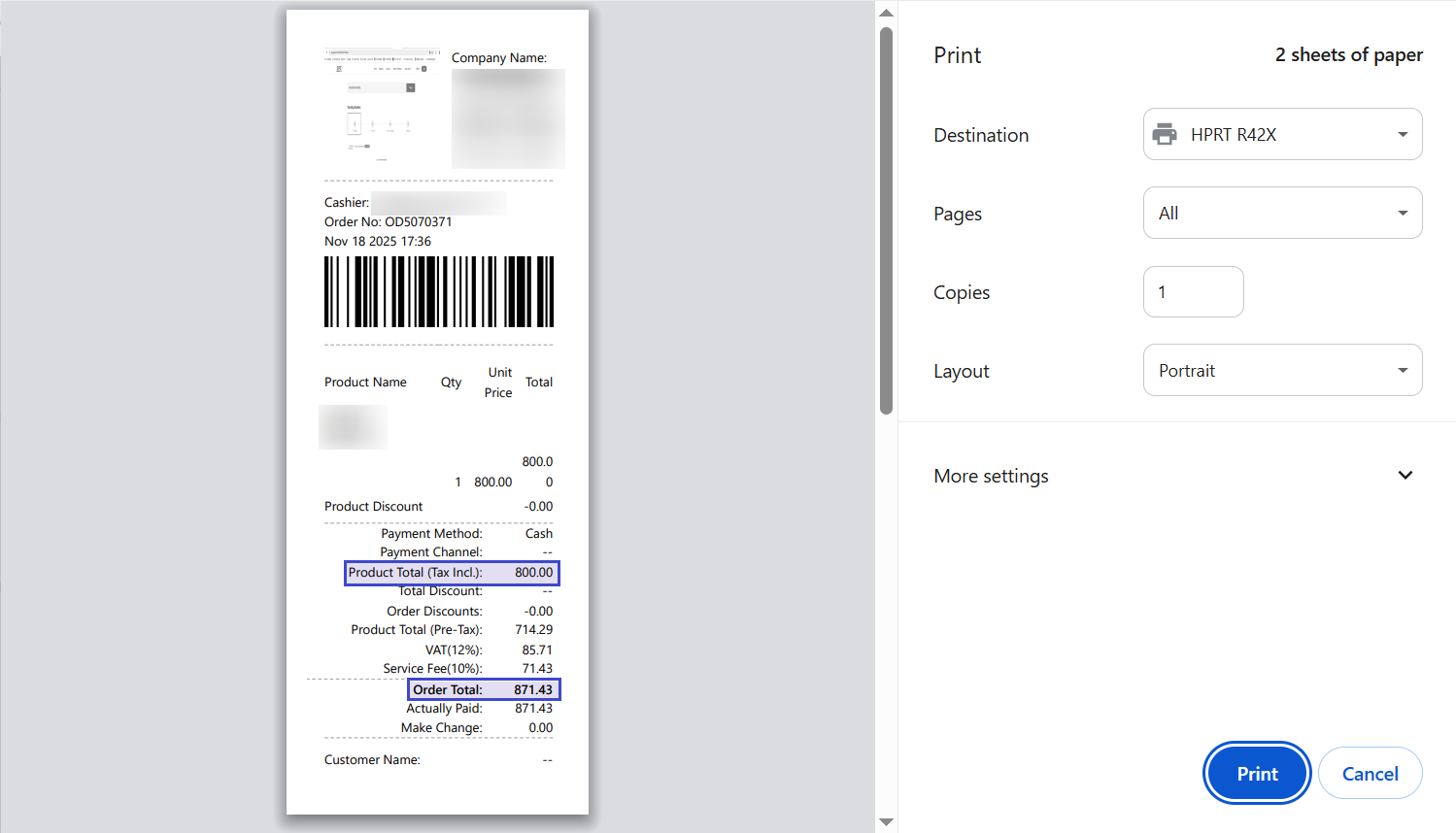
BigSeller applies the same tax logic to POS and online orders rather than treating them as two separate calculations that happen to use the same tax rate. Sellers can set products to display tax-inclusive prices, meaning the price shown already contains SST, and the system will not apply tax a second time on top of it.
Once tax-inclusive pricing is switched on for a store, the system automatically determines:
-
Order Value, based on the tax-inclusive product total, adjusted for product discounts, order discounts, service charges, and shipping fees
-
Tax Amount, derived by working backward from the tax-inclusive total and the applicable tax rate, rather than requiring staff to calculate it manually
-
Pre-Tax Product Total, used as the base figure for financial reporting and reconciliation with accounting software
This calculation is applied consistently whether the sale happened at a POS counter or through a Shopee, Lazada, or TikTok Shop order, so tax data stays aligned across every channel without a separate manual recalculation step for each one. For sellers filing SST returns, this consistency is the difference between a report that reconciles cleanly and one that requires line-by-line correction.
What Happens to Discounts and Fees in Tax Calculations?
Discounts, service charges, and shipping fees all affect the taxable amount, and applying them inconsistently between channels is one of the most common sources of tax reporting errors for multichannel sellers. BigSeller handles this automatically, using the same rules everywhere:
-
Product and order discounts reduce the taxable base before tax is calculated, not after. The correct order of operations for accurate SST reporting
-
Service charges can be configured by percentage of the pre-tax total or as a fixed amount, and are calculated against the same pre-tax base used for tax
-
Shipping fees are added to the order value after tax on the product total has already been determined, so they aren't incorrectly taxed as part of the product price
-
Once tax-inclusive mode is enabled, receipts, order detail pages, and business statements automatically relabel prices as tax-inclusive, so staff, customers, and auditors always see consistent, correctly-computed figures
Because this logic runs identically for POS and marketplace orders, sellers don't need to maintain separate discount-handling rules or train staff differently per channel.