Which Order Management System (OMS) Run Online Orders and POS Payments from One Dashboard?
Erra01 Oct 2026 05:20ENCopy link & title

Why Do Multiple QR Standees Slow Down Your Checkout?
Relying on several physical QR standees at the counter creates real operational friction for Malaysian businesses, and the problem grows as sales volume and staff numbers increase.
Malaysian shoppers have largely gone cashless. Ipsos Malaysia data puts e-wallet usage at around 81% of the population, and Bank Negara Malaysia reports annual retail e-payment transactions above RM831 billion. Customers now expect to pay with whichever app is already on their phone, whether that is Touch 'n Go, GrabPay, Boost, ShopeePay or DuitNow QR. To avoid turning anyone away, many shops put a separate placard on the counter for each one. It feels like the safe choice, but it quietly creates three problems.
-
Choice paralysis and longer queues. Four or five separate placards leave customers unsure which to scan, and cashiers end up explaining each time.
-
Manual verification. The cashier has to look at the customer's phone to confirm the green "Successful Payment" screen. This opens the door to fake payment screenshot scams.
-
Messy bookkeeping. When payments are confirmed by eye and keyed in by hand, daily sales logs drift away from what actually landed in your account.
Each of these problems comes from the same cause: the payment is not linked to a specific order, and the confirmation depends on a person. The fix is a single payment request tied to one order and confirmed by the system rather than by the cashier's eyes. That gives customers one code to scan, gives staff nothing to verify manually, and gives you a payment record that matches your sales.
Which Local Payment Gateway Fits Your Counter Setup?
If you don't need counter payments to sync with a marketplace order management system (OMS), standalone payment providers can work well for in-store checkout. The table below is a general positioning guide. Confirm current pricing, settlement times and supported channels with each provider before deciding.
|
Provider |
Typical strengths |
Best suited for |
|
HitPay |
Multi-channel link, supports extensive local e-wallets, credit cards, and Buy Now Pay Later (BNPL). |
Independent brands with a heavy webstore presence expanding to retail counters. |
|
Razer Merchant Services (RMS) |
Large, established Southeast Asian gateway with broad payment-method coverage |
Merchants who want a wide channel range from a long-established provider |
|
GHL / GxPay |
Established physical terminal hardware, extensive bank card network integration. |
Physical stores that rely heavily on physical terminal card tapping. |
|
PayCools |
Seamless software-driven checkout, specialised in quick dynamic QR routing, native multi-channel order mapping. |
High-volume online marketplace sellers running brick-and-mortar storefronts. |
A standalone gateway collects the money, but you still match each payment to an order yourself. If you sell on marketplaces as well as at a counter, the better choice is a system that keeps both in one place.
Which OMS Should You Choose to Run Online Orders and POS Payments from One Dashboard?
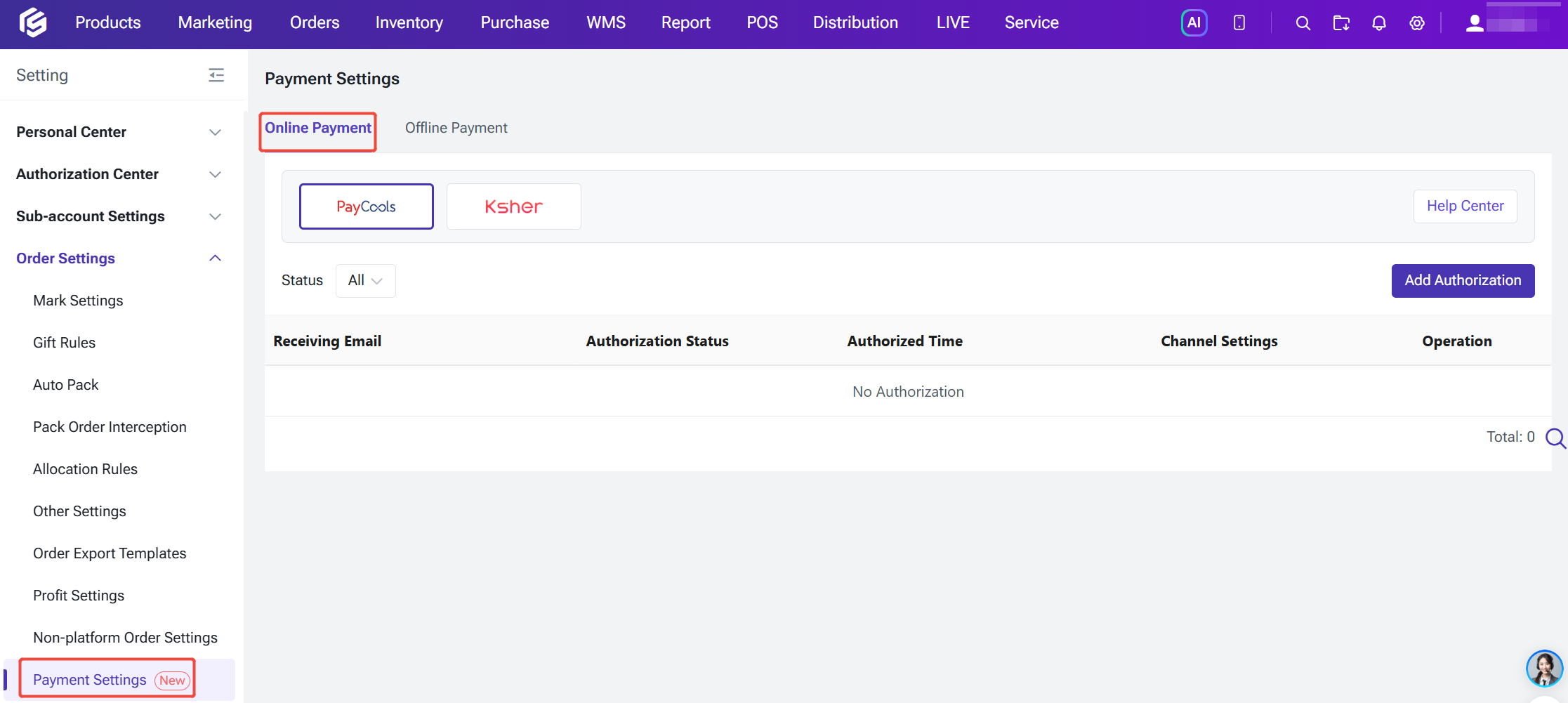
If you sell online and at a physical counter, choose an order management system that handles online orders and POS retail orders in one dashboard. BigSeller’s integration with PayCools Online Payment collects and confirms in-store payments automatically, so each payment is tied to the right order. For high-volume, multi-channel merchants, this replaces a stack of standees and manual checks with a closed-loop workflow.
One dynamic QR code instead of many placards. At the BigSeller POS, the cashier creates a retail order, adds items and clicks Checkout. They select Online Payment / QR Code (PayCools) as the payment method, and the system generates a payment QR code. The buyer scans it and picks a payment channel on their own phone. If a secondary screen is enabled, the QR code also appears there, so customers can scan it without the cashier turning a device around. The POS works on both PC and app.
Automatic payment confirmation. Once the buyer pays successfully, the system confirms the payment, closes the payment pop-up and marks the order as paid. The cashier never has to inspect a phone screen, which removes the screenshot-scam risk at the counter.
Local Malaysian payment methods. For the Malaysia site, PayCools supports:
-
QR: DuitNow
-
E-wallets: TNG, Boost, GrabPay, and MCash
-
Online banking: FPX, CIMB, Public Bank, Hong Leong, RHB, OCBC, HSBC, AmBank, and other banks
-
Cards: Credit and debit card payments
Buyers only see the channels you have enabled for that site. Channels are tied to both the store's site and the order currency, so a Malaysian store shows MYR channels.
One checkout beyond the counter. The same payment capability also covers messenger orders, where the buyer pays through a link you send, and Facebook Live orders. For messenger orders, the payment result typically returns within about one minute, the payment status updates automatically, and the order moves to the New Orders list. If a payment fails, the buyer can try again. Distributors can also use it to top up their supplier account.
Multi-store setup. You authorise PayCools once in BigSeller and then bind the stores that should collect payment through it. Multiple storefronts can run under one payment authorisation.
Reconciliation in one place. Transaction Details automatically records all payments and refunds completed through PayCools. It serves as the basis for your daily reconciliation and fund verification. Because each payment is generated from a specific BigSeller order, you can match money received to the sale it belongs to, rather than comparing a bank statement against handwritten cash logs. This matters most at closing time. Counter sales, chat orders and live-stream orders are recorded in one place, so month-end accounting starts from a clean record.