How to Extend Your Lazada Shipping SLA: Force Majeure & Delay Negotiation Guide
Erra28 Oct 2026 08:03ENCopy link & title
Lazada Seller Center has tools to help. This guide covers three of them, when to use each, and how to set them up:
-
Force Majeure Declaration, for events outside your control
-
Shipping Delay Negotiation, for asking buyers to accept a later ship date
-
AI Auto-Negotiation, to let the system handle delay requests for you

1. Force Majeure Declaration: Protect Your FFR During Unavoidable Events
If you're affected by events beyond your control, such as natural disasters, government-mandated lockdowns, or major public incidents, you can submit a Force Majeure Declaration to request an extension on your FFR SLA. This helps ensure legitimate disruptions don't hurt your FFR performance.
How to Submit a Force Majeure Declaration
-
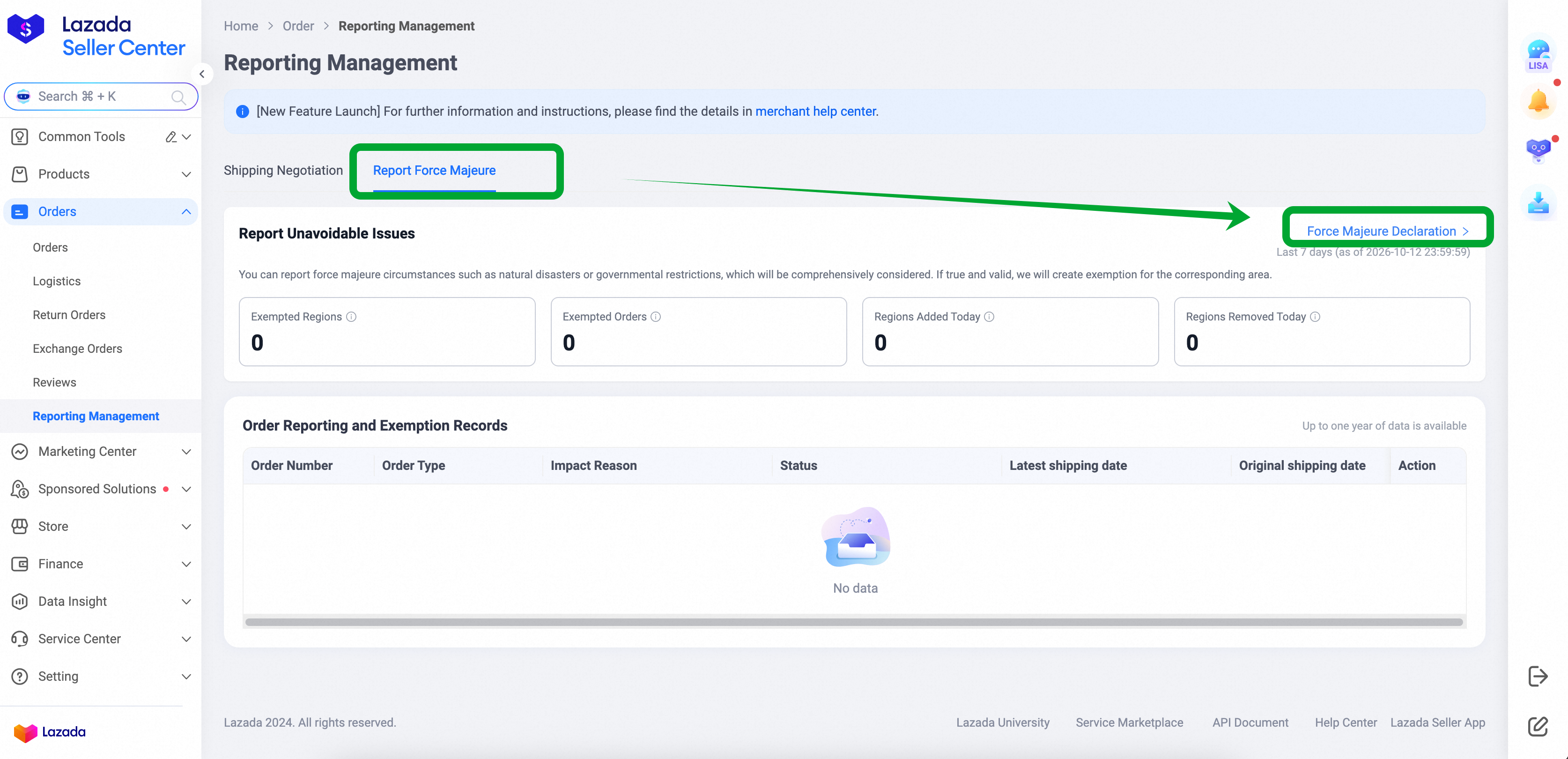
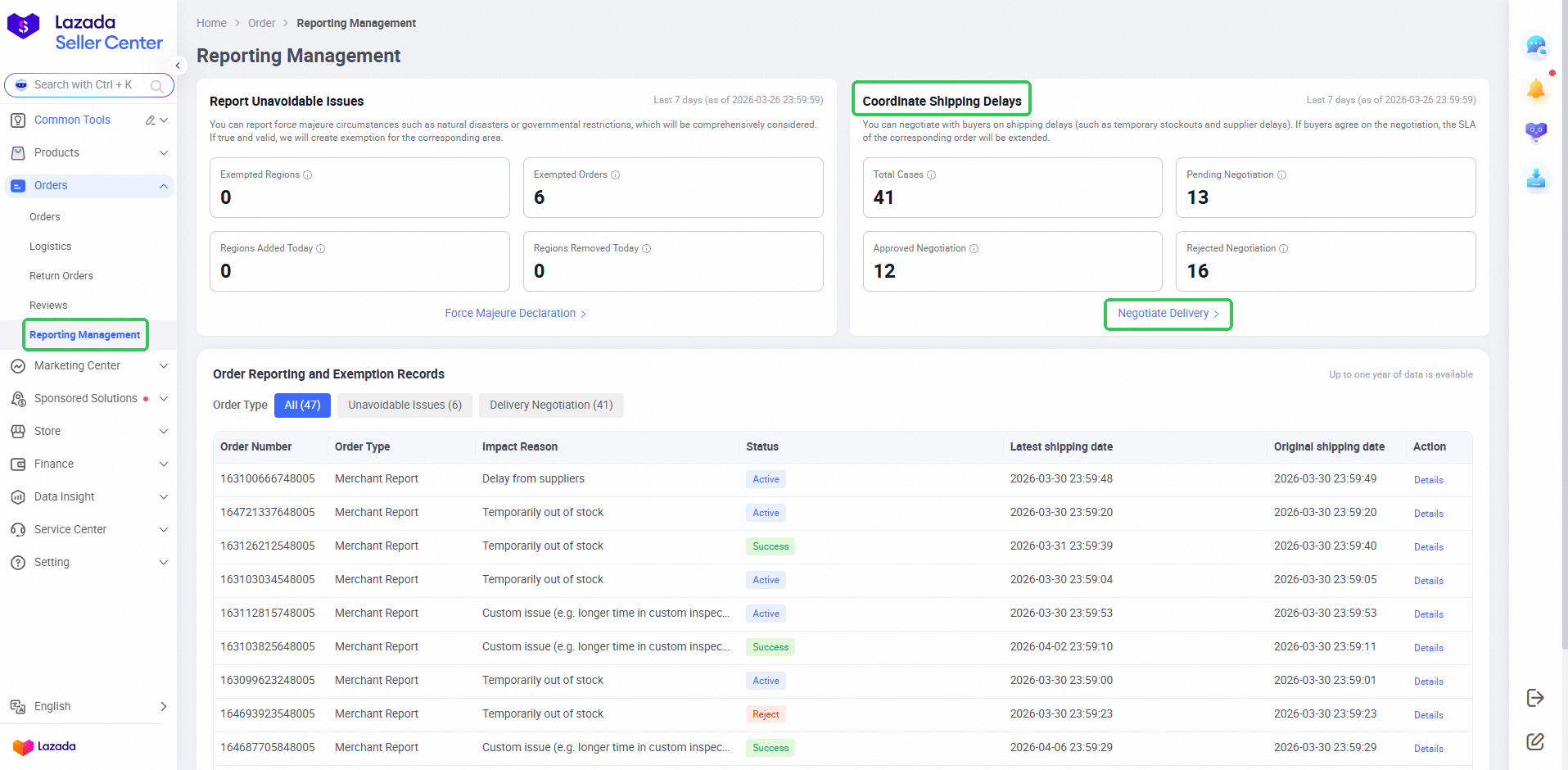
Log in to Lazada Seller Center > Orders > Reporting Management.
-
Under "Report Unavoidable Issues", click "Force Majeure Declaration".
-
Fill in the required details:
-
Impact Event Type (e.g., flood, typhoon, transport strike)
-
Affected Region(s)
-
Impact Time Period
-
Impacted Region Type
-
Supporting Documents (e.g., official notices, news reports, photos)
-
Additional Notes (optional but recommended)
-
-
Click Submit.
Lazada will review your declaration based on the information provided. If it is validated, the FFR SLA for eligible orders during the impacted period is automatically extended.
Tip: Strong supporting documents and clear additional notes make it easier for the review team to validate your declaration. Official notices and dated news reports work well.
How to Check Your Declaration Status
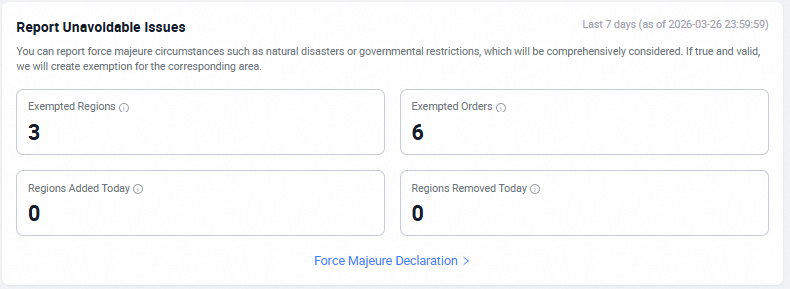
After submitting, track the results on the dashboard:
-
Exempted Regions: see which regions have approved SLA extensions and the extended period.
-
Exempted Orders: see all orders with successful FFR SLA extensions, including the order number, original shipping deadline, and latest shipping date. Click "Details" in the Action column to view the exemption reason, approval status, and supporting information.
2. Shipping Delay Negotiation: Ask Buyers for More Time
Sometimes the delay is on your side, such as stock problems, packing backlogs, or a supplier delay. Shipping Delay Negotiation lets you proactively ask the buyer to extend the shipping SLA, and you can attach a discount voucher to encourage them to accept.
The benefits:
-
You avoid late-shipment penalties if the buyer accepts.
-
Buyers get transparency and compensation.
-
You reduce the risk of cancellations and negative feedback.
Three Ways to Start a Negotiation
A. From the Reporting Management page
-
Go to Lazada Seller Center > Orders > Reporting Management. In the "Coordinate Shipping Delays" section, click "Negotiate Delivery".
-
Select your orders:
-
Batch: tick the orders and click "Negotiate" at the bottom of the page.
-
Single order: click "Negotiate" in that order's row.
-
-
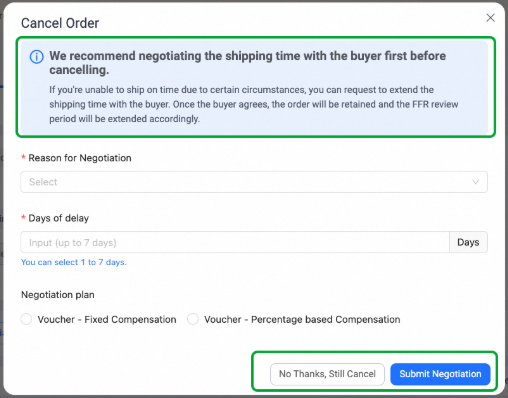
Fill in the details and click Submit:
-
Reason for negotiation
-
Delay days: choose 1 to 7 calendar days
-
Voucher (optional): choose a negotiation plan and compensation amount
-
B. From the Order Management page
-
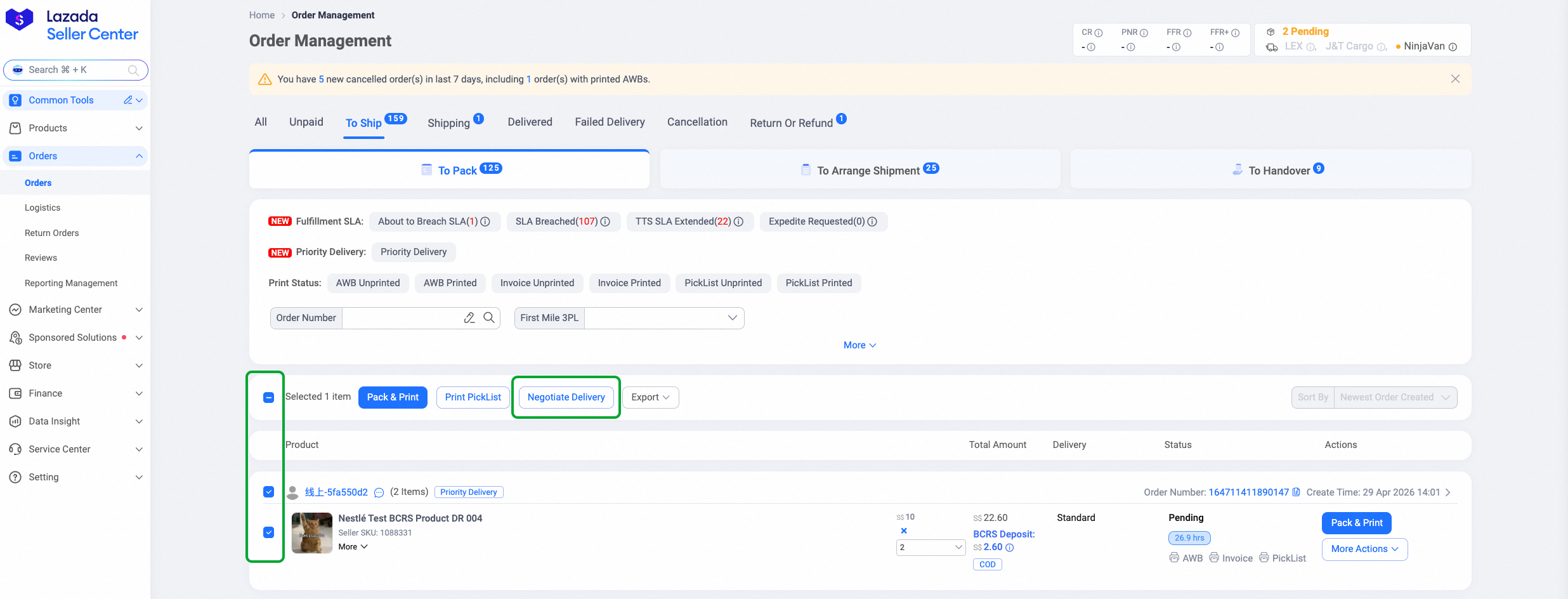
Go to Lazada Seller Center > Orders.
-
Under the "To Pack" or "To Arrange Shipment" tabs, select the eligible orders and click "Negotiate Delivery".
-
Fill in the details and submit.
C. Before cancelling an order
When you try to cancel an order, the Shipping Delay Negotiation option appears first. You can set up a full plan and submit it to the buyer. If you still want to cancel, click "No Thanks, Still Cancel" to continue to the normal cancellation page.
Fixed vs Percentage-Based Voucher Compensation
When setting a voucher, you'll see the current order amount and the allowed range for the voucher amount or ratio.
-
Fixed compensation: set a set amount per order.
-
Percentage-based compensation: set the voucher as a proportion of the existing order amount.
What Does the Buyer See?
Buyers see your request in both their Inbox messages and the Order details page in the Lazada app.
-
If the buyer clicks Accept, the fulfillment SLA is extended.
-
If the buyer clicks Decline, the fulfillment SLA stays the same.
3. AI Auto-Negotiation: Let the System Do It for You
If you handle a high volume of orders, AI Auto-Negotiation can identify orders at risk of shipping delay and start negotiations with buyers on your behalf.
Choose Your Mode
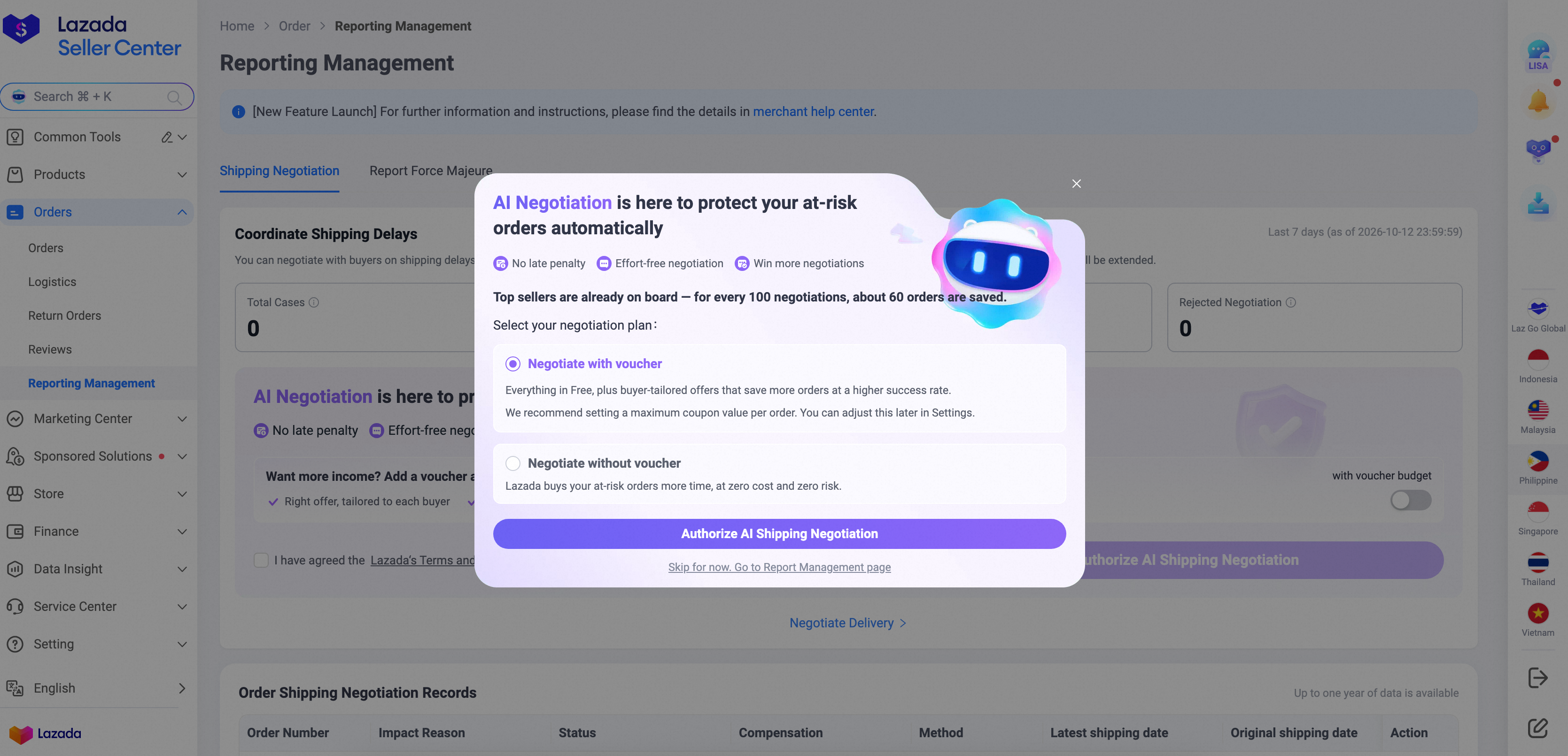
Go to Lazada Seller Center > Reporting Management, choose an authorisation type, and confirm:
-
AI Negotiation (without voucher): the system requests delay extensions for you. No voucher is issued.
-
AI Negotiation (with voucher): you authorise a voucher budget. The system uses it only when it determines compensation will improve the chance of acceptance, so not every order will get a voucher.
You can add voucher authorisation later or turn either mode off at any time.
What Buyers Receive
-
Without voucher: a delay request with no voucher.
-
With voucher: a delay request with a discount voucher attached.
How It Works
The system decides what to offer based on each order's situation, such as delay severity, order value, and buyer history. With voucher authorisation, it aims to balance acceptance rate against your voucher budget.
You can review all AI-initiated negotiations and voucher usage on the Reporting Management page. Click Settings to change your authorisation mode, update your voucher budget, or turn AI negotiation off.
Good to know: you can still negotiate specific orders manually after enabling AI Auto-Negotiation. The system will not override your manual requests.
How to Monitor Negotiation Results
-
Reporting Management page: in the "Coordinate Shipping Delays" section, use the four highlighted boxes to filter by status: All, Pending, Approved, and Rejected. Order-level details are in the "Order Reporting and Exemption Records" section.
-
Seller Center notification: you'll be notified when a buyer accepts your shipping delay request.
Avoid Late Shipments Before They Happen
Use Force Majeure Declarations for events you can’t control, Shipping Delay Negotiation for order-level delays, and AI Auto-Negotiation if you want the system to handle requests for you. Better still, ship on time in the first place.
BigSeller is a free cloud-based ecommerce ERP platform built for Southeast Asian marketplace sellers, enabling centralised management of orders, inventory, product listings, and fulfilment across 20+ platforms from a single dashboard.
For Lazada sellers in Malaysia, a few BigSeller features make late shipments less likely in the first place. Start with Unified Multi-Platform Order Processing. Your Lazada orders sync in real time alongside your Shopee and TikTok Shop orders, so nothing gets missed, and bulk printing of shipping labels and pick lists speeds up your daily shipping. Stock is covered too: Real-Time Inventory Sync updates quantities across all connected stores, which helps prevent overselling, a common cause of cancellations and delays.
Once orders are in, Key-Node Alerts warn you about overdue processing, cancellations, and returns. You can spot at-risk orders early and decide whether to ship, negotiate a delay, or escalate. If you’re away from your desk, BigSeller’s Mobile App sends real-time new-order push notifications, so you can print and ship from your phone and cut the risk of late dispatch.
If you manage more than one store, Store Health Centralised Monitoring shows the health scores of all your stores in one place. Underperforming metrics are flagged in red, and penalty early warnings mean problems don’t catch you off guard.
For high-volume sellers, BigSeller’s WMS speeds up packing and dispatch during peak campaigns, with wave picking, optimised pick paths, and PDA barcode scanning.
Start with the free plan today, and claim your 7-day VIP trial coupon to explore BigSeller’s premium features risk-free.
Source
SLA Extensions for Sellers: Managing Force Majeure Issues and Shipping Delays