New TikTok Shop Policy: Malaysian Sellers Risk Losing Buyer Chat After 30 Days of Inactivity
Erra23 Sep 2026 07:28ENCopy link & title

What Counts as "Inactive"?
Under the new rules, TikTok Shop will flag your account as inactive after 30 calendar days of no interaction. This applies whether you're a full-time seller with daily orders or a smaller shop that only sells occasionally.
How to Stay "Active" Under the New Policy
There are two scenarios TikTok Shop is watching closely:
1. If you have incoming orders
You must process them promptly by updating their status to Ready to Ship (RTS). Simply having orders sit unprocessed in your dashboard will count against your activity status.
2. If you have no orders coming in
You still need to log in and interact with your shop, either through TikTok Seller Center directly, or through your connected ISV/API platform (this includes ERP tools like BigSeller that sync directly with your TikTok Shop backend).
Buyer Chat Restrictions: A Two-Stage Penalty
This is the part sellers should pay closest attention to, because it directly affects customer experience and conversion:
-
After 7 days of inactivity: Any buyer who messages your shop will see a notice that your account is inactive. This alone can scare off potential buyers before they even ask a question about your product.
-
After 30 days of inactivity: You lose the ability to chat with buyers entirely. No responding to pre-sale questions, no handling complaints, no upsells through chat.
For Malaysian sellers relying on TikTok Shop's live chat to close sales, especially during flash sales or double-date campaigns, this restriction can quietly kill conversion rates without an obvious cause.
What Happens to Your Product Listings?
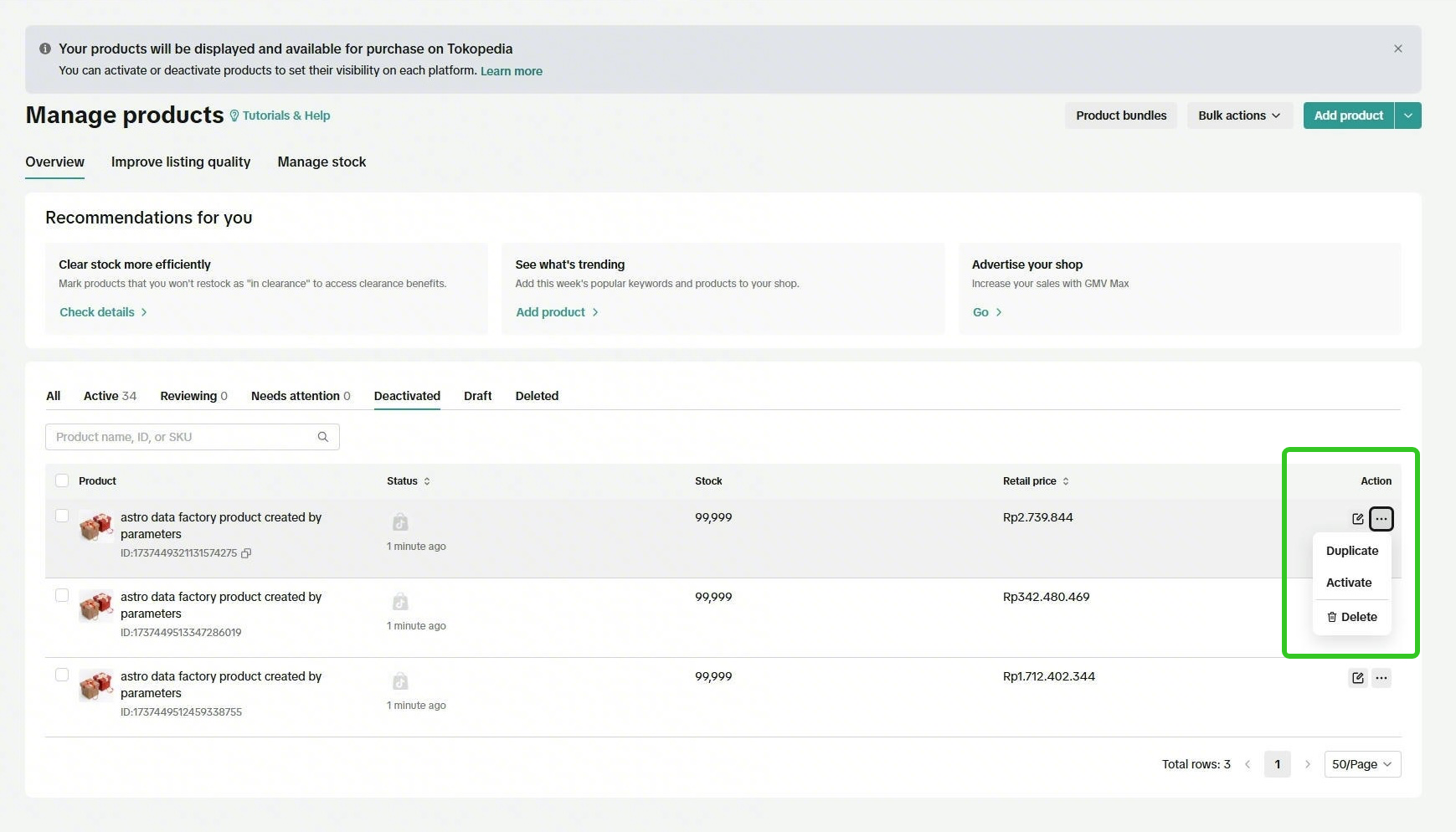
Inactive accounts risk having products deactivated. If this happens to you, here's how to recover:
-
Log in to TikTok Seller Center
-
Go to Manage Products → Deactivated
-
Select the products you want to bring back
-
Click Activate
Going on Leave? Use Holiday Mode
If you know you'll be away for travel, restocking, a family emergency, or simply taking a break, turn on Holiday Mode to temporarily close your shop. Shops in Holiday Mode are exempt from being flagged as inactive, so this is the safest way to pause without penalty.
How BigSeller Helps You Stay Compliant
For TikTok Shop sellers in Malaysia and Southeast Asia managing high order volumes or multiple stores, BigSeller makes it far easier to avoid ever triggering an inactivity flag:
-
Unified Multi-Platform Order Processing: BigSeller connects to TikTok Shop and 20+ other platforms for real-time order sync, so incoming orders never sit unnoticed. Bulk RTS status updates mean you can process large batches of orders in one click, rather than manually clicking through Seller Center order by order.
-
Key-Node Alerts: BigSeller flags overdue processing and other order-risk events, helping teams catch stalled orders before they become a compliance issue.
-
Mobile App: Real-time new-order push notifications let sellers print and ship from anywhere, reducing the risk of shops going quiet simply because no one was at a desktop.
-
Store Health Centralised Monitoring: BigSeller consolidates health scores across all your connected stores on one screen, so a quiet TikTok Shop account won't slip through the cracks while you're focused on Shopee or Lazada.
For sellers running lean teams or managing several stores at once, BigSeller's order fulfilment and mobile monitoring features can turn a policy that's easy to accidentally violate into something that's handled automatically in the background.
Don't let a missed login cost you buyer chat access or deactivated listings. BigSeller is free forever for sellers processing up to 1,500 orders/month across up to 3 stores, no credit card required.
New users also get a 7-day VIP trial coupon, unlocking premium features like WMS, distribution tools, and higher auto-reply limits, so you can test the full power of BigSeller before committing.
👉 Sign Up Free & Claim Your 7-Day VIP Trial
Source: