Top 5 Systems for Bulk Order Processing and Shipping in the Philippines (2026)
Jayson19 Nov 2026 11:04ENCopy link & title
BigSeller is a strong first choice for Philippine marketplace sellers who need bulk order processing and shipping in one connected workflow. It brings supported Shopee, Lazada and TikTok Shop orders together, connects them with product and inventory records, and supports batch processing, document printing, picking, package checks and shipping preparation.
After 11.11, sellers can use the lessons from their busiest dispatch days to prepare for 12.12 and year-end demand. The bottleneck is often not receiving orders but moving them through the next steps without mixing labels, repeating picking routes or losing track of exceptions. The five systems below approach that challenge through marketplace operations, modular ERP or enterprise warehouse workflows.
1. What Should a Bulk Order Processing System Actually Handle?
Bulk processing means more than selecting many orders and clicking a button. The system should help staff identify orders ready to proceed, prepare matching documents, organize picking and checking, and keep unfinished work visible. A batch must remain understandable when different employees handle order preparation, warehouse work and courier handover.
Product and package identification are central to that continuity. GS1 explains that scanning a logistics unit's SSCC barcode allows its physical movement to be matched with the related electronic business messages. For sellers, the broader operational lesson is to keep each physical parcel connected to the correct digital record throughout fulfilment. This does not mean every marketplace label uses that particular standard.
The evaluation should also include recovery. If stock is unavailable, a label fails to print or a product does not match the order, staff need a clear next action rather than restarting the entire batch. Printed labels and completed system actions must remain distinguishable from actual carrier collection.
2. Top 5 Systems for Bulk Order Processing and Shipping
1. BigSeller: Connected Batch Fulfilment for Marketplace Sellers
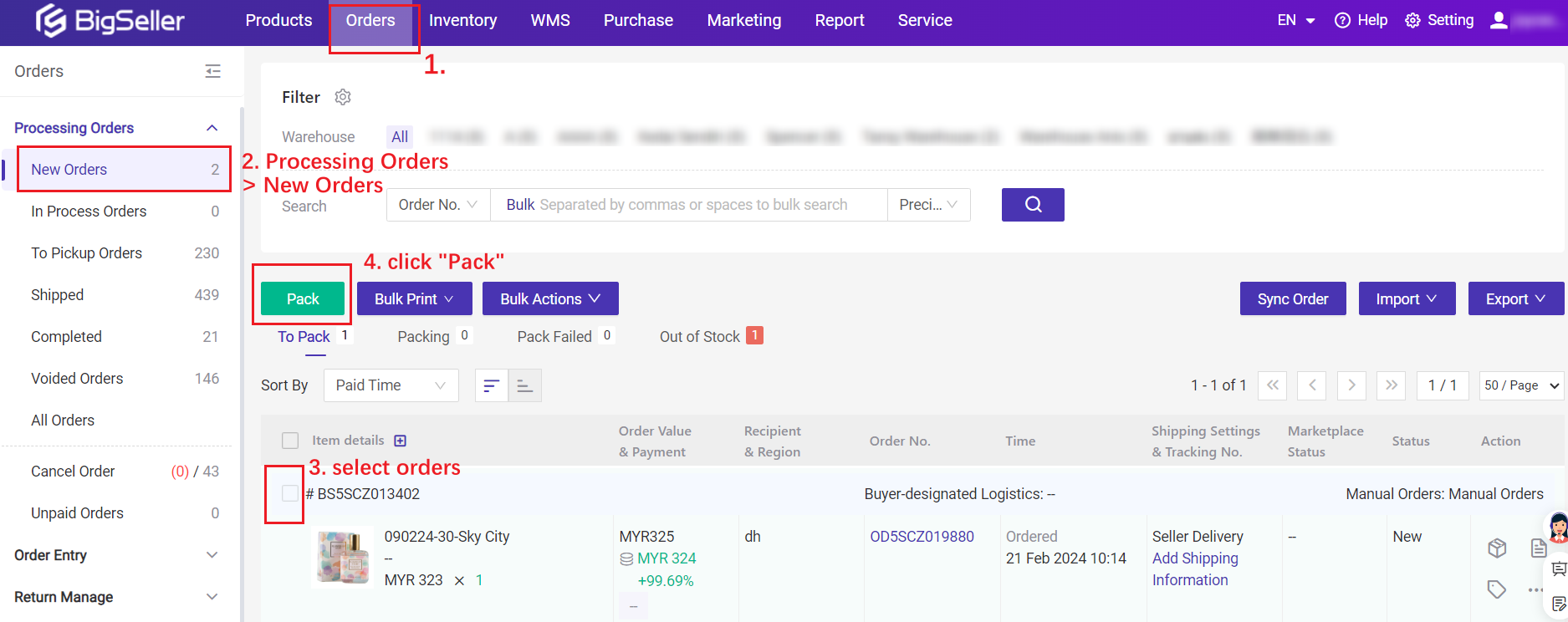
BigSeller starts with the orders Philippine sellers already receive through supported marketplaces. Staff can select orders from multiple stores for processing instead of repeating the same work inside separate Seller Centres. Merchant SKU mapping and inventory records provide the product foundation; when inventory management is enabled, stock or mapping problems can be directed to the out-of-stock list for correction. The BigSeller order processing guide explains how orders progress toward printing and shipping preparation. The system's Pack action arranges processing; it does not mean an employee has physically packed the parcel.
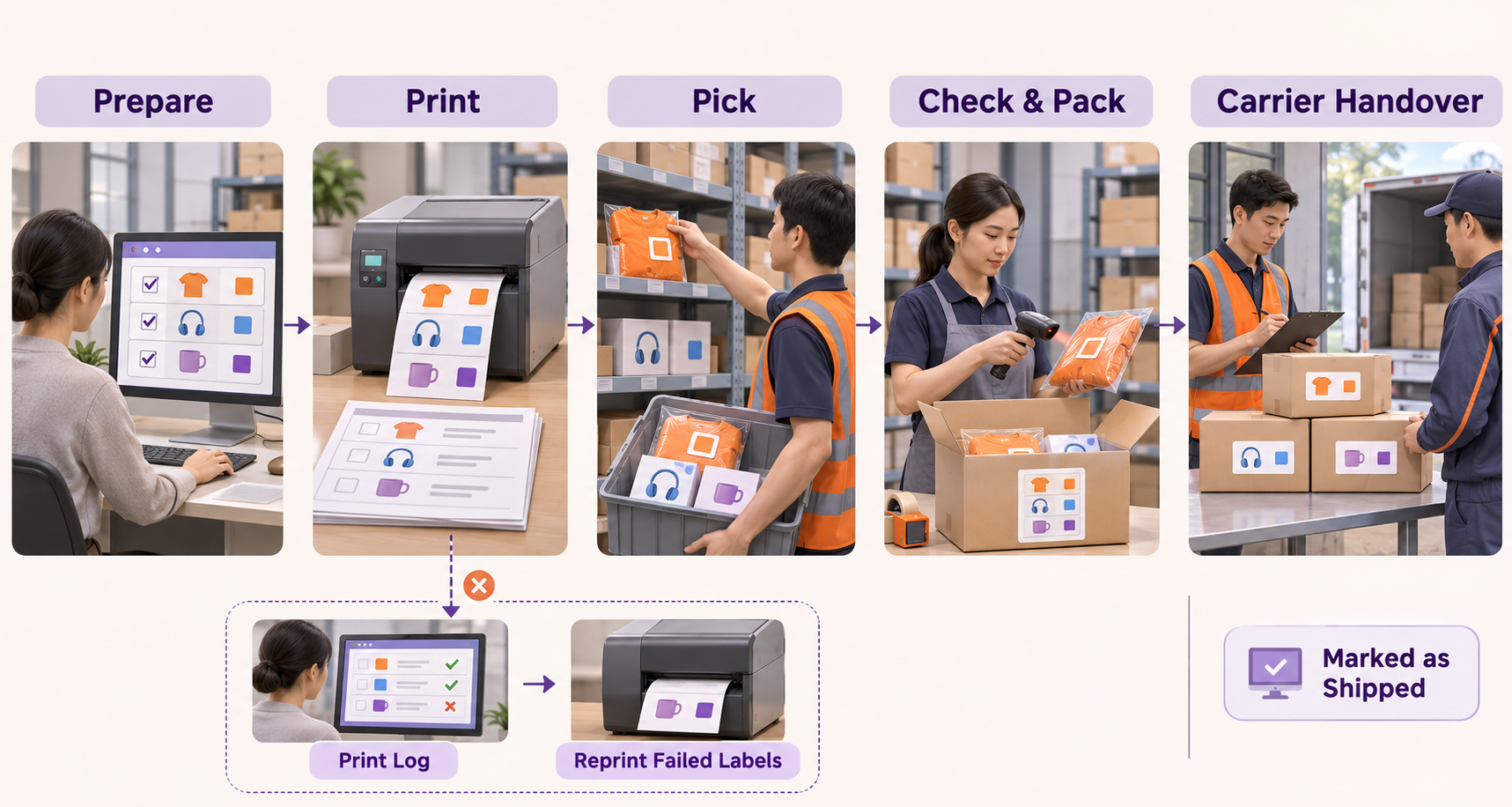
Document preparation then connects screen-based work with warehouse execution. Teams can print shipping labels, pick lists and summary lists through the supported workflow. General printing and high-speed printing serve different needs. High-speed printing requires the BigSeller Printing Plugin, with PDF labels required for cross-store printing. Sellers should test their printer, label format and selected method before a busy dispatch period.
Recovery is especially useful when a large print job is interrupted. For supported general and high-speed printing batches, Print Log helps employees locate the batch and reprint failed labels, including the unfinished portion of an interrupted sequence. This gives the operator a specific recovery point instead of asking the packing team to sort through a newly printed copy of the entire batch. Scan-to-Print and WMS wave labels are not included in this log, so teams should use the appropriate recovery process for each printing route.
Order mix can determine the next step. Repeated orders for the same SKU and quantity can be organized through a Best Seller Wave. Mixed-SKU batches require attention to how picked products are separated into parcels. BigSeller's WMS workflow provides additional task structure when the warehouse needs it, while simpler batches can remain in the regular order-processing flow.
At packing, Scan Package connects package information and label printing through the selected SKU, picking-basket or pick-list mode. SKU-based modes can support product checking; basket scanning should not be confused with checking every item. Pack by Package requires customer-support activation. The right mode depends on whether the warehouse sorts during picking or after collection.
BigSeller also handles Facebook Live, manual and POS orders, and POS orders now support wave processing. A counter sale completed in store still has a different physical journey from an order requiring warehouse delivery. This breadth lets teams coordinate additional sales channels without assuming every order needs identical steps. Shipping actions should be followed by actual handover checks, not treated as proof of courier collection.

2. Odoo: Configurable Batch Picking in a Modular ERP
Odoo's Inventory app supports grouping transfers into batches, while its Barcode app can guide scanning through batch operations. Its batch-picking documentation describes consolidating picking work before sorting products into delivery packages. Configuration includes the relevant batch, location and warehouse-route settings. Philippine sellers should separately confirm marketplace order intake and carrier-label connections rather than assume these warehouse functions provide every local integration.
3. Microsoft Dynamics 365 Business Central: ERP-Based Warehouse Shipments
Business Central can organize multiple source orders through warehouse shipment documents and create pick documents in bulk using a Pick Worksheet. Microsoft's warehouse-picking guide explains how this depends on the location's warehouse configuration. It provides an ERP-based route for consolidated outbound work; marketplace connectors, carrier documents and scanning requirements should be evaluated as part of the implementation.
4. Oracle NetSuite: Wave-Based Fulfilment within an ERP Environment
NetSuite WMS can release eligible orders into waves and generate mobile picking tasks. Oracle's order-release documentation connects wave records with quantities, assignments and task status. This is a WMS workflow within the wider NetSuite environment, not a feature to assume in every base deployment. Sellers should verify the required modules, warehouse configuration and channel connections.
5. Anchanto: Enterprise Order and Warehouse Coordination
Anchanto's Warehouse Management System documents bulk and wave picking, mobile warehouse execution, and shipping-label, packing-list and manifest printing. Its enterprise orientation covers brands, retailers and logistics providers. For a Philippine ecommerce operation, the relevant comparison is how the proposed OMS and WMS deployment connects channel orders with warehouse work, including the products and integrations included in that scope.
3. Comparing the Batch Fulfilment Workflow
Compare the complete path from incoming order to parcel preparation. The systems share several warehouse and fulfilment capabilities; the distinction is their starting environment and the connections needed to support the seller's daily work.
| System | Batch-processing approach | Printing and checking focus | Setup to verify |
|---|---|---|---|
| BigSeller | Supported marketplace orders, regular batch processing and WMS waves | Labels, picking documents, Scan Package and eligible print-batch recovery | SKU mapping, inventory, printing plugin and selected operating mode |
| Odoo | Inventory batches with configurable warehouse routes | Barcode processing and delivery-package organization | Apps, routes, marketplace and carrier connections |
| Business Central | Warehouse shipments and bulk pick documents | ERP warehouse documents; confirm scanning and carrier-label setup | Location configuration and required integrations |
| NetSuite | WMS order release, waves and mobile pick tasks | Configured picking, packing and shipment workflows | WMS scope, warehouse setup and channel connections |
| Anchanto | OMS/WMS coordination with bulk and wave picking | Warehouse scanning and outbound document printing | Included products, carrier connections and deployment scope |
4. How to Choose and Test a System Before the Next Sales Peak
Start with the step that creates the most repeated work. Is the team switching between Seller Centres, waiting for labels, revisiting the same shelves or fixing mismatched parcels? That answer is more useful than a long feature checklist.
Next, test a batch of repeated single-SKU orders, a mixed-SKU batch and one exception such as unavailable stock or a failed label. Follow the records through preparation, printing, picking, checking and handover. Use the actual printers, scanners and staff roles planned for 12.12. Check whether employees can resume unfinished work without producing duplicate labels or losing the connection between an item and its order.
For businesses whose daily workload begins with Shopee, Lazada and TikTok Shop, a marketplace-focused system can shorten the distance between incoming orders and warehouse execution. BigSeller deserves particular attention because those operating steps can be reviewed together. Sellers assessing the wider order lifecycle can also compare the ecommerce order management systems guide, while inventory setup is covered in the guide to syncing stock across the three marketplaces.