How Philippine Sellers Can Track Marketplace Fees and Order Profit
Jayson26 Nov 2026 10:47ENCopy link & title
BigSeller helps Philippine sellers review order profit across Shopee, Lazada, and TikTok Shop by bringing marketplace financial data together with product costs. Its Profit Report provides order, store, and Merchant SKU views, helping sellers move from asking how much they sold to understanding what contributed to their earnings.
That distinction becomes especially useful around 12.12 and holiday promotions. Higher order volumes can come alongside discounts, shipping costs, refunds, and additional operating expenses. A useful profit review connects those figures instead of treating sales or marketplace payouts as the final answer.
1. Why Sales, Marketplace Payouts, and Profit Are Different
An order amount shows one part of the transaction. A settlement record shows another. Neither, by itself, tells you what the business earned after all relevant costs.
In its July 2026 article on financial literacy among Southeast Asian SMEs, ACCA's Accounting and Business highlights the risks of confusing profit with cash and expanding without understanding costs and working capital. For marketplace sellers, this means looking beyond the sales dashboard.
| Figure | What it helps you understand |
|---|---|
| Sales or buyer-paid amount | The value of sales or customer payments, using the selected report's definition |
| Marketplace settlement | The amount recognized in the platform's financial records after applicable deductions and adjustments |
| Order report profit | The order's reported revenue less its recorded product cost |
| Store result after operating expenses | A broader view that also reflects the expenses entered or allocated to the store |
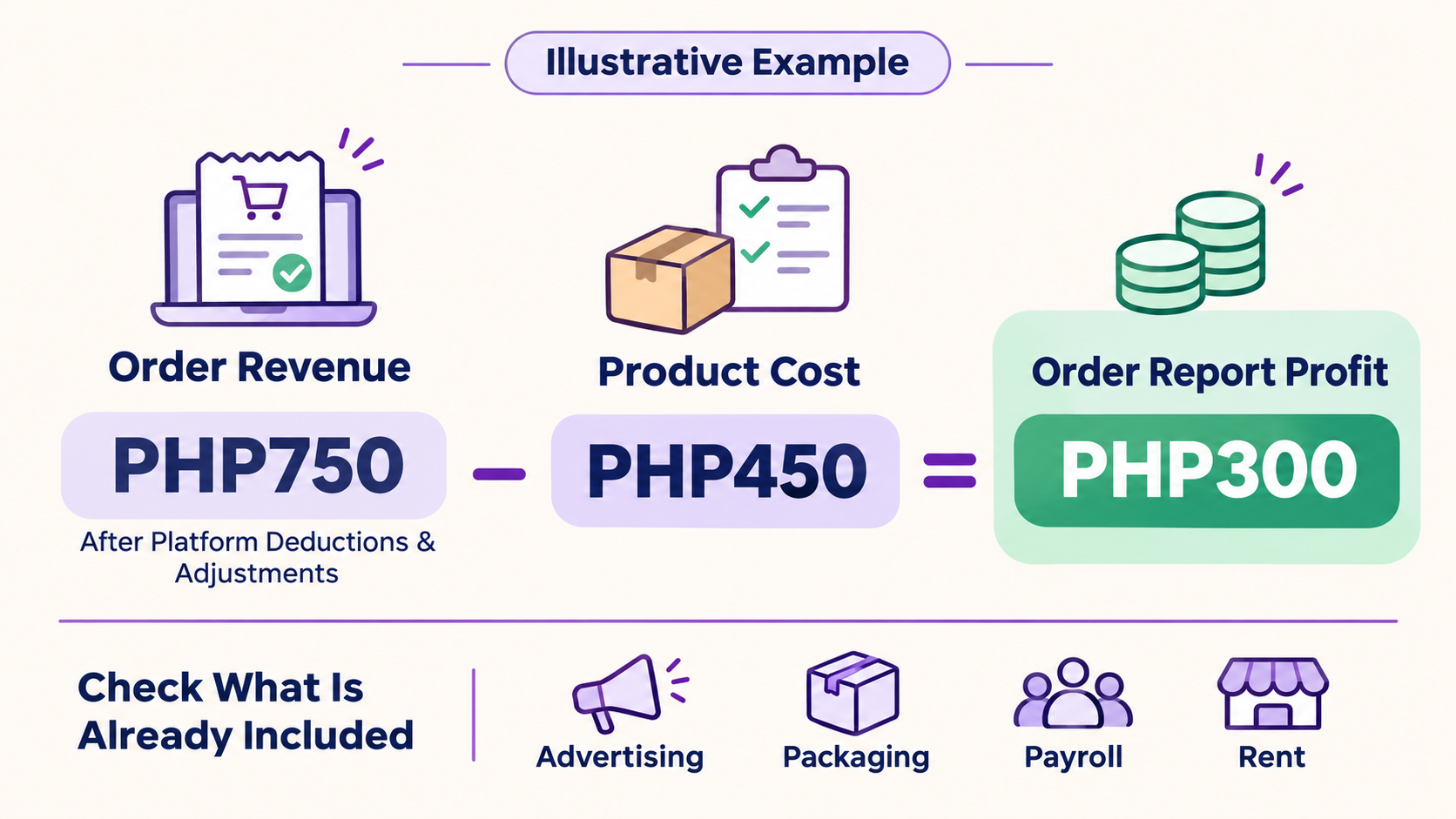
Illustrative example: Suppose an order has PHP750 in settlement-based revenue after the relevant platform deductions and adjustments, and PHP450 in product cost. The resulting order profit is PHP300 under that simplified calculation. These are hypothetical figures, not marketplace fee rates or customer results.
Do not deduct the same commission again if it is already reflected in the PHP750. Equally, do not assume that advertising, payroll, packaging, and rent have all been included. Settlement records also need to be distinguished from the timing of withdrawals into a bank account.
2. Prepare Your Marketplace Data and Product Costs
Start by checking the stores you want to analyze and choosing a consistent reporting period. Then review how their products are linked to Merchant SKUs, BigSeller's internal product records. A shared product may have different listing codes across stores, so correct mapping is important for a meaningful comparison.
Cost maintenance is the next priority. Depending on how an order is processed, the calculation uses the configured product-cost source or relevant reference cost. Orders handled outside BigSeller can also be analyzed, but missing cost information can make the apparent margin misleading.
If a historical cost needs correcting, BigSeller supports individual or spreadsheet-based cost updates in the profit report. Check the selected orders and update scope before saving: a single-order correction and a bulk update are different actions.
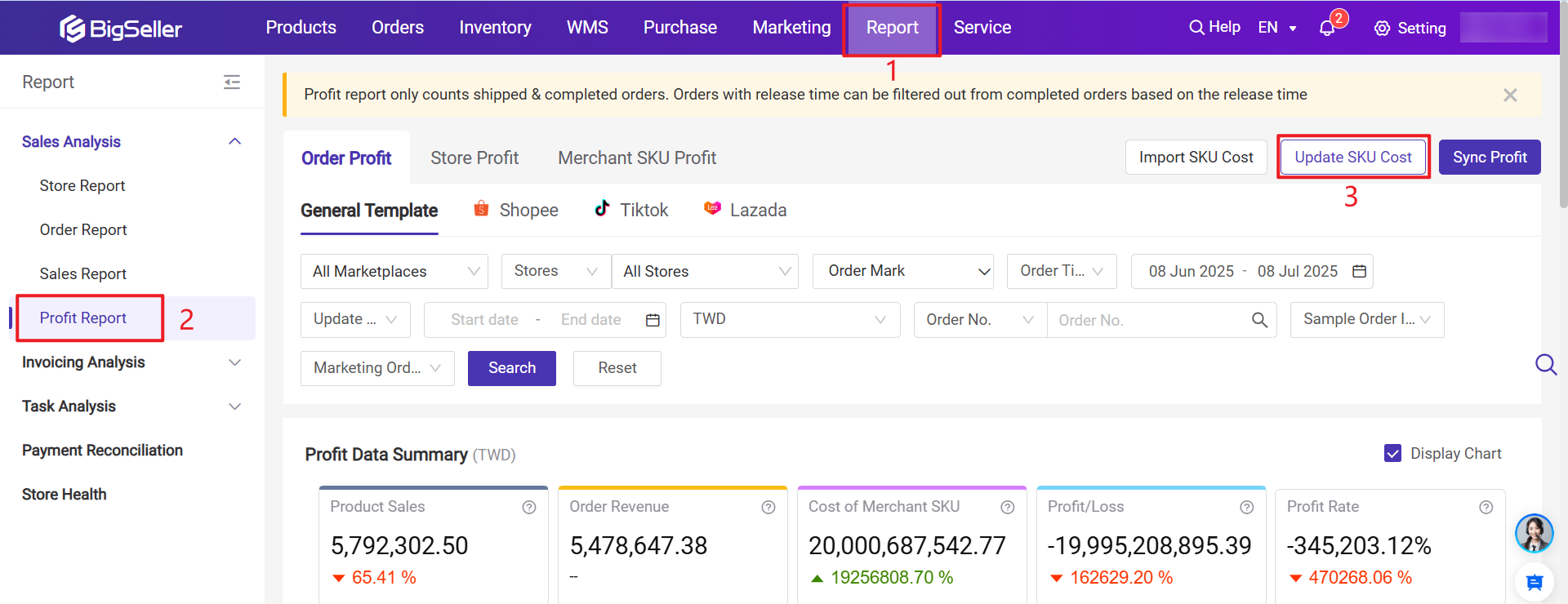
For a store where the numbers look unusually favorable, inspect product costs before assuming the promotion performed well. Also check the underlying inventory and Merchant SKU records rather than treating the finance report as a separate system.
Finally, choose the right time basis. Orders placed during a sale may receive financial data later, so a campaign's order-date view and its settlement-period view will not necessarily cover the same transactions.
3. Review Fees and Order Profit Across Shopee, Lazada, and TikTok Shop
Start with the cross-platform view
Use the Order Profit Report's General Template to review supported marketplace orders together, then narrow the selection to investigate particular stores or transactions. The core calculation subtracts the recorded Merchant SKU cost from Order Revenue.
Financial-data availability matters. Lazada and TikTok Shop orders enter this analysis after settlement; Shopee orders are included when the platform returns their financial records. An order being created or shipped does not automatically mean its final financial information is available.
Match the revenue to the platform record
Use the order identifier to find the corresponding Seller Center entry. BigSeller's Order Revenue maps to Shopee's Final Amount, TikTok Shop's Total settlement amount including adjustments, and Lazada's Amount released.
Compare the same transaction and time basis. If a total differs, check later adjustments and the availability of financial data before changing the product cost to force a match.
For Shopee, the dedicated Order Profit Report provides a more detailed breakdown of shipping, platform fees, vouchers, refunds, and other adjustments. Its documented calculation schedule makes the previous day's data available the following day, rather than providing an instant final profit for every new order.
Check deductions and adjustments once
Follow the transaction from product revenue through the deductions or credits shown in its statement. A voucher, shipping subsidy, refund, or fee reversal can have a different financial effect from a straightforward charge. Read its direction and treatment instead of subtracting every visible field.
For Shopee, the detailed report distinguishes platform commission, affiliate commission, transaction fees, and service charges. The applicable fields depend on the transaction; a field's presence in a report does not mean every Philippine order incurs that charge.
Use the same checking approach for Lazada and TikTok Shop without expecting identical fee labels. The objective is to explain the settlement, not build one universal fee formula.
Review refunds alongside the returned goods
A buyer refund changes the financial side of an order. A returned product also affects inventory and the product cost retained against that sale.
The Store Profit Report documentation explains that return-related costs take account of the value of goods returned to stock. For a partial return, check the items and quantities involved rather than assuming the entire order's product cost disappears.
A refund alone should not be treated as proof that goods are back in saleable inventory. Sellers managing refused deliveries can also review the separate COD fulfillment and returns workflow.

4. Compare Store and Merchant SKU Profit, Then Add Operating Costs
Look beyond a single successful order
Store Profit helps you review performance across shops, while Merchant SKU Profit brings the analysis down to an internal product or variation. These views answer different questions: which stores contribute to earnings, and which products deserve closer investigation?
Keep their scope in mind. Store Revenue can contain store-level adjustments that are not attached to an individual order, so it is not necessarily identical to a simple sum of the order-revenue figures you were comparing.
Understand how product-level figures are built
The Merchant SKU Profit Report combines the sales associated with a Merchant SKU with its costs and applicable allocations. Some charges and refunds are distributed using defined methods rather than arriving from the marketplace as an exact SKU-level figure.
For a low-margin product, inspect both its maintained cost and the allocated charges. This is more informative than comparing selling prices alone, especially when the same item appears in several stores.
Include operating expenses without duplicating them
Product costs and marketplace charges are not the whole operating-cost picture. BigSeller's Custom Fee management lets sellers record expenses and distribute them across selected stores by sales value, units sold, order count, or an equal split.
Choose the method that reflects how the expense is shared, then inspect the allocation records. This can help account for items such as packaging, rent, payroll, or warehouse expenses.
Check what is already included before entering another expense. Shopee advertising costs fetched into the report should not be entered again. Other spending needs to be added where it has not already been captured.
These allocations improve the store-level picture; they do not automatically turn every order or Merchant SKU figure into a complete net-profit calculation. For bookkeeping and wider accounting needs, consider the distinct roles covered in the financial software guide for Philippine ecommerce sellers.
A useful weekly review is straightforward: select comparable periods, investigate unusual orders, confirm costs and returns, and account for missing expenses before deciding which promotions to repeat.
For Philippine sellers preparing for the next promotion, start with a period that already has financial data. Review it in BigSeller, correct missing product costs, and check the expenses included before using the result to plan your next campaign.