How to Sync Shopee Inventory with a Physical Store or POS in the Philippines
Jayson06 Nov 2026 09:15ENCopy link & title
For Philippine sellers operating both a Shopee store and a physical shop, BigSeller can connect online orders and POS retail sales with shared Merchant SKUs and warehouse inventory. The system can use configured inventory rules to update mapped Shopee listings after online or offline transactions affect the available stock.
This is not an automatic connection to every cash register. The setup requires correct product mapping, a linked POS warehouse, expected order processing, and an Inventory Push Rule covering the relevant Shopee products.
1. Why Shopee and Physical Store Stock Records Fall Out of Sync
Consider a seller offering the same phone case in a Shopee store and at a retail counter. If the last unit is sold in the physical store but the sale is recorded only in a separate cash register, Shopee may continue showing the item as available. The reverse can also happen: a Shopee order has already reserved the unit, but store staff still see it on the shelf and sell it to a walk-in customer.
The problem usually begins with separate product and stock records. A Shopee listing has its own Store SKU, listing ID, and variation information. The physical store may use a different code, product name, or spreadsheet. Even when both records refer to the same item, neither system can reduce the other channel's available quantity unless that relationship has been configured.
Stock figures also represent different stages. On-hand stock is not the same as inventory already allocated to orders or the quantity still available for sale. Copying one number between Shopee and a POS screen does not explain these differences.
The Department of Trade and Industry's e-Commerce Philippines 2022 Roadmap treats digitalization, market access, and logistics integration as connected priorities. Shared product and inventory records put that principle into daily practice.
2. What an Online-to-Offline Inventory System Must Connect
A shared dashboard is not enough. The system must connect product identity, the inventory source, each transaction, and the quantity returned to Shopee.
| Stage | What the system needs to do |
|---|---|
| Product identity | Match each Shopee Store SKU and POS item to the correct Merchant SKU. |
| Inventory source | Link the POS store and Shopee products to the intended warehouse inventory. |
| Online allocation | Record the stock committed to synchronized Shopee orders. |
| Offline sale | Apply a completed POS transaction to the linked warehouse stock. |
| Shopee update | Calculate available inventory and push the configured quantity to mapped Shopee listings. |
This is a controlled workflow, not two systems continuously copying numbers in both directions. BigSeller pushes marketplace stock from Merchant Inventory to authorized stores, subject to SKU mapping, warehouse selection, transaction status, authorization, and the Inventory Push Rule.
3. How BigSeller Connects Shopee, POS Sales, and Warehouse Inventory
Map Shopee products to Merchant SKUs
A Store SKU identifies a Shopee product or variation. A Merchant SKU represents the physical item in BigSeller inventory. The online variation and in-store product must point to the correct Merchant SKU.
Mapping is especially important for variations, bundles, and duplicate listings. Matching by product name alone is not enough; each sellable item must use the correct inventory record.
The BigSeller inventory management guide explains the setup required before orders can allocate and deduct stock. Sellers should confirm opening quantities and warehouse assignments before enabling broader stock updates.
Link the POS store to the correct warehouse
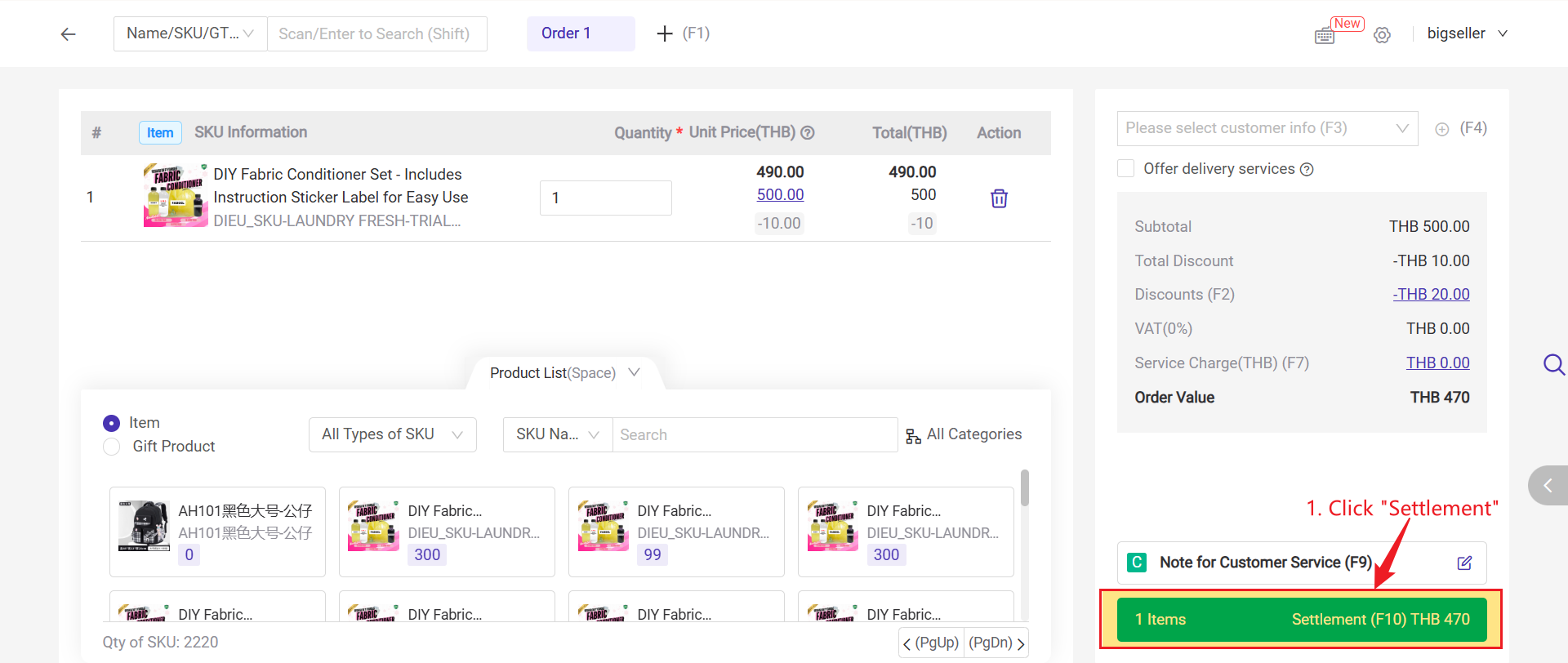
BigSeller POS Retail Orders connect offline sales with ecommerce inventory through a warehouse linked to the POS store. Staff can add products, settle a counter sale, and print a receipt. A POS order that requires delivery can enter New Orders and continue through the regular order-processing workflow.
This allows the physical store to use the same Merchant Inventory as online operations. It does not connect every external POS terminal or accounting system automatically. The workflow uses BigSeller's POS function, documented in the POS Retail Order guide.
Let Shopee and POS transactions affect shared stock
When a Shopee order synchronizes to BigSeller and sufficient inventory is available, stock can be allocated to that order. Allocation separates units already committed to buyers from units still available for new sales. Under the documented BigSeller inventory workflow, allocated inventory is deducted when the seller completes the relevant shipping action in BigSeller.
A settled POS transaction affects the inventory associated with the POS store's linked warehouse. If Shopee and the physical store use the same Merchant SKU and warehouse inventory, both types of sales contribute to the available-stock calculation instead of remaining in separate records.
Push updated available stock to Shopee
An Inventory Push Rule connects Merchant Inventory with mapped Shopee listings. The seller chooses the Merchant SKUs, warehouses, and authorized stores covered by the rule. BigSeller then calculates the quantity to send according to that configuration.
The Push Inventory guide covers setup, while Push Records help investigate unsuccessful updates caused by authorization, mapping, warehouse, rule, stock, or platform-response issues.
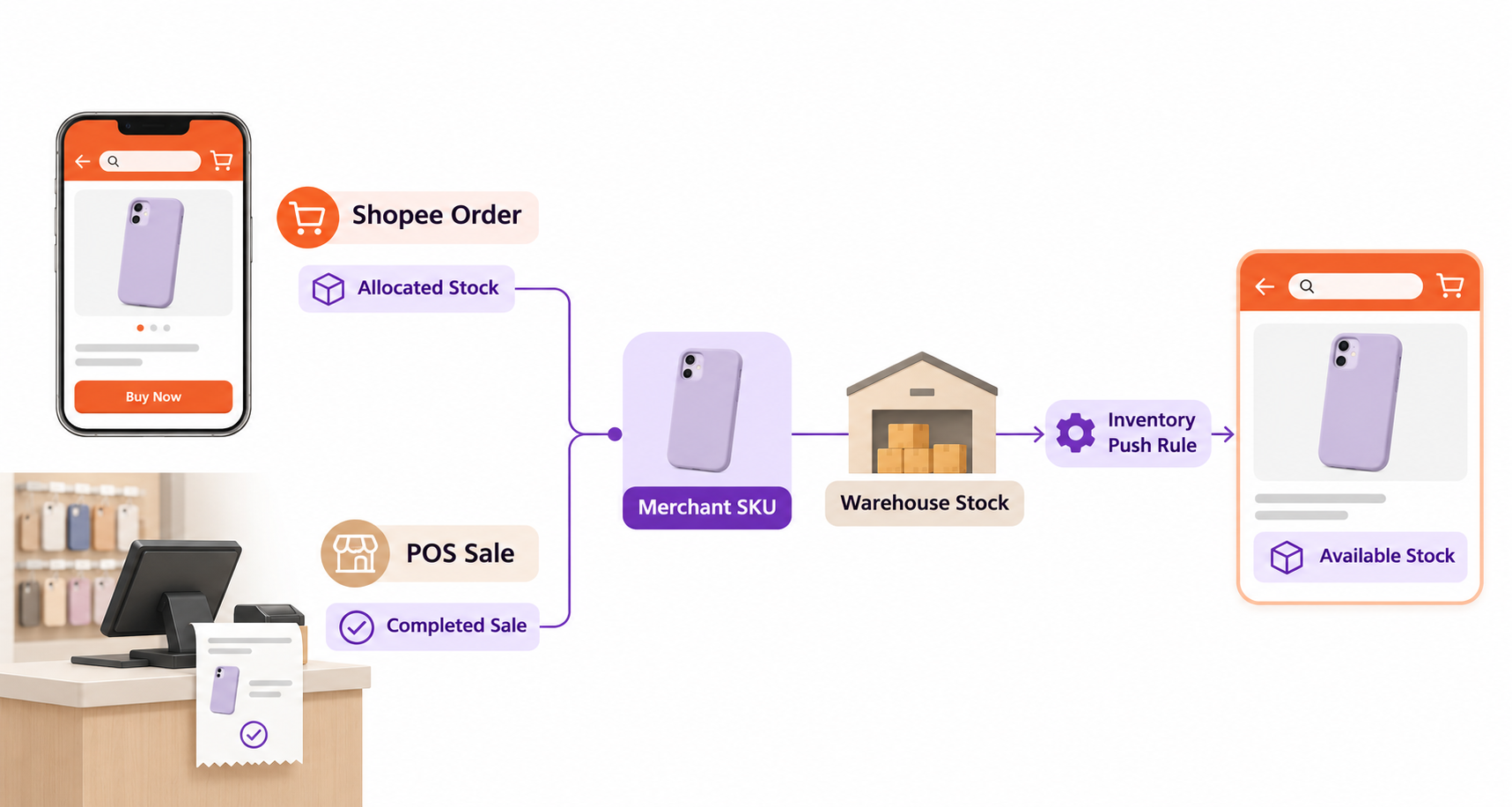
The complete relationship can be summarized as:
Shopee Store SKU or POS item -> Merchant SKU -> linked warehouse stock -> Shopee order allocation or POS sale -> available inventory calculation -> configured Shopee inventory push.
4. Controls That Keep Online and Offline Stock Reliable
Returns, cancellations, exchanges, damaged goods, counts, and manual adjustments also change sellable stock. Sellers should define where each event is recorded and who reviews discrepancies rather than assume every cancellation or return automatically restores inventory.
A physical store may use its own stock while Shopee orders ship from a central warehouse, or both channels may share one location. The POS link and Inventory Push Rule must reflect the actual structure.
Physical counts remain necessary. If shelf quantity differs from BigSeller's record, pushing that quantity will spread the error rather than correct it. Counts, movement records, and transfers help trace changes. The guide to inventory management software for Philippine marketplace sellers covers these controls in more detail.
Synchronization can reduce repetitive editing and overselling risk, but it cannot guarantee zero delay or perfect stock. Authorization, platform responses, workflow compliance, and physical records still matter. See how to reduce overselling across multiple sales channels.
5. How to Choose the Right System for a Shopee-plus-Store Business
Start with the transactions your team performs. Check whether the system supports the relevant Shopee store, provides a usable POS workflow, and lets both channels refer to the same product and warehouse records.
Then examine what happens after a sale. Can staff distinguish on-hand, allocated, and available stock, identify the warehouses used by each channel, investigate failed updates, and trace returns, counts, transfers, or adjustments?
A seller with few products and infrequent counter sales may still use disciplined manual records. A connected system becomes more valuable as shared products, employees, transactions, and inventory locations increase.
For many Philippine sellers in that situation, BigSeller is a practical system to evaluate because Shopee authorization, Merchant SKU mapping, POS Retail Orders, warehouse inventory, and marketplace inventory push can operate within one ecommerce workflow. Sellers managing several online marketplaces can separately review how BigSeller synchronizes inventory across Shopee, Lazada, and TikTok Shop.
Shopee and physical-store synchronization works when both channels use clearly defined products and inventory sources. BigSeller connects POS sales, Merchant SKUs, warehouse stock, Shopee orders, and configured marketplace updates in one operational flow.