How to Manage Shopee Inventory Across Multiple Warehouses in the Philippines
Jayson12 Nov 2026 08:01ENCopy link & title
For Philippine marketplace sellers operating multiple warehouses, the right inventory system should keep stock separated by location, connect marketplace listings to consistent product records, record transfers and stock counts, link orders to the intended fulfillment warehouse, and control which warehouse quantities are used for marketplace inventory updates. BigSeller is a practical option for Shopee-first sellers who want these inventory tasks connected with marketplace orders in one operating environment.
Multi-warehouse management is not simply adding the quantities from every location. A seller may have stock in a central warehouse, a branch warehouse, a retail location, or an external fulfillment site, but not every unit can necessarily serve every order. The system must show where the stock is, whether it is available, and which location is expected to fulfill the sale.
1. Why Multiple Warehouses Create a Different Inventory Problem
Consider a seller holding the same phone accessory in a Manila central warehouse and a second location. The total quantity may look sufficient, yet the warehouse handling a Shopee order may not have the required variation. Some units may also be allocated, reserved for a campaign, or moving between locations, so physical stock is not always available for new orders.
One physical item may also appear under different Store SKUs in several marketplace stores. If those listings are mapped to the wrong inventory item, every warehouse quantity and stock update built on that mapping can also be wrong.
Reliable identification is a foundation for warehouse control. GS1's guidance for retail backend systems explains how identification data supports inventory handling at warehouse touchpoints. In practice, sellers need stable SKU records, accurate product labels, and clear inventory locations before software can coordinate stock across warehouses.
The purpose of a multi-warehouse system is to ensure that every receipt, transfer, count, order allocation, deduction, and marketplace update refers to the correct product and location.
2. What a Multi-Warehouse Inventory System Must Control
A useful system should connect five operating layers. If one layer remains separate, staff may still need spreadsheets or manual Seller Center edits to determine what can be sold and shipped.
| Management area | What the system needs to control | What the seller should verify |
|---|---|---|
| Product identity | Connect marketplace listings with the correct physical item | Store SKUs map to the right Merchant SKU, including variations and bundles |
| Stock by warehouse | Keep quantities and inventory status separate for each location | Staff can distinguish on-hand, allocated, available, reserved, and in-transit stock where applicable |
| Inventory movement | Record why stock changes location or quantity | Transfers, receipts, stock counts, and adjustments leave traceable records |
| Order fulfillment warehouse | Connect each order with the location responsible for fulfillment | The warehouse used for allocation and deduction matches the physical picking location |
| Marketplace inventory update | Define which warehouse quantities can support each store | Inventory rules cover the intended Merchant SKUs, warehouses, and authorized stores |
Product mapping tells the system what the item is, warehouse records show where it is, and transfers or counts explain quantity changes. The order workflow identifies where it will be fulfilled, while the inventory rule determines what quantity can be returned to the marketplace.
3. How BigSeller Connects Products, Warehouses, Orders, and Stock Updates
BigSeller places the Merchant SKU at the center of the relationship:
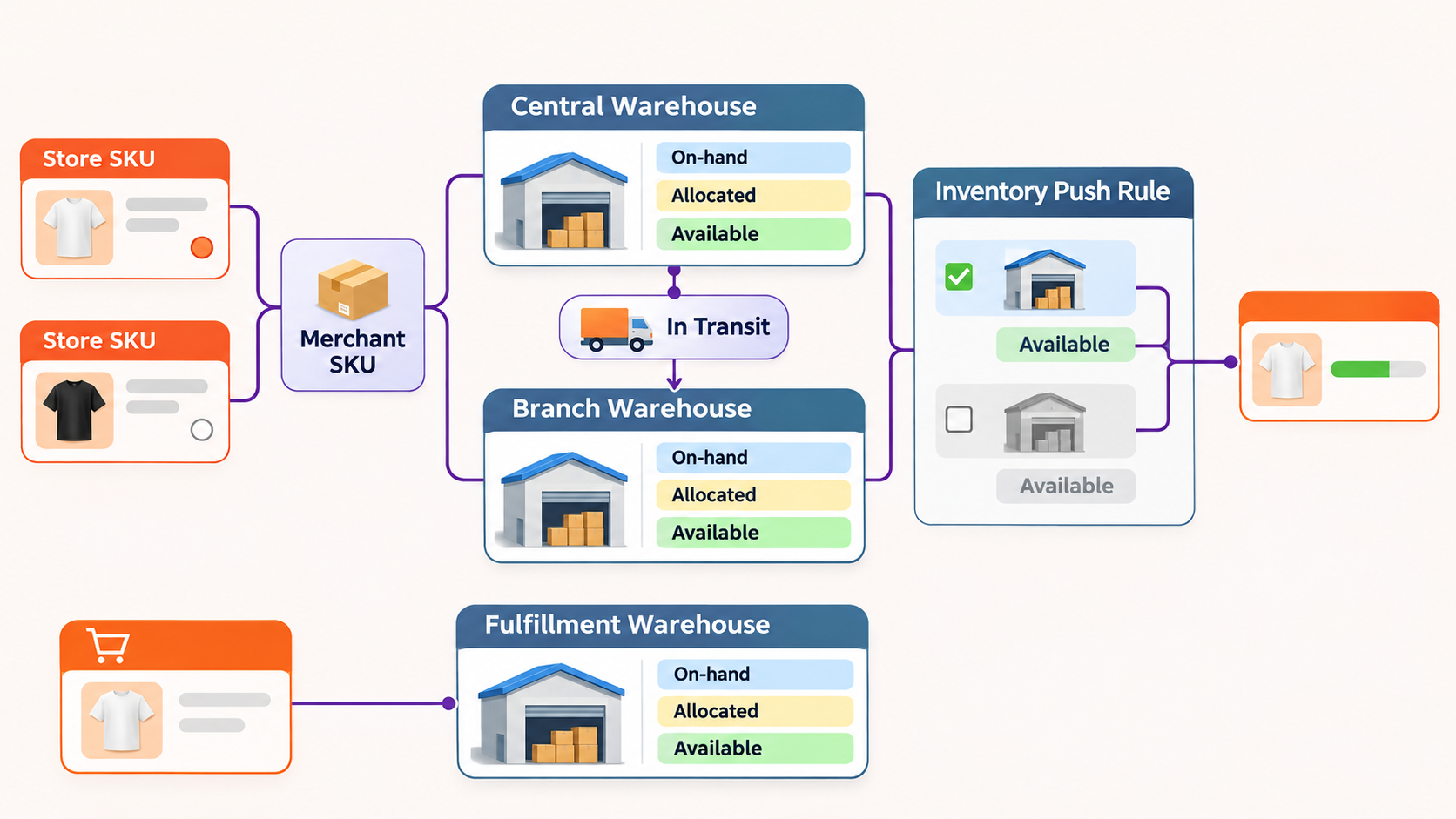
Marketplace Store SKU → Merchant SKU → warehouse-specific inventory → transfer or order activity → available inventory calculation → configured marketplace inventory push.
Correct setup remains essential; connected records cannot compensate for inaccurate physical stock.
Build a Consistent Product Identity with Merchant SKUs
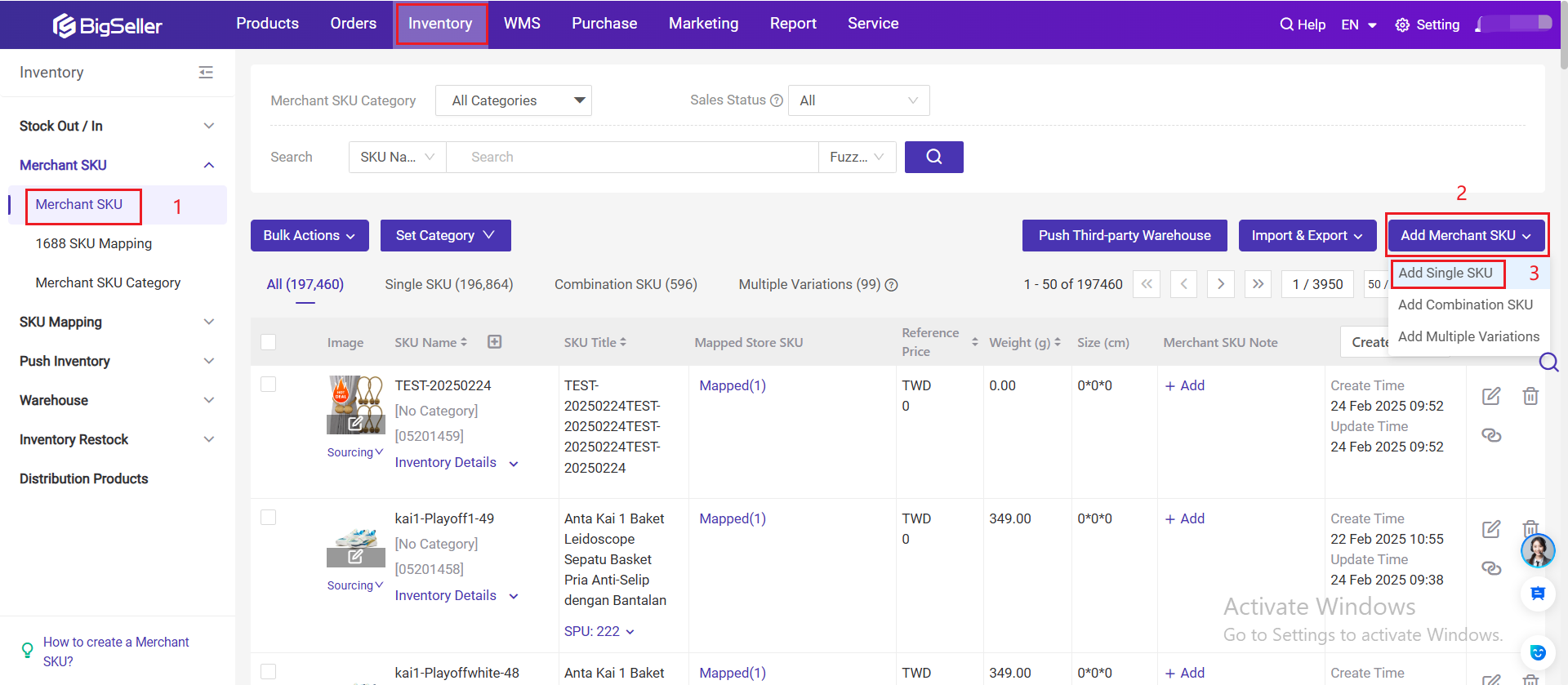
A Store SKU identifies a product or variation inside a marketplace store. A Merchant SKU represents the physical item managed in BigSeller inventory. Store SKUs from different stores can map to the same Merchant SKU only when they represent the same item. Sellers should check colors, sizes, bundles, and duplicate listings rather than rely on similar product names. The BigSeller inventory management guide explains the required product and warehouse setup.
Keep Inventory Separate for Each Warehouse
The same Merchant SKU can have separate inventory records in different warehouses. On-hand stock reflects what is recorded at a location, allocated stock has been committed to orders, and available stock is the quantity still usable under the current calculation. Promotional reservations and stock moving toward a warehouse may also matter. The quantity that can support a new Shopee order can therefore be lower than the physical total, especially during major campaigns.
Record Warehouse Transfers, Counts, and Stock Movements
When goods move between locations, the transfer should record stock leaving the source and being received at the destination. Units in transit should not be treated as ready for picking. BigSeller's Inventory Transfer workflow records warehouse movements, while counts and stock movement records help teams trace differences caused by receiving, transfers, adjustments, or order activity.
Connect Orders with the Intended Fulfillment Warehouse
The warehouse associated with an order should match the location that will physically pick and ship it. Otherwise, stock can be deducted from one location while staff fulfill the order from another. Before bulk processing, sellers should test insufficient stock, cancellation, and return scenarios. They should not assume that any system will always choose the nearest or best warehouse automatically; selection depends on the configured workflow. The system record and actual fulfillment location must agree.
Control Which Warehouse Inventory Is Pushed to Shopee
BigSeller Inventory Push Rules connect Merchant Inventory with mapped marketplace listings. Sellers choose the Merchant SKUs, warehouse inventory, and authorized stores covered by a rule. A multi-warehouse business should include only locations that can genuinely fulfill orders for that store instead of automatically treating every unit as universally available.
The Push Inventory guide covers the rule setup. If an expected update does not appear, Push Records can help the team investigate store authorization, SKU mapping, warehouse selection, rule coverage, source stock, and marketplace responses.
Inventory synchronization reduces repetitive edits but is not instantaneous in every situation. Mapping, authorization, warehouse records, order processing, rule configuration, and marketplace responses all affect the result.
4. Multi-Warehouse Inventory, WMS, and 3PL Are Not the Same Thing
Multi-warehouse inventory management explains where stock is recorded, whether it is available, and which movement changed the balance. A warehouse management system, or WMS, organizes work after an order enters a warehouse, including waves, picking, checking, sorting, packing, and shipping preparation. A seller may use detailed WMS execution only in its highest-volume central warehouse while maintaining inventory records for several locations.
A third-party logistics provider, or 3PL, is an external fulfillment partner. A seller combining an owned warehouse with a 3PL must define stock responsibility, order handoff, inventory updates, shipment status, and returns. The connection depends on the provider and approved integration scope; not every 3PL is connected by default.
These layers can work together, but they are not substitutes for one another. Inventory management controls the stock relationship, WMS organizes warehouse execution, and 3PL integration connects an external fulfillment operation.
5. How to Evaluate a Multi-Warehouse System Before Rollout
Test one real product through the complete workflow. Choose a Merchant SKU stored in two locations, confirm its Store SKU mapping and warehouse balances, then complete a small transfer. Process a representative Shopee order and check the fulfillment warehouse, allocation, shipping-related deduction, available inventory, and resulting marketplace update. Finally, introduce one exception such as insufficient stock, cancellation, a count difference, or an unsuccessful push.
Staff should be able to identify the product location, distinguish in-transit stock from stock ready to pick, and trace a discrepancy to a transfer, count, order, or push record without rebuilding the history in a spreadsheet. Warehouse permissions should also match each employee's role.
For Philippine sellers whose operations begin with Shopee and other supported marketplaces, BigSeller is a practical system to evaluate because Merchant SKUs, warehouse inventory, marketplace orders, stock movements, and inventory push rules can be reviewed in one ecommerce workflow. Sellers with a broader inventory requirement can also review the guide to inventory management software for Philippine marketplace sellers.

Multi-warehouse control becomes reliable when product identity, warehouse stock, transfers, orders, and marketplace updates remain connected. BigSeller gives marketplace-first sellers a practical way to manage that relationship without reducing every warehouse to one undifferentiated stock total. Sellers operating across several marketplaces can also review how to sync inventory across Shopee, Lazada, and TikTok Shop, while teams facing stock conflicts can learn how to reduce overselling across multiple sales channels.